also @ TechSpot: Apple CEO declines $75 million payout in stock dividends

TechSpot

CPU Fan Error After Installing OCZ Vendetta 2

Discussion in 'Overclocking, Cooling and Modding' started by Ritwik7, Aug 27, 2009.

Thread Status:
Not open for further replies.
  1. Ritwik7 TechSpot Chancellor

    Hi everyone.

    I just installed the OCZ Vendetta 2 on my mobo. As soon as I started up the machine I get an error message : "CPU Fan Error. Press F1 To Continue." I checked that the Vendetta Fan is spinning alright. I also plugged it directly to the PSU. I still get the same error. Only difference I noticed was that when plugged to the mobo, the fan starts spinning at the instant I get the error. When connected to the PSU it spins up as soon as I power on.

    My CPU idle temps have dropped by about 5C after installing the cooler.

    Any help is much appreciated. Thanks.
  2. red1776 Omnipotent Ruler of the Universe

    hey Rit,
    if your sure you have it plugged into the designated cpu connector, the Vendetta fan runs at a relativley low RPM compared to some cpu fans. check your bios under"pc health settings" or something similar, and disable the cpu fan rpm warning.

    Btw, what is your idle temp now?
  3. Ritwik7 TechSpot Chancellor

    Idle's at about 35C compared to 40 before. I'll check for what you said and see if there's anything like that.

    Also, my mobo temps have jumped by about 4 - 5C.
  4. red1776 Omnipotent Ruler of the Universe

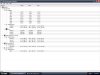
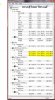
    can you put up a HWmonitor screenshot up?
  5. Ritwik7 TechSpot Chancellor

    Here it is Red.

    Attached Files:

  6. Ritwik7 TechSpot Chancellor

    And I tried looking in the BIOS. Nothing like you mentioned. So I plugged in the Vendetta to the PSU and just plugged in the stock AMD fan into the mobo. Comp started up without any problems. So I guess it's the RPM. The AMD spins at 1800+ and the Vendetta at 900+. :(

    What should I do? It's bugging to have to hit F1 before I boot all the time.
  7. red1776 Omnipotent Ruler of the Universe

    the vendetta's rpm range is 800-1500, the bios does not like it that low, its set somewhere in there above that threshold. did you turn off 'cool and quiet' in your bios? download the manual from asus website(pdf) and find out where in your bios the rpm warning threshold adjustment is for your cpu fan is.nothing to worry about:) btw those temps look great
  8. Ritwik7 TechSpot Chancellor

    I've been checking the BIOS manual. But came across nothing. I turned off Cool And Quiet the first time I got the error. No help.

    You say those temps look good? Ok. I must admit that my application of TIM was less than perfect. Kind of messy even. But I didn't apply the whole pack that came with the Vendetta.

    Awaiting further instructions. :)
  9. red1776 Omnipotent Ruler of the Universe

    download the manual for your board from the asus website, they are usually more detailed than the printed manual, it will likely have screen shots from each of the bios categories. you can find the RPM warning adjustment in there:)
  10. Ritwik7 TechSpot Chancellor

    I'll check and post back.

    I also forgot to mention that Speedfan is somehow unable to alter Fan Speed on my computer. Even with ASUS Q Fan Control disabled.
  11. red1776 Omnipotent Ruler of the Universe

    here it is see attached
  12. Ritwik7 TechSpot Chancellor

    I've already seen that. What should I do there?

    I'll set it to Ignore and check.
  13. red1776 Omnipotent Ruler of the Universe

    and then set it to performance, should run at 1500 rpm

    dont worry about, speedfan, might not be up to date yet for the x3 720
  14. Ritwik7 TechSpot Chancellor

    Done. No problems this time during boot.

    However, it was set to performance from before. RPM still 955.
  15. Ritwik7 TechSpot Chancellor

    Played Crysis a few minutes back with all settings to High at 1280x1024. Max CPU temp was 38C. :)
    That good?
  16. red1776 Omnipotent Ruler of the Universe

    hmmm, see if the RPM's go up as the temps go up under load. I will send you an email later, i put together a OC tutorial for the X3 720 for ya, oh! go here and download AOD. you can try unlocking the 4th core with ACC on this (in your bios to if you want). i'll catch up with you later Rit :)

    yeah , thats a great temp for load :)

    oh i was gonna show ya this
    http://www.techspot.com/gallery/showphoto.php/photo/3551
  17. Ritwik7 TechSpot Chancellor

    Now that I've seen before. I envy that FPS figure!!! LOL!!!
  18. captaincranky TechSpot Addict

    After reading the hardware monitor reports, unless you're working in an air conditioned room, the CPU temps simply can't be 68F when it's 90F outside. Even if you aren't in an air conditioned room, the room has to be really cold, since unless you are liquid cooling with refrigerated liquid, the CPU temps MUST rise above ambient.

    I don't think you can plug the fan directly into the PSU and NOT get a fan error, because the BIOS is expecting a signal from the fan.

    The "fan failed" warning is probably a BIOS error, I've seen something like that on resume from standby with an intel board. as long as the fan is spinning and the cooler is seated properly, don't worry too much.

    "Speed Fan" sucks, I don't know what to say other than that, It's never been accurate, and likely never will be. It mostly publishes low temperature readings to make the computer owner think he's got the coolest running box on the block.
  19. red1776 Omnipotent Ruler of the Universe

    I had that thought as well cap, but these are my temps (my bios jives with these using everest and sandra which takes its reading from the bios) and being in the bios at idle obviously. there is an element of relative here you have to play with, but my HS is at best tepid to the touch, so its more of a guide to go by.

    Attached Files:

  20. Ritwik7 TechSpot Chancellor

    Hello Cap! Yes, I'm working in an airconditioned room at 25C. :)

    Thanks.
Thread Status:
Not open for further replies.