I
iBeJinro
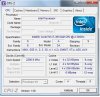
So I've been looking to overclock my laptop for about a week now and I've come across CPU-Z to view some specs and I've noticed that there is no multiplier shown under the CPU tab.
Also if anyone could help me with another problem. When I'm inside my BIOS menu there is no option related to Advanced BIOS features or anything like that.
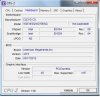
Picture of CPU-Z displaying Mainboard
Any help or direction would be much appreciated. Thanks.
Also if anyone could help me with another problem. When I'm inside my BIOS menu there is no option related to Advanced BIOS features or anything like that.
Picture of CPU-Z displaying Mainboard
Any help or direction would be much appreciated. Thanks.


