also @ TechSpot: Google, Samsung unveil Chromebook, Chromebox with Chrome OS 19

TechSpot

Display tab doesn't appear, infected PC?

Discussion in 'Virus and Malware Removal' started by Chronos, Aug 28, 2008.

Thread Status:
Not open for further replies.
  1. Chronos Newcomer, in training

    Yesterday, my deesktop was infected following up with my computer.
    It is very similiar to this thread:
    http://www.techspot.com/vb/topic20613.html

    The only problem is when i go to Display i dont have Desktop Tab.
    I used Kaspersky and Registry Mechanic, and they took out ALOTE of viruses......but.....the dam background is still there:
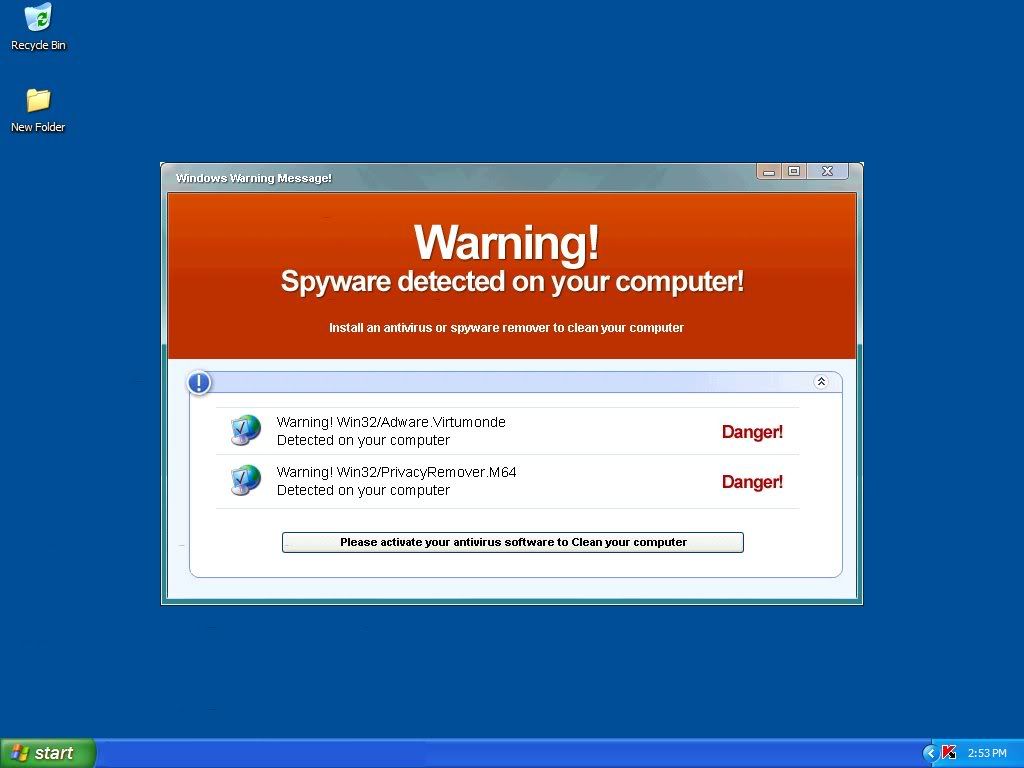
    [IMG]
    (notice Kaspersky at the bottom right corner:p)

    Here are my logs:
    View attachment 35430

    View attachment 35431

    Please help me out guys.
    This thing is highly annoying:(
  2. InsaneVr6 Newcomer, in training

    Well there are two things you can do from what i see.

    1. You can go into the C:\Windows\system32 and look for the two files "adware.virtumonde" and "PrivacyRemover.M64" If you find any of these two files in the system32 folder (be sure to turn on "show hidden files and folders") simply try to delete them manually and then again from the recycle bin. restart your computer and see if anything changed and check the system32 folder again to see if they came back.

    2. You can try as many antivirus software's as you please and maybe some will work but the only way to COMPLETEY and UNQESTIONABLY delete everything malicious from the computer is to format the drive and reinstall windows. So you will need to backup everything you NEED to a CD or USB drive and proceed to wipe. (try not to save system files if you can because the "virus" could be in more than one place.)
  3. Chronos Newcomer, in training

    oh crap.....i was REALLY scared of that answer.....i got so many stuff on here that i wanna keep.

    I'll wait to see if anybody else got some suggestion....if not.....then i'll have to do it, =(
  4. bluedame Newcomer, in training

    Click Start>Run

    Type: regedit

    Navigate to:

    HKEY_CURRENT_USER\Software\Microsoft\Windows\CurrentVersion\Policies\System

    If there is a DWoRD Value such "NoDispScrSavPage" with a data value of 1 this will disable the screen saver tab. Change the value to 0 or delete it to
    see the tab again.
  5. Chronos Newcomer, in training

    AWWWW THANK YOU!!!

    That got my background back
    your like the smartest person man, thnx alote.
Thread Status:
Not open for further replies.