also @ TechSpot: Xbox One: Entertainment Hub First, Gaming Console Second -- But Could It Disrupt TV?

Identifying AMD processors

Discussion in 'Processors and Motherboards' started by Mictlantecuhtli, Jan 27, 2003.

  1. fuzmnky Newcomer, in training Posts: 38

  2. videobruce Newcomer, in training Posts: 129

  3. Voodoo_God Newcomer, in training Posts: 20

    Shame the links dont work realblackstuff, would be interested.
    it's easy to tell a Barton from a tbread, it's the last 4 characters of the code. i think DKV4D is a barton. if not, CPUID will tell you your L2 cache size, 512 for a barton, as you know.
    the easiest way to save all this brain-ache is to buy an Athlon64, like me :). (though, now ive got it, i think it's crap).
  4. Logisys Newcomer, in training

    Hey guys,
    I have a comp, that is well out of date, I am a gamer and the games I have now bog my system too much, and plus I just bought a new FX5700 Geforce 256MB card, and I have been told that its a power sucker. So anyways I want to upgrade from my Intel 1.8 processor and motherboard to a AMD CPU/Mother. I have 512MB memory and 107Gig Hard drive. that is only used up 20%. so im ok there i think.
    A friend told me that my processor was a crapi one and really ran at a1.6 or .7 and he said my mother board has a 400FSB but was really lower because my motherboard is pretty out of date and it wasnt a true 400FSB.
    so thats why i want to upgrade. to a AMD CPUand new mother.
    I really dont have a need for a onboard graphics chip with my motherboard that i buy, so that might take off of the price alittle.

    Anyways please help me find a good but cheap setup. I want atleast a 2.2G processor and a decent AMD compatible motherboard. any suggestions?

    thanks,:p
  5. RealBlackStuff Newcomer, in training Posts: 8,165

  6. RealBlackStuff Newcomer, in training Posts: 8,165

    More confusing AMD numbers

    Here is more confusing info about new AMD processors with HT

    http://www.theinquirer.net/?article=18925

    (This item figured in the Frontpage News & Comments, from where I nicked the info)
     
  7. Eder Newcomer, in training

  8. RealBlackStuff Newcomer, in training Posts: 8,165

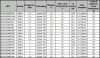
    Model Descriptions AMD64

    As for the naming of the currently shipping AMD Athlon 64 processors, here is one more table summing up all the available models for your convenience. Below you can find a list of all OPN codes and the major specifications of the currently selling Athlon 64 processor models:

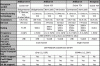
    A very comprehensive comparison between sockets 754 and 939, as well as 130nm(Newcastle) versus 90nm(Winchester) can be found here
    http://www.xbitlabs.com/articles/cp...lon64-90nm.html
    from where i got the attached GIFs.

    Attached Files:

  9. fuzzy_kitten37 Newcomer, in training

    Need Help with finding out exactly what processor I have.

    I bought a motherboard and processor from a friend of mine which couldn't afford to continue with the build he was attempting. I just recently put everything together. My motherboard is Chaintech 7vil3 with Award Bios
    my processor is a AMD 2600+ I know its a Thourbred Core but not sure about 266/333 ? Another issue is my BIOS/Motherboard is only reconizing it as a 2000+ and when I up the muliplier so that it will detect as a 2600+ my system can't handle it and the system is completly unstable. So either I am doing something really wrong or plain and simple my mobo or processor is faulty.
  10. Didou Bowtie extraordinair! Posts: 5,898

    You can't "up" the multiplier unless it is unlocked (a mobile CPU for example). You can only play with the FSB in order to get the proper clockspeed. When you set the FSB to 133mhz, what is the clockspeed of the chip ?
  11. fuzzy_kitten37 Newcomer, in training

    Fsb

    my problem is that I'm not very familar with this bios also I have searched hi and low for the operating perameters for the chip and motherboard and have failed every attempt. the per fact is that at 133 my chip says its a 2000+ I know for reality that its a 2600+. I'm running off of a chaintech 7vil3 motherboard with phoenix award bios 6.00pg. The situation is almost like the motherboard knows it has the parts to operate but fails to reconize the fact that it has better parts then min. The other thing is on this motherboard I don't have any jumpers that will do the task either and my bios doesn't seem to have the right place.
  12. luvhuffer TechSpot Paladin Posts: 631

    Central Brain Identifier is designed to provide detailed identification and obtaining the most complete information about all AMD processors. It recognizes more than 50 various models of the AMD processors. It shows not only the general information about the processor, but also allows to determine its important technical features, such as processor core name, core revision, a nominal processor frequency, the date of announce, an OPN number, the components of the PowerNow! Technology and also independently computes an XP-Rating for processors having a Model Number. The program is capable to detect the core voltage of mobile AMD processors and the newest AMD Athlon 64 processor. Advanced recognition methods can accurately determine mobile, desktop and server variants of the AMD processors. The power diagnostic capabilities provide the most complete information about the processor cache. The program incorporates tweak features such as processor name modification, L1 Cache ECC control and Clock Control Register correction and DRAM timing control. Central Brain Identifier is aggressively aimed to compete with well-known processor diagnostic tools.
    http://cbid.amdclub.ru/ Enjoy!
  13. ancientoneuk Newcomer, in training

    Hi

    I am an oldie come newbie in that I used to mash up K6's but have only just decided to return to the o/c'ing thingy...

    Now tech has moved way beyond the old BX boards I was used to working on, what do I need to do, I have read countless reviews, How to's that don't quite get round to telling me whats good or bad.

    The components:

    AMD Athlon XP-M 2600+ AXMG2600FQQ4C
    (I have been told by a few that this is the nirvana of the mobile set, are they wrong?)

    Choice of two boards:

    Asus A7V333 w/o RAID Rev 1 with beta 1018 BIOS (support all socket A to top end)

    or

    MSI K7N2 Delta without RAID

    Choice of two AGP's

    128MB Radeon 9250

    or

    S8 Nitro Fanless 256mb with post DX9 architecture.

    plus tier 1 640Mb PC2700 RAM, Maxtor HDD's, DVD's etc and a brand new PSU (450W), 4 80mm case fans, Thermaltake Jetcooler N/bridge cooler, s/bridge heatsinks, RAM H/Sinks.

    Cooling - Gigabyte 3D Rocket Pro or....

    Thermaltake Peltier kit with twin rotor fan assy.

    Now I can chuck all that together in a few minutes building really two PC's as I have a couple of 1800 XP's running around.

    Do I have to unlock the Mobile?

    The Asus is a good very reliable board but is limited to 333FSB, whilst the MSI will run at a higher rate, which is going to be the best board?

    The AGP is down to chocie really I reckon, although NFSMW on the S* looks a million times better than on the old Radeotor

    So I install everything, slap on some thermal goo and plug the peltier on, noise don't bother me so will be on full blast.

    its the settings that bother me, 2600 is no slouch and 3000+ is what I aiming for and have been told that the moby will go past the 3200+ mark with ease.

    Do I take the settings up, one notch at a time, on the MSI would take forever or could I take others settings and take it up in stages?

    I just don't want to kill the chip but also want to get there quicker, am I mad? or should I just leave it at 2600 and play safe...?

    Oh and £50 delivered for this brand new chip, was that a good deal?

    Thank you in advance peeps

    Ancient One
  14. beerabuser30 TechSpot Enthusiast Posts: 289

    Is overclocking worth it? I have heard of many problems of people who overclock cpu's. A lot is probably the person who did it screwed up but if all things are the same can you really tell the diffrence between 2.1ghz and 2.4ghz? I have an AMD Athlon 3500 what would the advantage be to overclocking this besides a small boost of speed?
  15. Mictlantecuhtli TS Special Forces Posts: 4,916   +9

    Hi
    No, those are unlocked by default.

    Depends on which settings you mean. I usually overclock by 5-10 MHz at a time, starting with about 25% overclock. The worst that has happened over the years has been the computer just locking up, and that's easily cured by reseting the BIOS.
  16. ancientoneuk Newcomer, in training

    Thanks, thats a weight off my mind, I've been fluffing round trying to see which is the best way forward and now I know I don't have to unlock I can then jut up it a bit.

    Which board is the best..?

    The rock solid and very stable Asus or the more flighty and finicky MSI?

    AO
  17. David Alexandru Newcomer, in training Posts: 43

    goood stuff...but i think this notation from amd is junk....it doesn't show the real frequency