also @ TechSpot: IBM's Watson conquers Jeopardy, cancer and now customer service

Lag Spikes, Cmd results

Discussion in 'Storage and Networking' started by smu122, Jun 13, 2008.

  1. smu122 Newcomer, in training Posts: 70

    So, why arent these lags occuring on other pc's of the network?
  2. jobeard TS Ambassador Posts: 12,224   +120

    in the last picture, the ISP is node two. the massive loss is at node 14.

    if your conjecture were true, then ANY computer ANYWHERE could impact ALL other
    systems. thankfully, such is not the case.

    the 100% loss on node 14 means that router(system) is overloaded, whereas if the
    losses were on the line between 13 & 14, it would imply a bad physical link or adapter(s) on either end.
  3. jobeard TS Ambassador Posts: 12,224   +120

    good question and there's many possibilities:
    1. different nic speeds on each system
    2. different loading on your router
    3. different time of testing
    4. ... i'm sure there's even more ...
    you would have to run two (or more) pathpings from different lan systems at the
    same time to validate one systems has no losses and the other suffers.
  4. smu122 Newcomer, in training Posts: 70


    This is the case jobeard.
  5. jobeard TS Ambassador Posts: 12,224   +120

    please attach the pathping from two systems on your lan accessing the same server --
    I'm really interested in this :)
  6. smu122 Newcomer, in training Posts: 70

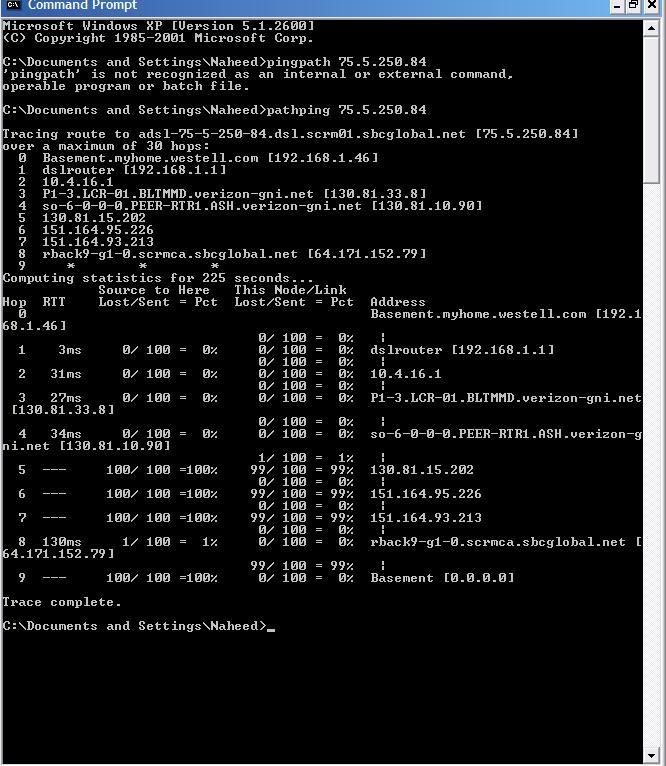
    here is a game server from the laptop on my network... i think i was mistaken about its lags... sorry bout that...:eek:
    [IMG]
     
  7. smu122 Newcomer, in training Posts: 70

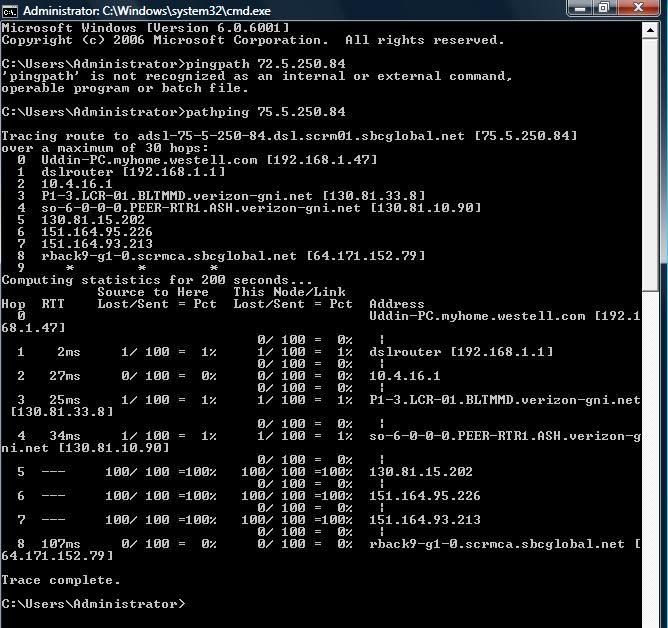
    Okay, and here are the results from the desktop. Both pathpings were done at the same time and to the same server.

    [IMG]
  8. jobeard TS Ambassador Posts: 12,224   +120

    ok; BOTH have similar losses at nodes 5-6-7 :(

    the desktop had 1% lost at your dslrouter (likely due to parallel outgoing traffic; ie workloading on your lan)

    laptop had physical link errors between nodes 8-9;
    this can be due to hi traffic volumes in/out bound from the "server"

    btw: did you notice that the desktop reports only EIGHT nodes while the laptop
    reports NINE? the losses between 8-9 are 99% and likely this cause the pathping to not find the
    last node

    other issue: node 9 has an invalid ip address [0.0.0.0] AND
    this is not the ip address that you were pinging in the first place!! (72.5.250.84)
    this is NOT good to say the least :(

    Code:
    $ whois -H 72.5.250.84
    Internap Network Services PNAP-09-2004 (NET-72-5-0-0-1)
                                      72.5.0.0 - 72.5.255.255
    The Ultimate Game Server INAP-DAL-EXT1-[B]ULTIMATEGAME[/B]-9721 (NET-72-5-250-0-1)
                                      72.5.250.0 - 72.5.250.255
  9. smu122 Newcomer, in training Posts: 70

    Is the packet suppose to come back.., like on the laptop where it comes to "basement" (name of laptop)?
  10. jobeard TS Ambassador Posts: 12,224   +120

    ping (and the derived pathping) has a protocol that sends a short message and
    then listens for the reply. the time for the round trip is 'the ping response time'.
    by setting some special bits in the tcp header, the reply records the node names that it has traversed.

    'Basement' is just bogus.

    I think you and I have taken this as far as the original request can be taken.

    yes you have variable lag times.

    no, it's not on your system.

    this is just life on tcp/internet.

    have a good day.
  11. smu122 Newcomer, in training Posts: 70

    Alright, thanks for all the help.