also @ TechSpot: Congress pressures Google on Glass privacy concerns

Looking for a new video card for my birthday

Discussion in 'Audio and Video' started by Just wanna play, Jan 14, 2008.

  1. Just wanna play Banned Posts: 36

    My birthday is coming up next month and i love playing Guild wars on my downstairs PC the only problem is i have limited usage of that computer so i decided id buy a new video card for my upstairs pc.

    I like to play MMOs seriously so im not a frugal gamer.

    I have a budget of about 50-100 dollars.

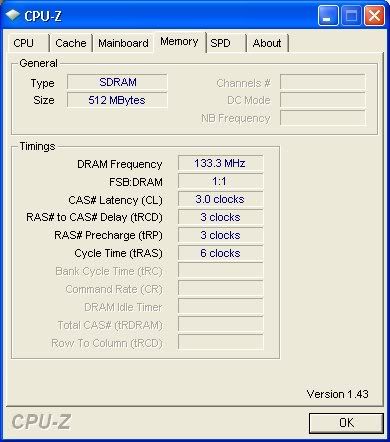
    [IMG]


    [IMG]

    [IMG]

    And im not sure of what my power level is but theres a switch underneath where you plug in the tower which is switched to 115 so im guessing 115watts?


    Im also from the united states.


    I was thinkin of getting this card
    http://www.walmart.com/catalog/product.do?product_id=8154257
    Would it be compatible?

    I checked my device manager for the current video card that i have in and it says its in a PCI bus, i was guessing that this is important for you all to know.
  2. SNGX1275 TS Special Forces Posts: 11,889   +116

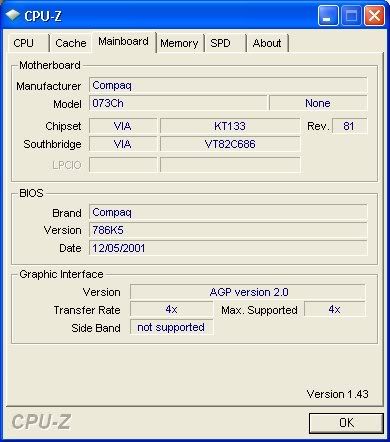
    Looks to me like you have an AGP slot according to your 2nd screen shot. Take the side of your case off to make sure, there will be some white slots, and then above them one of slightly larger size that is *probably* brown. If you have that, then its AGP. If you have an AGP slot then your possibilities are a little more broad than if you only have regular PCI.

    The card you linked to is PCIe, which is different from regular PCI (so it won't work, don't buy it) which you almost certainly have. Regular PCI is those white slots below the brown AGP.

    The 115 you see is 115 Volts, what your wall outlet supplies. The other option is 230, which you don't want to have that flipped to. It is there so the power supply can be used in countries that use 230V.
  3. Just wanna play Banned Posts: 36

    Ah Im hesitant to take the case off because im afraid of damaging anything but ill get on that and post after i do, My computer has these weird like switches you pullback to pull the case off

    Ok well i googled the model of the computer i have (Compaq 5000 series) and got the basic stats for it and found out that it comes with an an APG slot
    (Video Output Interface: AGP)
    but the power level i still don't know and theres no sticker on my computer other than the one that was one the side which tells what it came with

    So do i want something like this?http://www.walmart.com/catalog/product.do?product_id=4087780
    It says 300watts but i don't know the power i have

    Ok i opened up my PC, which for me was sliding off a side panel, and found that i have three of the white slots and a brown slot, so i have 3 PCI slots and an APG slot if im correct
    Also inside of my PC was the power rating....It said "Max output 250W"
  4. Blind Dragon TechSpot Evangelist Posts: 4,048

  5. Just wanna play Banned Posts: 36

    Oh i thought it ment 4x or 8x
    The one you posted looks good but it doesn't say about how much power it requires
  6. Cinders TechSpot Chancellor Posts: 1,312   +12

    All the newer video cards require at least 450 watt power supply.

    At this point I'm going to say stick with the downstairs PC. Your budget against your need for a new video card capable of handling a MMORG and a new quality power source don't add up.

    But if you want to save $138.00 then you may like what you get

    Video Card $75.00
    http://www.newegg.com/Product/Product.aspx?Item=N82E16814131070

    Power Supply $63.00
    http://www.newegg.com/Product/Product.aspx?Item=N82E16817104954

    Or for $184.00 you'll probably like what you get

    Video Card $121.00
    http://www.newegg.com/Product/Product.aspx?Item=N82E16814102718

    Power Supply $63.00
    http://www.newegg.com/Product/Product.aspx?Item=N82E16817104954
     
  7. SNGX1275 TS Special Forces Posts: 11,889   +116

    8x cards will work in your 4x slot. Where you get into something interesting is when you try to decide whether or not you are wasting money by getting a card faster than your processor can handle.
  8. Just wanna play Banned Posts: 36

    Yeah ill prolly save

    For now what card do you recomend that i can use to run it at its minimum at a semi-lag free state
  9. Rage_3K_Moiz Sith Lord Posts: 7,245   +16

    I'd recommend this video card paired with this PSU. They're both good quality products and with them you will be able to run all the MMOs you play quite easily with most\all of the effects turned up to maximum.
  10. Cinders TechSpot Chancellor Posts: 1,312   +12

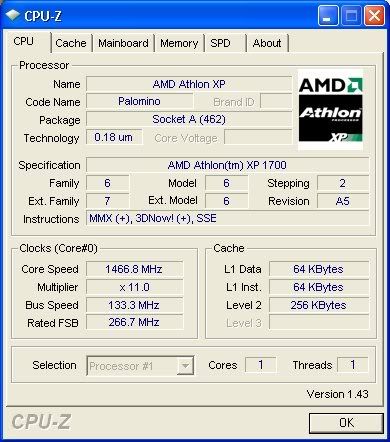
    You have an old computer. Back in the day it was a pretty good computer but now all it's really any good for is web browsing. Even with a very expensive (very fast) video card your computer may not be strong enough to play recent games at medium screen resolutions and medium quality settings with greater than 30 frames per second which can quickly become boring/old if you already own an XBox or a PS2.

    There are much better video cards then have been presented in this thread. The problems are three fold.

    1) You don't have the budget for an expensive card and even if you did your computer may not (probably will not) be fast enough to power the card to it's full potential.

    2) Under powered video cards don't produce frame rates like they would when powered by a newer computer. Low frame rates produce video lag.

    3) Any video card you buy for your current computer will not work in any new computer you build/buy in the future because the AGP connector your new video card must have to work with your old computer isn't compatible with the PCI-E slot a new computer will have.
  11. Just wanna play Banned Posts: 36

    Thanks for the help

    I guess Ill just have to save up cash and get a new computer
  12. MetalX TechSpot Chancellor Posts: 1,902

    Yeah, your PC is ancient. Your CPU was replaced by Athlon 64 in 2004, and Athlon 64s have now been replaced by Phenom. I believe Athlon XPs went out of production in... 2005?
  13. Just wanna play Banned Posts: 36

  14. Rage_3K_Moiz Sith Lord Posts: 7,245   +16

    Yeah that'd do, but I'd recommend getting a 6200 instead. Much better performance and it'd still work with your current PSU.
  15. Just wanna play Banned Posts: 36

  16. Rage_3K_Moiz Sith Lord Posts: 7,245   +16

    That item's deactivated but I don't reckon it's more than $500. For that much, you could customize this system at iBuyPower and just add in an 8600GT. You could also save a few bucks on the keyboard and mouse if you already have them. All in all, it'd be a much better system than the one you posted about.
  17. Just wanna play Banned Posts: 36

  18. Cinders TechSpot Chancellor Posts: 1,312   +12

  19. Just wanna play Banned Posts: 36

    Cinder whats the required power supply for that card?
    Sadly i only have a 250watt supply rightnow.

    I just looked through some of the reveiws and found out it requires atleast a 350watt power supply

    Any other suggestions?
    The system req for the game is

    Required System Specs:
    Windows XP/2000/ME/98
    800 MHz Pentium III or equivalent
    256 MB RAM
    ATI Radeon 8500 or GeForce 3 or 4 MX with 32MB of video memory
    500 MB hard drive space
    Internet connection
    DirectX 8.0

    Recommended System Specs:
    Windows XP/2000/ME/98
    Pentium III 1GHz or equivalent
    512 MB RAM
    ATI Radeon 9000 or GeForce 4 Ti Series with 64MB of video memory
    500 MB free hard drive space
    Internet connection

    For anyone still looking at this thread I went with an Geforce FX 5500.
    Its on order from a site and should be here in about 3-4 days.
    One thing im concerned about though is the AGP slot i have.
    It seems kind of small...Do they make them in diffrent sizes?
  20. Rage_3K_Moiz Sith Lord Posts: 7,245   +16

    They're sized differently for different voltages. Most AGP cards today are also keyed so they can fit in different types of slots.