also @ TechSpot: AMD A4-5000 Review: the affordable ultraportable APU

Malwarebytes keeps blocking 206.161.121.6

Discussion in 'Virus and Malware Removal' started by CharlieAndover, Jun 12, 2012.

Post New Reply
  1. CharlieAndover Newcomer, in training Posts: 24

    Malwarebytes and Avira caught and dispatched some bad stuff (caused, I believe, by "System Checker"). Everything looks clean, but Malwarebytes keeps blocking 206.161.121.6.

    I've done all of the 5 steps that I could -- DDS wouldn't run to completion. See below.

    Thanks!

    -------------------------------
    Malwarebytes Anti-Malware (Trial) 1.61.0.1400
    www.malwarebytes.org
    Database version: v2012.06.11.09
    Windows XP Service Pack 3 x86 NTFS
    Internet Explorer 8.0.6001.18702
    Charlie :: BEACON1003 [administrator]
    Protection: Enabled
    6/11/2012 5:13:39 PM
    mbam-log-2012-06-11 (17-13-39).txt
    Scan type: Quick scan
    Scan options enabled: Memory | Startup | Registry | File System | Heuristics/Extra | Heuristics/Shuriken | PUP | PUM
    Scan options disabled: P2P
    Objects scanned: 233366
    Time elapsed: 15 minute(s), 15 second(s)
    Memory Processes Detected: 0
    (No malicious items detected)
    Memory Modules Detected: 0
    (No malicious items detected)
    Registry Keys Detected: 0
    (No malicious items detected)
    Registry Values Detected: 0
    (No malicious items detected)
    Registry Data Items Detected: 0
    (No malicious items detected)
    Folders Detected: 0
    (No malicious items detected)
    Files Detected: 0
    (No malicious items detected)
    (end)
    ------------------------------------

    GMER didn't find any modifications

    ------------------------------------

    DDS wouldn't run to completion -- after about 7 minutes and 54 hashmarks, the system became unresponsive and had to be cold rebooted. Tried it three times -- same thing each time.

    I couldn't find any script blocking to turn off. I checked throughout Avira and Malwarebytes interfaces, but couldn't find anything to turn off.
  2. Bobbye Helper on the Fringe Posts: 16,406   +16

    The IP you left, IP 206.16.121.6 belongs to the ISP "Beyond The Network America" This is sometimes seen as BTNA. It is part of the Bit Torrent file sharing network.

    If you use Bit Torrent, uTorrent or other file sharing program. and the attempt is outgoing, something on your system is attempting to access the internet.
    If it's incoming, something from the internet is trying to access your system.

    Either way, Malwarebytes is protecting you. If that is your only problem and you don't want to find and remove the program, open Mbam and uncheck the section to alert you to the blocks.
    ----------------------------------------------------
    Did you get a message about script blocking when you tried to run DDS? If so, try either or both of the following:
    Disable a Script Blocker in Internet Explorer

    • Open Internet Explorer by clicking the icon on your desktop or through the "Start" menu.
    • Click "Tools" and "Internet Options." Click the "Security" tab, then click the "Internet" icon.

    • Click the "Custom Level" button and make sure "Active Scripting" is set to "Enabled."
    Disable a Script Blocker in Firefox

    • Open Mozilla Firefox by clicking the icon on your desktop or through the "Start" menu.
    • Click "Tools" from the menu bar at the top and select "Options."
    • Click the "Content" tab and make sure "enable JavaScript" is checked.
    ===================================================
    If that isn't the problem: Please download the corresponding file for your operating system:

    XP

    Vista

    Windows 7

    Extract (unzip) the file onto your desktop, double-click on it and choose Yes to merge the file into the registry when prompted. Afterwards you should then be able to run DDS.scr.
    =====================================
    If you still can't run DDS, please let me know.
    =====================================
    Please leave the 2 logs from DDS in your next reply.
    =====================================
    My Guidelines: please read and follow:
    • Be patient. Malware cleaning takes time. I am also working with other members while I am helping you.
    • Read my instructions carefully. If you don't understand or have a problem, ask me. Follow the order of the tasks I give you. Order is crucial in cleaning process.
    • If you have questions, or if a program doesn't work, stop and tell me about it. Don't try to get around it yourself.
    • File sharing programs should be uninstalled or disabled during the cleaning process..
    • Observe these:
      [o] Don't follow directions given to someone else
      [o] Don't use any other cleaning programs or scans while I'm helping you.
      [o] Don't use a Registry cleaner or make any changes in the Registry.
      [o] Don't download and install new programs- except those I give you.
    Threads are closed after 5 days if there is no reply.
  3. CharlieAndover Newcomer, in training Posts: 24

    Thanks, Bobbye. You "white hat" folks are awesome!

    It's an outgoing block, so I do want to eliminate whatever's causing it.

    Thanks for the help with script blocking. I checked both IE and FF per your instructions, and neither are blocking scripts.

    I ran the registry thing you gave me a link to, and it ran fine.

    I tried DDS again, but the symptom is unchanged -- after a few minutes and 54 hash marks, I lose control of the system and have to cold boot.

    What's the next step? Thanks!!!
  4. Bobbye Helper on the Fringe Posts: 16,406   +16

    Can you clarify this for me?

    [QUOTEafter about 7 minutes and 54 hashmarks, the system became unresponsive and had to be cold rebooted.][/QUOTE]

    What do you mean '54 hash marks.?

    Right now I have no ifo about your system:
    1. What OS are you running. 32bit, 64bit?
    2. How much RAM do you have

    It sounds like you have DDS on the system. See if it will run in this:
    Boot into Safe Mode with Networking
    • Restart your computer and start pressing the F8 key on your keyboard.
    • Select the Safe Mode with Networking option when the Windows Advanced Options menu appears, and then press ENTER.

    Now see if the scan will run.
  5. CharlieAndover Newcomer, in training Posts: 24

    When I run DDS, it opens a DOS command window. It displays its little text spiel, then starts slowly displaying one hash mark (shift of the 3 key) after another on a single line. I assume it's simulating a Windows progress bar. After displaying 54 hash marks, the system becomes unresponsive. If I click on anything outside the DOS window, the DOS window loses focus but nothing else happens. Can't even summon the Task Manager with ctrl/alt/del. Cold boot is the only option. (Oddly, upon re-boot it doesn't complain about Windows having been shut down improperly.)

    Running Windows XP Home Edition, SP3; 1 GB RAM, Dell 4550

    I tried DDS in Safe Mode with Networking -- the symptom is unchanged: 54 hash marks, then nothing.

    Just out of curiosity -- the DDS file I've got is called dds.scr, it's sitting on my Desktop, it's 607,260 bytes, its Properties show version 2011.8.26.1, it's read-only, and under Security on the General tab of Properties it says "This file came from another computer and might be blocked to protect this computer." Does all that sound OK?

    I'll be shutting down for the day in a bit, but I'll check this thread again tomorrow morning (EDT). Thanks for your continued help (and patience), Bobbye!
  6. Bobbye Helper on the Fringe Posts: 16,406   +16

    Okay, we'll try one more thing:

    Do a right click on dds.scr> Rename> Change the .scr file extension to .exe> to then read dds.exe. Now try the scan

    Sometimes the .scr extension gets blocked. If that's the cause, this should resolve it
     
  7. CharlieAndover Newcomer, in training Posts: 24

    Same symptom -- it doesn't seem to matter if it's called dds.scr or dds.exe.

    I've seen mention of RSIT in another thread where DDS wouldn't run. Would that be a possibility?
  8. Bobbye Helper on the Fringe Posts: 16,406   +16

    Let's see if this one will run:
    • Download OTL from one of the links below and save it to your desktop.
      OTL.exe
      OTL.com
      OTL.scr
      You just need one. Sometimes the file extension gets blocked.

      Note: When using these links, use Internet Explorer to download. If using Firefox, you should right-click and use "Save link As". Otherwise, on some systems, FF attempts to open the file as a script and just a bunch of gibberish is displayed.
    • Double click the OTL icon to run it.[IMG]
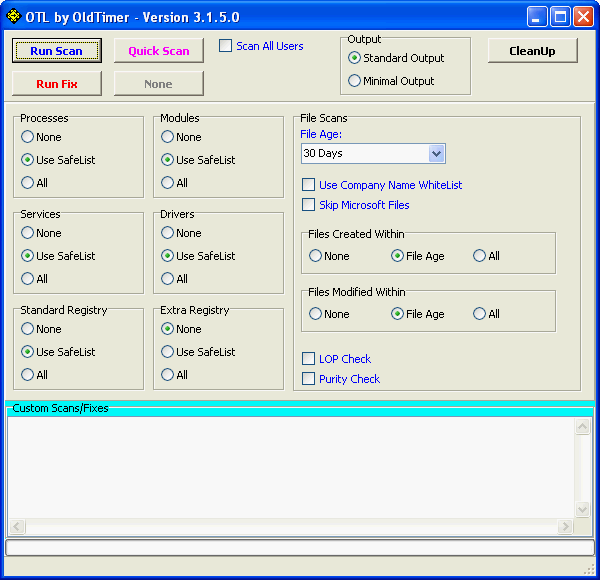
    • The opened console will resemble this: [IMG]
    • Set Output at the top to Minimal Output.
    • Check the boxes beside LOP Check and Purity Check.
    • Copy the entries in the Codebox below> Paste in the Custom Scan box.
      Code:
      netsvcs
      %SYSTEMDRIVE%\*.exe
      %systemroot%\*. /mp /s
      /md5start
      explorer.exe
      winlogon.exe
      userinit.exe
      /md5stop
      %systemroot%\*. /mp /s
      CREATERESTOREPOINT
      
    • Click the Quick Scan button. Do not change any settings unless otherwise told to do so. The scan wont take long.
      Make sure all other windows are closed and to let it run uninterrupted.
    • When the scan completes, it will open two notepad windows. OTListIt.Txt and Extras.Txt. These are saved in the same location as OTL.
    • Please copy (Edit->Select All, Edit->Copy) the contents of these files, one at a time, and post it with your next reply. You may need two posts to fit them all in.
  9. CharlieAndover Newcomer, in training Posts: 24

    OTL runs fine. Thanks! Version 3.2.48.0 differs slightly from the screenshot:
    • In the Modules section, the default is now No Company Name instead of Use SafeList
    • In the File Scans section, they've added Use No-Company-Name Whitelist, and that is checked as the default
    Other things I noticed:
    • It seems to be focused on the last 30 days. FYI, this problem may have been resident on this computer for longer than that ... maybe.
    • When I clicked the Quick Scan button, it automatically checked Use Company-Name Whitelist and Skip Microsoft Files in the File Scans section.
    The logs follow in the next posts...
  10. CharlieAndover Newcomer, in training Posts: 24

    OTL logfile created on: 6/14/2012 12:19:00 PM - Run 1
    OTL by OldTimer - Version 3.2.48.0 Folder = C:\Documents and Settings\Charlie\Desktop
    Windows XP Home Edition Service Pack 3 (Version = 5.1.2600) - Type = NTWorkstation
    Internet Explorer (Version = 8.0.6001.18702)
    Locale: 00000409 | Country: United States | Language: ENU | Date Format: M/d/yyyy

    1023.00 Mb Total Physical Memory | 435.15 Mb Available Physical Memory | 42.54% Memory free
    1.84 Gb Paging File | 1.29 Gb Available in Paging File | 70.15% Paging File free
    Paging file location(s): C:\pagefile.sys 960 1920 [binary data]

    %SystemDrive% = C: | %SystemRoot% = C:\WINDOWS | %ProgramFiles% = C:\Program Files
    Drive C: | 18.64 Gb Total Space | 4.93 Gb Free Space | 26.46% Space Free | Partition Type: NTFS
    Drive F: | 450.00 Gb Total Space | 449.88 Gb Free Space | 99.97% Space Free | Partition Type: NTFS

    Computer Name: BEACON1003 | User Name: Charlie | Logged in as Administrator.
    Boot Mode: Normal | Scan Mode: Current user | Quick Scan
    Company Name Whitelist: On | Skip Microsoft Files: On | No Company Name Whitelist: On | File Age = 30 Days

    ========== Processes (SafeList) ==========

    PRC - C:\Documents and Settings\Charlie\Desktop\OTL.exe (OldTimer Tools)
    PRC - C:\Program Files\Mozilla Firefox\firefox.exe (Mozilla Corporation)
    PRC - C:\Program Files\Avira\AntiVir Desktop\sched.exe (Avira Operations GmbH & Co. KG)
    PRC - C:\Program Files\Avira\AntiVir Desktop\avshadow.exe (Avira Operations GmbH & Co. KG)
    PRC - C:\Program Files\Avira\AntiVir Desktop\avguard.exe (Avira Operations GmbH & Co. KG)
    PRC - C:\Program Files\Avira\AntiVir Desktop\avgnt.exe (Avira Operations GmbH & Co. KG)
    PRC - C:\Program Files\Malwarebytes' Anti-Malware\mbamservice.exe (Malwarebytes Corporation)
    PRC - C:\Program Files\Malwarebytes' Anti-Malware\mbamgui.exe (Malwarebytes Corporation)
    PRC - C:\WINDOWS\system32\TUProgSt.exe (TuneUp Software)
    PRC - C:\WINDOWS\system32\TuneUpDefragService.exe (TuneUp Software)
    PRC - C:\Program Files\TRENDnet\MFP Server\Control Center.exe ()
    PRC - C:\Program Files\Epson Software\Event Manager\EEventManager.exe (SEIKO EPSON CORPORATION)
    PRC - C:\WINDOWS\explorer.exe (Microsoft Corporation)
    PRC - C:\Program Files\Common Files\EPSON\EBAPI\eEBSvc.exe (SEIKO EPSON CORPORATION)


    ========== Modules (No Company Name) ==========

    MOD - C:\Program Files\Mozilla Firefox\mozjs.dll ()
    MOD - C:\Documents and Settings\Charlie\Local Settings\Application Data\Microsoft\Adobe\uhdovosl.dll ()
    MOD - C:\Program Files\Avira\AntiVir Desktop\sqlite3.dll ()
    MOD - C:\Program Files\Common Files\Microsoft Shared\OFFICE14\Cultures\OFFICE.ODF ()
    MOD - C:\Program Files\Microsoft Office\Office14\1033\GrooveIntlResource.dll ()
    MOD - C:\WINDOWS\system32\pdf995mon.dll ()
    MOD - C:\Program Files\TRENDnet\MFP Server\Control Center.exe ()
    MOD - C:\Program Files\Epson Software\Event Manager\Assistants\Scan Assistant\ScanEngine.dll ()
    MOD - C:\Program Files\Epson Software\Event Manager\Assistants\Scan Assistant\Satwain.dll ()
    MOD - C:\WINDOWS\system32\tsd32.dll ()


    ========== Win32 Services (SafeList) ==========

    SRV - (AppMgmt) -- %SystemRoot%\System32\appmgmts.dll File not found
    SRV - (MozillaMaintenance) -- C:\Program Files\Mozilla Maintenance Service\maintenanceservice.exe (Mozilla Foundation)
    SRV - (AntiVirSchedulerService) -- C:\Program Files\Avira\AntiVir Desktop\sched.exe (Avira Operations GmbH & Co. KG)
    SRV - (AntiVirService) -- C:\Program Files\Avira\AntiVir Desktop\avguard.exe (Avira Operations GmbH & Co. KG)
    SRV - (MBAMService) -- C:\Program Files\Malwarebytes' Anti-Malware\mbamservice.exe (Malwarebytes Corporation)
    SRV - (Microsoft SharePoint Workspace Audit Service) -- C:\Program Files\Microsoft Office\Office14\GROOVE.EXE (Microsoft Corporation)
    SRV - (TuneUp.ProgramStatisticsSvc) -- C:\WINDOWS\system32\TUProgSt.exe (TuneUp Software)
    SRV - (TuneUp.Defrag) -- C:\WINDOWS\system32\TuneUpDefragService.exe (TuneUp Software)
    SRV - (UxTuneUp) -- C:\WINDOWS\system32\uxtuneup.dll (TuneUp Software)
    SRV - (FLEXnet Licensing Service) -- C:\Program Files\Common Files\Macrovision Shared\FLEXnet Publisher\FNPLicensingService.exe (Macrovision Europe Ltd.)
    SRV - (AdobeActiveFileMonitor7.0) -- C:\Program Files\Adobe\Photoshop Elements 7.0\PhotoshopElementsFileAgent.exe (Adobe Systems Incorporated)
    SRV - (EpsonBidirectionalService) -- C:\Program Files\Common Files\EPSON\EBAPI\eEBSvc.exe (SEIKO EPSON CORPORATION)
    SRV - (Imapi Helper) -- C:\Program Files\Alex Feinman\ISO Recorder\ImapiHelper.exe (Alex Feinman)


    ========== Driver Services (SafeList) ==========

    DRV - (WDICA) -- File not found
    DRV - (Rksample) -- system32\DRIVERS\rksample.sys File not found
    DRV - (PDRFRAME) -- File not found
    DRV - (PDRELI) -- File not found
    DRV - (PDFRAME) -- File not found
    DRV - (PDCOMP) -- File not found
    DRV - (PCIDump) -- File not found
    DRV - (lbrtfdc) -- File not found
    DRV - (i2omgmt) -- File not found
    DRV - (Changer) -- File not found
    DRV - (Chan2vletmf) -- File not found
    DRV - (basic2) -- system32\DRIVERS\basic2.sys File not found
    DRV - (avipbb) -- C:\WINDOWS\system32\drivers\avipbb.sys (Avira GmbH)
    DRV - (avgntflt) -- C:\WINDOWS\system32\drivers\avgntflt.sys (Avira GmbH)
    DRV - (MBAMProtector) -- C:\WINDOWS\system32\drivers\mbam.sys (Malwarebytes Corporation)
    DRV - (avkmgr) -- C:\WINDOWS\system32\drivers\avkmgr.sys (Avira GmbH)
    DRV - (ssmdrv) -- C:\WINDOWS\system32\drivers\ssmdrv.sys (Avira GmbH)
    DRV - (snapman) -- C:\WINDOWS\system32\drivers\snapman.sys (Acronis)
    DRV - (SASENUM) -- C:\Program Files\SUPERAntiSpyware\SASENUM.SYS ( SUPERAdBlocker.com and SUPERAntiSpyware.com)
    DRV - (SASKUTIL) -- C:\Program Files\SUPERAntiSpyware\SASKUTIL.SYS (SUPERAdBlocker.com and SUPERAntiSpyware.com)
    DRV - (SASDIFSV) -- C:\Program Files\SUPERAntiSpyware\sasdifsv.sys (SUPERAdBlocker.com and SUPERAntiSpyware.com)
    DRV - (KUSBusByTCPMasterBus) -- C:\WINDOWS\system32\drivers\KUSBusByTCPMasterBus.sys (Windows (R) Codename Longhorn DDK provider)
    DRV - (KUSBusByTCP) -- C:\WINDOWS\system32\drivers\KUSBusByTCP.sys (Windows (R) Codename Longhorn DDK provider)
    DRV - (FETNDISB) -- C:\WINDOWS\system32\drivers\dlkfet5b.sys (D-Link )
    DRV - (ati2mtaa) -- C:\WINDOWS\system32\drivers\ati2mtaa.sys (ATI Technologies Inc.)
    DRV - (OMCI) -- C:\WINDOWS\system32\drivers\omci.sys (Dell Computer Corporation)
    DRV - (hsf_msft) -- C:\WINDOWS\system32\drivers\HSF_MSFT.sys (Conexant)
    DRV - (ati2mpaa) -- C:\WINDOWS\system32\drivers\ati2mpaa.sys (ATI Technologies Inc.)


    ========== Standard Registry (SafeList) ==========


    ========== Internet Explorer ==========

    IE - HKLM\..\SearchScopes,DefaultScope = {0633EE93-D776-472f-A0FF-E1416B8B2E3A}
    IE - HKLM\..\SearchScopes\{0633EE93-D776-472f-A0FF-E1416B8B2E3A}: "URL" = http://search.live.com/results.aspx?q={searchTerms}&src={referrer:source?}

    IE - HKCU\SOFTWARE\Microsoft\Internet Explorer\Main,Start Page Redirect Cache = http://www.msn.com/?ocid=iehp
    IE - HKCU\SOFTWARE\Microsoft\Internet Explorer\Main,Start Page Redirect Cache AcceptLangs = en-us
    IE - HKCU\SOFTWARE\Microsoft\Internet Explorer\Main,Start Page Redirect Cache_TIMESTAMP = 6E C4 D5 5A D0 48 CD 01 [binary data]
    IE - HKCU\..\SearchScopes,DefaultScope = {0633EE93-D776-472f-A0FF-E1416B8B2E3A}
    IE - HKCU\..\SearchScopes\{0633EE93-D776-472f-A0FF-E1416B8B2E3A}: "URL" = http://search.live.com/results.aspx?q={searchTerms}&src=IE-SearchBox&Form=IE8SRC
    IE - HKCU\Software\Microsoft\Windows\CurrentVersion\Internet Settings: "ProxyEnable" = 0
    IE - HKCU\Software\Microsoft\Windows\CurrentVersion\Internet Settings: "ProxyOverride" = *.local

    ========== FireFox ==========

    FF - prefs.js..browser.startup.homepage: "http://docs.google.com/#all|http://mail.andoverbeacon.com/"
    FF - prefs.js..extensions.enabledItems: jqs@sun.com:1.0


    FF - HKLM\Software\MozillaPlugins\@adobe.com/FlashPlayer: C:\WINDOWS\system32\Macromed\Flash\NPSWF32.dll ()
    FF - HKLM\Software\MozillaPlugins\@microsoft.com/OfficeAuthz,version=14.0: C:\PROGRA~1\MICROS~2\Office14\NPAUTHZ.DLL (Microsoft Corporation)
    FF - HKLM\Software\MozillaPlugins\@microsoft.com/SharePoint,version=14.0: C:\PROGRA~1\MICROS~2\Office14\NPSPWRAP.DLL (Microsoft Corporation)
    FF - HKLM\Software\MozillaPlugins\@microsoft.com/WPF,version=3.5: C:\WINDOWS\Microsoft.NET\Framework\v3.5\Windows Presentation Foundation\NPWPF.dll (Microsoft Corporation)
    FF - HKLM\Software\MozillaPlugins\Adobe Reader: C:\Program Files\Adobe\Reader 9.0\Reader\AIR\nppdf32.dll (Adobe Systems Inc.)

    FF - HKEY_LOCAL_MACHINE\software\mozilla\Mozilla Firefox 12.0\extensions\\Components: C:\Program Files\Mozilla Firefox\components [2012/06/11 17:00:02 | 000,000,000 | ---D | M]
    FF - HKEY_LOCAL_MACHINE\software\mozilla\Mozilla Firefox 12.0\extensions\\Plugins: C:\Program Files\Mozilla Firefox\plugins [2012/06/12 15:14:49 | 000,000,000 | ---D | M]

    [2009/08/24 17:30:02 | 000,000,000 | ---D | M] (No name found) -- C:\Documents and Settings\Charlie\Application Data\Mozilla\Extensions
    [2012/06/14 12:10:47 | 000,000,000 | ---D | M] (No name found) -- C:\Documents and Settings\Charlie\Application Data\Mozilla\Firefox\Profiles\6mdemgdl.default\extensions
    [2010/06/10 11:24:52 | 000,000,000 | ---D | M] (Microsoft .NET Framework Assistant) -- C:\Documents and Settings\Charlie\Application Data\Mozilla\Firefox\Profiles\6mdemgdl.default\extensions\{20a82645-c095-46ed-80e3-08825760534b}
    [2011/11/14 12:35:32 | 000,000,000 | ---D | M] (No name found) -- C:\Program Files\Mozilla Firefox\extensions
    [2011/04/05 13:02:15 | 000,004,550 | ---- | M] () (No name found) -- C:\DOCUMENTS AND SETTINGS\CHARLIE\APPLICATION DATA\MOZILLA\FIREFOX\PROFILES\6MDEMGDL.DEFAULT\EXTENSIONS\{9BAE5926-8513-417D-8E47-774955A7C60D}.XPI
    [2012/06/11 17:00:19 | 000,340,198 | ---- | M] () (No name found) -- C:\DOCUMENTS AND SETTINGS\CHARLIE\APPLICATION DATA\MOZILLA\FIREFOX\PROFILES\6MDEMGDL.DEFAULT\EXTENSIONS\{A7C6CF7F-112C-4500-A7EA-39801A327E5F}.XPI
    [2002/06/25 17:43:40 | 000,004,813 | ---- | M] () (No name found) -- C:\DOCUMENTS AND SETTINGS\CHARLIE\APPLICATION DATA\MOZILLA\FIREFOX\PROFILES\6MDEMGDL.DEFAULT\EXTENSIONS\SCJXJNYQEP@SCJXJNYQEP.ORG.XPI
    [2012/06/11 17:00:01 | 000,097,208 | ---- | M] (Mozilla Foundation) -- C:\Program Files\mozilla firefox\components\browsercomps.dll
    [2012/06/11 16:59:52 | 000,002,252 | ---- | M] () -- C:\Program Files\mozilla firefox\searchplugins\bing.xml
    [2012/06/11 16:59:52 | 000,002,040 | ---- | M] () -- C:\Program Files\mozilla firefox\searchplugins\twitter.xml

    O1 HOSTS File: ([2002/06/25 17:38:30 | 000,000,734 | ---- | M]) - C:\WINDOWS\system32\drivers\etc\hosts
    O1 - Hosts: 127.0.0.1 localhost
    O2 - BHO: (Groove GFS Browser Helper) - {72853161-30C5-4D22-B7F9-0BBC1D38A37E} - C:\Program Files\Microsoft Office\Office14\GROOVEEX.DLL (Microsoft Corporation)
    O2 - BHO: (Office Document Cache Handler) - {B4F3A835-0E21-4959-BA22-42B3008E02FF} - C:\Program Files\Microsoft Office\Office14\URLREDIR.DLL (Microsoft Corporation)
    O3 - HKCU\..\Toolbar\WebBrowser: (no name) - {47833539-D0C5-4125-9FA8-0819E2EAAC93} - No CLSID value found.
    O4 - HKLM..\Run: [avgnt] C:\Program Files\Avira\AntiVir Desktop\avgnt.exe (Avira Operations GmbH & Co. KG)
    O4 - HKLM..\Run: [BCSSync] C:\Program Files\Microsoft Office\Office14\BCSSync.exe (Microsoft Corporation)
    O4 - HKLM..\Run: [Control Center] C:\Program Files\TRENDnet\MFP Server\Control Center.exe ()
    O4 - HKLM..\Run: [EEventManager] C:\Program Files\Epson Software\Event Manager\EEventManager.exe (SEIKO EPSON CORPORATION)
    O4 - HKLM..\Run: [Malwarebytes' Anti-Malware] C:\Program Files\Malwarebytes' Anti-Malware\mbamgui.exe (Malwarebytes Corporation)
    O4 - HKCU..\Run: [Adobe] C:\Documents and Settings\Charlie\Local Settings\Application Data\Microsoft\Adobe\uhdovosl.dll ()
    O4 - HKCU..\Run: [Update] rundll32.exe ",DllRegisterServer File not found
    O6 - HKLM\SOFTWARE\Microsoft\Windows\CurrentVersion\policies\Explorer: HonorAutoRunSetting = 1
    O7 - HKCU\Software\Policies\Microsoft\Internet Explorer\Recovery present
    O7 - HKCU\SOFTWARE\Microsoft\Windows\CurrentVersion\policies\Explorer: NoDriveTypeAutoRun = 145
    O7 - HKCU\SOFTWARE\Microsoft\Windows\CurrentVersion\policies\Explorer: NoDesktop = 0
    O8 - Extra context menu item: Append Link Target to Existing PDF - res://C:\Program Files\Common Files\Adobe\Acrobat\ActiveX\AcroIEFavClient.dll/AcroIEAppendSelLinks.html File not found
    O8 - Extra context menu item: E&xport to Microsoft Excel - C:\Program Files\Microsoft Office\Office14\EXCEL.EXE (Microsoft Corporation)
    O8 - Extra context menu item: Se&nd to OneNote - C:\Program Files\Microsoft Office\Office14\ONBttnIE.dll (Microsoft Corporation)
    O9 - Extra Button: Send to OneNote - {2670000A-7350-4f3c-8081-5663EE0C6C49} - C:\Program Files\Microsoft Office\Office14\ONBttnIE.dll (Microsoft Corporation)
    O9 - Extra 'Tools' menuitem : Se&nd to OneNote - {2670000A-7350-4f3c-8081-5663EE0C6C49} - C:\Program Files\Microsoft Office\Office14\ONBttnIE.dll (Microsoft Corporation)
    O9 - Extra Button: OneNote Lin&ked Notes - {789FE86F-6FC4-46A1-9849-EDE0DB0C95CA} - C:\Program Files\Microsoft Office\Office14\ONBttnIELinkedNotes.dll (Microsoft Corporation)
    O9 - Extra 'Tools' menuitem : OneNote Lin&ked Notes - {789FE86F-6FC4-46A1-9849-EDE0DB0C95CA} - C:\Program Files\Microsoft Office\Office14\ONBttnIELinkedNotes.dll (Microsoft Corporation)
    O16 - DPF: {6414512B-B978-451D-A0D8-FCFDF33E833C} http://update.microsoft.com/windowsupdate/v6/V5Controls/en/x86/client/wuweb_site.cab?1247325868874 (WUWebControl Class)
    O16 - DPF: {8AD9C840-044E-11D1-B3E9-00805F499D93} http://java.sun.com/update/1.6.0/jinstall-1_6_0_16-windows-i586.cab (Java Plug-in 1.6.0_16)
    O16 - DPF: {CAFEEFAC-0016-0000-0016-ABCDEFFEDCBA} http://java.sun.com/update/1.6.0/jinstall-1_6_0_16-windows-i586.cab (Java Plug-in 1.6.0_16)
    O16 - DPF: {CAFEEFAC-FFFF-FFFF-FFFF-ABCDEFFEDCBA} http://java.sun.com/update/1.6.0/jinstall-1_6_0_16-windows-i586.cab (Java Plug-in 1.6.0_16)
    O16 - DPF: {D27CDB6E-AE6D-11CF-96B8-444553540000} http://fpdownload2.macromedia.com/get/shockwave/cabs/flash/swflash.cab (Shockwave Flash Object)
    O16 - DPF: {E2883E8F-472F-4FB0-9522-AC9BF37916A7} http://platformdl.adobe.com/NOS/getPlusPlus/1.6/gp.cab (Reg Error: Key error.)
    O16 - DPF: Microsoft XML Parser for Java file://C:\WINDOWS\Java\classes\xmldso.cab (Reg Error: Key error.)
    O17 - HKLM\System\CCS\Services\Tcpip\Parameters: DhcpNameServer = 192.168.10.1
    O17 - HKLM\System\CCS\Services\Tcpip\Parameters\Interfaces\{74ACFCE6-C54F-480E-972A-727A489DF736}: DhcpNameServer = 192.168.10.1
    O20 - HKLM Winlogon: Shell - (Explorer.exe) - C:\WINDOWS\explorer.exe (Microsoft Corporation)
    O20 - HKLM Winlogon: UserInit - (C:\WINDOWS\system32\userinit.exe) - C:\WINDOWS\system32\userinit.exe (Microsoft Corporation)
    O20 - Winlogon\Notify\!SASWinLogon: DllName - (C:\Program Files\SUPERAntiSpyware\SASWINLO.dll) - C:\Program Files\SUPERAntiSpyware\SASWINLO.dll (SUPERAntiSpyware.com)
    O24 - Desktop WallPaper: C:\Documents and Settings\Charlie\Local Settings\Application Data\Microsoft\Wallpaper1.bmp
    O24 - Desktop BackupWallPaper: C:\Documents and Settings\Charlie\Local Settings\Application Data\Microsoft\Wallpaper1.bmp
    O28 - HKLM ShellExecuteHooks: {5AE067D3-9AFB-48E0-853A-EBB7F4A000DA} - C:\Program Files\SUPERAntiSpyware\SASSEH.DLL (SuperAdBlocker.com)
    O28 - HKLM ShellExecuteHooks: {B5A7F190-DDA6-4420-B3BA-52453494E6CD} - C:\Program Files\Microsoft Office\Office14\GROOVEEX.DLL (Microsoft Corporation)
    O32 - HKLM CDRom: AutoRun - 1
    O32 - AutoRun File - [2009/07/11 10:53:03 | 000,000,000 | ---- | M] () - C:\AUTOEXEC.BAT -- [ NTFS ]
    O33 - MountPoints2\{2822d588-8de4-11de-823d-0013466d4b29}\Shell - "" = AutoRun
    O33 - MountPoints2\{2822d588-8de4-11de-823d-0013466d4b29}\Shell\AutoRun - "" = Auto&Play
    O33 - MountPoints2\{2822d588-8de4-11de-823d-0013466d4b29}\Shell\AutoRun\command - "" = I:\LaunchU3.exe -a
    O34 - HKLM BootExecute: (autocheck autochk *)
    O35 - HKLM\..comfile [open] -- "%1" %*
    O35 - HKLM\..exefile [open] -- "%1" %*
    O37 - HKLM\...com [@ = comfile] -- "%1" %*
    O37 - HKLM\...exe [@ = exefile] -- "%1" %*
    O38 - SubSystems\\Windows: (ServerDll=winsrv:UserServerDllInitialization,3)
    O38 - SubSystems\\Windows: (ServerDll=winsrv:ConServerDllInitialization,2)

    NetSvcs: 6to4 - File not found
    NetSvcs: AppMgmt - %SystemRoot%\System32\appmgmts.dll File not found
    NetSvcs: Ias - File not found
    NetSvcs: Iprip - File not found
    NetSvcs: Irmon - File not found
    NetSvcs: NWCWorkstation - File not found
    NetSvcs: Nwsapagent - File not found
    NetSvcs: UxTuneUp - C:\WINDOWS\system32\uxtuneup.dll (TuneUp Software)
    NetSvcs: WmdmPmSp - File not found

    CREATERESTOREPOINT
    Restore point Set: OTL Restore Point

    ========== Files/Folders - Created Within 30 Days ==========

    [2012/06/14 12:12:05 | 000,596,480 | ---- | C] (OldTimer Tools) -- C:\Documents and Settings\Charlie\Desktop\OTL.exe
    [2012/06/12 10:51:58 | 000,000,000 | ---D | C] -- C:\Program Files\trend micro
    [2012/06/12 10:51:57 | 000,000,000 | ---D | C] -- C:\rsit
    [2012/06/12 09:03:24 | 000,000,000 | R--D | C] -- C:\Documents and Settings\All Users\Documents\My Videos
    [2012/06/12 09:03:23 | 000,000,000 | R--D | C] -- C:\Documents and Settings\Charlie\My Documents\My Videos
    [2012/06/12 09:03:23 | 000,000,000 | R--D | C] -- C:\Documents and Settings\All Users\Documents\My Pictures
    [2012/06/12 09:03:23 | 000,000,000 | R--D | C] -- C:\Documents and Settings\All Users\Documents\My Music
    [2012/06/12 09:03:21 | 000,000,000 | R--D | C] -- C:\Documents and Settings\Charlie\My Documents\My Music
    [2012/06/12 09:03:21 | 000,000,000 | R--D | C] -- C:\Documents and Settings\Charlie\Start Menu\Programs\Administrative Tools
    [2012/06/12 09:02:53 | 000,607,260 | R--- | C] (Swearware) -- C:\Documents and Settings\Charlie\Desktop\dds.exe
    [2012/06/11 17:00:08 | 000,000,000 | ---D | C] -- C:\Program Files\Mozilla Maintenance Service
    [2012/06/11 17:00:08 | 000,000,000 | ---D | C] -- C:\Documents and Settings\All Users\Application Data\Mozilla
    [2012/06/08 10:28:25 | 000,000,000 | -HSD | C] -- C:\Config.Msi
    [2012/06/08 09:28:17 | 000,022,344 | ---- | C] (Malwarebytes Corporation) -- C:\WINDOWS\System32\drivers\mbam.sys
    [2012/06/08 09:27:28 | 000,000,000 | ---D | C] -- C:\Documents and Settings\Charlie\Application Data\Malwarebytes
    [2012/06/07 12:18:30 | 000,000,000 | R--D | C] -- C:\Documents and Settings\Charlie\Recent
    [6 C:\WINDOWS\*.tmp files -> C:\WINDOWS\*.tmp -> ]
    [2 C:\WINDOWS\System32\*.tmp files -> C:\WINDOWS\System32\*.tmp -> ]

    ========== Files - Modified Within 30 Days ==========

    [2012/06/14 12:12:06 | 000,596,480 | ---- | M] (OldTimer Tools) -- C:\Documents and Settings\Charlie\Desktop\OTL.exe
    [2012/06/14 12:00:10 | 000,000,490 | ---- | M] () -- C:\WINDOWS\tasks\1-Click Maintenance.job
    [2012/06/14 11:26:02 | 000,002,048 | --S- | M] () -- C:\WINDOWS\bootstat.dat
    [2012/06/13 10:45:35 | 000,000,724 | ---- | M] () -- C:\Documents and Settings\Charlie\Desktop\Firefox.lnk
    [2012/06/13 10:04:07 | 000,000,456 | ---- | M] () -- C:\Documents and Settings\Charlie\Desktop\Office.lnk
    [2012/06/13 09:55:35 | 000,000,204 | ---- | M] () -- C:\Documents and Settings\Charlie\Desktop\UPDATED 5-step VirusesSpywareMalware Preliminary Removal Instructions - TechSpot Forums.URL
    [2012/06/12 15:21:49 | 000,000,191 | ---- | M] () -- C:\Documents and Settings\Charlie\Desktop\[Active] - Malwarebytes - blocked potently malicious website popup - TechSpot Forums.url
    [2012/06/12 15:18:06 | 000,607,260 | R--- | M] (Swearware) -- C:\Documents and Settings\Charlie\Desktop\dds.exe
    [2012/06/12 10:47:40 | 000,781,383 | ---- | M] () -- C:\Documents and Settings\Charlie\Desktop\RSIT.exe
    [2012/06/12 10:45:28 | 000,000,175 | ---- | M] () -- C:\Documents and Settings\Charlie\Desktop\how-to-disable-script-blocking-392291.url
    [2012/06/12 08:42:59 | 000,302,592 | ---- | M] () -- C:\Documents and Settings\Charlie\Desktop\gmer.exe
    [2012/06/11 10:10:14 | 000,002,206 | ---- | M] () -- C:\WINDOWS\System32\wpa.dbl
    [2012/06/08 11:41:28 | 000,000,784 | ---- | M] () -- C:\Documents and Settings\All Users\Desktop\Malwarebytes Anti-Malware.lnk
    [2012/06/07 14:16:37 | 000,001,530 | ---- | M] () -- C:\WINDOWS\System32\.lck
    [2012/06/07 14:16:36 | 000,009,580 | ---- | M] () -- C:\WINDOWS\System32\.rsp
    [2012/06/07 12:54:43 | 000,000,448 | ---- | M] () -- C:\Documents and Settings\All Users\Application Data\79MGbT8KrmIYHf
    [2012/06/07 12:37:12 | 000,137,928 | ---- | M] (Avira GmbH) -- C:\WINDOWS\System32\drivers\avipbb.sys
    [2012/06/07 12:37:11 | 000,083,392 | ---- | M] (Avira GmbH) -- C:\WINDOWS\System32\drivers\avgntflt.sys
    [2012/06/07 12:20:41 | 000,000,280 | ---- | M] () -- C:\Documents and Settings\All Users\Application Data\~79MGbT8KrmIYHf
    [6 C:\WINDOWS\*.tmp files -> C:\WINDOWS\*.tmp -> ]
    [2 C:\WINDOWS\System32\*.tmp files -> C:\WINDOWS\System32\*.tmp -> ]

    ========== Files Created - No Company Name ==========

    [2012/06/13 10:45:35 | 000,000,724 | ---- | C] () -- C:\Documents and Settings\Charlie\Desktop\Firefox.lnk
    [2012/06/12 15:21:49 | 000,000,191 | ---- | C] () -- C:\Documents and Settings\Charlie\Desktop\[Active] - Malwarebytes - blocked potently malicious website popup - TechSpot Forums.url
    [2012/06/12 15:13:20 | 000,002,347 | ---- | C] () -- C:\Documents and Settings\All Users\Start Menu\Programs\Adobe Reader 9.lnk
    [2012/06/12 10:47:32 | 000,781,383 | ---- | C] () -- C:\Documents and Settings\Charlie\Desktop\RSIT.exe
    [2012/06/12 10:45:28 | 000,000,175 | ---- | C] () -- C:\Documents and Settings\Charlie\Desktop\how-to-disable-script-blocking-392291.url
    [2012/06/12 09:05:09 | 000,000,204 | ---- | C] () -- C:\Documents and Settings\Charlie\Desktop\UPDATED 5-step VirusesSpywareMalware Preliminary Removal Instructions - TechSpot Forums.URL
    [2012/06/12 08:42:56 | 000,302,592 | ---- | C] () -- C:\Documents and Settings\Charlie\Desktop\gmer.exe
    [2012/06/08 11:41:28 | 000,000,784 | ---- | C] () -- C:\Documents and Settings\All Users\Desktop\Malwarebytes Anti-Malware.lnk
    [2012/06/07 17:13:00 | 000,213,096 | ---- | C] () -- C:\Documents and Settings\LocalService\Local Settings\Application Data\FontCache3.0.0.0.dat
    [2012/03/22 18:27:19 | 000,003,072 | ---- | C] () -- C:\WINDOWS\System32\iacenc.dll
    [2012/01/06 18:31:18 | 000,000,280 | ---- | C] () -- C:\Documents and Settings\All Users\Application Data\~79MGbT8KrmIYHf
    [2012/01/06 18:31:18 | 000,000,192 | ---- | C] () -- C:\Documents and Settings\All Users\Application Data\~79MGbT8KrmIYHfr
    [2012/01/06 18:31:10 | 000,000,448 | ---- | C] () -- C:\Documents and Settings\All Users\Application Data\79MGbT8KrmIYHf
    [2012/01/06 13:56:47 | 000,000,264 | ---- | C] () -- C:\Documents and Settings\All Users\Application Data\~iYADj09iT3gaEf
    [2012/01/06 13:56:47 | 000,000,160 | ---- | C] () -- C:\Documents and Settings\All Users\Application Data\~iYADj09iT3gaEfr
    [2012/01/06 13:56:38 | 000,000,440 | ---- | C] () -- C:\Documents and Settings\All Users\Application Data\iYADj09iT3gaEf
    [2011/01/18 15:51:18 | 000,000,000 | ---- | C] () -- C:\WINDOWS\ViewNX.INI
    [2010/08/10 17:20:29 | 000,000,000 | ---- | C] () -- C:\WINDOWS\EEventManager.INI
    [2010/08/10 13:56:41 | 000,000,079 | ---- | C] () -- C:\WINDOWS\EPWF310.ini
    [2010/08/05 15:42:23 | 000,073,220 | ---- | C] () -- C:\WINDOWS\System32\EPPICPrinterDB.dat
    [2010/08/05 15:42:23 | 000,004,943 | ---- | C] () -- C:\WINDOWS\System32\EPPICPattern6.dat
    [2010/08/05 15:42:23 | 000,001,140 | ---- | C] () -- C:\WINDOWS\System32\EPPICPresetData_PT.dat
    [2010/08/05 15:42:23 | 000,001,140 | ---- | C] () -- C:\WINDOWS\System32\EPPICPresetData_BP.dat
    [2010/08/05 15:42:23 | 000,001,137 | ---- | C] () -- C:\WINDOWS\System32\EPPICPresetData_ES.dat
    [2010/08/05 15:42:23 | 000,001,130 | ---- | C] () -- C:\WINDOWS\System32\EPPICPresetData_FR.dat
    [2010/08/05 15:42:23 | 000,001,130 | ---- | C] () -- C:\WINDOWS\System32\EPPICPresetData_CF.dat
    [2010/08/05 15:42:23 | 000,001,104 | ---- | C] () -- C:\WINDOWS\System32\EPPICPresetData_EN.dat
    [2010/08/05 15:42:23 | 000,000,097 | ---- | C] () -- C:\WINDOWS\System32\PICSDK.ini
    [2010/08/05 15:42:22 | 000,031,053 | ---- | C] () -- C:\WINDOWS\System32\EPPICPattern131.dat
    [2010/08/05 15:42:22 | 000,029,114 | ---- | C] () -- C:\WINDOWS\System32\EPPICPattern1.dat
    [2010/08/05 15:42:22 | 000,027,417 | ---- | C] () -- C:\WINDOWS\System32\EPPICPattern121.dat
    [2010/08/05 15:42:22 | 000,021,021 | ---- | C] () -- C:\WINDOWS\System32\EPPICPattern3.dat
    [2010/08/05 15:42:22 | 000,015,670 | ---- | C] () -- C:\WINDOWS\System32\EPPICPattern5.dat
    [2010/08/05 15:42:22 | 000,013,280 | ---- | C] () -- C:\WINDOWS\System32\EPPICPattern2.dat
    [2010/08/05 15:42:22 | 000,010,673 | ---- | C] () -- C:\WINDOWS\System32\EPPICPattern4.dat
    [2010/08/05 15:41:29 | 000,000,080 | ---- | C] () -- C:\WINDOWS\EPWF1100.ini
    [2010/06/30 16:02:41 | 000,000,193 | ---- | C] () -- C:\Documents and Settings\All Users\Application Data\Microsoft.SqlServer.Compact.351.32.bc

    ========== LOP Check ==========

    [2009/08/24 15:43:48 | 000,000,000 | ---D | M] -- C:\Documents and Settings\All Users\Application Data\Acronis
    [2010/01/13 17:50:24 | 000,000,000 | ---D | M] -- C:\Documents and Settings\All Users\Application Data\eFax Messenger 4.4 Output
    [2010/05/14 14:48:59 | 000,000,000 | ---D | M] -- C:\Documents and Settings\All Users\Application Data\EnterNHelp
    [2010/08/10 13:58:51 | 000,000,000 | ---D | M] -- C:\Documents and Settings\All Users\Application Data\EPSON
    [2010/09/02 10:56:15 | 000,000,000 | ---D | M] -- C:\Documents and Settings\All Users\Application Data\PassMark
    [2012/01/06 13:39:12 | 000,000,000 | ---D | M] -- C:\Documents and Settings\All Users\Application Data\pdf995
    [2012/06/07 14:36:24 | 000,000,000 | ---D | M] -- C:\Documents and Settings\All Users\Application Data\Soluto
    [2009/09/18 17:22:05 | 000,000,000 | ---D | M] -- C:\Documents and Settings\All Users\Application Data\TuneUp Software
    [2010/05/14 14:48:59 | 000,000,000 | ---D | M] -- C:\Documents and Settings\All Users\Application Data\Ultima_T15
    [2009/09/18 17:20:26 | 000,000,000 | -HSD | M] -- C:\Documents and Settings\All Users\Application Data\{55A29068-F2CE-456C-9148-C869879E2357}
    [2010/08/05 18:40:06 | 000,000,000 | ---D | M] -- C:\Documents and Settings\Charlie\Application Data\Canon
    [2009/09/18 18:12:57 | 000,000,000 | ---D | M] -- C:\Documents and Settings\Charlie\Application Data\com.adobe.mauby.4875E02D9FB21EE389F73B8D1702B320485DF8CE.1
    [2012/03/22 15:49:31 | 000,000,000 | ---D | M] -- C:\Documents and Settings\Charlie\Application Data\eFax Messenger
    [2011/04/07 17:02:00 | 000,000,000 | ---D | M] -- C:\Documents and Settings\Charlie\Application Data\Epson
    [2010/01/13 17:52:13 | 000,000,000 | ---D | M] -- C:\Documents and Settings\Charlie\Application Data\j2 Global
    [2010/08/05 15:42:41 | 000,000,000 | ---D | M] -- C:\Documents and Settings\Charlie\Application Data\Leadertech
    [2009/09/15 17:18:20 | 000,000,000 | ---D | M] -- C:\Documents and Settings\Charlie\Application Data\OpenOffice.org
    [2009/10/26 17:14:50 | 000,000,000 | ---D | M] -- C:\Documents and Settings\Charlie\Application Data\pdf995
    [2009/09/18 17:22:48 | 000,000,000 | ---D | M] -- C:\Documents and Settings\Charlie\Application Data\TuneUp Software
    [2009/10/02 17:32:19 | 000,000,000 | ---D | M] -- C:\Documents and Settings\Charlie\Application Data\uniblue
    [2012/06/14 12:00:10 | 000,000,490 | ---- | M] () -- C:\WINDOWS\Tasks\1-Click Maintenance.job

    ========== Purity Check ==========


    ========== Custom Scans ==========

    < %SYSTEMDRIVE%\*.exe >

    < %systemroot%\*. /mp /s >

    < MD5 for: EXPLORER.EXE >
    [2008/04/13 20:12:19 | 001,033,728 | ---- | M] (Microsoft Corporation) MD5=12896823FB95BFB3DC9B46BCAEDC9923 -- C:\WINDOWS\explorer.exe
    [2008/04/13 20:12:19 | 001,033,728 | ---- | M] (Microsoft Corporation) MD5=12896823FB95BFB3DC9B46BCAEDC9923 -- C:\WINDOWS\ServicePackFiles\i386\explorer.exe

    < MD5 for: USERINIT.EXE >
    [2008/04/13 20:12:38 | 000,026,112 | ---- | M] (Microsoft Corporation) MD5=A93AEE1928A9D7CE3E16D24EC7380F89 -- C:\WINDOWS\ServicePackFiles\i386\userinit.exe
    [2008/04/13 20:12:38 | 000,026,112 | ---- | M] (Microsoft Corporation) MD5=A93AEE1928A9D7CE3E16D24EC7380F89 -- C:\WINDOWS\system32\userinit.exe

    < MD5 for: WINLOGON.EXE >
    [2012/04/04 15:56:38 | 000,199,240 | ---- | M] () MD5=097D0E812D7A9A3101CE46CB2BE0474D -- C:\Program Files\Malwarebytes' Anti-Malware\Chameleon\winlogon.exe
    [2008/04/13 20:12:39 | 000,507,904 | ---- | M] (Microsoft Corporation) MD5=ED0EF0A136DEC83DF69F04118870003E -- C:\WINDOWS\ServicePackFiles\i386\winlogon.exe
    [2008/04/13 20:12:39 | 000,507,904 | ---- | M] (Microsoft Corporation) MD5=ED0EF0A136DEC83DF69F04118870003E -- C:\WINDOWS\system32\winlogon.exe

    < %systemroot%\*. /mp /s >

    < End of report >
  11. CharlieAndover Newcomer, in training Posts: 24

    OTL Extras logfile created on: 6/14/2012 12:19:00 PM - Run 1
    OTL by OldTimer - Version 3.2.48.0 Folder = C:\Documents and Settings\Charlie\Desktop
    Windows XP Home Edition Service Pack 3 (Version = 5.1.2600) - Type = NTWorkstation
    Internet Explorer (Version = 8.0.6001.18702)
    Locale: 00000409 | Country: United States | Language: ENU | Date Format: M/d/yyyy

    1023.00 Mb Total Physical Memory | 435.15 Mb Available Physical Memory | 42.54% Memory free
    1.84 Gb Paging File | 1.29 Gb Available in Paging File | 70.15% Paging File free
    Paging file location(s): C:\pagefile.sys 960 1920 [binary data]

    %SystemDrive% = C: | %SystemRoot% = C:\WINDOWS | %ProgramFiles% = C:\Program Files
    Drive C: | 18.64 Gb Total Space | 4.93 Gb Free Space | 26.46% Space Free | Partition Type: NTFS
    Drive F: | 450.00 Gb Total Space | 449.88 Gb Free Space | 99.97% Space Free | Partition Type: NTFS

    Computer Name: BEACON1003 | User Name: Charlie | Logged in as Administrator.
    Boot Mode: Normal | Scan Mode: Current user | Quick Scan
    Company Name Whitelist: On | Skip Microsoft Files: On | No Company Name Whitelist: On | File Age = 30 Days

    ========== Extra Registry (SafeList) ==========


    ========== File Associations ==========

    [HKEY_LOCAL_MACHINE\SOFTWARE\Classes\<extension>]
    .cpl [@ = cplfile] -- rundll32.exe shell32.dll,Control_RunDLL "%1",%*
    .url [@ = InternetShortcut] -- rundll32.exe shdocvw.dll,OpenURL %l

    [HKEY_CURRENT_USER\SOFTWARE\Classes\<extension>]
    .html [@ = FirefoxHTML] -- C:\Program Files\Mozilla Firefox\firefox.exe (Mozilla Corporation)

    ========== Shell Spawning ==========

    [HKEY_LOCAL_MACHINE\SOFTWARE\Classes\<key>\shell\[command]\command]
    batfile [open] -- "%1" %*
    cmdfile [open] -- "%1" %*
    comfile [open] -- "%1" %*
    cplfile [cplopen] -- rundll32.exe shell32.dll,Control_RunDLL "%1",%*
    exefile [open] -- "%1" %*
    htmlfile [edit] -- "C:\Program Files\Microsoft Office\Office14\msohtmed.exe" %1 (Microsoft Corporation)
    htmlfile [print] -- "C:\Program Files\Microsoft Office\Office14\msohtmed.exe" /p %1 (Microsoft Corporation)
    InternetShortcut [open] -- rundll32.exe shdocvw.dll,OpenURL %l
    piffile [open] -- "%1" %*
    regfile [merge] -- Reg Error: Key error.
    scrfile [config] -- "%1"
    scrfile [install] -- rundll32.exe desk.cpl,InstallScreenSaver %l
    scrfile [open] -- "%1" /S
    txtfile [edit] -- Reg Error: Key error.
    Unknown [openas] -- %SystemRoot%\system32\rundll32.exe %SystemRoot%\system32\shell32.dll,OpenAs_RunDLL %1
    Directory [find] -- %SystemRoot%\Explorer.exe (Microsoft Corporation)
    Folder [open] -- %SystemRoot%\Explorer.exe /idlist,%I,%L (Microsoft Corporation)
    Folder [explore] -- %SystemRoot%\Explorer.exe /e,/idlist,%I,%L (Microsoft Corporation)
    Drive [find] -- %SystemRoot%\Explorer.exe (Microsoft Corporation)

    ========== Security Center Settings ==========

    [HKEY_LOCAL_MACHINE\SOFTWARE\Microsoft\Security Center]
    "AntiVirusDisableNotify" = 0
    "FirewallDisableNotify" = 0
    "UpdatesDisableNotify" = 0
    "AntiVirusOverride" = 0
    "FirewallOverride" = 0

    [HKEY_LOCAL_MACHINE\SOFTWARE\Microsoft\Security Center\Monitoring]

    [HKEY_LOCAL_MACHINE\SOFTWARE\Microsoft\Security Center\Monitoring\AhnlabAntiVirus]

    [HKEY_LOCAL_MACHINE\SOFTWARE\Microsoft\Security Center\Monitoring\ComputerAssociatesAntiVirus]

    [HKEY_LOCAL_MACHINE\SOFTWARE\Microsoft\Security Center\Monitoring\KasperskyAntiVirus]

    [HKEY_LOCAL_MACHINE\SOFTWARE\Microsoft\Security Center\Monitoring\McAfeeAntiVirus]

    [HKEY_LOCAL_MACHINE\SOFTWARE\Microsoft\Security Center\Monitoring\McAfeeFirewall]

    [HKEY_LOCAL_MACHINE\SOFTWARE\Microsoft\Security Center\Monitoring\PandaAntiVirus]

    [HKEY_LOCAL_MACHINE\SOFTWARE\Microsoft\Security Center\Monitoring\PandaFirewall]

    [HKEY_LOCAL_MACHINE\SOFTWARE\Microsoft\Security Center\Monitoring\SophosAntiVirus]

    [HKEY_LOCAL_MACHINE\SOFTWARE\Microsoft\Security Center\Monitoring\SymantecAntiVirus]

    [HKEY_LOCAL_MACHINE\SOFTWARE\Microsoft\Security Center\Monitoring\SymantecFirewall]

    [HKEY_LOCAL_MACHINE\SOFTWARE\Microsoft\Security Center\Monitoring\TinyFirewall]

    [HKEY_LOCAL_MACHINE\SOFTWARE\Microsoft\Security Center\Monitoring\TrendAntiVirus]

    [HKEY_LOCAL_MACHINE\SOFTWARE\Microsoft\Security Center\Monitoring\TrendFirewall]

    [HKEY_LOCAL_MACHINE\SOFTWARE\Microsoft\Security Center\Monitoring\ZoneLabsFirewall]

    ========== System Restore Settings ==========

    [HKEY_LOCAL_MACHINE\SOFTWARE\Microsoft\Windows NT\CurrentVersion\SystemRestore]
    "DisableSR" = 0

    [HKEY_LOCAL_MACHINE\SYSTEM\CurrentControlSet\Services\Sr]
    "Start" = 0

    [HKEY_LOCAL_MACHINE\SYSTEM\CurrentControlSet\Services\SrService]
    "Start" = 2

    ========== Firewall Settings ==========

    [HKEY_LOCAL_MACHINE\SYSTEM\CurrentControlSet\Services\SharedAccess\Parameters\FirewallPolicy\DomainProfile]

    [HKEY_LOCAL_MACHINE\SYSTEM\CurrentControlSet\Services\SharedAccess\Parameters\FirewallPolicy\DomainProfile\GloballyOpenPorts\List]
    "139:TCP" = 139:TCP:*:Enabled:mad:xpsp2res.dll,-22004
    "445:TCP" = 445:TCP:*:Enabled:mad:xpsp2res.dll,-22005
    "137:UDP" = 137:UDP:*:Enabled:mad:xpsp2res.dll,-22001
    "138:UDP" = 138:UDP:*:Enabled:mad:xpsp2res.dll,-22002

    [HKEY_LOCAL_MACHINE\SYSTEM\CurrentControlSet\Services\SharedAccess\Parameters\FirewallPolicy\StandardProfile]
    "EnableFirewall" = 1
    "DoNotAllowExceptions" = 0

    [HKEY_LOCAL_MACHINE\SYSTEM\CurrentControlSet\Services\SharedAccess\Parameters\FirewallPolicy\StandardProfile\GloballyOpenPorts\List]
    "7303:UDP" = 7303:UDP:*:Enabled:Control Center UDP Port
    "1900:UDP" = 1900:UDP:LocalSubNet:Disabled:mad:xpsp2res.dll,-22007
    "2869:TCP" = 2869:TCP:LocalSubNet:Disabled:mad:xpsp2res.dll,-22008
    "139:TCP" = 139:TCP:LocalSubNet:Enabled:mad:xpsp2res.dll,-22004
    "445:TCP" = 445:TCP:LocalSubNet:Enabled:mad:xpsp2res.dll,-22005
    "137:UDP" = 137:UDP:LocalSubNet:Enabled:mad:xpsp2res.dll,-22001
    "138:UDP" = 138:UDP:LocalSubNet:Enabled:mad:xpsp2res.dll,-22002

    ========== Authorized Applications List ==========

    [HKEY_LOCAL_MACHINE\SYSTEM\CurrentControlSet\Services\SharedAccess\Parameters\FirewallPolicy\DomainProfile\AuthorizedApplications\List]

    [HKEY_LOCAL_MACHINE\SYSTEM\CurrentControlSet\Services\SharedAccess\Parameters\FirewallPolicy\StandardProfile\AuthorizedApplications\List]
    "C:\Program Files\TRENDnet\MFP Server\Control Center.exe" = C:\Program Files\TRENDnet\MFP Server\Control Center.exe:*:Enabled:Control Center -- ()
    "C:\Program Files\Epson Software\Event Manager\EEventManager.exe" = C:\Program Files\Epson Software\Event Manager\EEventManager.exe:*:Enabled:EEventManager.exe -- (SEIKO EPSON CORPORATION)
    "C:\WINDOWS\system32\spool\drivers\w32x86\3\SAGENT4.EXE" = C:\WINDOWS\system32\spool\drivers\w32x86\3\SAGENT4.EXE:*:Enabled:SAgent4 -- (SEIKO EPSON CORPORATION)
    "C:\Program Files\Microsoft Office\Office14\GROOVE.EXE" = C:\Program Files\Microsoft Office\Office14\GROOVE.EXE:*:Enabled:Microsoft SharePoint Workspace -- (Microsoft Corporation)
    "C:\Program Files\Microsoft Office\Office14\ONENOTE.EXE" = C:\Program Files\Microsoft Office\Office14\ONENOTE.EXE:*:Enabled:Microsoft OneNote -- (Microsoft Corporation)
    "C:\Program Files\Microsoft Office\Office14\OUTLOOK.EXE" = C:\Program Files\Microsoft Office\Office14\OUTLOOK.EXE:*:Enabled:Microsoft Office Outlook -- (Microsoft Corporation)


    ========== HKEY_LOCAL_MACHINE Uninstall List ==========

    [HKEY_LOCAL_MACHINE\SOFTWARE\Microsoft\Windows\CurrentVersion\Uninstall]
    "{1F1C2DFC-2D24-3E06-BCB8-725134ADF989}" = Microsoft Visual C++ 2008 Redistributable - x86 9.0.30729.4148
    "{2300EE96-0A41-4FAB-BD03-989EC44577A0}" = Acronis Disk Director Suite
    "{237CD223-1B9D-47E8-A76C-E478B83CCEA2}" = File Uploader
    "{26A24AE4-039D-4CA4-87B4-2F83216016FF}" = Java(TM) 6 Update 16
    "{350C97B0-3D7C-4EE8-BAA9-00BCB3D54227}" = WebFldrs XP
    "{48F22622-1CC2-4A83-9C1E-644DD96F832D}" = Epson Event Manager
    "{52D93EC4-819F-4507-83B6-91C3E2BECF43}" = TRENDnet USB MFP Server Control Center
    "{55A29068-F2CE-456C-9148-C869879E2357}" = TuneUp Utilities 2009
    "{710f4c1c-cc18-4c49-8cbf-51240c89a1a2}" = Microsoft Visual C++ 2005 Redistributable
    "{87441A59-5E64-4096-A170-14EFE67200C3}" = Picture Control Utility
    "{90140000-0010-0409-0000-0000000FF1CE}" = Microsoft Software Update for Web Folders (English) 14
    "{90140000-0011-0000-0000-0000000FF1CE}" = Microsoft Office Professional Plus 2010
    "{90140000-0011-0000-0000-0000000FF1CE}_Office14.PROPLUS_{047B0968-E622-4FAA-9B4B-121FA109EDDE}" = Microsoft Office 2010 Service Pack 1 (SP1)
    "{90140000-0015-0409-0000-0000000FF1CE}" = Microsoft Office Access MUI (English) 2010
    "{90140000-0015-0409-0000-0000000FF1CE}_Office14.PROPLUS_{6BD185A0-E67F-4F77-8BCD-E34EA6AE76DF}" = Microsoft Office 2010 Service Pack 1 (SP1)
    "{90140000-0016-0409-0000-0000000FF1CE}" = Microsoft Office Excel MUI (English) 2010
    "{90140000-0016-0409-0000-0000000FF1CE}_Office14.PROPLUS_{6BD185A0-E67F-4F77-8BCD-E34EA6AE76DF}" = Microsoft Office 2010 Service Pack 1 (SP1)
    "{90140000-0018-0409-0000-0000000FF1CE}" = Microsoft Office PowerPoint MUI (English) 2010
    "{90140000-0018-0409-0000-0000000FF1CE}_Office14.PROPLUS_{6BD185A0-E67F-4F77-8BCD-E34EA6AE76DF}" = Microsoft Office 2010 Service Pack 1 (SP1)
    "{90140000-0019-0409-0000-0000000FF1CE}" = Microsoft Office Publisher MUI (English) 2010
    "{90140000-0019-0409-0000-0000000FF1CE}_Office14.PROPLUS_{6BD185A0-E67F-4F77-8BCD-E34EA6AE76DF}" = Microsoft Office 2010 Service Pack 1 (SP1)
    "{90140000-001A-0409-0000-0000000FF1CE}" = Microsoft Office Outlook MUI (English) 2010
    "{90140000-001A-0409-0000-0000000FF1CE}_Office14.PROPLUS_{6BD185A0-E67F-4F77-8BCD-E34EA6AE76DF}" = Microsoft Office 2010 Service Pack 1 (SP1)
    "{90140000-001B-0409-0000-0000000FF1CE}" = Microsoft Office Word MUI (English) 2010
    "{90140000-001B-0409-0000-0000000FF1CE}_Office14.PROPLUS_{6BD185A0-E67F-4F77-8BCD-E34EA6AE76DF}" = Microsoft Office 2010 Service Pack 1 (SP1)
    "{90140000-001F-0409-0000-0000000FF1CE}" = Microsoft Office Proof (English) 2010
    "{90140000-001F-0409-0000-0000000FF1CE}_Office14.PROPLUS_{99ACCA38-6DD3-48A8-96AE-A283C9759279}" = Microsoft Office 2010 Service Pack 1 (SP1)
    "{90140000-001F-040C-0000-0000000FF1CE}" = Microsoft Office Proof (French) 2010
    "{90140000-001F-040C-0000-0000000FF1CE}_Office14.PROPLUS_{46298F6A-1E7E-4D4A-B5F5-106A4F0E48C6}" = Microsoft Office 2010 Service Pack 1 (SP1)
    "{90140000-001F-0C0A-0000-0000000FF1CE}" = Microsoft Office Proof (Spanish) 2010
    "{90140000-001F-0C0A-0000-0000000FF1CE}_Office14.PROPLUS_{DEA87BE2-FFCC-4F33-9946-FCBE55A1E998}" = Microsoft Office 2010 Service Pack 1 (SP1)
    "{90140000-002C-0409-0000-0000000FF1CE}" = Microsoft Office Proofing (English) 2010
    "{90140000-002C-0409-0000-0000000FF1CE}_Office14.PROPLUS_{7CA93DF4-8902-449E-A42E-4C5923CFBDE3}" = Microsoft Office 2010 Service Pack 1 (SP1)
    "{90140000-0044-0409-0000-0000000FF1CE}" = Microsoft Office InfoPath MUI (English) 2010
    "{90140000-0044-0409-0000-0000000FF1CE}_Office14.PROPLUS_{6BD185A0-E67F-4F77-8BCD-E34EA6AE76DF}" = Microsoft Office 2010 Service Pack 1 (SP1)
    "{90140000-006E-0409-0000-0000000FF1CE}" = Microsoft Office Shared MUI (English) 2010
    "{90140000-006E-0409-0000-0000000FF1CE}_Office14.PROPLUS_{4560037C-E356-444A-A015-D21F487D809E}" = Microsoft Office 2010 Service Pack 1 (SP1)
    "{90140000-00A1-0409-0000-0000000FF1CE}" = Microsoft Office OneNote MUI (English) 2010
    "{90140000-00A1-0409-0000-0000000FF1CE}_Office14.PROPLUS_{6BD185A0-E67F-4F77-8BCD-E34EA6AE76DF}" = Microsoft Office 2010 Service Pack 1 (SP1)
    "{90140000-00BA-0409-0000-0000000FF1CE}" = Microsoft Office Groove MUI (English) 2010
    "{90140000-00BA-0409-0000-0000000FF1CE}_Office14.PROPLUS_{6BD185A0-E67F-4F77-8BCD-E34EA6AE76DF}" = Microsoft Office 2010 Service Pack 1 (SP1)
    "{90140000-0115-0409-0000-0000000FF1CE}" = Microsoft Office Shared Setup Metadata MUI (English) 2010
    "{90140000-0115-0409-0000-0000000FF1CE}_Office14.PROPLUS_{4560037C-E356-444A-A015-D21F487D809E}" = Microsoft Office 2010 Service Pack 1 (SP1)
    "{90140000-0117-0409-0000-0000000FF1CE}" = Microsoft Office Access Setup Metadata MUI (English) 2010
    "{90140000-0117-0409-0000-0000000FF1CE}_Office14.PROPLUS_{6BD185A0-E67F-4F77-8BCD-E34EA6AE76DF}" = Microsoft Office 2010 Service Pack 1 (SP1)
    "{9A25302D-30C0-39D9-BD6F-21E6EC160475}" = Microsoft Visual C++ 2008 Redistributable - x86 9.0.30729.17
    "{9BE518E6-ECC6-35A9-88E4-87755C07200F}" = Microsoft Visual C++ 2008 Redistributable - x86 9.0.30729.6161
    "{A3051CD0-2F64-3813-A88D-B8DCCDE8F8C7}" = Microsoft .NET Framework 3.0 Service Pack 2
    "{AC76BA86-7AD7-1033-7B44-A95000000001}" = Adobe Reader 9.5.1
    "{C09FB3CD-3D0C-3F2D-899A-6A1D67F2073F}" = Microsoft .NET Framework 2.0 Service Pack 2
    "{CB6075D9-F912-40AE-BEA6-E590DA24F16B}" = Adobe Photoshop Elements 7.0
    "{CDDCBBF1-2703-46BC-938B-BCC81A1EEAAA}" = SUPERAntiSpyware Free Edition
    "{CE2CDD62-0124-36CA-84D3-9F4DCF5C5BD9}" = Microsoft .NET Framework 3.5 SP1
    "{D2FCC1AE-6311-47C5-8130-C6C66D77DD71}" = Nikon Message Center
    "{DF6DA606-904D-4C18-823F-A4CFC3035E53}" = eFax Messenger
    "{DFC6573E-124D-4026-BFA4-B433C9D3FF21}" = ISO Recorder
    "{F007CBCE-D714-4C0B-8CE9-9B0D78116468}" = ViewNX
    "{F0C3E5D1-1ADE-321E-8167-68EF0DE699A5}" = Microsoft Visual C++ 2010 x86 Redistributable - 10.0.40219
    "Adobe Flash Player ActiveX" = Adobe Flash Player 10 ActiveX
    "Adobe Flash Player Plugin" = Adobe Flash Player 11 Plugin
    "Adobe Photoshop Elements 7" = Adobe Photoshop Elements 7.0
    "Adobe SVG Viewer" = Adobe SVG Viewer 3.0
    "A-PDF Split_is1" = A-PDF Split 2.7
    "ATI Display Driver" = ATI Display Driver
    "Avira AntiVir Desktop" = Avira Free Antivirus
    "EPSON WorkForce 1100 Series" = EPSON WorkForce 1100 Series Printer Uninstall
    "EPSON WorkForce 310 Series" = EPSON WorkForce 310 Series Printer Uninstall
    "ie8" = Windows Internet Explorer 8
    "Malwarebytes' Anti-Malware_is1" = Malwarebytes Anti-Malware version 1.61.0.1400
    "Microsoft .NET Framework 3.5 SP1" = Microsoft .NET Framework 3.5 SP1
    "Microsoft.Net.Client.3.5" = Microsoft .NET Framework Client Profile - PREVIEW
    "Mozilla Firefox 12.0 (x86 en-US)" = Mozilla Firefox 12.0 (x86 en-US)
    "MozillaMaintenanceService" = Mozilla Maintenance Service
    "Office14.PROPLUS" = Microsoft Office Professional Plus 2010
    "Pdf995" = Pdf995
    "PerformanceTest 7_is1" = PerformanceTest v7.0
    "PhotoScape" = PhotoScape
    "VN_VUIns_Rhine_D-Link" = D-Link PCI Fast Ethernet Adapter
    "Windows XP Service Pack" = Windows XP Service Pack 3

    ========== Last 20 Event Log Errors ==========

    [ Application Events ]
    Error - 1/18/2011 2:32:15 PM | Computer Name = BEACON1003 | Source = Application Hang | ID = 1002
    Description = Hanging application firefox.exe, version 1.9.2.3909, hang module hungapp,
    version 0.0.0.0, hang address 0x00000000.

    Error - 1/28/2011 11:08:23 AM | Computer Name = BEACON1003 | Source = Application Hang | ID = 1002
    Description = Hanging application Photoshop.exe, version 10.0.1.0, hang module hungapp,
    version 0.0.0.0, hang address 0x00000000.

    Error - 5/24/2011 3:11:27 PM | Computer Name = BEACON1003 | Source = Application Hang | ID = 1002
    Description = Hanging application PhotoScape.exe, version 1.0.0.1294, hang module
    hungapp, version 0.0.0.0, hang address 0x00000000.

    Error - 6/21/2011 8:22:08 AM | Computer Name = BEACON1003 | Source = Application Hang | ID = 1002
    Description = Hanging application Photoshop.exe, version 10.0.1.0, hang module hungapp,
    version 0.0.0.0, hang address 0x00000000.

    [ System Events ]
    Error - 6/13/2012 3:57:42 PM | Computer Name = BEACON1003 | Source = DCOM | ID = 10010
    Description = The server {9B1F122C-2982-4E91-AA8B-E071D54F2A4D} did not register
    with DCOM within the required timeout.

    Error - 6/13/2012 4:06:37 PM | Computer Name = BEACON1003 | Source = DCOM | ID = 10005
    Description = DCOM got error "%1084" attempting to start the service EventSystem
    with arguments "" in order to run the server: {1BE1F766-5536-11D1-B726-00C04FB926AF}

    Error - 6/13/2012 4:07:22 PM | Computer Name = BEACON1003 | Source = Service Control Manager | ID = 7026
    Description = The following boot-start or system-start driver(s) failed to load:
    avipbb avkmgr Fips intelppm OMCI SASDIFSV SASKUTIL ssmdrv

    Error - 6/13/2012 5:53:40 PM | Computer Name = BEACON1003 | Source = DCOM | ID = 10010
    Description = The server {9B1F122C-2982-4E91-AA8B-E071D54F2A4D} did not register
    with DCOM within the required timeout.

    Error - 6/13/2012 5:53:45 PM | Computer Name = BEACON1003 | Source = Disk | ID = 262155
    Description = The driver detected a controller error on \Device\Harddisk0\D.

    Error - 6/13/2012 5:53:45 PM | Computer Name = BEACON1003 | Source = Disk | ID = 262155
    Description = The driver detected a controller error on \Device\Harddisk0\D.

    Error - 6/13/2012 5:53:46 PM | Computer Name = BEACON1003 | Source = Disk | ID = 262155
    Description = The driver detected a controller error on \Device\Harddisk0\D.

    Error - 6/13/2012 5:53:46 PM | Computer Name = BEACON1003 | Source = Disk | ID = 262155
    Description = The driver detected a controller error on \Device\Harddisk0\D.

    Error - 6/13/2012 5:53:47 PM | Computer Name = BEACON1003 | Source = Disk | ID = 262155
    Description = The driver detected a controller error on \Device\Harddisk0\D.

    Error - 6/13/2012 5:56:13 PM | Computer Name = BEACON1003 | Source = DCOM | ID = 10010
    Description = The server {9B1F122C-2982-4E91-AA8B-E071D54F2A4D} did not register
    with DCOM within the required timeout.

    [ TuneUp Events ]
    Error - 6/12/2012 3:31:31 PM | Computer Name = BEACON1003 | Source = TuneUp Program Statistics | ID = 131840
    Description = SQL Error: near "anti": syntax error; when executing SQL: INSERT INTO
    ActiveApps (Started, Exe, ProcID, Resumed) VALUES ('2012-06-12 15:31:31', '\device\harddiskvolume1\program
    files\malwarebytes' anti-malware\mbam.exe','2864',0)

    Error - 6/12/2012 4:24:30 PM | Computer Name = BEACON1003 | Source = TuneUp Program Statistics | ID = 131840
    Description = SQL Error: near "anti": syntax error; when executing SQL: INSERT INTO
    ActiveApps (Started, Exe, ProcID, Resumed) VALUES ('2012-06-12 16:24:30', '\device\harddiskvolume1\program
    files\malwarebytes' anti-malware\mbamservice.exe','1040',0)

    Error - 6/12/2012 4:42:31 PM | Computer Name = BEACON1003 | Source = TuneUp Program Statistics | ID = 131840
    Description = SQL Error: near "anti": syntax error; when executing SQL: INSERT INTO
    ActiveApps (Started, Exe, ProcID, Resumed) VALUES ('2012-06-12 16:42:31', '\device\harddiskvolume1\program
    files\malwarebytes' anti-malware\mbamgui.exe','2712',0)

    Error - 6/13/2012 10:43:20 AM | Computer Name = BEACON1003 | Source = TuneUp Program Statistics | ID = 131840
    Description = SQL Error: near "anti": syntax error; when executing SQL: INSERT INTO
    ActiveApps (Started, Exe, ProcID, Resumed) VALUES ('2012-06-13 10:43:20', '\device\harddiskvolume1\program
    files\malwarebytes' anti-malware\mbamservice.exe','584',0)

    Error - 6/13/2012 10:43:55 AM | Computer Name = BEACON1003 | Source = TuneUp Program Statistics | ID = 131840
    Description = SQL Error: near "anti": syntax error; when executing SQL: INSERT INTO
    ActiveApps (Started, Exe, ProcID, Resumed) VALUES ('2012-06-13 10:43:55', '\device\harddiskvolume1\program
    files\malwarebytes' anti-malware\mbamgui.exe','1556',0)

    Error - 6/13/2012 4:28:22 PM | Computer Name = BEACON1003 | Source = TuneUp Program Statistics | ID = 131840
    Description = SQL Error: near "anti": syntax error; when executing SQL: INSERT INTO
    ActiveApps (Started, Exe, ProcID, Resumed) VALUES ('2012-06-13 16:28:22', '\device\harddiskvolume1\program
    files\malwarebytes' anti-malware\mbamservice.exe','1064',0)

    Error - 6/13/2012 4:28:32 PM | Computer Name = BEACON1003 | Source = TuneUp Program Statistics | ID = 131840
    Description = SQL Error: near "anti": syntax error; when executing SQL: INSERT INTO
    ActiveApps (Started, Exe, ProcID, Resumed) VALUES ('2012-06-13 16:28:32', '\device\harddiskvolume1\program
    files\malwarebytes' anti-malware\mbamgui.exe','1988',0)

    Error - 6/14/2012 9:00:53 AM | Computer Name = BEACON1003 | Source = TuneUp Program Statistics | ID = 131840
    Description = SQL Error: near "anti": syntax error; when executing SQL: INSERT INTO
    ActiveApps (Started, Exe, ProcID, Resumed) VALUES ('2012-06-14 09:00:53', '\device\harddiskvolume1\program
    files\malwarebytes' anti-malware\mbamservice.exe','412',0)

    Error - 6/14/2012 9:04:18 AM | Computer Name = BEACON1003 | Source = TuneUp Program Statistics | ID = 131840
    Description = SQL Error: near "anti": syntax error; when executing SQL: INSERT INTO
    ActiveApps (Started, Exe, ProcID, Resumed) VALUES ('2012-06-14 09:04:18', '\device\harddiskvolume1\program
    files\malwarebytes' anti-malware\mbamgui.exe','2456',0)

    Error - 6/14/2012 11:27:01 AM | Computer Name = BEACON1003 | Source = TuneUp Program Statistics | ID = 131840
    Description = SQL Error: near "anti": syntax error; when executing SQL: INSERT INTO
    ActiveApps (Started, Exe, ProcID, Resumed) VALUES ('2012-06-14 11:27:01', '\device\harddiskvolume1\program
    files\malwarebytes' anti-malware\mbamservice.exe','988',0)


    < End of report >
  12. Bobbye Helper on the Fringe Posts: 16,406   +16

    Please follow the directions we give you and don't make any other changes. Sometime a software change is made that is not shown in a screen shot that is used. Unless you get specific instructions to change/add/omit or other for any setting, please do no make any changes. We also have to set date spans- regarding the 30 days. Those are made by the author and we do not change those intervals.
    ===================================================
    Please disable Tune Up Utilities while I am working with you.
    ==================================================

    • Run OTL
    • Copy the contents of the Code box and paste in the Custom Scans/Fixes box at the bottom:

      Code:
      :OTL
      O3 - HKCU\..\Toolbar\WebBrowser: (no name) - {47833539-D0C5-4125-9FA8-0819E2EAAC93} - No CLSID value found.
      O16 - DPF: {E2883E8F-472F-4FB0-9522-AC9BF37916A7} http://platformdl.adobe.com/NOS/getPlusPlus/1.6/gp.cab (Reg Error: Key error.)
      O16 - DPF: Microsoft XML Parser for Java file://C:\WINDOWS\Java\classes\xmldso.cab (Reg Error: Key error.)
      O33 - MountPoints2\{2822d588-8de4-11de-823d-0013466d4b29}\Shell - "" = AutoRun
      O33 - MountPoints2\{2822d588-8de4-11de-823d-0013466d4b29}\Shell\AutoRun - "" = Auto&Play
      O33 - MountPoints2\{2822d588-8de4-11de-823d-0013466d4b29}\Shell\AutoRun\command - "" = I:\LaunchU3.exe -a
      [6 C:\WINDOWS\*.tmp files -> C:\WINDOWS\*.tmp -> ]
      [2012/01/06 18:31:18 | 000,000,280 | ---- | C] () -- C:\Documents and Settings\All Users\Application Data\~79MGbT8KrmIYHf
      [2012/01/06 18:31:18 | 000,000,192 | ---- | C] () -- C:\Documents and Settings\All Users\Application Data\~79MGbT8KrmIYHfr
      [2012/01/06 18:31:10 | 000,000,448 | ---- | C] () -- C:\Documents and Settings\All Users\Application Data\79MGbT8KrmIYHf
      [2012/01/06 13:56:47 | 000,000,264 | ---- | C] () -- C:\Documents and Settings\All Users\Application Data\~iYADj09iT3gaEf
      [2012/01/06 13:56:47 | 000,000,160 | ---- | C] () -- C:\Documents and Settings\All Users\Application Data\~iYADj09iT3gaEfr
      [2012/01/06 13:56:38 | 000,000,440 | ---- | C] () -- C:\Documents and Settings\All Users\Application Data\iYADj09iT3gaEf
      [2009/10/02 17:32:19 | 000,000,000 | ---D | M] -- C:\Documents and Settings\Charlie\Application Data\uniblue
      
      :Files
      ipconfig /flushdns /c
      
      :Commands
      [purity]
      [emptytemp]
      [emptyflash]5
      [emptyjava]
      [resethosts]
      [CreateRestorePoint]
      [Reboot]
    • Then click the Run Fix button at the top
    • Let the program run uninterrupted, reboot the PC when it is done
    • Open OTL again and click the Quick Scan button. Post the log it produces in your next reply.
    ===================================================

    Please update Java: Java Updates . Uninstall any earlier versions in Add/Remove Programs as they are vulnerabilities for the system.

    Be sure to check all download screens for any pre-check toolbars or BHO> if found, remove the check before the download..
    =====================================================
    Has there been any change in the system?
  13. CharlieAndover Newcomer, in training Posts: 24

    I uninstalled old java and downloaded latest. I uninstalled Tune-Up.

    The OTL "Run Fix" shown above consistently displays "Killing processes. Do not interrupt" in the OTL status line, then hangs the system. The cursor is still present, but clicking doesn't accomplish anything and I can't summon the Task Manager with ctrl/alt/delete. I've tried it multiple times, but the symptom is consistent, even if I wait an hour after clicking the Run Fix button before touching the mouse or keyboard.

    If you feel like we're losing this battle, Bobbye, just say the word and I'll simply format the hard drive and rebuild the system from scratch. If that's the decision, then I'd appreciate a few sentences about your best guess as to what clobbered the system and how/why.

    But if you want to keep trying, that's OK with me, too.

    Let me know ... thanks!
  14. Bobbye Helper on the Fringe Posts: 16,406   +16

    Is the OTL Fix stopping at the same place?

    Please see if you can run Combofix. I can have you do removals with script in Combofix:

    Please note: If you have previously run Combofix and it's still on the system, please uninstall it. Then download the current version and do the scan: Uninstall directions, if needed
    • Click START> then RUN
    • Now type Combofix /Uninstall in the runbox and click OK. Note the space between the X and the U, it needs to be there.
    --------------------------------------

    • Download Combofix from HERE or HEREand save to the desktop
      • Double click combofix.exe & follow the prompts.
      • If prompted for Recovery Console, please allow.
      • Once installed, you should see a blue screen prompt that says:
      • Note: If Combofix was downloaded to a flash drive, the Recovery Console will not install- just bypass and go on.[/b]
      • Note: No query will be made if the Recovery Console is already on the system.
    • Close any open browsers.
    • Before you run the Combofix scan, please disable any security software you have running.
      (If you need help with this, please see HERE)
    • Click on Yes, to continue scanning for malware
    • If Combofix asks you to update the program, allow
    • When the scan completes , a report will be generated-it will open a text window. Please paste the C:\ComboFix.txt in next reply..
    Re-enable your Antivirus software.
    Note 1:Do not mouse-click Combofix's window while it is running. That may cause it to stall.
    Note 2:If you receive an error "Illegal operation attempted on a registry key that has been marked for deletion", restart the computer.
    Note 3:CF disconnects your machine from the internet. The connection is automatically restored before CF completes its run. If CF runs into difficultyand terminates prematurely, the connection can be manually restored by restarting your machine.
    =========================================================
    I'd like to check this also:

    Bootkit Remover:

    Download Bootkit Remover.zip and save to your desktop.
    1. Extract the boot_cleaner.exe file from the Zip using a program capable of extracting compressed files. (Use 7-Zip if you don't have an extraction program, )
    2. Double-click on the boot_cleaner.exe file to run the program.
      (Vista/7 users,right click on remover.exe and click Run As Administrator.)
    3. You will see a black screen with data
    4. Right click on the screen and click Select All.
    5. Press CTRL+C
    6. Open a Notepad and press CTRL+V
    7. Paste the output in your next reply.
    (Corrected)
  15. CharlieAndover Newcomer, in training Posts: 24

    I can't say for sure whether OTL stops at the same place every time. However, there's no evidence to suggest it's stopping at different places -- the symptoms appear to be identical every time.

    I downloaded and ran Combofix, which installed the Recovery Console. I let it start its scan at 10:38 AM. At 10:43 AM the clock in the system tray froze, but I could still wiggle the cursor around the screen. I left it alone for another hour. When I finally tried to see if anything was working by clicking on a desktop icon to re-direct focus, even the cursor froze. I couldn't summon the Task Manager, so I did a cold boot.

    I didn't try Combofix a second time, and I didn't run Bootkit Remover yet. I can do either or both if you want.

    Thanks, Bobbye!
  16. Bobbye Helper on the Fringe Posts: 16,406   +16

    Go ahead and run the Bootkit Remover scan.

    Following that, let's try these options for Combofix:

    First choice:
    Try running Combofix in Safe Mode:
    Boot into Safe Mode with Networking
    • Restart your computer and start pressing the F8 key on your keyboard.
    • Select the Safe Mode with Networking option when the Windows Advanced Options menu appears, and then press ENTER.
    Now try the scan. If it still won't work, do the following:

    Second Choice:
    1. Delete Combofix file, download fresh one, but rename combofix.exe to
      friday.exe BEFORE saving it to your desktop.
      Do NOT run it yet.

      Add Rkill:
    2. Download one of these versions of RKill:
      (Note: You do not need to download all three versions> You only need to get one of these to run.You may get warnings from your antivirus about this tool, ignore them or shutdown your antivirus.)
      Rkill.com
      Rkill.scr
      Rkill.exe
      [o] Double-click on the Rkill desktop icon to run the tool.(Vista/Win 7> right-click> choose Run As Administrator.
      [o] A black DOS box will briefly flash and then disappear. This is normal and indicates the tool ran successfully.
      [o] If not, delete the file, then download and use the one provided in Link 2.
      [o] If it does not work, repeat the process and attempt to use one of the remaining links until the tool runs.
      [o] Do not reboot until instructed.
      [o] If the tool does not run from any of the links provided, please let me know.

      Once you've gotten one of them to run, add the following:

      Add exehelper:
    3. Please download exeHelper by Raktor and save desktop.
      [o] Double-click on exeHelper.com or exeHelper.scr to run the fix tool.
      [o] A black window should pop up, press any key to close once the fix is completed.
      [o] A log file called exehelperlog.txt will be created and should open at the end of the scan)
      [o] A copy of that log will also be saved in the directory where you ran exeHelper.com
      [o] Copy and paste the contents of exehelperlog.txt in your next reply.

      Note: If the window shows a message that says "Error deleting file", please re-run the tool again before posting a log and then post the two logs together (they both will be in the one file).
      (Directions courtesy bleeping computer)
    4. .With both RKill and exehelper on board:
      [o]Go right to the renamed (Combofix) and double click on friday.exe to run
      [o]If it won't run in Normal Mode, run BOTH tools from safe mode, then try the double click on friday.exe to run.
    If successful, please leave RKill, Exehelper and Combofix logs with the Bootscan.
  17. CharlieAndover Newcomer, in training Posts: 24

    Progress!!

    -------------------------------
    Bootkit Remover
    (c) 2009 Esage Lab
    www.esagelab.com

    Program version: 1.2.0.1
    OS Version: Microsoft Windows XP Home Edition Service Pack 3 (build 2600)

    System volume is \\.\C:
    \\.\C: -> \\.\PhysicalDrive0 at offset 0x00000000`00007e00

    Size Device Name MBR Status
    --------------------------------------------
    18 GB \\.\PhysicalDrive0 Controlled by rootkit!

    Boot code on some of your physical disks is hidden by a rootkit.
    To disinfect the master boot sector, use the following command:
    remover.exe fix <device_name>
    To inspect the boot code manually, dump the master boot sector:
    remover.exe dump <device_name> [output_file]


    Done;
    Press any key to quit...
    -----------------------------------------------------

    I didn't do what the screen said. I'll await your instructions.

    One thing -- Bootkit_remover.zip doesn't contain a file called remover.exe. It only contains boot_cleaner.exe (and some txt instructions), which is the exe I ran to get the above log (which presumably should refer to boot_cleaner.exe instead of remover.exe).

    Thanks, Bobbye -- this feels like progress!
  18. Bobbye Helper on the Fringe Posts: 16,406   +16

    You did the right thing. It was my fault not to change the file name when the hosting site was changed!

    Let's see if we can fix this bear:

    • Open Notepad
    • Copy and paste the text in the codebox into Notepad:
    Code:
     
    @ECHO OFF
    START boot cleaner.exe fix \\.\PhysicalDrive0
    EXIT
     
    
    • Go FILE > SAVE AS and in the drop down box select SAVE AS TYPE to ALL FILES
    • In the FILE NAME box type fix.bat.
    • Save fix.bat to your Desktop.
    • Double click on fixbat to run.
      You may see a black box appear; this is normal.
    • When done, run bootkit.exe again and post its output.
    At lest we have something to work with!
  19. CharlieAndover Newcomer, in training Posts: 24

    Eureka!

    I moved boot_cleaner.exe to Desktop; fixed the missing underscore in Fix.bat; told boot_cleaner to go ahead and restart the computer when done; boot_cleaner ran and restarted the computer.

    Already I can see a difference -- the computer used to be very sluggish, but now it runs like it should!!!!!

    One thing unexpected: when it restarted, it found a "new hardware device" and automatically installed it. I don't know what that's about. It then said it wouldn't be done installing it until a re-boot. I told it not to reboot, as I thought I'd better check with you first.

    So I haven't run bootkit and I haven't restarted the computer after the mysterious "new hardware device" episode. I await your instructions.

    Thanks!!
  20. Bobbye Helper on the Fringe Posts: 16,406   +16

    I have no idea what the hardwre is about!. But I did notice somethins which could have made a difference in some of the programs you tried to run and couldn.'t

    I suggest you make the desktop the default download location. I keep mine set that way. You can make a location change easier FROM the desktop than you can TO the desktop:

    You can choose a location on your computer where downloads should be saved by default. This means that whenever you using Save As in the File> Save As or when you choose to Save a download, it will automatically default to the location you have set/

    You may find that setting the Default Download Location to your Desktop the most convenient. If you want to move the file later, you can. If you want to delete the file, it will be most handy on the Desktop. For the cleaning and scanning programs we use, almost all are directed to be saved to the desktop.

    If I write script to remove entries in Combofix, instructions are:
    ======================================================
    Entries can appear differently in different parts of the system. Dragging a "fix" to the desktop in order to run it, often prevents the 'fix' from working as it should.
    ===============================================
    Set Default Download Location in Browsers:

    Chrome:

    Open Chrome> Customize and control> Options> Under the Hood> Downloads> Change> Select Desktop> OK
    (Don't check 'ask where to save each time....')

    Firefox:
    Open Firefox> Tools> Options> Main/General> Downloads Section> Save Files to> Browse> Navigate to and select Desktop> OK

    IE9
    Open IE> Gear icon> View Downloads> Options> Browse to and select Desktop> OK

    There may be a slight difference in the path dependent on the browser version. There may also be a box to check to "Ask me the location each time". I do not asvise checking that box.
    ==============================================================
    Then run the Fix.Bat. Leave the new log for me.