also @ TechSpot: Building a Thin Mini-ITX PC: Small and Silent Performance

Need help with W7

Discussion in 'Windows OS' started by learninmypc, Dec 27, 2012.

Post New Reply
  1. learninmypc TechSpot Guru Posts: 3,000   +100

    I finally got my 2nd hand W7 & updated my specs in here.
    I'm slowly finding my way around it & so far I'm liking it. Its not the first one I've dealt with, but it is the first one I get to set up for myself.:)
    In looking thru the C:drive, I noticed the name THOMAS PAINE. I know its not the name of the original owner so I'd like to change it if possible.
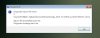
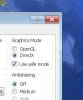
    Also, I was trying to change the font in Google Earth & I some how messed up & its not working correctly. How do I know if I have DirectX or OpenGl? See attached. Google Earth.jpg I put it in safe mode,but need further help to make sure its working as it was originally. The font was very large because the original owner had it that way. I'll have more questions later, thank you.:)
  2. stonarda TechSpot Member Posts: 75   +7

    Sorry, I am happy to help if I can but am a little confused as to the question you want answered.
  3. learninmypc TechSpot Guru Posts: 3,000   +100

    As I mentioned, I was looking thru my C:Drive & saw this [ C:\USERS\THOMAS PAINE\APPDATA\ROAMING\ & so on.
    The original owners name is not/was not Thomas Paine. Thomas Paine is http://en.wikipedia.org/wiki/Thomas_Paine
    so I'd like to know how to change it.
    Also, I use Google Earth considerably but when I was trying to make the font smaller, I messed up something & it crashed on me. I relaunched it, but it crashed again. I removed it using revo & reinstalled it but that didn't work so I installed the previous version.
    So I'd like to know if I should use OpenGL or DirectX mode.
    It worked for a bit in safe mode & I even tried restoring it to default settings but still don't work correctly. Thanks for any help.
  4. cliffordcooley TechSpot Paladin Posts: 2,303   +291

    I believe you would need remove the Thomas Paine user account. If you are only using one user account then you may need to create a new one before you can remove the old one.

    Control Panel\User Accounts and Family Safety\User Accounts
  5. learninmypc TechSpot Guru Posts: 3,000   +100

    Ok, since I'm new to W7, can you give me step by step directions? Thank you.
  6. cliffordcooley TechSpot Paladin Posts: 2,303   +291

    It would be easier for me to point you in the direction of another tutorial. Laziness and the fact that I've little knowledge dealing with user accounts. :(
    Beginner Geek: Delete User Accounts in Windows 7
     
  7. learninmypc TechSpot Guru Posts: 3,000   +100

    I don't blame you one bit & don't consider it laziness. Thank you.
  8. learninmypc TechSpot Guru Posts: 3,000   +100

  9. learninmypc TechSpot Guru Posts: 3,000   +100

    I've got a MS wireless mouse. On white background, its black. At the bottom of this page where it shows Main Sections, Community & so on, its white & I can see the letters thru the cursor.
    Depending on the background color, it changes. Mousing over the Firefox icon in my taskbar, the fox is blue & the globe is the color the fox is supposed to be.
    Is there a fix for it or not?:)
  10. Rabbit01 TechSpot Enthusiast Posts: 763   +12

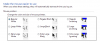
    Take a look at Control Panel > Ease of Access Center > Make the Mouse Easier to User. You might have inverting selected.

    Clipboard01.png
    learninmypc likes this.
  11. learninmypc TechSpot Guru Posts: 3,000   +100

    I never even gave that area a thought. Many thanks, I'll go thru it now.:)(y)
    Perfect, thanks.(y)
  12. Rabbit01 TechSpot Enthusiast Posts: 763   +12

    After undoing the inverted mouse pointer, you might need to go back to the Control Panel and click on Mouse and select the point you want.

    Looking at the selections carefully, I probably should have suggested to you to change mouse pointer Scheme to None or Windows Aero or Windows Standard in the first place. Sorry about that.
  13. learninmypc TechSpot Guru Posts: 3,000   +100

    Its ok, I might do so later on, but for now, it is ok.:)
  14. learninmypc TechSpot Guru Posts: 3,000   +100

    In Control Panel, is it ok (safe) to turn off "auto play" on my usb flashdrives? Everytime I put one in, the damn thing pops up & wants to scan it. Auto Play.jpg Can I just UN check it?
  15. Rabbit01 TechSpot Enthusiast Posts: 763   +12

    Sure, it's save to turn off Autoplay. What's trying to scan the flash drive? Windows? Antivirus program? Mine doesn't scan the drive.
  16. learninmypc TechSpot Guru Posts: 3,000   +100

    I have a USB hub similiar, not exact, thing I guess its called, 6 usb flashdrives can be plugged into & everytime I plug one it, a box pops up (auto scan) & it start in.
    Now if it was a usb I found on the sidewalk, I'd appreciate that but I know better than doing that. Long story short, I know my flashdrives are clean so I'll turn it off. I thank you jobeard.
  17. jobeard TS Ambassador Posts: 12,211   +119

    IMO, disabling autoplay is a major security improvement. Considering the the thumbdrive is the modern version of the floppy
    and the first virus' were transported to other system via sharing floppies, by all means - - disable autorun!

    The gives you the opportunity to use your A/V to scan the device before you manually lunch any SETUP.EXE or AUTORUN.

    Yea, the music doesn't start when the CD is mounted - - I'll take that any day :)
    fimbles and cliffordcooley like this.
  18. learninmypc TechSpot Guru Posts: 3,000   +100

    99.9% of the time, its my own flashdrives I use & I know they're clean. Thank you for your input.
  19. learninmypc TechSpot Guru Posts: 3,000   +100

    I've checked my settings on Google Earth with those on my XP & they're the same with the exception my XP had DirectX enabled.
    How do I find out if I have DirectX on my W7?
    In my 1st post, it shows I set it there thinking it'd help, it didn't & one of the help pages I looked at, said to use OpenGl so I reset it. Its better, but it still occasionally crashes.
    So, my next question is can I go to the Google Earth folder, C:\Program files (x86)\Google\Google Earth delete its contents & put the contents from the XP folder in there?
    If not,what?
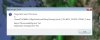
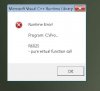
    This is what I get
    Google Earth crash.jpg
    is there something I can do to stop this?
  20. Rabbit01 TechSpot Enthusiast Posts: 763   +12

    DirectX 11 is part of Win7, you can run Dxdiag.exe (DirectX Diagnostic Tool), which is also part of Windows, and see what it says.

    I'd go here and run the installer and let it update whatever needs to be updated. I had to use that to update some files in order to run a benchmarking tool a while back. Something else to check...see if video drivers need updating.