You are using an out of date browser. It may not display this or other websites correctly.
You should upgrade or use an alternative browser.
You should upgrade or use an alternative browser.
Solved Random audio clips and random pop-ups
- Thread starter AKFH
- Start date
- Thread Starter
- #52
Yes so, I used to have around 3-4 anti-viruses and they detected NOTHING. Even when the Pop-ups and Audio sounds were active. It discovered nothing. Which is why I started to run them in Safe Mode (With Networking) [I did not try Safe Mode (with nothing)] It found 2 Back Door Trojans and it deleted it. I thought it would mean the end, but it did not. So after that, I really didn't trust my Anti-Viruses.
Also, when after all of this is done, would you kindly link me up to a trusted Anti-Virus you use or would use for me to download?
1 Paid and 1 Free? So I can decide. Thank you very much!
Also, when after all of this is done, would you kindly link me up to a trusted Anti-Virus you use or would use for me to download?
1 Paid and 1 Free? So I can decide. Thank you very much!

Broni
Posts: 56,041 +517
Your computer was infected with a bootkit (fixed already), which was causing your main problems.
Regular AV, or antimalware programs will NOT detect bootkits.
That's why, we use a whole set of tools to make sure, your computer is clean.
Also, there is no perfect security tool.
The most important security tool is your brain and your computer habits.
Now, do you have any antivirus program installed and current at this moment?
Combofix reports:
WARNING -THIS MACHINE DOES NOT HAVE THE RECOVERY CONSOLE INSTALLED !!
With malware infections being as they are today, it's strongly recommended to have the Windows Recovery Console pre-installed on your machine before doing any malware removal.
The Windows Recovery Console will allow you to boot up into a special recovery (repair) mode. This allows us to more easily help you should your computer have a problem after an attempted removal of malware. It is a simple procedure that will only take a few moments of your time.
Go to Microsoft's website => http://support.microsoft.com/kb/310994
Select the download that's appropriate for your Operating System

Download the file & save it as it's originally named.
---------------------------------------------------------------------
Transfer all files you just downloaded, to the desktop of the infected computer.
--------------------------------------------------------------------
Disable your AntiVirus and AntiSpyware applications, usually via a right click on the System Tray icon. They may otherwise interfere with our tools

Regular AV, or antimalware programs will NOT detect bootkits.
That's why, we use a whole set of tools to make sure, your computer is clean.
Also, there is no perfect security tool.
The most important security tool is your brain and your computer habits.
Now, do you have any antivirus program installed and current at this moment?
Combofix reports:
WARNING -THIS MACHINE DOES NOT HAVE THE RECOVERY CONSOLE INSTALLED !!
With malware infections being as they are today, it's strongly recommended to have the Windows Recovery Console pre-installed on your machine before doing any malware removal.
The Windows Recovery Console will allow you to boot up into a special recovery (repair) mode. This allows us to more easily help you should your computer have a problem after an attempted removal of malware. It is a simple procedure that will only take a few moments of your time.
Go to Microsoft's website => http://support.microsoft.com/kb/310994
Select the download that's appropriate for your Operating System
Download the file & save it as it's originally named.
---------------------------------------------------------------------
Transfer all files you just downloaded, to the desktop of the infected computer.
--------------------------------------------------------------------
Disable your AntiVirus and AntiSpyware applications, usually via a right click on the System Tray icon. They may otherwise interfere with our tools
- Drag the setup package onto ComboFix.exe and drop it.
- Follow the prompts to start ComboFix and when prompted, agree to the End-User License Agreement to install the Microsoft Recovery Console.
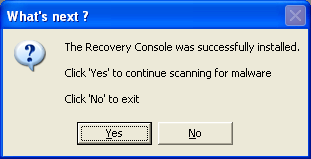
- At the next prompt, click 'Yes' to run the full ComboFix scan.
- When the tool is finished, it will produce a report for you.
- Thread Starter
- #54
Recovery Console:
I have tried that. Using SP2 to drag it in. Mine is a SP3, and you said it is the same as SP2. But it doesn't work. It keeps saying Boot enumoration error or some message along those lines I dragged it in 3 times.
Anti-Viruses:
Currently, besides Malwarebytes which you instructed me to re-install after Bobbye told me to un-install it. What would you suggest up toy our experience?
I have tried that. Using SP2 to drag it in. Mine is a SP3, and you said it is the same as SP2. But it doesn't work. It keeps saying Boot enumoration error or some message along those lines I dragged it in 3 times.
Anti-Viruses:
Currently, besides Malwarebytes which you instructed me to re-install after Bobbye told me to un-install it. What would you suggest up toy our experience?
Broni
Posts: 56,041 +517
OK. We'll leave recovery console for now.
Malwarebytes is a program to keep. Currently, the best free antimalware tool, you can get.
If you didn't use AVG Remover: http://www.avg.com/us-en/download-tools to uninstall AVG, please do it now, so we're are sure, there are no leftovers.
If you did use it, you're fine.
Download and install ONE of these:
- Avast! free antivirus: http://www.avast.com/eng/download-avast-home.html
- Avira free antivirus: http://www.free-av.com/en/download/1/avira_antivir_personal__free_antivirus.html
When done, re-run OTL and give me fresh log.
Also, disregarding any past issues, are there any current problems with your computer?
Malwarebytes is a program to keep. Currently, the best free antimalware tool, you can get.
If you didn't use AVG Remover: http://www.avg.com/us-en/download-tools to uninstall AVG, please do it now, so we're are sure, there are no leftovers.
If you did use it, you're fine.
Download and install ONE of these:
- Avast! free antivirus: http://www.avast.com/eng/download-avast-home.html
- Avira free antivirus: http://www.free-av.com/en/download/1/avira_antivir_personal__free_antivirus.html
When done, re-run OTL and give me fresh log.
Also, disregarding any past issues, are there any current problems with your computer?
Broni
Posts: 56,041 +517
I don't see any AV program running.
Install one and THEN post fresh OTL log.
Also....
Update your Java version here: http://www.java.com/en/download/installed.jsp
Note 1: UNCHECK any pre-checked toolbar and/or software offered with the Java update. The pre-checked toolbars/software are not part of the Java update.
Note 2: The Java Quick Starter (JQS.exe) adds a service to improve the initial startup time of Java applets and applications. If you don't want to run another extra service, go to Start > Control Panel > Java > Advanced > Miscellaneous and uncheck the box for Java Quick Starter. Click OK and restart your computer.
Now, we need to remove old Java version and its remnants...
Download JavaRa to your desktop and unzip it to its own folder
Install one and THEN post fresh OTL log.
Also....
Update your Java version here: http://www.java.com/en/download/installed.jsp
Note 1: UNCHECK any pre-checked toolbar and/or software offered with the Java update. The pre-checked toolbars/software are not part of the Java update.
Note 2: The Java Quick Starter (JQS.exe) adds a service to improve the initial startup time of Java applets and applications. If you don't want to run another extra service, go to Start > Control Panel > Java > Advanced > Miscellaneous and uncheck the box for Java Quick Starter. Click OK and restart your computer.
Now, we need to remove old Java version and its remnants...
Download JavaRa to your desktop and unzip it to its own folder
- Run JavaRa.exe (Vista users! Right click on JavaRa.exe, click Run As Administrator), pick the language of your choice and click Select. Then click Remove Older Versions.
- Accept any prompts.
- Thread Starter
- #64
Thanks, 'The Other Guy' was a great movie, haha.
I updated Java, and I installed Avira. For the AHeAD level setting, what would you suggest?
Low, Medium, or High? It said Medium was the recommended choice but it never stated any bad side-effects of the High level AHeAD detection level.
OTL log is coming up
I updated Java, and I installed Avira. For the AHeAD level setting, what would you suggest?
Low, Medium, or High? It said Medium was the recommended choice but it never stated any bad side-effects of the High level AHeAD detection level.
OTL log is coming up
Attachments
Broni
Posts: 56,041 +517
Shut up...LOL...I'm going to see it on Sunday....'The Other Guy' was a great movie, haha.
"Medium" will be fine.
Let me check your log...
Broni
Posts: 56,041 +517
Run OTL
- Under the Custom Scans/Fixes box at the bottom, paste in the following
Code::OTL O2 - BHO: (no name) - {5C255C8A-E604-49b4-9D64-90988571CECB} - No CLSID value found. O16 - DPF: {40F576AD-8680-4F9E-9490-99D069CD665F} http://srtest-cdn.systemrequirementslab.com.s3.amazonaws.com/bin/sysreqlabdetect.cab (Reg Error: Key error.) O16 - DPF: {8FFBE65D-2C9C-4669-84BD-5829DC0B603C} http://fpdownload.macromedia.com/get/flashplayer/current/polarbear/ultrashim.cab (Reg Error: Key error.) O16 - DPF: {E2883E8F-472F-4FB0-9522-AC9BF37916A7} http://platformdl.adobe.com/NOS/getPlusPlus/1.6/gp.cab (Reg Error: Key error.) O16 - DPF: DirectAnimation Java Classes file://C:\WINDOWS\Java\classes\dajava.cab (Reg Error: Key error.) O16 - DPF: Microsoft XML Parser for Java file://C:\WINDOWS\Java\classes\xmldso.cab (Reg Error: Key error.) [2010/05/12 16:23:57 | 000,000,000 | ---D | C] -- C:\Documents and Settings\Ant\Application Data\AVG9 [3 C:\windows\System32\*.tmp files -> C:\windows\System32\*.tmp -> ] [3 C:\windows\*.tmp files -> C:\windows\*.tmp -> ] [2010/08/04 19:36:43 | 000,000,000 | ---D | M] -- C:\Documents and Settings\All Users\Application Data\avg9 @Alternate Data Stream - 130 bytes -> C:\Documents and Settings\All Users\Application Data\TEMP:CB0AACC9 :Services :Reg :Files :Commands [purity] [emptytemp] [emptyflash] [Reboot] - Then click the Run Fix button at the top
- Let the program run unhindered, reboot the PC when it is done
- You will get a log that shows the results of the fix. Please post it.
- Thread Starter
- #69
All processes killed
Error: Unable to interpret <OTL> in the current context!
Error: Unable to interpret <O2 - BHO: (no name) - {5C255C8A-E604-49b4-9D64-90988571CECB} - No CLSID value found.> in the current context!
Error: Unable to interpret <O16 - DPF: {40F576AD-8680-4F9E-9490-99D069CD665F} http://srtest-cdn.systemrequirementslab.com.s3.amazonaws.com/bin/sysreqlabdetect.cab (Reg Error: Key error.)> in the current context!
Error: Unable to interpret <O16 - DPF: {8FFBE65D-2C9C-4669-84BD-5829DC0B603C} http://fpdownload.macromedia.com/get/flashplayer/current/polarbear/ultrashim.cab (Reg Error: Key error.)> in the current context!
Error: Unable to interpret <O16 - DPF: {E2883E8F-472F-4FB0-9522-AC9BF37916A7} http://platformdl.adobe.com/NOS/getPlusPlus/1.6/gp.cab (Reg Error: Key error.)> in the current context!
Error: Unable to interpret <O16 - DPF: DirectAnimation Java Classes file://C:\WINDOWS\Java\classes\dajava.cab (Reg Error: Key error.)> in the current context!
Error: Unable to interpret <O16 - DPF: Microsoft XML Parser for Java file://C:\WINDOWS\Java\classes\xmldso.cab (Reg Error: Key error.)> in the current context!
Error: Unable to interpret <[2010/05/12 16:23:57 | 000,000,000 | ---D | C] -- C:\Documents and Settings\Ant\Application Data\AVG9> in the current context!
Error: Unable to interpret <[3 C:\windows\System32\*.tmp files -> C:\windows\System32\*.tmp -> ]> in the current context!
Error: Unable to interpret <[3 C:\windows\*.tmp files -> C:\windows\*.tmp -> ]> in the current context!
Error: Unable to interpret <[2010/08/04 19:36:43 | 000,000,000 | ---D | M] -- C:\Documents and Settings\All Users\Application Data\avg9> in the current context!
Error: Unable to interpret <@Alternate Data Stream - 130 bytes -> C:\Documents and Settings\All Users\Application Data\TEMP:CB0AACC9> in the current context!
========== SERVICES/DRIVERS ==========
========== REGISTRY ==========
========== FILES ==========
========== COMMANDS ==========
[EMPTYTEMP]
User: All Users
User: Ant
->Temp folder emptied: 10349603 bytes
->Temporary Internet Files folder emptied: 34137118 bytes
->Java cache emptied: 8114974 bytes
->FireFox cache emptied: 86322388 bytes
->Google Chrome cache emptied: 352696488 bytes
->Apple Safari cache emptied: 5252096 bytes
->Opera cache emptied: 229707 bytes
->Flash cache emptied: 108956 bytes
User: Christopher
->Temp folder emptied: 706 bytes
->Temporary Internet Files folder emptied: 77607877 bytes
->Google Chrome cache emptied: 6623600 bytes
->Flash cache emptied: 924 bytes
User: Default User
->Temp folder emptied: 0 bytes
->Temporary Internet Files folder emptied: 33170 bytes
User: Guest
->Temp folder emptied: 477158 bytes
->Temporary Internet Files folder emptied: 345626 bytes
User: LocalService
->Temp folder emptied: 0 bytes
->Temporary Internet Files folder emptied: 9204946 bytes
->Flash cache emptied: 3261 bytes
User: NetworkService
->Temp folder emptied: 0 bytes
->Temporary Internet Files folder emptied: 112094 bytes
->Flash cache emptied: 434 bytes
User: Tony
->Temp folder emptied: 282 bytes
->Temporary Internet Files folder emptied: 489577 bytes
User: User Data
User: Veronica
->Temp folder emptied: 225025 bytes
->Temporary Internet Files folder emptied: 34978829 bytes
->Flash cache emptied: 434 bytes
%systemdrive% .tmp files removed: 0 bytes
%systemroot% .tmp files removed: 1119359 bytes
%systemroot%\System32 .tmp files removed: 2675729 bytes
%systemroot%\System32\dllcache .tmp files removed: 0 bytes
%systemroot%\System32\drivers .tmp files removed: 0 bytes
Windows Temp folder emptied: 0 bytes
%systemroot%\system32\config\systemprofile\Local Settings\Temp folder emptied: 0 bytes
%systemroot%\system32\config\systemprofile\Local Settings\Temporary Internet Files folder emptied: 185340 bytes
RecycleBin emptied: 44089904 bytes
Total Files Cleaned = 644.00 mb
[EMPTYFLASH]
User: All Users
User: Ant
->Flash cache emptied: 0 bytes
User: Christopher
->Flash cache emptied: 0 bytes
User: Default User
User: Guest
User: LocalService
->Flash cache emptied: 0 bytes
User: NetworkService
->Flash cache emptied: 0 bytes
User: Tony
User: User Data
User: Veronica
->Flash cache emptied: 0 bytes
Total Flash Files Cleaned = 0.00 mb
OTL by OldTimer - Version 3.2.9.1 log created on 08062010_225352
Files\Folders moved on Reboot...
Registry entries deleted on Reboot...
Odd...
EDIT: Is it suppose to say all that...?
Error: Unable to interpret <OTL> in the current context!
Error: Unable to interpret <O2 - BHO: (no name) - {5C255C8A-E604-49b4-9D64-90988571CECB} - No CLSID value found.> in the current context!
Error: Unable to interpret <O16 - DPF: {40F576AD-8680-4F9E-9490-99D069CD665F} http://srtest-cdn.systemrequirementslab.com.s3.amazonaws.com/bin/sysreqlabdetect.cab (Reg Error: Key error.)> in the current context!
Error: Unable to interpret <O16 - DPF: {8FFBE65D-2C9C-4669-84BD-5829DC0B603C} http://fpdownload.macromedia.com/get/flashplayer/current/polarbear/ultrashim.cab (Reg Error: Key error.)> in the current context!
Error: Unable to interpret <O16 - DPF: {E2883E8F-472F-4FB0-9522-AC9BF37916A7} http://platformdl.adobe.com/NOS/getPlusPlus/1.6/gp.cab (Reg Error: Key error.)> in the current context!
Error: Unable to interpret <O16 - DPF: DirectAnimation Java Classes file://C:\WINDOWS\Java\classes\dajava.cab (Reg Error: Key error.)> in the current context!
Error: Unable to interpret <O16 - DPF: Microsoft XML Parser for Java file://C:\WINDOWS\Java\classes\xmldso.cab (Reg Error: Key error.)> in the current context!
Error: Unable to interpret <[2010/05/12 16:23:57 | 000,000,000 | ---D | C] -- C:\Documents and Settings\Ant\Application Data\AVG9> in the current context!
Error: Unable to interpret <[3 C:\windows\System32\*.tmp files -> C:\windows\System32\*.tmp -> ]> in the current context!
Error: Unable to interpret <[3 C:\windows\*.tmp files -> C:\windows\*.tmp -> ]> in the current context!
Error: Unable to interpret <[2010/08/04 19:36:43 | 000,000,000 | ---D | M] -- C:\Documents and Settings\All Users\Application Data\avg9> in the current context!
Error: Unable to interpret <@Alternate Data Stream - 130 bytes -> C:\Documents and Settings\All Users\Application Data\TEMP:CB0AACC9> in the current context!
========== SERVICES/DRIVERS ==========
========== REGISTRY ==========
========== FILES ==========
========== COMMANDS ==========
[EMPTYTEMP]
User: All Users
User: Ant
->Temp folder emptied: 10349603 bytes
->Temporary Internet Files folder emptied: 34137118 bytes
->Java cache emptied: 8114974 bytes
->FireFox cache emptied: 86322388 bytes
->Google Chrome cache emptied: 352696488 bytes
->Apple Safari cache emptied: 5252096 bytes
->Opera cache emptied: 229707 bytes
->Flash cache emptied: 108956 bytes
User: Christopher
->Temp folder emptied: 706 bytes
->Temporary Internet Files folder emptied: 77607877 bytes
->Google Chrome cache emptied: 6623600 bytes
->Flash cache emptied: 924 bytes
User: Default User
->Temp folder emptied: 0 bytes
->Temporary Internet Files folder emptied: 33170 bytes
User: Guest
->Temp folder emptied: 477158 bytes
->Temporary Internet Files folder emptied: 345626 bytes
User: LocalService
->Temp folder emptied: 0 bytes
->Temporary Internet Files folder emptied: 9204946 bytes
->Flash cache emptied: 3261 bytes
User: NetworkService
->Temp folder emptied: 0 bytes
->Temporary Internet Files folder emptied: 112094 bytes
->Flash cache emptied: 434 bytes
User: Tony
->Temp folder emptied: 282 bytes
->Temporary Internet Files folder emptied: 489577 bytes
User: User Data
User: Veronica
->Temp folder emptied: 225025 bytes
->Temporary Internet Files folder emptied: 34978829 bytes
->Flash cache emptied: 434 bytes
%systemdrive% .tmp files removed: 0 bytes
%systemroot% .tmp files removed: 1119359 bytes
%systemroot%\System32 .tmp files removed: 2675729 bytes
%systemroot%\System32\dllcache .tmp files removed: 0 bytes
%systemroot%\System32\drivers .tmp files removed: 0 bytes
Windows Temp folder emptied: 0 bytes
%systemroot%\system32\config\systemprofile\Local Settings\Temp folder emptied: 0 bytes
%systemroot%\system32\config\systemprofile\Local Settings\Temporary Internet Files folder emptied: 185340 bytes
RecycleBin emptied: 44089904 bytes
Total Files Cleaned = 644.00 mb
[EMPTYFLASH]
User: All Users
User: Ant
->Flash cache emptied: 0 bytes
User: Christopher
->Flash cache emptied: 0 bytes
User: Default User
User: Guest
User: LocalService
->Flash cache emptied: 0 bytes
User: NetworkService
->Flash cache emptied: 0 bytes
User: Tony
User: User Data
User: Veronica
->Flash cache emptied: 0 bytes
Total Flash Files Cleaned = 0.00 mb
OTL by OldTimer - Version 3.2.9.1 log created on 08062010_225352
Files\Folders moved on Reboot...
Registry entries deleted on Reboot...
Odd...
EDIT: Is it suppose to say all that...?
- Thread Starter
- #71
All processes killed
========== OTL ==========
Registry key HKEY_LOCAL_MACHINE\Software\Microsoft\Windows\CurrentVersion\Explorer\Browser Helper Objects\{5C255C8A-E604-49b4-9D64-90988571CECB}\ deleted successfully.
Registry key HKEY_LOCAL_MACHINE\SOFTWARE\Classes\CLSID\{5C255C8A-E604-49b4-9D64-90988571CECB}\ not found.
Starting removal of ActiveX control {40F576AD-8680-4F9E-9490-99D069CD665F}
C:\WINDOWS\Downloaded Program Files\sysreqlabdetect.inf moved successfully.
Registry key HKEY_LOCAL_MACHINE\SOFTWARE\Microsoft\Code Store Database\Distribution Units\{40F576AD-8680-4F9E-9490-99D069CD665F}\ deleted successfully.
Registry key HKEY_LOCAL_MACHINE\SOFTWARE\Classes\CLSID\{40F576AD-8680-4F9E-9490-99D069CD665F}\ not found.
Registry key HKEY_CURRENT_USER\SOFTWARE\Classes\CLSID\{40F576AD-8680-4F9E-9490-99D069CD665F}\ deleted successfully.
Registry key HKEY_LOCAL_MACHINE\SOFTWARE\Microsoft\Active Setup\Installed Components\{40F576AD-8680-4F9E-9490-99D069CD665F}\ not found.
Registry key HKEY_LOCAL_MACHINE\SOFTWARE\Classes\CLSID\{40F576AD-8680-4F9E-9490-99D069CD665F}\ not found.
Starting removal of ActiveX control {8FFBE65D-2C9C-4669-84BD-5829DC0B603C}
C:\WINDOWS\Downloaded Program Files\erma.inf moved successfully.
Registry key HKEY_LOCAL_MACHINE\SOFTWARE\Microsoft\Code Store Database\Distribution Units\{8FFBE65D-2C9C-4669-84BD-5829DC0B603C}\ deleted successfully.
Registry key HKEY_LOCAL_MACHINE\SOFTWARE\Classes\CLSID\{8FFBE65D-2C9C-4669-84BD-5829DC0B603C}\ not found.
Registry key HKEY_LOCAL_MACHINE\SOFTWARE\Microsoft\Active Setup\Installed Components\{8FFBE65D-2C9C-4669-84BD-5829DC0B603C}\ not found.
Registry key HKEY_LOCAL_MACHINE\SOFTWARE\Classes\CLSID\{8FFBE65D-2C9C-4669-84BD-5829DC0B603C}\ not found.
Starting removal of ActiveX control {E2883E8F-472F-4FB0-9522-AC9BF37916A7}
C:\WINDOWS\Downloaded Program Files\gp.inf not found.
Registry key HKEY_LOCAL_MACHINE\SOFTWARE\Microsoft\Code Store Database\Distribution Units\{E2883E8F-472F-4FB0-9522-AC9BF37916A7}\ deleted successfully.
Registry key HKEY_LOCAL_MACHINE\SOFTWARE\Classes\CLSID\{E2883E8F-472F-4FB0-9522-AC9BF37916A7}\ not found.
Registry key HKEY_LOCAL_MACHINE\SOFTWARE\Microsoft\Active Setup\Installed Components\{E2883E8F-472F-4FB0-9522-AC9BF37916A7}\ not found.
Registry key HKEY_LOCAL_MACHINE\SOFTWARE\Classes\CLSID\{E2883E8F-472F-4FB0-9522-AC9BF37916A7}\ not found.
File Animation Java Classes file://C:\WINDOWS\Java\classes\dajava.cab not found.
Starting removal of ActiveX control DirectAnimation Java Classes
Registry error reading value HKEY_LOCAL_MACHINE\SOFTWARE\Microsoft\Code Store Database\Distribution Units\DirectAnimation Java Classes\DownloadInformation\\INF .
Registry key HKEY_LOCAL_MACHINE\SOFTWARE\Microsoft\Code Store Database\Distribution Units\DirectAnimation Java Classes\ deleted successfully.
Registry key HKEY_LOCAL_MACHINE\SOFTWARE\Microsoft\Active Setup\Installed Components\DirectAnimation Java Classes\ not found.
File oft XML Parser for Java file://C:\WINDOWS\Java\classes\xmldso.cab not found.
Starting removal of ActiveX control Microsoft XML Parser for Java
Registry error reading value HKEY_LOCAL_MACHINE\SOFTWARE\Microsoft\Code Store Database\Distribution Units\Microsoft XML Parser for Java\DownloadInformation\\INF .
Registry key HKEY_LOCAL_MACHINE\SOFTWARE\Microsoft\Code Store Database\Distribution Units\Microsoft XML Parser for Java\ deleted successfully.
Registry key HKEY_LOCAL_MACHINE\SOFTWARE\Microsoft\Active Setup\Installed Components\Microsoft XML Parser for Java\ not found.
C:\Documents and Settings\Ant\Application Data\AVG9\cfgall folder moved successfully.
C:\Documents and Settings\Ant\Application Data\AVG9 folder moved successfully.
File/Folder C:\windows\System32\*.tmp not found.
File/Folder C:\windows\*.tmp not found.
C:\Documents and Settings\All Users\Application Data\avg9\update\prepare\temp folder moved successfully.
C:\Documents and Settings\All Users\Application Data\avg9\update\prepare folder moved successfully.
C:\Documents and Settings\All Users\Application Data\avg9\update\backup folder moved successfully.
C:\Documents and Settings\All Users\Application Data\avg9\update folder moved successfully.
C:\Documents and Settings\All Users\Application Data\avg9\Temp folder moved successfully.
C:\Documents and Settings\All Users\Application Data\avg9\scanlogs folder moved successfully.
C:\Documents and Settings\All Users\Application Data\avg9\Log folder moved successfully.
C:\Documents and Settings\All Users\Application Data\avg9\emc\Queue\TEMP folder moved successfully.
C:\Documents and Settings\All Users\Application Data\avg9\emc\Queue\OUT folder moved successfully.
C:\Documents and Settings\All Users\Application Data\avg9\emc\Queue\ACTIVE folder moved successfully.
C:\Documents and Settings\All Users\Application Data\avg9\emc\Queue folder moved successfully.
C:\Documents and Settings\All Users\Application Data\avg9\emc\Log folder moved successfully.
C:\Documents and Settings\All Users\Application Data\avg9\emc folder moved successfully.
C:\Documents and Settings\All Users\Application Data\avg9\Dumps folder moved successfully.
C:\Documents and Settings\All Users\Application Data\avg9\cfgall folder moved successfully.
C:\Documents and Settings\All Users\Application Data\avg9\cfg folder moved successfully.
C:\Documents and Settings\All Users\Application Data\avg9\AvgApi folder moved successfully.
C:\Documents and Settings\All Users\Application Data\avg9\AvgAm folder moved successfully.
C:\Documents and Settings\All Users\Application Data\avg9\admincli folder moved successfully.
C:\Documents and Settings\All Users\Application Data\avg9 folder moved successfully.
ADS C:\Documents and Settings\All Users\Application Data\TEMP:CB0AACC9 deleted successfully.
========== SERVICES/DRIVERS ==========
========== REGISTRY ==========
========== FILES ==========
========== COMMANDS ==========
[EMPTYTEMP]
User: All Users
User: Ant
->Temp folder emptied: 1140 bytes
->Temporary Internet Files folder emptied: 46269 bytes
->Java cache emptied: 0 bytes
->FireFox cache emptied: 28925804 bytes
->Google Chrome cache emptied: 0 bytes
->Apple Safari cache emptied: 0 bytes
->Opera cache emptied: 0 bytes
->Flash cache emptied: 0 bytes
User: Christopher
->Temp folder emptied: 0 bytes
->Temporary Internet Files folder emptied: 0 bytes
->Google Chrome cache emptied: 0 bytes
->Flash cache emptied: 0 bytes
User: Default User
->Temp folder emptied: 0 bytes
->Temporary Internet Files folder emptied: 0 bytes
User: Guest
->Temp folder emptied: 0 bytes
->Temporary Internet Files folder emptied: 0 bytes
User: LocalService
->Temp folder emptied: 0 bytes
->Temporary Internet Files folder emptied: 33170 bytes
->Flash cache emptied: 0 bytes
User: NetworkService
->Temp folder emptied: 0 bytes
->Temporary Internet Files folder emptied: 0 bytes
->Flash cache emptied: 0 bytes
User: Tony
->Temp folder emptied: 0 bytes
->Temporary Internet Files folder emptied: 0 bytes
User: User Data
User: Veronica
->Temp folder emptied: 0 bytes
->Temporary Internet Files folder emptied: 0 bytes
->Flash cache emptied: 0 bytes
%systemdrive% .tmp files removed: 0 bytes
%systemroot% .tmp files removed: 0 bytes
%systemroot%\System32 .tmp files removed: 0 bytes
%systemroot%\System32\dllcache .tmp files removed: 0 bytes
%systemroot%\System32\drivers .tmp files removed: 0 bytes
Windows Temp folder emptied: 483 bytes
%systemroot%\system32\config\systemprofile\Local Settings\Temp folder emptied: 0 bytes
%systemroot%\system32\config\systemprofile\Local Settings\Temporary Internet Files folder emptied: 0 bytes
RecycleBin emptied: 875296 bytes
Total Files Cleaned = 28.00 mb
[EMPTYFLASH]
User: All Users
User: Ant
->Flash cache emptied: 0 bytes
User: Christopher
->Flash cache emptied: 0 bytes
User: Default User
User: Guest
User: LocalService
->Flash cache emptied: 0 bytes
User: NetworkService
->Flash cache emptied: 0 bytes
User: Tony
User: User Data
User: Veronica
->Flash cache emptied: 0 bytes
Total Flash Files Cleaned = 0.00 mb
OTL by OldTimer - Version 3.2.9.1 log created on 08062010_232420
Files\Folders moved on Reboot...
Registry entries deleted on Reboot...
========== OTL ==========
Registry key HKEY_LOCAL_MACHINE\Software\Microsoft\Windows\CurrentVersion\Explorer\Browser Helper Objects\{5C255C8A-E604-49b4-9D64-90988571CECB}\ deleted successfully.
Registry key HKEY_LOCAL_MACHINE\SOFTWARE\Classes\CLSID\{5C255C8A-E604-49b4-9D64-90988571CECB}\ not found.
Starting removal of ActiveX control {40F576AD-8680-4F9E-9490-99D069CD665F}
C:\WINDOWS\Downloaded Program Files\sysreqlabdetect.inf moved successfully.
Registry key HKEY_LOCAL_MACHINE\SOFTWARE\Microsoft\Code Store Database\Distribution Units\{40F576AD-8680-4F9E-9490-99D069CD665F}\ deleted successfully.
Registry key HKEY_LOCAL_MACHINE\SOFTWARE\Classes\CLSID\{40F576AD-8680-4F9E-9490-99D069CD665F}\ not found.
Registry key HKEY_CURRENT_USER\SOFTWARE\Classes\CLSID\{40F576AD-8680-4F9E-9490-99D069CD665F}\ deleted successfully.
Registry key HKEY_LOCAL_MACHINE\SOFTWARE\Microsoft\Active Setup\Installed Components\{40F576AD-8680-4F9E-9490-99D069CD665F}\ not found.
Registry key HKEY_LOCAL_MACHINE\SOFTWARE\Classes\CLSID\{40F576AD-8680-4F9E-9490-99D069CD665F}\ not found.
Starting removal of ActiveX control {8FFBE65D-2C9C-4669-84BD-5829DC0B603C}
C:\WINDOWS\Downloaded Program Files\erma.inf moved successfully.
Registry key HKEY_LOCAL_MACHINE\SOFTWARE\Microsoft\Code Store Database\Distribution Units\{8FFBE65D-2C9C-4669-84BD-5829DC0B603C}\ deleted successfully.
Registry key HKEY_LOCAL_MACHINE\SOFTWARE\Classes\CLSID\{8FFBE65D-2C9C-4669-84BD-5829DC0B603C}\ not found.
Registry key HKEY_LOCAL_MACHINE\SOFTWARE\Microsoft\Active Setup\Installed Components\{8FFBE65D-2C9C-4669-84BD-5829DC0B603C}\ not found.
Registry key HKEY_LOCAL_MACHINE\SOFTWARE\Classes\CLSID\{8FFBE65D-2C9C-4669-84BD-5829DC0B603C}\ not found.
Starting removal of ActiveX control {E2883E8F-472F-4FB0-9522-AC9BF37916A7}
C:\WINDOWS\Downloaded Program Files\gp.inf not found.
Registry key HKEY_LOCAL_MACHINE\SOFTWARE\Microsoft\Code Store Database\Distribution Units\{E2883E8F-472F-4FB0-9522-AC9BF37916A7}\ deleted successfully.
Registry key HKEY_LOCAL_MACHINE\SOFTWARE\Classes\CLSID\{E2883E8F-472F-4FB0-9522-AC9BF37916A7}\ not found.
Registry key HKEY_LOCAL_MACHINE\SOFTWARE\Microsoft\Active Setup\Installed Components\{E2883E8F-472F-4FB0-9522-AC9BF37916A7}\ not found.
Registry key HKEY_LOCAL_MACHINE\SOFTWARE\Classes\CLSID\{E2883E8F-472F-4FB0-9522-AC9BF37916A7}\ not found.
File Animation Java Classes file://C:\WINDOWS\Java\classes\dajava.cab not found.
Starting removal of ActiveX control DirectAnimation Java Classes
Registry error reading value HKEY_LOCAL_MACHINE\SOFTWARE\Microsoft\Code Store Database\Distribution Units\DirectAnimation Java Classes\DownloadInformation\\INF .
Registry key HKEY_LOCAL_MACHINE\SOFTWARE\Microsoft\Code Store Database\Distribution Units\DirectAnimation Java Classes\ deleted successfully.
Registry key HKEY_LOCAL_MACHINE\SOFTWARE\Microsoft\Active Setup\Installed Components\DirectAnimation Java Classes\ not found.
File oft XML Parser for Java file://C:\WINDOWS\Java\classes\xmldso.cab not found.
Starting removal of ActiveX control Microsoft XML Parser for Java
Registry error reading value HKEY_LOCAL_MACHINE\SOFTWARE\Microsoft\Code Store Database\Distribution Units\Microsoft XML Parser for Java\DownloadInformation\\INF .
Registry key HKEY_LOCAL_MACHINE\SOFTWARE\Microsoft\Code Store Database\Distribution Units\Microsoft XML Parser for Java\ deleted successfully.
Registry key HKEY_LOCAL_MACHINE\SOFTWARE\Microsoft\Active Setup\Installed Components\Microsoft XML Parser for Java\ not found.
C:\Documents and Settings\Ant\Application Data\AVG9\cfgall folder moved successfully.
C:\Documents and Settings\Ant\Application Data\AVG9 folder moved successfully.
File/Folder C:\windows\System32\*.tmp not found.
File/Folder C:\windows\*.tmp not found.
C:\Documents and Settings\All Users\Application Data\avg9\update\prepare\temp folder moved successfully.
C:\Documents and Settings\All Users\Application Data\avg9\update\prepare folder moved successfully.
C:\Documents and Settings\All Users\Application Data\avg9\update\backup folder moved successfully.
C:\Documents and Settings\All Users\Application Data\avg9\update folder moved successfully.
C:\Documents and Settings\All Users\Application Data\avg9\Temp folder moved successfully.
C:\Documents and Settings\All Users\Application Data\avg9\scanlogs folder moved successfully.
C:\Documents and Settings\All Users\Application Data\avg9\Log folder moved successfully.
C:\Documents and Settings\All Users\Application Data\avg9\emc\Queue\TEMP folder moved successfully.
C:\Documents and Settings\All Users\Application Data\avg9\emc\Queue\OUT folder moved successfully.
C:\Documents and Settings\All Users\Application Data\avg9\emc\Queue\ACTIVE folder moved successfully.
C:\Documents and Settings\All Users\Application Data\avg9\emc\Queue folder moved successfully.
C:\Documents and Settings\All Users\Application Data\avg9\emc\Log folder moved successfully.
C:\Documents and Settings\All Users\Application Data\avg9\emc folder moved successfully.
C:\Documents and Settings\All Users\Application Data\avg9\Dumps folder moved successfully.
C:\Documents and Settings\All Users\Application Data\avg9\cfgall folder moved successfully.
C:\Documents and Settings\All Users\Application Data\avg9\cfg folder moved successfully.
C:\Documents and Settings\All Users\Application Data\avg9\AvgApi folder moved successfully.
C:\Documents and Settings\All Users\Application Data\avg9\AvgAm folder moved successfully.
C:\Documents and Settings\All Users\Application Data\avg9\admincli folder moved successfully.
C:\Documents and Settings\All Users\Application Data\avg9 folder moved successfully.
ADS C:\Documents and Settings\All Users\Application Data\TEMP:CB0AACC9 deleted successfully.
========== SERVICES/DRIVERS ==========
========== REGISTRY ==========
========== FILES ==========
========== COMMANDS ==========
[EMPTYTEMP]
User: All Users
User: Ant
->Temp folder emptied: 1140 bytes
->Temporary Internet Files folder emptied: 46269 bytes
->Java cache emptied: 0 bytes
->FireFox cache emptied: 28925804 bytes
->Google Chrome cache emptied: 0 bytes
->Apple Safari cache emptied: 0 bytes
->Opera cache emptied: 0 bytes
->Flash cache emptied: 0 bytes
User: Christopher
->Temp folder emptied: 0 bytes
->Temporary Internet Files folder emptied: 0 bytes
->Google Chrome cache emptied: 0 bytes
->Flash cache emptied: 0 bytes
User: Default User
->Temp folder emptied: 0 bytes
->Temporary Internet Files folder emptied: 0 bytes
User: Guest
->Temp folder emptied: 0 bytes
->Temporary Internet Files folder emptied: 0 bytes
User: LocalService
->Temp folder emptied: 0 bytes
->Temporary Internet Files folder emptied: 33170 bytes
->Flash cache emptied: 0 bytes
User: NetworkService
->Temp folder emptied: 0 bytes
->Temporary Internet Files folder emptied: 0 bytes
->Flash cache emptied: 0 bytes
User: Tony
->Temp folder emptied: 0 bytes
->Temporary Internet Files folder emptied: 0 bytes
User: User Data
User: Veronica
->Temp folder emptied: 0 bytes
->Temporary Internet Files folder emptied: 0 bytes
->Flash cache emptied: 0 bytes
%systemdrive% .tmp files removed: 0 bytes
%systemroot% .tmp files removed: 0 bytes
%systemroot%\System32 .tmp files removed: 0 bytes
%systemroot%\System32\dllcache .tmp files removed: 0 bytes
%systemroot%\System32\drivers .tmp files removed: 0 bytes
Windows Temp folder emptied: 483 bytes
%systemroot%\system32\config\systemprofile\Local Settings\Temp folder emptied: 0 bytes
%systemroot%\system32\config\systemprofile\Local Settings\Temporary Internet Files folder emptied: 0 bytes
RecycleBin emptied: 875296 bytes
Total Files Cleaned = 28.00 mb
[EMPTYFLASH]
User: All Users
User: Ant
->Flash cache emptied: 0 bytes
User: Christopher
->Flash cache emptied: 0 bytes
User: Default User
User: Guest
User: LocalService
->Flash cache emptied: 0 bytes
User: NetworkService
->Flash cache emptied: 0 bytes
User: Tony
User: User Data
User: Veronica
->Flash cache emptied: 0 bytes
Total Flash Files Cleaned = 0.00 mb
OTL by OldTimer - Version 3.2.9.1 log created on 08062010_232420
Files\Folders moved on Reboot...
Registry entries deleted on Reboot...
Broni
Posts: 56,041 +517
Now, you're talking 
Last scans...
1. Download Security Check from HERE, and save it to your Desktop.
2. Download Temp File Cleaner (TFC)
3. Go to Kaspersky website and perform an online antivirus scan.
Last scans...
1. Download Security Check from HERE, and save it to your Desktop.
- Double-click SecurityCheck.exe
- Follow the onscreen instructions inside of the black box.
- A Notepad document should open automatically called checkup.txt; please post the contents of that document.
2. Download Temp File Cleaner (TFC)
- Double click on TFC.exe to run the program.
- Click on Start button to begin cleaning process.
- TFC will close all running programs, and it may ask you to restart computer.
3. Go to Kaspersky website and perform an online antivirus scan.
- Disable your active antivirus program.
- Read through the requirements and privacy statement and click on Accept button.
- It will start downloading and installing the scanner and virus definitions. You will be prompted to install an application from Kaspersky. Click Run.
- When the downloads have finished, click on Settings.
- Make sure these boxes are checked (ticked). If they are not, please tick them and click on the Save button:
- Spyware, Adware, Dialers, and other potentially dangerous programs
- Archives
- Mail databases
- Click on My Computer under Scan.
- Once the scan is complete, it will display the results. Click on View Scan Report.
- You will see a list of infected items there. Click on Save Report As....
- Save this report to a convenient place. Change the Files of type to Text file (.txt) before clicking on the Save button. Then post it here.
- Thread Starter
- #73
Results of screen317's Security Check version 0.99.5
Windows XP Service Pack 3
Internet Explorer 7 Out of date!
``````````````````````````````
Antivirus/Firewall Check:
Windows Firewall Enabled!
Avira AntiVir Personal - Free Antivirus
ESET Online Scanner v3
Antivirus up to date!
```````````````````````````````
Anti-malware/Other Utilities Check:
Malwarebytes' Anti-Malware
CCleaner (remove only)
Java(TM) 6 Update 21
Adobe Flash Player 10.1.53.64
Adobe Reader 9.1.2
Chinese Traditional Fonts Support For Adobe Reader 9
Mozilla Firefox (3.6.8)
````````````````````````````````
Process Check:
objlist.exe by Laurent
Avira Antivir avgnt.exe
Avira Antivir avguard.exe
````````````````````````````````
DNS Vulnerability Check:
GREAT! (Not vulnerable to DNS cache poisoning)
``````````End of Log````````````
QUESTION: Why does Mozilla Fire Fox continue to have a pop-up after every download saying No Anti-Virus detected. When I do? It didn't happen when I had AVG
Windows XP Service Pack 3
Internet Explorer 7 Out of date!
``````````````````````````````
Antivirus/Firewall Check:
Windows Firewall Enabled!
Avira AntiVir Personal - Free Antivirus
ESET Online Scanner v3
Antivirus up to date!
```````````````````````````````
Anti-malware/Other Utilities Check:
Malwarebytes' Anti-Malware
CCleaner (remove only)
Java(TM) 6 Update 21
Adobe Flash Player 10.1.53.64
Adobe Reader 9.1.2
Chinese Traditional Fonts Support For Adobe Reader 9
Mozilla Firefox (3.6.8)
````````````````````````````````
Process Check:
objlist.exe by Laurent
Avira Antivir avgnt.exe
Avira Antivir avguard.exe
````````````````````````````````
DNS Vulnerability Check:
GREAT! (Not vulnerable to DNS cache poisoning)
``````````End of Log````````````
QUESTION: Why does Mozilla Fire Fox continue to have a pop-up after every download saying No Anti-Virus detected. When I do? It didn't happen when I had AVG
Similar threads
- Replies
- 9
- Views
- 184
- Replies
- 20
- Views
- 287
Latest posts
-
 New York becomes the first state to ban smart glasses in courtrooms
- NumberNine replied
-
 LG and Alienware monitors caught auto-installing Windows adware
- Win7user replied
-
 Budget smartphones are the next victim of the memory crisis
- OortCloud replied


-
TechSpot is dedicated to computer enthusiasts and power users.
Ask a question and give support.
Join the community here, it only takes a minute.