also @ TechSpot: Updated Microsoft EULA prohibits class action lawsuits

TechSpot

[Solved] Search engine re-direct virus / IE running in background

Discussion in 'Virus and Malware Removal' started by dalego, Nov 23, 2011.

Thread Status:
Not open for further replies.
  1. dalego Newcomer, in training

    Hi. The problem remains.
    As soon as i click any result in a google search, it directs to random websites. However, the random IE adverts that would play sound in the background despite no IE windows being open have stopped.

    **Apologies for the exces posts instead of hitting edit.

    I dont know if this will help but I have since installed Firefox for my friend but when you look at task manager there is always a process for iexplorer32*.exe which i assume is IE but it shouldnt be running anything?
  2. Bobbye Helper on the Fringe

    Sorry for delay- I got a bit more behind than usual.

    Please ignore my reference to this file: C:\Users\Anthony\Downloads\c5h833gf.exe
    It's GMER. Not the first time I got fooled by it!

    In your subject, you say IE running in the background." It's possible that it has been this instead all along:
    iexplorer32.exe is Added by a variant of the AGOBOT/GAOBOT WORM!
    I am not seeing any other processes associates with this Worm, however and the online virus scan was clean.

    There are only 3 entries I need to remove with script in Combofix, but they aren't malware related. So although this might sound like a strange question:

    Please describe what is happening that you refer to a 'redirect.'

    The usual process for Internet Explorer is iexplore.exe
    I see this as a running process: C:\Program Files (x86)\Internet Explorer\iexplore.exe
    If you have now made Firefox the default browser, go into Internet Options (Control Panel or Tools in IE)> Programs tab> Uncheck 'IE should check to see if it's the default browser'> Apply> OK.
    =============================================
    I'd like to check some system info which require special scans:
    Download CKScanner and save to your desktop.
    • Doubleclick CKScanner.exe and click Search For Files.
    • When the cursor hourglass disappears, click Save List To File.
    • A message box will verify that the file is saved.
    • Double-click the CKFiles.txt icon on your desktop and copy/paste the contents in your next reply.
    =============================
    Please run the MGA Diagnostics tool
    • You will be prompted to either “Run” or “Save” the tool. Choose to “Run” the tool and follow the on-screen prompts.
    • You will receive an Internet Explorer-Security Warning dialog box for the Windows Genuine Advantage Diagnostic Tool>
    • You must choose to Run this tool when prompted.
    • Once you are presented with the Diagnostics tool choose Continue to run the diagnostic report.
    • If the RESOLVE button is available after running the diagnostics, please click RESOLVE to allow the diagnostic tool to attempt a repair.
    • After running the MGA Diagnostic tool, click on the Windows tab and then click on Copy
    • Please return to this thread and Paste the results here for review.
    ------------------------------------------
    This tool will is to look on the computer itself, in the documentation you received with the computer or with your retail purchase of Windows to see if you have a Certificate of Authenticity (COA). If you have one, tell us about the COA. Tell us:

    1. What edition of Windows is it?
    2. Does it read "OEM Software" or "OEM Product" in black lettering?
    3. Or, does it have the computer manufacturer's name in black lettering?
    4. DO NOT post the Product Key.

    NOTE: The data collected with the Genuine Diagnostics Tool does NOT contain any information that can personally identify you and can be fully reviewed, by you, before being posted.
    =====================================
  3. dalego Newcomer, in training

    Hi, the iexplorer.exe*32 is no longer as an EXTRA running process....

    Previously, there would be a process for it but no open windows, and if the sound was enabled, you would hear what sounded like an advert playing in the background. But there was no open IE Windows which i found strange.

    The initial problem with google re-direct remains:
    -put a search into google ..e.g. BBC
    -Results page loades millions of responses
    - Click on any link to the BBC Site and you are immediately diverted to 2 or 3 different websites, totally unrelated to BBC in anyway. (If you click the back and forward arrow a few times it does eventually open BBC)

    I was unable to find the txt file after the CKScanner finished but it read 'nothing unecessarily bad found'

    MGA Report:

    Diagnostic Report (1.9.0027.0):
    -----------------------------------------
    Windows Validation Data-->

    Validation Code: 0
    Cached Online Validation Code: 0x0
    Windows Product Key: *****-*****-*****-*****-*****
    Windows Product Key Hash: sdEjrEJjW0FuXAhegYxl8GAkBYg=
    Windows Product ID: 00359-OEM-8992687-00016
    Windows Product ID Type: 2
    Windows License Type: OEM SLP
    Windows OS version: 6.1.7600.2.00010300.0.0.003
    ID: {1A4074AA-1D77-492E-9DEB-818E961598A0}(1)
    Is Admin: Yes
    TestCab: 0x0
    LegitcheckControl ActiveX: N/A, hr = 0x80070002
    Signed By: N/A, hr = 0x80070002
    Product Name: Windows 7 Home Premium
    Architecture: 0x00000009
    Build lab: 7600.win7_gdr.110622-1503
    TTS Error:
    Validation Diagnostic:
    Resolution Status: N/A

    Vista WgaER Data-->
    ThreatID(s): N/A, hr = 0x80070002
    Version: N/A, hr = 0x80070002

    Windows XP Notifications Data-->
    Cached Result: N/A, hr = 0x80070002
    File Exists: No
    Version: N/A, hr = 0x80070002
    WgaTray.exe Signed By: N/A, hr = 0x80070002
    WgaLogon.dll Signed By: N/A, hr = 0x80070002

    OGA Notifications Data-->
    Cached Result: N/A, hr = 0x80070002
    Version: N/A, hr = 0x80070002
    OGAExec.exe Signed By: N/A, hr = 0x80070002
    OGAAddin.dll Signed By: N/A, hr = 0x80070002

    OGA Data-->
    Office Status: 100 Genuine
    Microsoft Office Home and Student 2007 - 100 Genuine
    OGA Version: N/A, 0x80070002
    Signed By: N/A, hr = 0x80070002
    Office Diagnostics: 025D1FF3-364-80041010_025D1FF3-229-80041010_025D1FF3-230-1_025D1FF3-517-80040154_025D1FF3-237-80040154_025D1FF3-238-2_025D1FF3-244-80070002_025D1FF3-258-3_E2AD56EA-765-d003_E2AD56EA-766-0_E2AD56EA-134-80004005

    Browser Data-->
    Proxy settings: N/A
    User Agent: Mozilla/4.0 (compatible; MSIE 8.0; Win32)
    Default Browser: C:\Program Files (x86)\Mozilla Firefox\firefox.exe
    Download signed ActiveX controls: Prompt
    Download unsigned ActiveX controls: Disabled
    Run ActiveX controls and plug-ins: Allowed
    Initialize and script ActiveX controls not marked as safe: Disabled
    Allow scripting of Internet Explorer Webbrowser control: Disabled
    Active scripting: Allowed
    Script ActiveX controls marked as safe for scripting: Allowed

    File Scan Data-->

    Other data-->
    Office Details: <GenuineResults><MachineData><UGUID>{1A4074AA-1D77-492E-9DEB-818E961598A0}</UGUID><Version>1.9.0027.0</Version><OS>6.1.7600.2.00010300.0.0.003</OS><Architecture>x64</Architecture><PKey>*****-*****-*****-*****-CGKHQ</PKey><PID>00359-OEM-8992687-00016</PID><PIDType>2</PIDType><SID>S-1-5-21-38427403-1550948586-3537897607</SID><SYSTEM><Manufacturer>Sony Corporation</Manufacturer><Model>VGN-NW26M</Model></SYSTEM><BIOS><Manufacturer>American Megatrends Inc.</Manufacturer><Version>R1120Y4</Version><SMBIOSVersion major="2" minor="4"/><Date>20090820000000.000000+000</Date></BIOS><HWID>9AB93607018400F8</HWID><UserLCID>0809</UserLCID><SystemLCID>0409</SystemLCID><TimeZone>GMT Standard Time(GMT+00:00)</TimeZone><iJoin>0</iJoin><SBID><stat>3</stat><msppid></msppid><name></name><model></model></SBID><OEM><OEMID>Sony</OEMID><OEMTableID>VAIO</OEMTableID></OEM><GANotification/></MachineData><Software><Office><Result>100</Result><Products><Product GUID="{91120000-002F-0000-0000-0000000FF1CE}"><LegitResult>100</LegitResult><Name>Microsoft Office Home and Student 2007</Name><Ver>12</Ver><Val>407D84FB673873C</Val><Hash>khla85s1HZpem0RSrqFBSVhLzpA=</Hash><Pid>81602-926-9903106-68119</Pid><PidType>1</PidType></Product></Products><Applications><App Id="16" Version="12" Result="100"/><App Id="18" Version="12" Result="100"/><App Id="1B" Version="12" Result="100"/><App Id="A1" Version="12" Result="100"/></Applications></Office></Software></GenuineResults>

    Spsys.log Content: 0x80070002

    Licensing Data-->
    Software licensing service version: 6.1.7600.16385

    Name: Windows(R) 7, HomePremium edition
    Description: Windows Operating System - Windows(R) 7, OEM_SLP channel
    Activation ID: d2c04e90-c3dd-4260-b0f3-f845f5d27d64
    Application ID: 55c92734-d682-4d71-983e-d6ec3f16059f
    Extended PID: 00359-00178-926-800016-02-2057-7600.0000-2292009
    Installation ID: 021363398472257902401465200921275194368130479604937541
    Processor Certificate URL: http://go.microsoft.com/fwlink/?LinkID=88338
    Machine Certificate URL: http://go.microsoft.com/fwlink/?LinkID=88339
    Use License URL: http://go.microsoft.com/fwlink/?LinkID=88341
    Product Key Certificate URL: http://go.microsoft.com/fwlink/?LinkID=88340
    Partial Product Key: CGKHQ
    License Status: Licensed
    Remaining Windows rearm count: 3
    Trusted time: 15/12/2011 18:13:47

    Windows Activation Technologies-->
    HrOffline: 0x00000000
    HrOnline: 0x00000000
    HealthStatus: 0x0000000000000000
    Event Time Stamp: 9:25:2011 16:48
    ActiveX: Registered, Version: 7.1.7600.16395
    Admin Service: Registered, Version: 7.1.7600.16395
    HealthStatus Bitmask Output:


    HWID Data-->
    HWID Hash Current: NAAAAAEAAwABAAIAAAABAAAAAwABAAEA6GFe3HB1MsG+lSBAxmNEUeihzkduNjBWjhlGyg==

    OEM Activation 1.0 Data-->
    N/A

    OEM Activation 2.0 Data-->
    BIOS valid for OA 2.0: yes
    Windows marker version: 0x20001
    OEMID and OEMTableID Consistent: yes
    BIOS Information:
    ACPI Table Name OEMID Value OEMTableID Value
    APIC Sony VAIO
    FACP Sony VAIO
    HPET Sony VAIO
    MCFG Sony VAIO
    SLIC Sony VAIO
    SSDT Sony VAIO
    SSDT Sony VAIO
  4. Bobbye Helper on the Fringe

    This is part of the template whether there is any text or not. Please run the CK Scanner again.
    Follow this:
  5. dalego Newcomer, in training

    Here is the message which appeared:

    CKScanner - Additional Security Risks - These are not necessarily bad
    scanner sequence 3.RP.11.DHGLRL
    ----- EOF -----
  6. Bobbye Helper on the Fringe

    Holiday Notice! I will not be working on the threads Sat. Dec. 24 or Sunday Dec. 25. I will begin with the oldest threads first on Monday. I will do my best to get you finished or as far along as I can before that. Please do not send a PM during those days.
    ------------------------------
    There was evidence of the System Restore malware earlier. Sine you are still being redirected, I'd like you to do the following: Note: It is important that you follow the order of these programs. Best to print the instructions if possible:

    it is important that you do not delete any files from your Temp folder or use any temp file cleaners.

    1. Download Unhide.exe and save to the desktop.
    • Double-click on Unhide.exe icon to run the program.
    • This program will remove the +H, or hidden, attribute from all the files on your hard drives.
    Note: This does not remove the malware- only the attribute that hides icons and programs. It is important that you continue.
    ================================
    2. Boot into Safe Mode
    • Restart your computer and start pressing the F8 key on your keyboard.
    • Select the Safe Mode with Networking option when the Windows Advanced Options
      menu appears, using your up/down arrows to reach it and then press ENTER.
    =======================================
    3. To end the processes that belong to the rogue program:
    Please click on RKill
    • At the download page, click on Download now button for iExplore.exe download link and save to the desktop
    • Double click on the iExplore.exe icon
    • Please be patient- it may take a bit.
    • The black Window will close when through and you can continue.
    Note: If you get a message that RKilll is malware, ignore it> it's from the malware.
    =======================================
    Do not reboot your computer after running RKilll as the malware programs will start again.
    ================================
    4. This malware frequently comes with the TDSSrootkit, so do the following:
    • Download the file TDSSKiller.zip and save to the desktop.
      (If you are unable to download the file for some reason, then TDSS may be blocking it. You would then need to download it first to a clean computer and then transfer it to the infected one using an external drive or USB flash drive.)
    • Right-click the tdsskiller.zip file> Select Extract All into a folder on the infected (or potentially infected) PC.
    • Double click on TDSSKiller.exe. to run the scan
    • When the scan is over, the utility outputs a list of detected objects with description.
      The utility automatically selects an action (Cure or Delete) for malicious objects.
      The utility prompts the user to select an action to apply to suspicious objects (Skip, by default).
    • Select the action Quarantine to quarantine detected objects.
      The default quarantine folder is in the system disk root folder, e.g.: C:\TDSSKiller_Quarantine\23.07.2010_15.31.43
    • After clicking Next, the utility applies selected actions and outputs the result.
    • A reboot is required after disinfection.
    ====================================
    If TDSSKiller requires you to reboot, please allow it to do so. After you reboot, reboot back into Safe Mode with Networking again
    ====================================
    5. Update and rescan with Malwarebytes:
    • Select Perform Full Scan on the Scanner tab
    • Click on the Scan button.
    • When scan has finished, you will see this image:
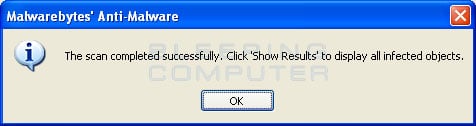
      [IMG]
    • Click on OK to close box and continue.
    • Click on the Show Results button.
    • Click on the Remove Selected button to remove all the listed malware.
    • At end of malware removal, the scan log opens and displays in Notepad. Be sure to click on Format>Uncheck Word Wrap before copying the log to paste in your next reply.
    ==============================
    6. Correct Display Changes if needed:
    If the desktop background is black or if the theme has been removed:
    For Windows XP: Click on Start> Control Panel> Display> change theme and/or background if needed.
    For Windows Vista or Windows 7: Click on Start> Control Panel> Appearance & Personalization> Select Change Theme or Change Desktop Background
    =====================================
    You can now reboot back into Normal Mode
    ====================================
    Please let me know if the redirect has been resolved.
    Leave the logs in your next reply.
  7. dalego Newcomer, in training

    Having tested a sample of websites, I have not been redirected once. The results of the scan is listed below:

    Malwarebytes Anti-Malware 1.60.0.1800
    www.malwarebytes.org

    Database version: v2011.12.28.03

    Windows 7 x64 NTFS (Safe Mode/Networking)
    Internet Explorer 9.0.8112.16421
    Anthony :: ANTHONY-VAIO [administrator]

    28/12/2011 19:28:47
    mbam-log-2011-12-28 (19-28-47).txt

    Scan type: Full scan
    Scan options enabled: Memory | Startup | Registry | File System | Heuristics/Extra | Heuristics/Shuriken | PUP | PUM
    Scan options disabled: P2P
    Objects scanned: 350186
    Time elapsed: 50 minute(s), 42 second(s)

    Memory Processes Detected: 0
    (No malicious items detected)

    Memory Modules Detected: 0
    (No malicious items detected)

    Registry Keys Detected: 0
    (No malicious items detected)

    Registry Values Detected: 0
    (No malicious items detected)

    Registry Data Items Detected: 0
    (No malicious items detected)

    Folders Detected: 0
    (No malicious items detected)

    Files Detected: 0
    (No malicious items detected)

    (end)


    Thankyou!
  8. dalego Newcomer, in training

    It is still redirecting also
  9. Bobbye Helper on the Fringe

    Dale, you started this thread over a month ago. The thread should have been closed on 2 different occasions. It is my understanding that you are helping someone else who owns the system and that the owner has been using the system in between scans.It is entirely possible that the system was clean, only to have gotten infected again.

    You can run the following 2 scans again- If that fails to resolve the problem, I will ask you to start a new thread beginning again with the prelim. scans, at a time when we can finish.
    -----------------------------------------------
    New Holiday Notice! I will not be working on the threads Sat. Dec. 31 or Sunday Jan. 1 I will begin with the oldest threads first on Monday. I will do my best to get you finished or as far along as I can before that.Please do not send a PM during those days.
    ----------------------------------------------
    You will most likely need to uninstall Mbam and get a new download:Just be sure to do the Full Scan, not the Quick Scan.

    Update and rescan with Malwarebytes: Note: On the Scanner tab, make sure the the Perform Full Scan option is selected and then click on the Scan button.
    When scan has finished, you will see this image:
    [IMG]
    • Click on OK to close box and continue.
    • Click on the Show Results button.
    • Click on the Remove Selected button to remove all the listed malware.
    • At end of malware removal, the scan log opens and displays in Notepad. Be sure to click on Format> Uncheck Word Wrap before copying the log to paste in your next reply.
    ====================================
    To run the Eset Online Virus Scan:
    If you use Internet Explorer:
    1. Open the ESETOnlineScan
    2. Skip to #4 to "Continue with the directions"

      If you are using a browser other than Internet Explorer
    3. Open Eset Smart Installer
      [o] Click on the esetsmartinstaller_enu.exelink and save to the desktop.
      [o] Double click on the desktop icon to run.
      [o] After successful installation of the ESET Smart Installer, the ESET Online Scanner will be launched in a new Window
    4. Continue with the directions.
    5. Check 'Yes I accept terms of use.'
    6. Click Start button
    7. Accept any security warnings from your browser.
      [IMG]
    8. Uncheck 'Remove found threats'
    9. Check 'Scan archives/
    10. Leave remaining settings as is.
    11. Press the Start button.
    12. ESET will then download updates for itself, install itself, and begin scanning your computer. Please wait for the scan to finish.
    13. When the scan completes, press List of found threats
    14. Push Export of text file and save the file to your desktop using a unique name, such as ESETScan. Paste this log in your next reply.
    15. Push the Back button, then Finish
    NOTE: If no malware is found then no log will be produced. Let me know if this is the case.
  10. dalego Newcomer, in training

    Only 1 threat was found, details below:

    C:\Users\Anthony\AppData\LocalLow\Sun\Java\Deployment\cache\6.0\33\28235d61-5191f44d Java/Exploit.CVE-2011-3544.H trojan
  11. Bobbye Helper on the Fringe

    Please download OTMovit by Old Timer and save to your desktop.
    • Double-click OTMoveIt3.exe to run it. (Vista users, please right click on OTMoveit3.exe and select "Run as an Administrator")
    • Copy the file paths below to the clipboard by highlighting ALL of them and pressing CTRL + C (or, after highlighting, right-click and choose Copy):
      Code:
      :Files 
      C:\Users\Anthony\AppData\LocalLow\Sun\Java\Deployment\cache\6.0\33\28235d61-5191f44d
      :Commands
      [purity]
      [emptytemp]
      [start explorer]
      [Reboot]
    • Return to OTMoveIt3, right click in the "Paste Instructions for Items to be Moved" window and choose Paste.
    • Click the red Moveit! button.
    • A log of files and folders moved will be created in the c:\_OTMoveIt\MovedFiles folder in the form of Date and Time (mmddyyyy_hhmmss.log). Please open this log in Notepad and post its contents in your next reply.
    • Close OTMoveIt3
    If a file or folder cannot be moved immediately you may be asked to reboot the machine to finish the move process. If you are asked to reboot the machine choose Yes.
    =================================
    Dale, is the Java current? This is in the Java cache which is usually from an outdated version.
    =================================
    To clear the Java Plug-in cache:

    • [1]. Click Start > Control Panel.
      [2]. Double-click the Java icon in the control panel. [IMG] The Java Control Panel appears.
      [IMG]
      [3].Click Settings under Temporary Internet Files.The Temporary Files Settings dialog box appears.
      [IMG]
      [4] Click Delete Files.The Delete Temporary Files dialog box appears.
      [IMG]
      [5]. Click OK on Delete Temporary Files window.
      Note: This deletes all the Downloaded Applications and Applets from the cache.
      [6]. Click Apply> OK on Temporary Files Settings window.
    Images courtesy java.com
    ==================================
    Still directing? Any changes?
  12. dalego Newcomer, in training

    >Flash cache emptied: 56502 bytes

    User: Default User
    ->Temp folder emptied: 0 bytes
    ->Temporary Internet Files folder emptied: 0 bytes
    ->Flash cache emptied: 0 bytes

    User: Public
    ->Temp folder emptied: 0 bytes

    %systemdrive% .tmp files removed: 0 bytes
    %systemroot% .tmp files removed: 0 bytes
    %systemroot%\System32 .tmp files removed: 0 bytes
    %systemroot%\System32 (64bit) .tmp files removed: 0 bytes
    %systemroot%\System32\drivers .tmp files removed: 0 bytes
    Windows Temp folder emptied: 128109 bytes
    %systemroot%\sysnative\config\systemprofile\AppData\Local\Microsoft\Windows\Temporary Internet Files folder emptied: 50467 bytes
    RecycleBin emptied: 2226065768 bytes

    Total Files Cleaned = 2,613.00 mb


    OTM by OldTimer - Version 3.1.19.0 log created on 01032012_101304


    It is not currently directing, however, if it does I will let you know immediately.
  13. Bobbye Helper on the Fringe

    From OTM: Total Files Cleaned = 2,613.00 mb

    You might want to pass on to the owner that the system needs to havedo maintenanne on the system on a regular basis: Delete temporary internet files and Cookies, Disc cleanup, Error Check, Defrag.
    ===================================
    Since the problem has been resolved, you can clean up the tools:
    Remove all of the tools we used and the files and folders they created
    • Uninstall ComboFix and all Backups of the files it deleted
      [o] Click START> then RUN
      [o] Now type Combofix /Uninstall in the runbox and click OK. Note the space between the X and the U, it needs to be there.
    • Download OTCleanIt by OldTimer and save it to your Desktop.
      [o] Double click OTCleanIt.exe.
      [o] Click the CleanUp! button.
      [o] If you are prompted to Reboot during the cleanup, select Yes.
      [o]The tool will delete itself once it finishes.
      Note: If you receive a warning from your firewall or other security programs regarding OTC attempting to contact the internet, please allow it to do so.
      Note: If any tool, file or folder (belonging to the program we have used) hasn't been deleted, please delete it manually.
    • Set a new, clean Restore Point
      [o] Click on Start> right click on Computer> Properties
      [o] Select System Protection
      [o] Click on the Create button (near bottom)
      [o] Type a name for the Restore Point
      [o] Click on Create again to save the restore point.
    • Deleting all but the most recent System Protection point in Windows 7
      [o] Click Start> Computer> right click the C Drive and choose Properties> enter.
      [o] Click Disk Cleanup from there.
      [IMG]
      [o] Click Clean up system files
      This restarts Disk Cleanup to run in elevated mode.
      [o] Click the More Options tab
      [IMG]
      [o] Click the Clean up under System Restore and Shadow Copies.
      [o] Click OK.
      [o] You will get a confirmation screen> Just click Delete.
      [o] Click OK on the Disk Cleanup Screen.
      [o] Click Delete Files on the Confirmation screen.
    [IMG]
    This runs the Disk Cleanup utility along with other selections if you have chosen any. (if you had a lot System Restore points, you will see a significant change in the free space in C drive)
    Images courtesy lytebyte.

    Empty the Recycle Bin
Thread Status:
Not open for further replies.