also @ TechSpot: Metro: Last Light Performance, Benchmarked

Svchost.exe trojan.agent, along with a few others I believe

Discussion in 'Virus and Malware Removal' started by ClineStine, Jul 16, 2012.

Post New Reply
  1. Broni Malware Annihilator Posts: 39,324   +175

  2. ClineStine Newcomer, in training Posts: 50

    To my knowlege my computer is running good. I greatly appreciate your time and help!!

    action center tells me:
    Windowshas stopped working properly.
    To solve this problem, follow the steps in this Microsoft Support Knowledge Base (KB) article online

    Window Defender needs to scan computer.

    Turn on Windows firewall (important) but also says action center cant turn it on to do it manually.

    and Virus Protection (important) I click on it and it wants to open norton file. Im going to install avast soon.

    My questions are the windows stopped working properlly, I follow the link and its not very specific as to whats not working properlly. also I should turn on windows firewall manually?
  3. ClineStine Newcomer, in training Posts: 50

  4. ClineStine Newcomer, in training Posts: 50

    Also, (Windows XP only) Run defrag at your convenience.
    I have windows 7 so I should not degrag often or at all??? I belive using boost speed's defrag is what brought back the hidden audio ads now that I think about it.
  5. Broni Malware Annihilator Posts: 39,324   +175

    Windows 7 has its own defrag program which runs in the background when needed so no 3rd party defrag is needed.

    You're running Norton which includes a firewall so Windows firewall should be OFF.
    However I can see one registry key missing, which we can fix in case you change your security program in the future.

    Following steps involve registry editing. Please create new restore point before proceeding!!!
    How to:
    XP - http://support.microsoft.com/kb/948247
    Vista and Seven - http://www.howtogeek.com/howto/wind...tore-point-for-windows-vistas-system-restore/


    Download Seven.zip file from here: http://www.smartestcomputing.us.com/files/download/9-registry-network-keys/
    Unzip the file.
    You'll find several files inside.
    Double click on bits.reg file and confirm the prompt.
    Restart computer.
    Post new FSS log.
  6. ClineStine Newcomer, in training Posts: 50

    right on, I just intalled free Avast though, should I uninstall Norton? or let it be.
     
  7. ClineStine Newcomer, in training Posts: 50

    Not 100% sure But I believe avast created a restore point. should I continue to create one?
  8. Broni Malware Annihilator Posts: 39,324   +175

  9. ClineStine Newcomer, in training Posts: 50

    I believe so, I was seeing the action center through the bottom right corner icon telling me I had multiple messages and things to be fixed now it says nothing so its good I think.
  10. Broni Malware Annihilator Posts: 39,324   +175

  11. ClineStine Newcomer, in training Posts: 50

    Farbar Service Scanner Version: 19-07-2012
    Ran by TLC (administrator) on 19-07-2012 at 18:37:11
    Running from "C:\Users\TLC\Desktop"
    Microsoft Windows 7 Home Premium Service Pack 1 (X64)
    Boot Mode: Normal
    ****************************************************************
    Internet Services:
    ============
    Connection Status:
    ==============
    Localhost is accessible.
    LAN connected.
    Google IP is accessible.
    Google.com is accessible.
    Yahoo IP is accessible.
    Yahoo.com is accessible.

    Windows Firewall:
    =============
    MpsSvc Service is not running. Checking service configuration:
    The start type of MpsSvc service is OK.
    The ImagePath of MpsSvc service is OK.
    The ServiceDll of MpsSvc service is OK.
    bfe Service is not running. Checking service configuration:
    The start type of bfe service is set to Demand. The default start type is Auto.
    The ImagePath of bfe: ".".
    Checking ServiceDll: ATTENTION!=====> Unable to open bfe registry key. The service key does not exist.

    Firewall Disabled Policy:
    ==================

    System Restore:
    ============
    System Restore Disabled Policy:
    ========================

    Action Center:
    ============
    Windows Update:
    ============
    Windows Autoupdate Disabled Policy:
    ============================

    Windows Defender:
    ==============
    Other Services:
    ==============
    sharedaccess Service is not running. Checking service configuration:
    The start type of sharedaccess service is set to Demand
    The ImagePath of sharedaccess service is OK.
    The ServiceDll of sharedaccess service is OK.

    File Check:
    ========
    C:\Windows\System32\nsisvc.dll => MD5 is legit
    C:\Windows\System32\drivers\nsiproxy.sys => MD5 is legit
    C:\Windows\System32\dhcpcore.dll => MD5 is legit
    C:\Windows\System32\drivers\afd.sys => MD5 is legit
    C:\Windows\System32\drivers\tdx.sys => MD5 is legit
    C:\Windows\System32\Drivers\tcpip.sys => MD5 is legit
    C:\Windows\System32\dnsrslvr.dll => MD5 is legit
    C:\Windows\System32\mpssvc.dll => MD5 is legit
    C:\Windows\System32\bfe.dll => MD5 is legit
    C:\Windows\System32\drivers\mpsdrv.sys => MD5 is legit
    C:\Windows\System32\SDRSVC.dll => MD5 is legit
    C:\Windows\System32\vssvc.exe => MD5 is legit
    C:\Windows\System32\wscsvc.dll => MD5 is legit
    C:\Windows\System32\wbem\WMIsvc.dll => MD5 is legit
    C:\Windows\System32\wuaueng.dll => MD5 is legit
    C:\Windows\System32\qmgr.dll => MD5 is legit
    C:\Windows\System32\es.dll => MD5 is legit
    C:\Windows\System32\cryptsvc.dll => MD5 is legit
    C:\Program Files\Windows Defender\MpSvc.dll => MD5 is legit
    C:\Windows\System32\svchost.exe => MD5 is legit
    C:\Windows\System32\rpcss.dll => MD5 is legit

    **** End of log ****
  12. Broni Malware Annihilator Posts: 39,324   +175

    I don't think you ran the fix from my reply #45.
    Redo.
  13. ClineStine Newcomer, in training Posts: 50

    sorry about that.

    Farbar Service Scanner Version: 19-07-2012
    Ran by TLC (administrator) on 19-07-2012 at 18:45:22
    Running from "C:\Users\TLC\Desktop"
    Microsoft Windows 7 Home Premium Service Pack 1 (X64)
    Boot Mode: Normal
    ****************************************************************
    Internet Services:
    ============
    Connection Status:
    ==============
    Localhost is accessible.
    LAN connected.
    Google IP is accessible.
    Google.com is accessible.
    Yahoo IP is accessible.
    Yahoo.com is accessible.

    Windows Firewall:
    =============
    MpsSvc Service is not running. Checking service configuration:
    The start type of MpsSvc service is OK.
    The ImagePath of MpsSvc service is OK.
    The ServiceDll of MpsSvc service is OK.
    bfe Service is not running. Checking service configuration:
    The start type of bfe service is set to Demand. The default start type is Auto.
    The ImagePath of bfe: ".".
    Checking ServiceDll: ATTENTION!=====> Unable to open bfe registry key. The service key does not exist.

    Firewall Disabled Policy:
    ==================

    System Restore:
    ============
    System Restore Disabled Policy:
    ========================

    Action Center:
    ============
    wscsvc Service is not running. Checking service configuration:
    The start type of wscsvc service is OK.
    The ImagePath of wscsvc service is OK.
    The ServiceDll of wscsvc service is OK.

    Windows Update:
    ============
    wuauserv Service is not running. Checking service configuration:
    The start type of wuauserv service is OK.
    The ImagePath of wuauserv service is OK.
    The ServiceDll of wuauserv service is OK.

    Windows Autoupdate Disabled Policy:
    ============================

    Windows Defender:
    ==============
    Other Services:
    ==============
    sharedaccess Service is not running. Checking service configuration:
    The start type of sharedaccess service is set to Demand
    The ImagePath of sharedaccess service is OK.
    The ServiceDll of sharedaccess service is OK.

    File Check:
    ========
    C:\Windows\System32\nsisvc.dll => MD5 is legit
    C:\Windows\System32\drivers\nsiproxy.sys => MD5 is legit
    C:\Windows\System32\dhcpcore.dll => MD5 is legit
    C:\Windows\System32\drivers\afd.sys => MD5 is legit
    C:\Windows\System32\drivers\tdx.sys => MD5 is legit
    C:\Windows\System32\Drivers\tcpip.sys => MD5 is legit
    C:\Windows\System32\dnsrslvr.dll => MD5 is legit
    C:\Windows\System32\mpssvc.dll => MD5 is legit
    C:\Windows\System32\bfe.dll => MD5 is legit
    C:\Windows\System32\drivers\mpsdrv.sys => MD5 is legit
    C:\Windows\System32\SDRSVC.dll => MD5 is legit
    C:\Windows\System32\vssvc.exe => MD5 is legit
    C:\Windows\System32\wscsvc.dll => MD5 is legit
    C:\Windows\System32\wbem\WMIsvc.dll => MD5 is legit
    C:\Windows\System32\wuaueng.dll => MD5 is legit
    C:\Windows\System32\qmgr.dll => MD5 is legit
    C:\Windows\System32\es.dll => MD5 is legit
    C:\Windows\System32\cryptsvc.dll => MD5 is legit
    C:\Program Files\Windows Defender\MpSvc.dll => MD5 is legit
    C:\Windows\System32\svchost.exe => MD5 is legit
    C:\Windows\System32\rpcss.dll => MD5 is legit

    **** End of log ****
  14. ClineStine Newcomer, in training Posts: 50

    aaah
    I didnt create new restore point first..
  15. Broni Malware Annihilator Posts: 39,324   +175

    We have one more registry key missing.

    Following steps involve registry editing. Please create new restore point before proceeding!!!
    How to:
    XP - http://support.microsoft.com/kb/948247
    Vista and Seven - http://www.howtogeek.com/howto/wind...tore-point-for-windows-vistas-system-restore/


    Download Seven.zip file from here: http://www.smartestcomputing.us.com/files/download/9-registry-network-keys/
    Unzip the file.
    You'll find several files inside.
    Double click on bfe.reg file and confirm the prompt.
    Restart computer.
    Post new FSS log.

    Did you run Norton removal tool?
  16. ClineStine Newcomer, in training Posts: 50

    should I create a new restore point, then run bits.reg again?
  17. ClineStine Newcomer, in training Posts: 50

    yes I did run the norton removal tool.
  18. Broni Malware Annihilator Posts: 39,324   +175

    It's a different key.
    Read my previous reply carefully.
  19. ClineStine Newcomer, in training Posts: 50

    Farbar Service Scanner Version: 19-07-2012
    Ran by TLC (administrator) on 19-07-2012 at 19:02:44
    Running from "C:\Users\TLC\Desktop"
    Microsoft Windows 7 Home Premium Service Pack 1 (X64)
    Boot Mode: Normal
    ****************************************************************
    Internet Services:
    ============
    Connection Status:
    ==============
    Localhost is accessible.
    LAN connected.
    Google IP is accessible.
    Google.com is accessible.
    Yahoo IP is accessible.
    Yahoo.com is accessible.

    Windows Firewall:
    =============
    MpsSvc Service is not running. Checking service configuration:
    The start type of MpsSvc service is OK.
    The ImagePath of MpsSvc service is OK.
    The ServiceDll of MpsSvc service is OK.
    bfe Service is not running. Checking service configuration:
    The start type of bfe service is OK.
    The ImagePath of bfe service is OK.
    The ServiceDll of bfe service is OK.

    Firewall Disabled Policy:
    ==================

    System Restore:
    ============
    System Restore Disabled Policy:
    ========================

    Action Center:
    ============
    wscsvc Service is not running. Checking service configuration:
    The start type of wscsvc service is OK.
    The ImagePath of wscsvc service is OK.
    The ServiceDll of wscsvc service is OK.

    Windows Update:
    ============
    wuauserv Service is not running. Checking service configuration:
    The start type of wuauserv service is OK.
    The ImagePath of wuauserv service is OK.
    The ServiceDll of wuauserv service is OK.

    Windows Autoupdate Disabled Policy:
    ============================

    Windows Defender:
    ==============
    Other Services:
    ==============
    sharedaccess Service is not running. Checking service configuration:
    The start type of sharedaccess service is set to Demand
    The ImagePath of sharedaccess service is OK.
    The ServiceDll of sharedaccess service is OK.

    File Check:
    ========
    C:\Windows\System32\nsisvc.dll => MD5 is legit
    C:\Windows\System32\drivers\nsiproxy.sys => MD5 is legit
    C:\Windows\System32\dhcpcore.dll => MD5 is legit
    C:\Windows\System32\drivers\afd.sys => MD5 is legit
    C:\Windows\System32\drivers\tdx.sys => MD5 is legit
    C:\Windows\System32\Drivers\tcpip.sys => MD5 is legit
    C:\Windows\System32\dnsrslvr.dll => MD5 is legit
    C:\Windows\System32\mpssvc.dll => MD5 is legit
    C:\Windows\System32\bfe.dll => MD5 is legit
    C:\Windows\System32\drivers\mpsdrv.sys => MD5 is legit
    C:\Windows\System32\SDRSVC.dll => MD5 is legit
    C:\Windows\System32\vssvc.exe => MD5 is legit
    C:\Windows\System32\wscsvc.dll => MD5 is legit
    C:\Windows\System32\wbem\WMIsvc.dll => MD5 is legit
    C:\Windows\System32\wuaueng.dll => MD5 is legit
    C:\Windows\System32\qmgr.dll => MD5 is legit
    C:\Windows\System32\es.dll => MD5 is legit
    C:\Windows\System32\cryptsvc.dll => MD5 is legit
    C:\Program Files\Windows Defender\MpSvc.dll => MD5 is legit
    C:\Windows\System32\svchost.exe => MD5 is legit
    C:\Windows\System32\rpcss.dll => MD5 is legit

    **** End of log ****
  20. Broni Malware Annihilator Posts: 39,324   +175

    Looks better but we still have some services not running.

    Download Windows Repair (all in one) from this site

    Install the program then run

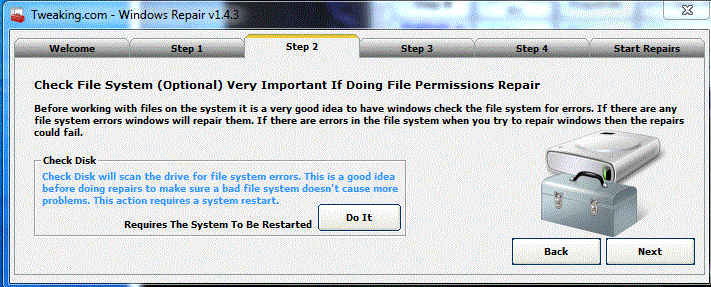
    Go to step 2 and allow it to run Disc check

    [IMG]


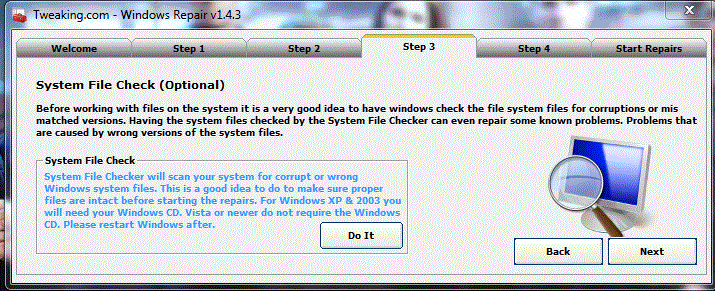
    Once that is done then go to step 3 and allow it to run SFC

    [IMG]


    On the the Start Repairs tab click Start button.

    [IMG]


    Please ensure that items seen in the image below are ticked as indicated:

    [IMG]

    Click on box next to the Restart System when Finished. Then click on Start

    Post new FSS log.