OP
You are using an out of date browser. It may not display this or other websites correctly.
You should upgrade or use an alternative browser.
You should upgrade or use an alternative browser.
Trojan Horse PSW.OnlineGames and other malware
- Thread starter unhacker57
- Start date
OP
unhacker57
Posts: 62 +0
OP
unhacker57
Posts: 62 +0
- Thread Starter
- #28
So far running Deckard's has crashed Windows twice. Blue screen. Will try again. Deckard's ran okay yesterday.
OP
unhacker57
Posts: 62 +0
OP
unhacker57
Posts: 62 +0
OP
unhacker57
Posts: 62 +0
- Thread Starter
- #31
Everything the hard way:
Logfile of Trend Micro HijackThis v2.0.2
Scan saved at 11:56, on 2007-12-18
Platform: Windows XP SP2 (WinNT 5.01.2600)
MSIE: Internet Explorer v6.00 SP2 (6.00.2900.2180)
Boot mode: Normal
Running processes:
C:\WINDOWS\System32\smss.exe
C:\WINDOWS\system32\winlogon.exe
C:\WINDOWS\system32\services.exe
C:\WINDOWS\system32\lsass.exe
C:\WINDOWS\system32\svchost.exe
C:\WINDOWS\System32\svchost.exe
C:\WINDOWS\SYSTEM32\ZoneLabs\vsmon.exe
C:\WINDOWS\Explorer.EXE
C:\Program Files\Lavasoft\Ad-Aware 2007\aawservice.exe
C:\WINDOWS\system32\LEXBCES.EXE
C:\WINDOWS\system32\spoolsv.exe
C:\WINDOWS\system32\LEXPPS.EXE
C:\Program Files\Grisoft\AVG Anti-Spyware 7.5\guard.exe
C:\WINDOWS\System32\hkcmd.exe
C:\PROGRA~1\Grisoft\AVG7\avgamsvr.exe
C:\Program Files\Grisoft\AVG Anti-Spyware 7.5\avgas.exe
C:\Program Files\Zone Labs\ZoneAlarm\zlclient.exe
C:\WINDOWS\system32\ctfmon.exe
C:\PROGRA~1\Grisoft\AVG7\avgupsvc.exe
C:\Program Files\Common Files\Microsoft Shared\VS7DEBUG\MDM.EXE
C:\WINDOWS\System32\svchost.exe
C:\Program Files\Digital Line Detect\DLG.exe
C:\WINDOWS\system32\taskmgr.exe
C:\WINDOWS\system32\wuauclt.exe
C:\Program Files\Trend Micro\HijackThis\Crusty.exe.exe
R0 - HKCU\Software\Microsoft\Internet Explorer\Main,Start Page = about:blank
R1 - HKCU\Software\Microsoft\Windows\CurrentVersion\Internet Settings,ProxyOverride = 127.0.0.1
O2 - BHO: Adobe PDF Reader Link Helper - {06849E9F-C8D7-4D59-B87D-784B7D6BE0B3} - C:\Program Files\Adobe\Acrobat 7.0\ActiveX\AcroIEHelper.dll
O2 - BHO: DriveLetterAccess - {5CA3D70E-1895-11CF-8E15-001234567890} - C:\WINDOWS\system32\dla\tfswshx.dll
O2 - BHO: SSVHelper Class - {761497BB-D6F0-462C-B6EB-D4DAF1D92D43} - C:\Program Files\Java\jre1.5.0_10\bin\ssv.dll
O2 - BHO: Adobe PDF Conversion Toolbar Helper - {AE7CD045-E861-484f-8273-0445EE161910} - C:\Program Files\Adobe\Acrobat 7.0\Acrobat\AcroIEFavClient.dll
O3 - Toolbar: Adobe PDF - {47833539-D0C5-4125-9FA8-0819E2EAAC93} - C:\Program Files\Adobe\Acrobat 7.0\Acrobat\AcroIEFavClient.dll
O4 - HKLM\..\Run: [HotKeysCmds] C:\WINDOWS\System32\hkcmd.exe
O4 - HKLM\..\Run: [!AVG Anti-Spyware] "C:\Program Files\Grisoft\AVG Anti-Spyware 7.5\avgas.exe" /minimized
O4 - HKLM\..\Run: [ZoneAlarm Client] "C:\Program Files\Zone Labs\ZoneAlarm\zlclient.exe"
O4 - HKLM\..\Run: [AVG7_CC] C:\PROGRA~1\Grisoft\AVG7\avgcc.exe /STARTUP
O4 - HKLM\..\Run: [KernelFaultCheck] %systemroot%\system32\dumprep 0 -k
O4 - HKCU\..\Run: [MSMSGS] "C:\Program Files\Messenger\msmsgs.exe" /background
O4 - HKCU\..\Run: [ctfmon.exe] C:\WINDOWS\system32\ctfmon.exe
O4 - HKCU\..\Run: [SUPERAntiSpyware] C:\Program Files\SUPERAntiSpyware\SUPERAntiSpyware.exe
O4 - HKUS\S-1-5-19\..\Run: [AVG7_Run] C:\PROGRA~1\Grisoft\AVG7\avgw.exe /RUNONCE (User 'LOCAL SERVICE')
O4 - HKUS\S-1-5-20\..\Run: [AVG7_Run] C:\PROGRA~1\Grisoft\AVG7\avgw.exe /RUNONCE (User 'NETWORK SERVICE')
O4 - HKUS\S-1-5-18\..\Run: [AVG7_Run] C:\PROGRA~1\Grisoft\AVG7\avgw.exe /RUNONCE (User 'SYSTEM')
O4 - HKUS\.DEFAULT\..\Run: [AVG7_Run] C:\PROGRA~1\Grisoft\AVG7\avgw.exe /RUNONCE (User 'Default user')
O4 - Global Startup: Adobe Acrobat Speed Launcher.lnk = ?
O4 - Global Startup: Digital Line Detect.lnk = ?
O6 - HKCU\Software\Policies\Microsoft\Internet Explorer\Control Panel present
O8 - Extra context menu item: Convert link target to Adobe PDF - res://C:\Program Files\Adobe\Acrobat 7.0\Acrobat\AcroIEFavClient.dll/AcroIECapture.html
O8 - Extra context menu item: Convert link target to existing PDF - res://C:\Program Files\Adobe\Acrobat 7.0\Acrobat\AcroIEFavClient.dll/AcroIEAppend.html
O8 - Extra context menu item: Convert selected links to Adobe PDF - res://C:\Program Files\Adobe\Acrobat 7.0\Acrobat\AcroIEFavClient.dll/AcroIECaptureSelLinks.html
O8 - Extra context menu item: Convert selected links to existing PDF - res://C:\Program Files\Adobe\Acrobat 7.0\Acrobat\AcroIEFavClient.dll/AcroIEAppendSelLinks.html
O8 - Extra context menu item: Convert selection to Adobe PDF - res://C:\Program Files\Adobe\Acrobat 7.0\Acrobat\AcroIEFavClient.dll/AcroIECapture.html
O8 - Extra context menu item: Convert selection to existing PDF - res://C:\Program Files\Adobe\Acrobat 7.0\Acrobat\AcroIEFavClient.dll/AcroIEAppend.html
O8 - Extra context menu item: Convert to Adobe PDF - res://C:\Program Files\Adobe\Acrobat 7.0\Acrobat\AcroIEFavClient.dll/AcroIECapture.html
O8 - Extra context menu item: Convert to existing PDF - res://C:\Program Files\Adobe\Acrobat 7.0\Acrobat\AcroIEFavClient.dll/AcroIEAppend.html
O8 - Extra context menu item: E&xport to Microsoft Excel - res://C:\PROGRA~1\MICROS~4\OFFICE11\EXCEL.EXE/3000
O9 - Extra button: (no name) - {08B0E5C0-4FCB-11CF-AAA5-00401C608501} - C:\WINDOWS\System32\msjava.dll
O9 - Extra 'Tools' menuitem: Sun Java Console - {08B0E5C0-4FCB-11CF-AAA5-00401C608501} - C:\WINDOWS\System32\msjava.dll
O9 - Extra button: Research - {92780B25-18CC-41C8-B9BE-3C9C571A8263} - C:\PROGRA~1\MICROS~4\OFFICE11\REFIEBAR.DLL
O9 - Extra button: Real.com - {CD67F990-D8E9-11d2-98FE-00C0F0318AFE} - C:\WINDOWS\System32\Shdocvw.dll
O9 - Extra button: Messenger - {FB5F1910-F110-11d2-BB9E-00C04F795683} - C:\Program Files\Messenger\msmsgs.exe
O9 - Extra 'Tools' menuitem: Windows Messenger - {FB5F1910-F110-11d2-BB9E-00C04F795683} - C:\Program Files\Messenger\msmsgs.exe
O16 - DPF: {215B8138-A3CF-44C5-803F-8226143CFC0A} - http://housecall65.trendmicro.com/housecall/applet/html/native/x86/win32/activex/hcImpl.cab
O16 - DPF: {56762DEC-6B0D-4AB4-A8AD-989993B5D08B} (OnlineScanner Control) - http://www.eset.eu/buxus/docs/OnlineScanner.cab
O16 - DPF: {6414512B-B978-451D-A0D8-FCFDF33E833C} (WUWebControl Class) - http://www.update.microsoft.com/win...ls/en/x86/client/wuweb_site.cab?1130356333218
O16 - DPF: {D27CDB6E-AE6D-11CF-96B8-444553540000} (Shockwave Flash Object) - https://fpdownload.macromedia.com/pub/shockwave/cabs/flash/swflash.cab
O20 - Winlogon Notify: !SASWinLogon - C:\Program Files\SUPERAntiSpyware\SASWINLO.dll
O23 - Service: Ad-Aware 2007 Service (aawservice) - Lavasoft AB - C:\Program Files\Lavasoft\Ad-Aware 2007\aawservice.exe
O23 - Service: Adobe LM Service - Adobe Systems - C:\Program Files\Common Files\Adobe Systems Shared\Service\Adobelmsvc.exe
O23 - Service: AVG Anti-Spyware Guard - GRISOFT s.r.o. - C:\Program Files\Grisoft\AVG Anti-Spyware 7.5\guard.exe
O23 - Service: AVG7 Alert Manager Server (Avg7Alrt) - GRISOFT, s.r.o. - C:\PROGRA~1\Grisoft\AVG7\avgamsvr.exe
O23 - Service: AVG7 Update Service (Avg7UpdSvc) - GRISOFT, s.r.o. - C:\PROGRA~1\Grisoft\AVG7\avgupsvc.exe
O23 - Service: LexBce Server (LexBceS) - Lexmark International, Inc. - C:\WINDOWS\system32\LEXBCES.EXE
O23 - Service: Windows Message Queue (msgqueue
) - Unknown owner - C:\WINDOWS\system32\msgqueue.exe (file missing)
O23 - Service: TrueVector Internet Monitor (vsmon) - Zone Labs, LLC - C:\WINDOWS\SYSTEM32\ZoneLabs\vsmon.exe
--
End of file - 6926 bytes
Logfile of Trend Micro HijackThis v2.0.2
Scan saved at 11:56, on 2007-12-18
Platform: Windows XP SP2 (WinNT 5.01.2600)
MSIE: Internet Explorer v6.00 SP2 (6.00.2900.2180)
Boot mode: Normal
Running processes:
C:\WINDOWS\System32\smss.exe
C:\WINDOWS\system32\winlogon.exe
C:\WINDOWS\system32\services.exe
C:\WINDOWS\system32\lsass.exe
C:\WINDOWS\system32\svchost.exe
C:\WINDOWS\System32\svchost.exe
C:\WINDOWS\SYSTEM32\ZoneLabs\vsmon.exe
C:\WINDOWS\Explorer.EXE
C:\Program Files\Lavasoft\Ad-Aware 2007\aawservice.exe
C:\WINDOWS\system32\LEXBCES.EXE
C:\WINDOWS\system32\spoolsv.exe
C:\WINDOWS\system32\LEXPPS.EXE
C:\Program Files\Grisoft\AVG Anti-Spyware 7.5\guard.exe
C:\WINDOWS\System32\hkcmd.exe
C:\PROGRA~1\Grisoft\AVG7\avgamsvr.exe
C:\Program Files\Grisoft\AVG Anti-Spyware 7.5\avgas.exe
C:\Program Files\Zone Labs\ZoneAlarm\zlclient.exe
C:\WINDOWS\system32\ctfmon.exe
C:\PROGRA~1\Grisoft\AVG7\avgupsvc.exe
C:\Program Files\Common Files\Microsoft Shared\VS7DEBUG\MDM.EXE
C:\WINDOWS\System32\svchost.exe
C:\Program Files\Digital Line Detect\DLG.exe
C:\WINDOWS\system32\taskmgr.exe
C:\WINDOWS\system32\wuauclt.exe
C:\Program Files\Trend Micro\HijackThis\Crusty.exe.exe
R0 - HKCU\Software\Microsoft\Internet Explorer\Main,Start Page = about:blank
R1 - HKCU\Software\Microsoft\Windows\CurrentVersion\Internet Settings,ProxyOverride = 127.0.0.1
O2 - BHO: Adobe PDF Reader Link Helper - {06849E9F-C8D7-4D59-B87D-784B7D6BE0B3} - C:\Program Files\Adobe\Acrobat 7.0\ActiveX\AcroIEHelper.dll
O2 - BHO: DriveLetterAccess - {5CA3D70E-1895-11CF-8E15-001234567890} - C:\WINDOWS\system32\dla\tfswshx.dll
O2 - BHO: SSVHelper Class - {761497BB-D6F0-462C-B6EB-D4DAF1D92D43} - C:\Program Files\Java\jre1.5.0_10\bin\ssv.dll
O2 - BHO: Adobe PDF Conversion Toolbar Helper - {AE7CD045-E861-484f-8273-0445EE161910} - C:\Program Files\Adobe\Acrobat 7.0\Acrobat\AcroIEFavClient.dll
O3 - Toolbar: Adobe PDF - {47833539-D0C5-4125-9FA8-0819E2EAAC93} - C:\Program Files\Adobe\Acrobat 7.0\Acrobat\AcroIEFavClient.dll
O4 - HKLM\..\Run: [HotKeysCmds] C:\WINDOWS\System32\hkcmd.exe
O4 - HKLM\..\Run: [!AVG Anti-Spyware] "C:\Program Files\Grisoft\AVG Anti-Spyware 7.5\avgas.exe" /minimized
O4 - HKLM\..\Run: [ZoneAlarm Client] "C:\Program Files\Zone Labs\ZoneAlarm\zlclient.exe"
O4 - HKLM\..\Run: [AVG7_CC] C:\PROGRA~1\Grisoft\AVG7\avgcc.exe /STARTUP
O4 - HKLM\..\Run: [KernelFaultCheck] %systemroot%\system32\dumprep 0 -k
O4 - HKCU\..\Run: [MSMSGS] "C:\Program Files\Messenger\msmsgs.exe" /background
O4 - HKCU\..\Run: [ctfmon.exe] C:\WINDOWS\system32\ctfmon.exe
O4 - HKCU\..\Run: [SUPERAntiSpyware] C:\Program Files\SUPERAntiSpyware\SUPERAntiSpyware.exe
O4 - HKUS\S-1-5-19\..\Run: [AVG7_Run] C:\PROGRA~1\Grisoft\AVG7\avgw.exe /RUNONCE (User 'LOCAL SERVICE')
O4 - HKUS\S-1-5-20\..\Run: [AVG7_Run] C:\PROGRA~1\Grisoft\AVG7\avgw.exe /RUNONCE (User 'NETWORK SERVICE')
O4 - HKUS\S-1-5-18\..\Run: [AVG7_Run] C:\PROGRA~1\Grisoft\AVG7\avgw.exe /RUNONCE (User 'SYSTEM')
O4 - HKUS\.DEFAULT\..\Run: [AVG7_Run] C:\PROGRA~1\Grisoft\AVG7\avgw.exe /RUNONCE (User 'Default user')
O4 - Global Startup: Adobe Acrobat Speed Launcher.lnk = ?
O4 - Global Startup: Digital Line Detect.lnk = ?
O6 - HKCU\Software\Policies\Microsoft\Internet Explorer\Control Panel present
O8 - Extra context menu item: Convert link target to Adobe PDF - res://C:\Program Files\Adobe\Acrobat 7.0\Acrobat\AcroIEFavClient.dll/AcroIECapture.html
O8 - Extra context menu item: Convert link target to existing PDF - res://C:\Program Files\Adobe\Acrobat 7.0\Acrobat\AcroIEFavClient.dll/AcroIEAppend.html
O8 - Extra context menu item: Convert selected links to Adobe PDF - res://C:\Program Files\Adobe\Acrobat 7.0\Acrobat\AcroIEFavClient.dll/AcroIECaptureSelLinks.html
O8 - Extra context menu item: Convert selected links to existing PDF - res://C:\Program Files\Adobe\Acrobat 7.0\Acrobat\AcroIEFavClient.dll/AcroIEAppendSelLinks.html
O8 - Extra context menu item: Convert selection to Adobe PDF - res://C:\Program Files\Adobe\Acrobat 7.0\Acrobat\AcroIEFavClient.dll/AcroIECapture.html
O8 - Extra context menu item: Convert selection to existing PDF - res://C:\Program Files\Adobe\Acrobat 7.0\Acrobat\AcroIEFavClient.dll/AcroIEAppend.html
O8 - Extra context menu item: Convert to Adobe PDF - res://C:\Program Files\Adobe\Acrobat 7.0\Acrobat\AcroIEFavClient.dll/AcroIECapture.html
O8 - Extra context menu item: Convert to existing PDF - res://C:\Program Files\Adobe\Acrobat 7.0\Acrobat\AcroIEFavClient.dll/AcroIEAppend.html
O8 - Extra context menu item: E&xport to Microsoft Excel - res://C:\PROGRA~1\MICROS~4\OFFICE11\EXCEL.EXE/3000
O9 - Extra button: (no name) - {08B0E5C0-4FCB-11CF-AAA5-00401C608501} - C:\WINDOWS\System32\msjava.dll
O9 - Extra 'Tools' menuitem: Sun Java Console - {08B0E5C0-4FCB-11CF-AAA5-00401C608501} - C:\WINDOWS\System32\msjava.dll
O9 - Extra button: Research - {92780B25-18CC-41C8-B9BE-3C9C571A8263} - C:\PROGRA~1\MICROS~4\OFFICE11\REFIEBAR.DLL
O9 - Extra button: Real.com - {CD67F990-D8E9-11d2-98FE-00C0F0318AFE} - C:\WINDOWS\System32\Shdocvw.dll
O9 - Extra button: Messenger - {FB5F1910-F110-11d2-BB9E-00C04F795683} - C:\Program Files\Messenger\msmsgs.exe
O9 - Extra 'Tools' menuitem: Windows Messenger - {FB5F1910-F110-11d2-BB9E-00C04F795683} - C:\Program Files\Messenger\msmsgs.exe
O16 - DPF: {215B8138-A3CF-44C5-803F-8226143CFC0A} - http://housecall65.trendmicro.com/housecall/applet/html/native/x86/win32/activex/hcImpl.cab
O16 - DPF: {56762DEC-6B0D-4AB4-A8AD-989993B5D08B} (OnlineScanner Control) - http://www.eset.eu/buxus/docs/OnlineScanner.cab
O16 - DPF: {6414512B-B978-451D-A0D8-FCFDF33E833C} (WUWebControl Class) - http://www.update.microsoft.com/win...ls/en/x86/client/wuweb_site.cab?1130356333218
O16 - DPF: {D27CDB6E-AE6D-11CF-96B8-444553540000} (Shockwave Flash Object) - https://fpdownload.macromedia.com/pub/shockwave/cabs/flash/swflash.cab
O20 - Winlogon Notify: !SASWinLogon - C:\Program Files\SUPERAntiSpyware\SASWINLO.dll
O23 - Service: Ad-Aware 2007 Service (aawservice) - Lavasoft AB - C:\Program Files\Lavasoft\Ad-Aware 2007\aawservice.exe
O23 - Service: Adobe LM Service - Adobe Systems - C:\Program Files\Common Files\Adobe Systems Shared\Service\Adobelmsvc.exe
O23 - Service: AVG Anti-Spyware Guard - GRISOFT s.r.o. - C:\Program Files\Grisoft\AVG Anti-Spyware 7.5\guard.exe
O23 - Service: AVG7 Alert Manager Server (Avg7Alrt) - GRISOFT, s.r.o. - C:\PROGRA~1\Grisoft\AVG7\avgamsvr.exe
O23 - Service: AVG7 Update Service (Avg7UpdSvc) - GRISOFT, s.r.o. - C:\PROGRA~1\Grisoft\AVG7\avgupsvc.exe
O23 - Service: LexBce Server (LexBceS) - Lexmark International, Inc. - C:\WINDOWS\system32\LEXBCES.EXE
O23 - Service: Windows Message Queue (msgqueue
) - Unknown owner - C:\WINDOWS\system32\msgqueue.exe (file missing)
O23 - Service: TrueVector Internet Monitor (vsmon) - Zone Labs, LLC - C:\WINDOWS\SYSTEM32\ZoneLabs\vsmon.exe
--
End of file - 6926 bytes
evilfantasy
Posts: 425 +0
Have HijackThis fix these entries.
O4 - Global Startup: Digital Line Detect.lnk = ?
O6 - HKCU\Software\Policies\Microsoft\Internet Explorer\Control Panel present
Close all windows before clicking Fix checked.
----------
We are going to have to do some more virus scans.
Run the BitDefender Online Scanner
Click I Agree to the license and then select Click here to scan
DO NOT CHANGE THE OPTIONS TO SHOW ALL FILES SCANNED.
That will make your logs huge and we don't need to see clean files.
Once Bitdefender completes the scan:
Click-on the Detected Problems tab.
Then select Click here to export the scan report
When the window comes up to save the report, change the Save as type: box to:
Text (Tab Delimited) (*.txt) and then in the File name box enter change to bdscan then click Save
This will save a file named bdscan.txt. I would suggest saving it to the Desktop so you can easily find it.
(take notice of where you save it so you can find it later)
This bdcan.txt file will actually contain HTML code that we can easily view later while reviewing your log. All we have to do is rename the file to bdscan.html.
If you do not follow these step, you will have an incorrect log or worse a log summary which is useless to us
Post the bdscan.txt file as an Attachment.
----------
Please download the trial version of SpySweeper (2 week trial that can be uninstalled once we are done)
* Run the installer. Choosing to only install SpySweeper
* It will prompt you to update to the latest definitions, choose Yes (recommended) and click Next
* Once the definitions are installed, click I accept the agreement and then Next
* Choose Typical Installation then click Next
* Enter your email address then click Next
Important Uncheck the box Install the Webroot Ask toolbar Search Assistant, I agree to the terms above before clicking Next
* Click Install.
* Choose Yes, restart my computer now (recommended) then click Finish (the computer will restart)
* Once restarted open SpySweeper.
* Click the Options tab. (lower left)
* Under Options > Sweep Tab > Sweep Type choose Full Sweep (Recommended)
* Click the Always Apply tab and use the dropdown menu to select Always Quarantine
* Click the Home tab and choose Start Full sweep
* When it's done scanning, Make sure everything has a check next to it, then click the Quarantine Selected button.
* It will quarantine all of the items found.
* Click View Session Log in the upper right corner.
* Click the Save To File button.
* Click Desktop for the location.
* Next to the Save as type: be sure it is set to Text Document (.txt) and then click Save
* Attach the SpySweeper Session Log in your next reply.
----------
Next post
bdscan.txt
SpySweeper log
O4 - Global Startup: Digital Line Detect.lnk = ?
O6 - HKCU\Software\Policies\Microsoft\Internet Explorer\Control Panel present
Close all windows before clicking Fix checked.
----------
We are going to have to do some more virus scans.
Run the BitDefender Online Scanner
Click I Agree to the license and then select Click here to scan
DO NOT CHANGE THE OPTIONS TO SHOW ALL FILES SCANNED.
That will make your logs huge and we don't need to see clean files.
Once Bitdefender completes the scan:
Click-on the Detected Problems tab.
Then select Click here to export the scan report
When the window comes up to save the report, change the Save as type: box to:
Text (Tab Delimited) (*.txt) and then in the File name box enter change to bdscan then click Save
This will save a file named bdscan.txt. I would suggest saving it to the Desktop so you can easily find it.
(take notice of where you save it so you can find it later)
This bdcan.txt file will actually contain HTML code that we can easily view later while reviewing your log. All we have to do is rename the file to bdscan.html.
If you do not follow these step, you will have an incorrect log or worse a log summary which is useless to us
Post the bdscan.txt file as an Attachment.
----------
Please download the trial version of SpySweeper (2 week trial that can be uninstalled once we are done)
* Run the installer. Choosing to only install SpySweeper
* It will prompt you to update to the latest definitions, choose Yes (recommended) and click Next
* Once the definitions are installed, click I accept the agreement and then Next
* Choose Typical Installation then click Next
* Enter your email address then click Next
Important Uncheck the box Install the Webroot Ask toolbar Search Assistant, I agree to the terms above before clicking Next
* Click Install.
* Choose Yes, restart my computer now (recommended) then click Finish (the computer will restart)
* Once restarted open SpySweeper.
* Click the Options tab. (lower left)
* Under Options > Sweep Tab > Sweep Type choose Full Sweep (Recommended)
* Click the Always Apply tab and use the dropdown menu to select Always Quarantine
* Click the Home tab and choose Start Full sweep
* When it's done scanning, Make sure everything has a check next to it, then click the Quarantine Selected button.
* It will quarantine all of the items found.
* Click View Session Log in the upper right corner.
* Click the Save To File button.
* Click Desktop for the location.
* Next to the Save as type: be sure it is set to Text Document (.txt) and then click Save
* Attach the SpySweeper Session Log in your next reply.
----------
Next post
bdscan.txt
SpySweeper log
OP
unhacker57
Posts: 62 +0
- Thread Starter
- #33
Bitdefender crashed windows. I am running SpySweeper right now but the trial version does not quarantine threats, so may not be as much help as you had thought.
I did run a ZA AV scan and found seven more trojans that were quarantined.
I did run a ZA AV scan and found seven more trojans that were quarantined.
OP
unhacker57
Posts: 62 +0
evilfantasy
Posts: 425 +0
Are you still getting the error message?
Do you have the Windows install CD?
Enable Viewing Of Hidden System Files & Folders
1. Click Start.
2. Select Control Panel.
3. Select the Tools menu and click Folder Options.
4. Select the View Tab.
5. Under the Hidden files and folders heading select Show hidden files and folders.
6. Uncheck the Hide extensions for known file types option.
7. Uncheck the Hide protected operating system files (recommended) option.
8. Click Apply.
9. Click OK.
Then go to http://www.virustotal.com/ and click "Browse" to locate the
C:\windows\system32\yprlnwb.dll
Click "Send File" and it will run it through multiple virus scanners and show the results. (takes a few minutes) Let us know if it the results show any malware.
Do you have the Windows install CD?
Enable Viewing Of Hidden System Files & Folders
1. Click Start.
2. Select Control Panel.
3. Select the Tools menu and click Folder Options.
4. Select the View Tab.
5. Under the Hidden files and folders heading select Show hidden files and folders.
6. Uncheck the Hide extensions for known file types option.
7. Uncheck the Hide protected operating system files (recommended) option.
8. Click Apply.
9. Click OK.
Then go to http://www.virustotal.com/ and click "Browse" to locate the
C:\windows\system32\yprlnwb.dll
Click "Send File" and it will run it through multiple virus scanners and show the results. (takes a few minutes) Let us know if it the results show any malware.
OP
unhacker57
Posts: 62 +0
- Thread Starter
- #36
Ok I will do that.
Good news, I realized that having ZA AV running was probably causing scanners problems. Turned it off and Spy Sweeper looks like it is going the distance this time. I will post log if ?I can and also try Bitdefender again. Bet Deckard will also run now. Want to try Deckard again?
Good news, I realized that having ZA AV running was probably causing scanners problems. Turned it off and Spy Sweeper looks like it is going the distance this time. I will post log if ?I can and also try Bitdefender again. Bet Deckard will also run now. Want to try Deckard again?
OP
unhacker57
Posts: 62 +0
- Thread Starter
- #37
Spysweeper found one trojan: trojan-pws-onlinegames.gen
It won't quarantine it or generate a report without a subscription.
Also found three cookies. Not bad.
I'll try Bitdefender and Deckard.
It won't quarantine it or generate a report without a subscription.
Also found three cookies. Not bad.
I'll try Bitdefender and Deckard.
evilfantasy
Posts: 425 +0
I will have to stop using SpySweeper. It used to remove what it found.
Go with the BitDefender and post that log. We may try Combofix again with the ZA turned off.
Go with the BitDefender and post that log. We may try Combofix again with the ZA turned off.
OP
unhacker57
Posts: 62 +0
OP
unhacker57
Posts: 62 +0
- Thread Starter
- #40
Not sure what the Viruslink report means. Maybe this link will work:
resultado.html?72d6d950066fb43c805419e7a713aac2
looks like Microsoft thinks it's adware and Prevx thinks it's malware. If that's what that page is saying.
in edit: did a new scan. Here's an additional link:
Prevx info: http://info.prevx.com/aboutprogramtext.asp?PX5=60C925995104D08300B9004C04AF5A00458C98AC
here's a link on totour.exe: http://forums.pcpitstop.com/index.php?showtopic=137078
Did a free Prevx scan and it found a bad file: C:\WINDOWS\system32\swreg.exe but it wouldn't fix it for free. It didn't find totour though or yprlnwb either
resultado.html?72d6d950066fb43c805419e7a713aac2
looks like Microsoft thinks it's adware and Prevx thinks it's malware. If that's what that page is saying.
in edit: did a new scan. Here's an additional link:
Prevx info: http://info.prevx.com/aboutprogramtext.asp?PX5=60C925995104D08300B9004C04AF5A00458C98AC
here's a link on totour.exe: http://forums.pcpitstop.com/index.php?showtopic=137078
Did a free Prevx scan and it found a bad file: C:\WINDOWS\system32\swreg.exe but it wouldn't fix it for free. It didn't find totour though or yprlnwb either
evilfantasy
Posts: 425 +0
We are making some progress now.
Try the Combofix again, hopefully it will go to the end this time.
Post a new HijackThis log with it.
Try the Combofix again, hopefully it will go to the end this time.
Post a new HijackThis log with it.
OP
unhacker57
Posts: 62 +0
OP
unhacker57
Posts: 62 +0
- Thread Starter
- #43
Combofix again gets to Deleting files/folders and there is one file there:
C:\windows\systems32\drivers\yprlnwb.sys
I let it sit there like this for an hour earlier. Should I wait longer?
C:\windows\systems32\drivers\yprlnwb.sys
I let it sit there like this for an hour earlier. Should I wait longer?
evilfantasy
Posts: 425 +0
No, I want to do some cleanup and start new on the scans. There is too much junk on the computer. This tool will remove all of the special tools and their related files/folders we have been using.
After it is complete try combofix, if it hangs, forget it for now.
Then try to boot to safe mode and try SDFix, which will hopefully run.
Remember to turn off ZA, each time you restart the computer it turns back on.
Please download OTMoveIt by OldTimer OTMoveIt.exe and place it on your desktop.
1. Double click OTMoveIt.exe to launch it.
2. Click on the CleanUp! button.
3. OTMoveIt will download a list from the Internet, if your firewall or other defensive programs alerts you, allow it access.
4. You will be prompted to allow the clean up procedure, click Yes
5. When finished exit out of OTMoveIt
Download a new combofix.
Please download Combofix by sUBs from either here or here
Save Combofix.exe to your your Desktop.
Do not mouseclick combofix's window while it's running. That may cause your computer to stall
New SDFix.
Download SDFix.exe and save it to your Desktop.
Double click SDFix.exe and it will extract the files to %systemdrive%
(Drive that contains the Windows Directory, typically C:\SDFix)
Please then reboot your computer in Safe Mode by doing the following:
* Restart your computer
* After hearing your computer beep once during startup, but before the Windows icon appears, tap the F8 key continually;
* Instead of Windows loading as normal, the Advanced Options Menu should appear;
* Select the first option, to run Windows in Safe Mode, then press Enter.
* Choose your usual account.
* Open the extracted SDFix folder and double click RunThis.bat to start the script.
* Type Y to begin the cleanup process.
* It will remove any Trojan Services and Registry Entries that it finds then prompt you to press any key to Reboot.
* Press any Key and it will restart the PC.
* When the PC restarts the Fixtool will run again and complete the removal process then display Finished, press any key to end the script and load your desktop icons.
*] Once the desktop icons load the SDFix report will open on screen and also save into the SDFix folder as Report.txt
(Report.txt will also be copied to Clipboard).
* Finally add the contents of the Report.txt in your next post as an Attachment
I will be looking through the Deckard log. Let me know............
After it is complete try combofix, if it hangs, forget it for now.
Then try to boot to safe mode and try SDFix, which will hopefully run.
Remember to turn off ZA, each time you restart the computer it turns back on.
Please download OTMoveIt by OldTimer OTMoveIt.exe and place it on your desktop.
1. Double click OTMoveIt.exe to launch it.
2. Click on the CleanUp! button.
3. OTMoveIt will download a list from the Internet, if your firewall or other defensive programs alerts you, allow it access.
4. You will be prompted to allow the clean up procedure, click Yes
5. When finished exit out of OTMoveIt
Download a new combofix.
Please download Combofix by sUBs from either here or here
Save Combofix.exe to your your Desktop.
- Double click combofix.exe & follow the prompts. (from the keyboard select 1 and press enter)
- When finished, it will produce a log for you.
- Attach that log in your next reply.
Do not mouseclick combofix's window while it's running. That may cause your computer to stall
New SDFix.
Download SDFix.exe and save it to your Desktop.
Double click SDFix.exe and it will extract the files to %systemdrive%
(Drive that contains the Windows Directory, typically C:\SDFix)
Please then reboot your computer in Safe Mode by doing the following:
* Restart your computer
* After hearing your computer beep once during startup, but before the Windows icon appears, tap the F8 key continually;
* Instead of Windows loading as normal, the Advanced Options Menu should appear;
* Select the first option, to run Windows in Safe Mode, then press Enter.
* Choose your usual account.
* Open the extracted SDFix folder and double click RunThis.bat to start the script.
* Type Y to begin the cleanup process.
* It will remove any Trojan Services and Registry Entries that it finds then prompt you to press any key to Reboot.
* Press any Key and it will restart the PC.
* When the PC restarts the Fixtool will run again and complete the removal process then display Finished, press any key to end the script and load your desktop icons.
*] Once the desktop icons load the SDFix report will open on screen and also save into the SDFix folder as Report.txt
(Report.txt will also be copied to Clipboard).
* Finally add the contents of the Report.txt in your next post as an Attachment
I will be looking through the Deckard log. Let me know............
evilfantasy
Posts: 425 +0
OK, found something more in the log. The virus has disabled Safe Mode.
Download and run AVZ from this link Repair SafeBoot
Download and run AVZ from this link Repair SafeBoot
- Unzip it to a folder on your desktop
- Double click on AVZ.exe (Must be unzipped or the options will not appear)
- Click on the file tab and then click on System recovery
- Put a checkmark next to Restore SafeBoot registry keys
- Click on Execute selected operations
- Restart the computer and see if you can enter safe mode by the F8 method and run SDFix.
OP
unhacker57
Posts: 62 +0
OP
unhacker57
Posts: 62 +0
evilfantasy
Posts: 425 +0
OK, try combofix.
Please download Combofix by sUBs from either here or here
Save Combofix.exe to your your Desktop.
Do not mouseclick combofix's window while it's running. That may cause your computer to stall
Please download Combofix by sUBs from either here or here
Save Combofix.exe to your your Desktop.
- Double click combofix.exe & follow the prompts. (from the keyboard select 1 and press enter)
- When finished, it will produce a log for you.
- Attach that log in your next reply.
Do not mouseclick combofix's window while it's running. That may cause your computer to stall
OP
unhacker57
Posts: 62 +0
- Thread Starter
- #49
Combofix did the same thing again. I don't think it was removed by that utility you gave me OTMOVEIT. I don't think that did anything.
evilfantasy
Posts: 425 +0
Go to Start > Run and copy and paste next command in the field:
ComboFix /u
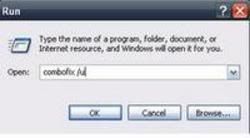
Make sure there's a space between Combofix and /
Then hit Enter.
This will uninstall Combofix, delete its related folders and files, reset your clock settings, hide file extensions, hide the system/hidden files and resets System Restore again
Then try combofix once again.
Are you are turning off ZA before the scan?
If it will not run then post a fresh deckards scan.
ComboFix /u
Make sure there's a space between Combofix and /
Then hit Enter.
This will uninstall Combofix, delete its related folders and files, reset your clock settings, hide file extensions, hide the system/hidden files and resets System Restore again
Then try combofix once again.
Are you are turning off ZA before the scan?
If it will not run then post a fresh deckards scan.
Similar threads

- Replies
- 2
- Views
- 541


- Replies
- 16
- Views
- 5K

- Replies
- 30
- Views
- 13K
Latest posts
-
Budget smartphones are the next victim of the memory crisis
- Underdog replied
-
SK Hynix raises $26.5 billion in massive US share offering
- texasrattler replied
-
Assassin's Creed Black Flag Resynced: 50 GPU Benchmark
- DirtyDan replied


-
TechSpot is dedicated to computer enthusiasts and power users.
Ask a question and give support.
Join the community here, it only takes a minute.