My folders in the library folder(Document, video, music, and pictures) won't open. There's a green arrow appearing on the icon and the folders say Libraries-MS File if I click on them it doesn't do anything. My favorites in internet explorer are also showing the same green arrow. I've tried running an Avg complete computer scan. Removing the virses, deleting the folders restarting the computer and then left clicking restore default libraries on the folders, but no luck I still have green arrows appearing on the favorites and libraries folders. Any help would be greatly appreciated!
You are using an out of date browser. It may not display this or other websites correctly.
You should upgrade or use an alternative browser.
You should upgrade or use an alternative browser.
Windows 8 can't get into library files
- Thread starter jeramy cassell
- Start date

learninmypc
Posts: 9,859 +753
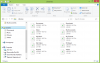
How about a screenshot? Kinda sounds like something I might of seen on my W7.My folders in the library folder(Document, video, music, and pictures) won't open. There's a green arrow appearing on the icon and the folders say Libraries-MS File if I click on them it doesn't do anything. My favorites in internet explorer are also showing the same green arrow. I've tried running an Avg complete computer scan. Removing the virses, deleting the folders restarting the computer and then left clicking restore default libraries on the folders, but no luck I still have green arrows appearing on the favorites and libraries folders. Any help would be greatly appreciated!
As an Amazon Associate we earn from qualifying purchases.
Yeah, I'm having the exact some problem with Windows 8. It just started doing it today after some system updates occurred. I can't even open to view what is inside, this is as far as it will let me go. It's rather frustrating, any help at all will be gratefully appreciated.
Attachments


I'm having the same exact problem! Not to mention, Windows Live has been having a "temporary problem" with the service that verifies my gmail email that I used to make my account... I also have no access to any of the apps because of the issue with Windows Live!!! Windows 8 is a nightmare!!! My screen looks just like Aramis14's!!!

Well I am running Windows 8 and have not seen this problem at all, It must be something having to do with your default applications, or maybe a third party software application you installed changed the open with keys in the registry, It looks like something that can be fixed, you will have to post more info about your systems, try uninstalling your antivirus, and go through each application as well as the event logs back when this first happened, It may take some work, but you guys can definitely fix this issue.

Rabbit01
Posts: 786 +58

Rabbit01, I appreciate the help, however I've already tried this and still nothing changes. I can't open any of my libraries. Unlike in the link you provided, when I click on my libraries, I do not get an error message. What happens instead is nothing. It acts as if I never even clicked on it. Also, when I try to create a new library, my new library does the exact same thing as the others.
Rabbit01
Posts: 786 +58
Rabbit01, I appreciate the help, however I've already tried this and still nothing changes. I can't open any of my libraries. Unlike in the link you provided, when I click on my libraries, I do not get an error message. What happens instead is nothing. It acts as if I never even clicked on it. Also, when I try to create a new library, my new library does the exact same thing as the others.
2nd attempt: http://www.techsupportforum.com/for...cess-libraries-library-ms-problem-458618.html
I tried running the Libraryfix_Win7, and still no results. I also tried the command prompt solution. Still no change. However I am running Windows 8, rather than Windows 7. If that makes any difference.

Ah, as for this problem it's a quick solve, Delete all of the library folders then on the left where it says "libraries" right click it, under it click the box that says "restore default libraries"
Ah, as for this problem it's a quick solve, Delete all of the library folders then on the left where it says "libraries" right click it, under it click the box that says "restore default libraries"
omg dude you are a life saver

This is the exact problem I had, and this completely solved it THANKS!

I can't believe I been going through this problem for about a year!!! Thanks for the solution!! it was sooo easy!!!Ah, as for this problem it's a quick solve, Delete all of the library folders then on the left where it says "libraries" right click it, under it click the box that says "restore default libraries"

W-H-O-L-L-Y, CHEESE! This worked, I cannot believe this... Thank you, so much. I called MS and they could not fix it over the phone either...and that was about 6 weeks ago. Then they offered me a "scan package" to run a remote diagnostic for a small price of $399.99, but it would be good for three years! Really, are you serious? Come on now, I may of been born at night, but not last night. Wholly cheese! Thank you so much. I was almost freaking out, because I have been working on a big report for one of one of my college classes, and I didn't want to shut off my computer because I had no where to save it other than my desktop. I was also made that I lost all my movies, music and my photos from when I was deployed to Afghanistan. Did what you suggested, SenorGuapo, thanks again! Wholly Cheese, you are a "super hero" my son said, and I guess I will agree with him!  Blessings!
Blessings!
yes lifesaver!I can't believe I been going through this problem for about a year!!! Thanks for the solution!! it was sooo easy!!!


I've installed ubuntu and windows8 both. I can't access any of the files neither from Libraries or 'My computer'. I can't even see it. It crashes when I try to open it, even if it is choosing a file to send via email etc. It just crashes and other things like chrome etc keep working like that.

I can't find where to right click on the libraries - all I can find is an icon on my bottom bar, and it doesn't give me any restore options.... so frustrating. I hate how there is automatic updates without options. The last one took my library, my email, and my desktop. Still trying to clean it all up.
Dont panic its an easy fix, go to your files (bottom left of your screen, looks like a folder) you will see the items that wont open, documents, music,pictures and videos. Dont touch them.
To the left of that panel you will see the word libraries. Underneath that you have the word documents, music, pictures and videos. Right click on documents and delete that file, same with all of them, right click and delete the files, (dont worry you wont lose anything). Now right click on the word Libraries and click restore default libraries. you will now see the icons have changed back to how they should be and you can access all the files you thought you had lost, Hope this helps.
To the left of that panel you will see the word libraries. Underneath that you have the word documents, music, pictures and videos. Right click on documents and delete that file, same with all of them, right click and delete the files, (dont worry you wont lose anything). Now right click on the word Libraries and click restore default libraries. you will now see the icons have changed back to how they should be and you can access all the files you thought you had lost, Hope this helps.
SenorGuapo said: ↑
Ah, as for this problem it's a quick solve, Delete all of the library folders then on the left where it says "libraries" right click it, under it click the box that says "restore default libraries"
My docs, music, and videos wouldn't open for a few weeks or so, and I'm not computer savy...far from it. I've been looking on the internet for a solution. I called a computer store. They told me to bring it in after trying a couple things over the phone , and nothing working. Then I stumbled onto your post on this website. Worked like a charm. Perfect. Voila. Great stuff.
Ah, as for this problem it's a quick solve, Delete all of the library folders then on the left where it says "libraries" right click it, under it click the box that says "restore default libraries"
My docs, music, and videos wouldn't open for a few weeks or so, and I'm not computer savy...far from it. I've been looking on the internet for a solution. I called a computer store. They told me to bring it in after trying a couple things over the phone , and nothing working. Then I stumbled onto your post on this website. Worked like a charm. Perfect. Voila. Great stuff.
Ah, as for this problem it's a quick solve, Delete all of the library folders then on the left where it says "libraries" right click it, under it click the box that says "restore default libraries"
Hi, I created an account on this forum just to tell you that you saved my life
THANK YOU!!!!!!!!
Jing
Senor Guapo: I created an account simply to THANK YOU !!!!! Can't include enuf exclamation points. Windows 8 gagged on something couple hours ago. Suddenly cannot see my music files though, ultimately, I know they are there. Backed up as much as I could; mentally shut eyes, deleted all libraries; restored default libraries. VOILA! So incredibly simple. PS restarting computer did nothing.Ah, as for this problem it's a quick solve, Delete all of the library folders then on the left where it says "libraries" right click it, under it click the box that says "restore default libraries"
G
Guest
-
Ah, as for this problem it's a quick solve, Delete all of the library folders then on the left where it says "libraries" right click it, under it click the box that says "restore default libraries"
learninmypc
Posts: 9,859 +753
Register & get better help.I don't have the "libraries" option on my computer. ...any ideas?
Similar threads
- Replies
- 0
- Views
- 551
- Replies
- 39
- Views
- 524

Latest posts
-
European Commission moves to designate Amazon and Microsoft as cloud gatekeepers
- Bluescreendeath replied


-
TechSpot is dedicated to computer enthusiasts and power users.
Ask a question and give support.
Join the community here, it only takes a minute.