Read on full site | Join TechSpot! (it's free) | Bookmark / Share this


RegCleaner 4.3 Help

wen9x88
09-27-2007, 09:12 AM
how to use this software RegCleaner 4.3 ?
i can see many item in my software list,startup list,uninstall menu,file types,and others.how can deleted it without damage my system?
there are too many files i don't know,just now i try to create a restore point and remove all the item in software list.but it damage my system,so i restore my system to early time.
here is my software list,shell extensions,files types,someone help me check which software i need to remove from my system?
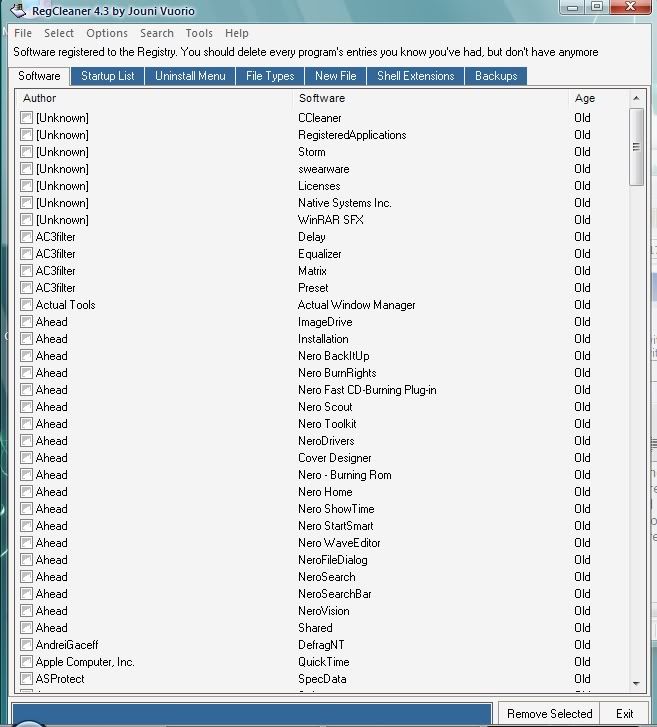
http://i216.photobucket.com/albums/cc2/wen9x88/untitled-3.jpg

evilfantasy
09-27-2007, 06:52 PM
Try using a Registry cleaner that is less aggressive then RegCleaner.

Remove invalid registry entries:
Frankly, the registry is overrated as a speed tweak, in general, but it does get large and can contain many invalid references. The registry is not an area for even the average computer user to be playing around in. The good news is CCleaner has a safe registry cleaner built in, so why not clean out old, invalid entries?
CCleaner Download (http://www.techspot.com/downloads/132-ccleaner.html)

Click the "Registry" button.
Click "Scan for Issues."
Click "Fix selected Issues."
You will be prompted to back up the registry. For the first run I would suggest doing so.
Thats it, your done, a safe, fast registry clean.

Ad
09-27-2007, 06:52 PM
  

Bobbye
09-28-2007, 10:44 PM
I use RegCleaner and would never advise it for an inexperienced user. First, when you don't know what an entry is, you search for information, just like I do. Too many users are asking for Registry Cleaners and don't have a clue how to use them!m This is not an area you want to fool around in.

Get Tune Up Utilities- it has a Registry cleaner that will backup and remove what need to be removed. An inexperienced should not be asking how to use a Registry Cleaner because they should not have one!

http://www.tune-up.com/products/tuneup-utilities/

"someone help me check which software i need to remove from my system" You don't remove the software through a Registry Cleaner!

Tedster
09-29-2007, 02:15 PM
use crap cleaner (CCleaner)- not only free, but pretty much automated.

Post a reply, see related topics & more

Tip: Download Advanced SystemCare 3 Free - Clean, Repair, Protect & Optimize your PC.


 Top Technology News

TechSpot Blog: Disable Windows automatic check for solutions after a program crashes

Weekend Open Forum: Google Chrome OS and the future of cloud computing

Tech Tip of the Week: Unearth Region-Specific Windows 7 Themes

Sony: PlayStation 3 to be 3D-capable via firmware update

iSuppli: DDR3 to account for over half of DRAM shipments by Q2 2010

Facebook named third most popular video website behind YouTube and Hulu

Patriot introduces new PS-100 SSD series

Sony working on digital store for music, movies, books

More Tech News

  
 Software Downloads

Norton Virus Definitions 2003-07 November 20, 2009

AVG Anti-Virus Updates November 20, 2009

Norton Virus Definitions 2008-09 November 20, 2009

avast! Virus Definitions November 20, 2009

McAfee SuperDAT Update 5808

Kaspersky Anti-Virus Update November 20, 2009

Google SketchUp 7.1.6087

More Downloads


Copyright © 1998-2009 TechSpot.com. TechSpot is a registered trademark. All Rights Reserved.