also @ TechSpot: Mozilla developing Metro-specific Firefox for Windows 8
Welcome to the TechSpot OpenBoards. Please read the FAQ if you have any questions. Sign up or Login to participate.

Go Back   TechSpot OpenBoards > Hardware > Storage and Networking

Collaborate in the cloud with Office, Exchange, SharePoint, and Lync

Lag Spikes, Cmd results

Page 1 of 2 1 2
Thread Tools Search this Thread
  #1  
Old 06-13-2008
smu122's Avatar
TechSpot Member
 
Member since: Feb 2008, 70 posts
System specs
Lag Spikes, Cmd results

I really enjoy playing online games, but i have been getting quite annoyed lately. I recently bought a new Vista PC, but i am now getting random lag spikes at intervals which last for about 1-2 seconds in game (CSS COD4 ect). I pinged an ip in command prompt and here are some results:
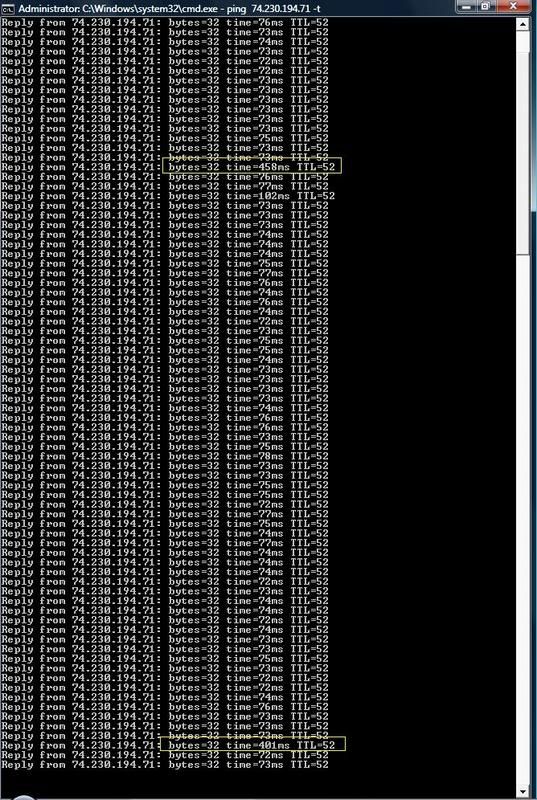


I just realized that these spikes happen almost at the exact interval.
I am using a Linksys USB Wireless G adapter with updated vista drivers. I have a very strong connection with my network as well and i am not running any background apps. My pc is clean and my firewall is not the issue.
What could the problem be, and are there any solutions? Thanks all in advance.

Last edited by smu122; 06-13-2008 at 11:06 PM..
  #2  
Old 06-15-2008
Tmagic650's Avatar
TechSpot Ambassador
 
Location: "The Treasure State" USA
Member since: Aug 2006, 14,714 posts
System specs
The first thing I would try is another router. Can you borrow one to try? When I changed from XP to Vista, I had to change routers. I don't use Linksys
  #3  
Old 06-15-2008
smu122's Avatar
TechSpot Member
 
Member since: Feb 2008, 70 posts
System specs
I only have one router It is actually a router and modem kind of thing. Westell Versalink. When i ping the same ip on a different XP pc on the network, I don't get these spikes, so I'm sure it is not the router.
  #4  
Old 06-15-2008
Tmagic650's Avatar
TechSpot Ambassador
 
Location: "The Treasure State" USA
Member since: Aug 2006, 14,714 posts
System specs
Some Vista network settings might be affecting this... Did you have an XP system before?
  #5  
Old 06-16-2008
smu122's Avatar
TechSpot Member
 
Member since: Feb 2008, 70 posts
System specs
Yes I had an XP pc previously before buying this vista one. I used the same Wireless G USB Network adapter for both systems and didnt have this problem on XP.
  #6  
Old 06-16-2008
smu122's Avatar
TechSpot Member
 
Member since: Feb 2008, 70 posts
System specs
One more thing, I have a laptop on the network using XP that was also having the lag spikes very similar to these. I fixed the problem by going into the advance properties of the network card and switching the "Wireless Mode" option to the radio of my router ("802.11b and 802.11g"). However, the Vista pc is using an external USB device and the advance properties are not their for the device.
  #7  
Old 06-16-2008
Tmagic650's Avatar
TechSpot Ambassador
 
Location: "The Treasure State" USA
Member since: Aug 2006, 14,714 posts
System specs
I'm trying to remember something that has to do with network properties like disabling IPv4 or IPv6 ... something like that
  #8  
Old 06-16-2008
smu122's Avatar
TechSpot Member
 
Member since: Feb 2008, 70 posts
System specs
Are you reffering to WZC (Windows Zero Configuration) or WLAN auto config in Vista?
  #9  
Old 06-16-2008
jobeard's Avatar
TechSpot Ambassador
 
Location: Southern Calif.
Member since: Apr 2005, 10,831 posts
the problem with ping is you can't tell WHERE in the network the problem lies.
your lag is infrequent and the normal times are good. this suggests a good network
with some infrequent overloading.

get a command prompt and use pathping 74.230.194.71 and then wait for the report.

see this sample

and a GUI version

Last edited by jobeard; 06-17-2008 at 01:34 PM..
  #10  
Old 06-17-2008
smu122's Avatar
TechSpot Member
 
Member since: Feb 2008, 70 posts
System specs
well, i just installed the same usb adapter on another XP pc on my network and I didnt get these lags, so I am almost positive it is not the network... Most probably Vista. would you like me to still pathping?

Last edited by smu122; 06-17-2008 at 12:29 AM..
  #11  
Old 06-17-2008
Tmagic650's Avatar
TechSpot Ambassador
 
Location: "The Treasure State" USA
Member since: Aug 2006, 14,714 posts
System specs
Quote:
Originally Posted by Tmagic650
I'm trying to remember something that has to do with network properties like disabling IPv4 or IPv6 ... something like that
Networking and Sharing Center, view status, uncheck IPv4 and check for lag. Do the same with IPv6 if you still get lags
  #12  
Old 06-17-2008
smu122's Avatar
TechSpot Member
 
Member since: Feb 2008, 70 posts
System specs
IPv4 disables the connection and disabling IPv6 still causes the lags =(
  #13  
Old 06-17-2008
jobeard's Avatar
TechSpot Ambassador
 
Location: Southern Calif.
Member since: Apr 2005, 10,831 posts
you flipped the settings -- ipv4 active, ipv6 inactive
  #14  
Old 06-17-2008
smu122's Avatar
TechSpot Member
 
Member since: Feb 2008, 70 posts
System specs
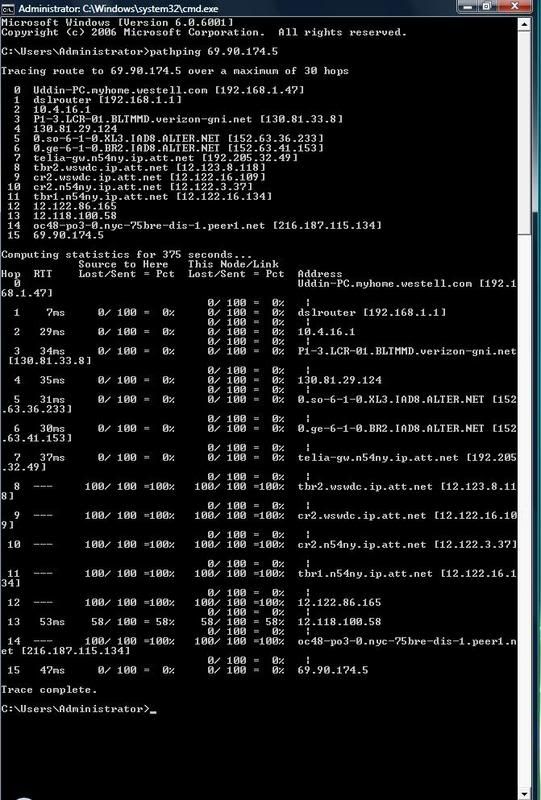
Alright i did path ping on this ip 69.90.174.5, one of the game servers. Here are the results:

  #15  
Old 06-17-2008
jobeard's Avatar
TechSpot Ambassador
 
Location: Southern Calif.
Member since: Apr 2005, 10,831 posts
massive losses deep into the path!

nodes 8, 9, 10, 11, 12, and 14 are basket cases as everything is getting timeouts.

changing ANYTHING in your system will be a total waste of time and effort as you
can not impact the conditions at these nodes.

suggest you find another server and try again
  #16  
Old 06-17-2008
smu122's Avatar
TechSpot Member
 
Member since: Feb 2008, 70 posts
System specs
so is this a problem with my adapter? I will try a different ip....
  #17  
Old 06-18-2008
jobeard's Avatar
TechSpot Ambassador
 
Location: Southern Calif.
Member since: Apr 2005, 10,831 posts
no, no, no.
Quote:
changing ANYTHING in your system will be a total waste of time and effort as you
can not impact the conditions at these nodes.
  #18  
Old 06-18-2008
smu122's Avatar
TechSpot Member
 
Member since: Feb 2008, 70 posts
System specs
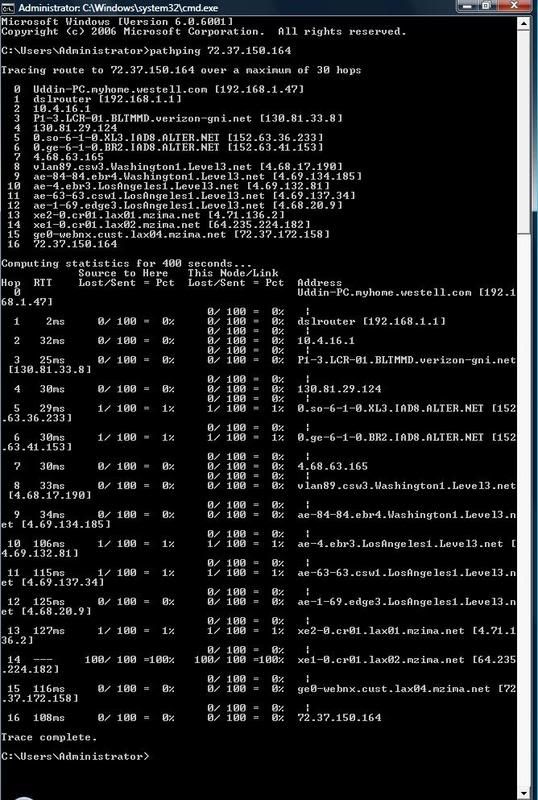
Sorry for the delayed response.... Here is another one to a game server:

  #19  
Old 06-19-2008
jobeard's Avatar
TechSpot Ambassador
 
Location: Southern Calif.
Member since: Apr 2005, 10,831 posts
much better; node 14 still has enormous loss however.

you should guess that gaming servers will be easily overloaded and the responsiveness
of the site will vary greatly from day to day and even hour to hour. These systems
are very hard to configure economically for the highly variable workloads.
  #20  
Old 06-19-2008
Tmagic650's Avatar
TechSpot Ambassador
 
Location: "The Treasure State" USA
Member since: Aug 2006, 14,714 posts
System specs
jobeard,
couldn't this be caused by smu122's ISP too?
Closed Thread
Page 1 of 2 1 2

Similar Topics
Topic Replies Forum
Google Search Results "Hijacked", All Results Are Ads For Fake Security Software? 2 Virus and Malware Removal
RAM the cause of my CPU spikes? 2 Processors and Motherboards
COD 4 lag spikes 3 Processors and Motherboards
CPU Spikes down???? 0 Processors and Motherboards
Lag Spikes 9 Windows OS

Thread Tools Search this Thread
Search this Thread:

Advanced Search
All times are GMT -4. The time now is 10:44 PM.