Welcome to the TechSpot OpenBoards. Please read the FAQ if you have any questions. Login to participate.

Go Back   TechSpot OpenBoards > OS & Software > Windows OS

Internet Connection Problem

Reply
Bookmark / Share this page
Thread Tools
  #1  
Old 09-30-2008
Newcomer, in training
 
Member since: Sep 2008, 12 posts
System specs
Internet Connection Problem

Right after installing Windows XP Professional, my internet does not connect.

I installed all my drivers with the same configurations as before the install.

i also installed windows xp servce pack 3, and any other updates windows offered

i get the error "Limited or no Connectivity" on my Local Area Connection.

i am on a Router with another computer and an xbox. the other computer and the xbox
on live works just fine.

i KNOW its not the router. because i get the same problem when i plug my computer straight to my modem and restart my modem and my computer and try. still "Limited or no Connectivity".

i know its not the other computer or the xbox because i haver had connection problems before
the windows XP install.

im pretty sure its not my network configurations. there the same, set up for DHCP.
Start > Control Panel > Network Connections "right click Local Area Connection"> Properties
scrolled down "Internet Protol (Tcp/IP) and Properties. its set to..

Obtain an Ip Address Automatically

Obtain DNS server address automatically.

ive also tried seeing if i can connect by renewing the ip through Command Prompt. Run > cmd

Ipconfig /renew

i get the error :An error Occured while renewing interface Local Area Connection : Unable to contact
your DHCP server. Request has timed out.


- the ONLY thing that works right now is while my computer it started, Power Cycling the Router, then i have internet. -

im THINK this is something to do with a windows service pack or update, or my drivers.

if someone knows how to fix this i would greatly appreciate. been 2 weeks or troubleshooting now.

remember, its not my router.
Reply With Quote
  #2  
Old 09-30-2008
kimsland's Avatar
TS Special Forces
 
Member since: Dec 2007, 11,673 posts
Try this: Network Reset
Reply With Quote
You can remove this banner by registering, join the TS Community for free.
  #3  
Old 09-30-2008
Newcomer, in training
 
Member since: Sep 2008, 12 posts
System specs
reply

Quote:
Originally Posted by kimsland View Post
Try this: "the link you put"
ok so i opened command prompt, and did this.


ipconfig /release

ipconfig /flushdns

ipconfig /registerdns

ipconfig /renew

then after the renew i get the same error as when i tried before.

:An error Occured while renewing interface Local Area Connection : Unable to contact
your DHCP server. Request has timed out.

then i had to power cycle my router.
Reply With Quote
  #4  
Old 09-30-2008
kimsland's Avatar
TS Special Forces
 
Member since: Dec 2007, 11,673 posts
There were more commands than that, and there was a winsock repair tool

Did you do them all? If not please do

Also after that do this:

Start --> Run--> cmd /c ipconfig /all >Desktop\ipconfig.txt < ok>

And post the ipconfig.txt (on your Desktop) as an attachment here
Reply With Quote
  #5  
Old 10-01-2008
Newcomer, in training
 
Member since: Sep 2008, 12 posts
System specs
Quote:
Originally Posted by kimsland View Post
There were more commands than that, and there was a winsock repair tool

Did you do them all? If not please do

Also after that do this:

Start --> Run--> cmd /c ipconfig /all >Desktop\ipconfig.txt < ok>

And post the ipconfig.txt (on your Desktop) as an attachment
yes i did all the commands and then restarted my computer. i also just did the ipconfig.txt part, here is the ipconfig file While the internet is WORKING.

Windows IP Configuration


Host Name . . . . . . . . . . . . : pwnage-c93a8255

Primary Dns Suffix . . . . . . . :

Node Type . . . . . . . . . . . . : Unknown

IP Routing Enabled. . . . . . . . : No

WINS Proxy Enabled. . . . . . . . : No


Ethernet adapter Local Area Connection 2:


Connection-specific DNS Suffix . :

Description . . . . . . . . . . . : NVIDIA nForce MCP Networking Controller

Physical Address. . . . . . . . . : 00-11-09-24-9C-A0

Dhcp Enabled. . . . . . . . . . . : Yes

Autoconfiguration Enabled . . . . : Yes

IP Address. . . . . . . . . . . . : 192.168.0.100

Subnet Mask . . . . . . . . . . . : 255.255.255.0

Default Gateway . . . . . . . . . : 192.168.0.1

DHCP Class ID . . . . . . . . . . :

DHCP Server . . . . . . . . . . . : 192.168.0.1

DNS Servers . . . . . . . . . . . : 192.168.0.1

Lease Obtained. . . . . . . . . . : Tuesday, September 30, 2008 11:11:56 PM

Lease Expires . . . . . . . . . . : Wednesday, October 01, 2008 2:11:56 AM


if needed i can repeat the process when i restart my computer before i power cycle my router.

is this a problem? "IP Routing Enabled. . . . . . . . : No" <----- i think thats not right? but you would know not me. lol


PS: i cant attach files untill my post count is 5. ^^

Last edited by Ultima686; 10-01-2008 at 01:27 AM.
Reply With Quote
  #6  
Old 10-01-2008
kimsland's Avatar
TS Special Forces
 
Member since: Dec 2007, 11,673 posts
Quote:
i cant attach files untill my post count is 5.
A little confusion there
You can attach files even at post count 1

The word is Attach ie this symbol (on the toolbar) in a new reply -->
Reply With Quote
  #7  
Old 10-01-2008
kimsland's Avatar
TS Special Forces
 
Member since: Dec 2007, 11,673 posts
Quote:
is this a problem? "IP Routing Enabled. . . . . . . . : No" <----- i think thats not right? but you would know not me. lol
No (I mean that's not it)

Can you open Network properties on Local Area Connection 2
And confirm everything says automatic in TCP/IP settings
Reply With Quote
You can remove this banner by registering, join the TS Community for free.
  #8  
Old 10-01-2008
Newcomer, in training
 
Member since: Sep 2008, 12 posts
System specs
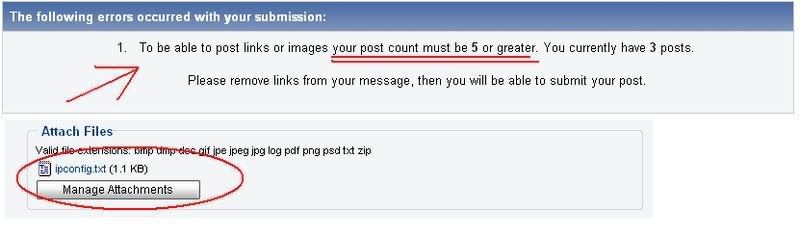
i fixed the "attach" typo right after i made it, :P supprised you cought it. but yeah i cant attach any files or post links till my post count is 5, ill show you what i mean when it reaches 5.
Reply With Quote
  #9  
Old 10-01-2008
Newcomer, in training
 
Member since: Sep 2008, 12 posts
System specs
Quote:
Originally Posted by kimsland View Post
No (I mean that's not it)

Can you open Network properties on Local Area Connection 2
And confirm everything says automatic in TCP/IP settings
there the same, set up for DHCP.
Start > Control Panel > Network Connections "right click Local Area Connection"> Properties
scrolled down "Internet Protol (Tcp/IP) and Properties. its set to..

Obtain an Ip Address Automatically

Obtain DNS server address automatically.

now that i have 5 posts, i can show you the error i got when i was trying to send screenshots or post attachments.


this error might have come from when i tried to quote you and you had a link in your post.

but anyways, back to my internet connection problem. anything else you would like me to do?

Last edited by Ultima686; 10-01-2008 at 02:17 AM.
Reply With Quote
  #10  
Old 10-01-2008
kimsland's Avatar
TS Special Forces
 
Member since: Dec 2007, 11,673 posts
That's strange
Then how do the members post there Spware logs on Post count 1
I'm aware that you cannot post links like www.google.com
is it possible that you posted a link plus the attachment at the same time?

I see you have reasonable tech ability (at this stage )
There is a possibility your provider is not allowing two different computers on your network, who is your provider?
Reply With Quote
  #11  
Old 10-01-2008
kimsland's Avatar
TS Special Forces
 
Member since: Dec 2007, 11,673 posts
Are you running an Antivirus or Firewall or something like Spybots (resident protection)?
If so, uninstall all of them (just disabling won't do (even in services)
Reply With Quote
  #12  
Old 10-01-2008
Newcomer, in training
 
Member since: Sep 2008, 12 posts
System specs
Quote:
Originally Posted by kimsland View Post
That's strange
Then how do the members post there Spware logs on Post count 1
I'm aware that you cannot post links like www.google.com
is it possible that you posted a link plus the attachment at the same time?

I see you have reasonable tech ability (at this stage )
There is a possibility your provider is not allowing two different computers on your network, who is your provider?
just a second, i think we might have figured out my problem. we updated the firmware on the router it would work, im going to restart my computer

my internet provider is mediacom and they allow multiple users to connect through a router.
Reply With Quote
  #13  
Old 10-01-2008
Newcomer, in training
 
Member since: Sep 2008, 12 posts
System specs
that wasn tthe problem but your going to laugh when i tell you what was.

out of curiosity i looked in task manager.
a personal firewall i downloaded, and had disabled on startup... STILL RAN in task manager, and i was like.. umm, going to uninstall that. so i did.

restarted.

internet. SUCESS!!1!ONE!!!SHIFT!!1ELEVEN!!

so anyone who is looking foward to using COMODO firewall pro, its a nice firewall but make sure you know how to set up the networking for it.

thanks. problem solved. i appreciate your help, but i fixed it :P =D im happy.
Reply With Quote
  #14  
Old 10-01-2008
kimsland's Avatar
TS Special Forces
 
Member since: Dec 2007, 11,673 posts
Quote:
Originally Posted by kimsland View Post
Are you running an Antivirus or Firewall or something like Spybots (resident protection)?
If so, uninstall all of them (just disabling won't do (even in services)
Posted above
Reply With Quote
  #15  
Old 10-01-2008
Newcomer, in training
 
Member since: Sep 2008, 12 posts
System specs
Quote:
Originally Posted by kimsland View Post
Posted above

....that post wasnt there before. 0_0;

why did you edit it? do you get paied to help people? xD
Reply With Quote
  #16  
Old 10-01-2008
kimsland's Avatar
TS Special Forces
 
Member since: Dec 2007, 11,673 posts
It was there
Reply With Quote
  #17  
Old 10-01-2008
kimsland's Avatar
TS Special Forces
 
Member since: Dec 2007, 11,673 posts
Actually you should have got a new mail message
That'll prove it
Reply With Quote
  #18  
Old 10-06-2008
Newcomer, in training
 
Member since: Oct 2008, 1 posts
Your response was for another person, but I used your advice and I was able to solve my problem. You are an angel. i can't thank you enough. .
mary
Reply With Quote
  #19  
Old 10-06-2008
kimsland's Avatar
TS Special Forces
 
Member since: Dec 2007, 11,673 posts
Thanks for the update
Reply With Quote
Reply

Tags
connection, internet, windows xp
Thread Tools

Forum Jump

Similar Topics
Thread Thread Starter Forum Replies Last Post
Internet Connection Problem yolak Windows OS 1 07-02-2007 11:41 AM
Internet connection problem Spikyalex Security and the Web 0 08-25-2006 01:34 PM
Problem with Internet connection chow1012 Storage & Networking 15 03-07-2006 01:15 PM
LAN and internet connection problem martinilite Storage & Networking 5 12-02-2005 03:04 PM
internet connection problem davids Windows OS 5 08-08-2005 11:58 AM


All times are GMT -4. The time now is 06:41 AM.