Welcome to the TechSpot OpenBoards. Please read the FAQ if you have any questions. Sign up or Login to participate.
Collaborate in the cloud with Office, Exchange, SharePoint, and Lync
|
|||||||
Collaborate in the cloud with Office, Exchange, SharePoint, and Lync
Sudden shutdowns with Error 102 and ID 1003
|
|
Thread Tools | Search this Thread |
|
#1
|
|||
|
|||
|
Sudden shutdowns with Error 102 and ID 1003
Hi there,
thank you for your great advices. I have a persistent problem on WinXP SP2 (Italian) that shutdowns once in a while without notice (I don't even see the BSOD!). I understood that the problem is related with HW (or drivers), since I had the experience with different software running (I noticed that an application usually up is: Virtual PC 2007 portable). This is the latest event report: System Error Categoria 102 Evento ID 1003 Codice errore 100000d1, parametro1 44cb08a0, parametro2 00000002, parametro3 00000001, parametro4 f6443263. I attached both the two last minidumps and the debuglog that I made following your precious instructions. But then.... what is the culprit? I am still in the dark! Is it related with the unavailable drivers (which I should remove) or whatever? Many thanks for your help. |
|
#2
|
|||
|
|||
|
It is related to your Sound drivers, and your Maxthon web browser
Please confirm all your Device Drivers are up to date And after doing a full AntiVirus scan, you may also want to update to Windows Service Pack 3 (its been out for a while now, all is good )
|
|
#3
|
|||
|
|||
|
Many thanks kimsland!
The sound card (which is incorporated in the motherboard with VIA controller) was also initially indicated as the culprit by microsoft.com after sending the standard ticket of the crash. Yet it is precisely the only drivers (realtek AC'97) that I updated to the latest version (v5.1 of Sept.'08). But the problem persists. And now microsoft.com, gives me generically Hardware problems (no more Sound card problems). So I am wondering whether the minidumps files could single out something else, or more specific issues, since the audio drivers installed are already the newest available. PS: Maxthon was just the application that was active when the PC crashed. But in the second case I submitted - I think - the application was another: biblioscape. |
|
#4
|
|||
|
|||
|
Try this
Uninstall your Sound driver If it's not in Add/Remove programs, it will at least be in [COLOR="DimGray"]Start->Run->[/COLOR] Devmgmt.msc [COLOR="DimGray"]->ok[/COLOR] After removing the drivers, do not re-install them just yet Run a full updated scan with your Antivirus software (I prefer free Avira Antivirus) Then run a full (updated) Anti-Malware scan with Malwarebytes By the way which Anti-Virus do you presently use? Once Virus and Malware is confirmed removed, then update the Sound driver, actually I would update to SP3 first (yes first) |
|
#5
|
|||
|
|||
|
Very kind of you. Thanks Kimsland again!
>>By the way which Anti-Virus do you presently use? Avira Antivirus, as you suggested. Sometimes it alerts with false positives, but for the rest it is really good. I run once a week Spyware Doctor (still v.4, with database updated though) and recently I gave a run to ComboFix antispyware too (which I was told it is very good). They both did not find anything significant. |
|
|
|
#6
|
|||
|
|||
|
I would uninstall Spyware Doctor for the moment (if not... for always)
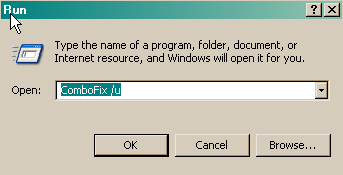
And also uninstall ComboFix [color=blue]Un-install Combofix[/color]
|
|
#7
|
|||
|
|||
|
Thank you again. I gave a try also to your suggestion by running Malwarebytes, with the same result of nothing relevant. I cleaned the Mobo, just to be sure that the dust was not the cause of the problem. Let us see... otherwise I shall install also the SP3 (of WinXP) as you are telling me. (The fact is that with SP2 I was happy, and in another pc with SP3 I was not so happy, so much so that I downgraded. But you are probably right that by now the SP3 has become stable!).
Last edited by science2002; 05-12-2009 at 05:14 AM.. |
![]() |
| Similar Topics | ||||
| Topic | Replies | Forum | ||
Random restarts -event id 1003 -system error- error code 000000f4
|
1 | Windows BSOD, Freezing, Restarting Help | ||
System Error: Cat:(102) Event: 1003 - Blue Screen Error frequently.
|
3 | Windows BSOD, Freezing, Restarting Help | ||
BSOD :sudden system crash : event id 1003 category :102
|
2 | Windows BSOD, Freezing, Restarting Help | ||
Sudden Shutdowns without Warning
|
5 | Windows OS | ||
Sudden system shutdowns
|
6 | Processors and Motherboards | ||
| Thread Tools | Search this Thread |
|
|
All times are GMT -4. The time now is 06:13 PM.


)


Random restarts -event id 1003 -system error- error code 000000f4