also @ TechSpot: UK's SOCA seizes domain of popular music blog, rnbxclusive.com
Welcome to the TechSpot OpenBoards. Please read the FAQ if you have any questions. Sign up or Login to participate.

Go Back   TechSpot OpenBoards > TechSpot Editorial and Site Feedback > TechSpot News and Comments

Download Now:

Download of the Week: Yet Another Process Monitor

Thread Tools Search this Thread
  #1  
Old 08-13-2009
Jos Jos is online now
TechSpot Elite
 
Location: Ecuador
Member since: Apr 2006, 904 posts
System specs
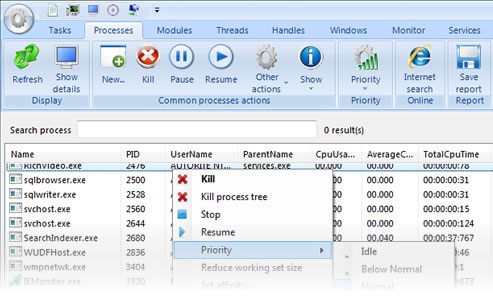
Download of the Week: Yet Another Process Monitor

All Windows versions since 3.0 have included a Task Manager utility to view running processes and (at least on the later versions) monitor a computer’s performance. Easily evoked by the Ctrl + Alt + Del keyboard combination, surely we’ve all found it to be a godsend on occasions when we need to kill a stuck application or resource hog process. But sometimes you just need more information and finer controls to make an accurate assessment on whether a process should be running or not and optimize memory use.
Read the whole story
__________________
Jose Vilches
Managing Editor
  #2  
Old 08-14-2009
Guest
 
Used the YAPM good app.

Liking the TECHSPOT new to it, I will take out an account.

G'Day
Corca
  #3  
Old 08-14-2009
Guest
 
How about ctrl+shift+esc? Jesus...
  #4  
Old 08-14-2009
Guest
 
Sysinternals, Process Monitor, Process Explorer and other tools are the best.
  #5  
Old 08-14-2009
Guest
 
Sysinternals tools are great, but not open source...

This one is open source. And provides remote monitoring, and I don't think sysinternals can do that...

BTW, nice app
  #6  
Old 08-14-2009
red1776's Avatar
Omnipotent Ruler of the Universe
 
Location: Minneapolis MN
Member since: Sep 2008, 5,668 posts
System specs
Quote:
Originally Posted by Guest View Post
How about ctrl+shift+esc? Jesus...

i cant find the jesus button on mine
  #7  
Old 08-17-2009
TechSpot Enthusiast
 
Location: Australia
Member since: Dec 2002, 210 posts
Quote:
red1776 said:
Quote:
Originally Posted by Guest View Post
How about ctrl+shift+esc? Jesus...
i cant find the jesus button on mine
I think that is one of the Ultimate Extras.
  #8  
Old 08-17-2009
red1776's Avatar
Omnipotent Ruler of the Universe
 
Location: Minneapolis MN
Member since: Sep 2008, 5,668 posts
System specs
Divine OS

Quote:
Originally Posted by Darth Shiv View Post
I think that is one of the Ultimate Extras.
thats why Vista Ultimate was so much
  #9  
Old 08-21-2009
Guest
 
This tools created with Visual Studio required a recent operating system with latest Microsoft .NET runtime.
Readme.txt file, I can read:
"REQUIREMENTS
YAPM runs on Windows XP, Windows Vista or even Windows Seven systems (32 bits only)."

What is the minimum configuration?
XP service pack?
Runtime .NET version ?
  #10  
Old 08-27-2009
Guest
 
It requires :
- .Net framework 2.0 SP1 (or above)
- Windows XP (tested successfully on SP2 and SP3) or Windows Vista (tested successfully on SP0 and SP1) or Windows Seven RC0 (could not test on another version)

Only 32 bits for now, but the 64 bits version is coming in 1 or 2 weeks

Concerning hardware conf, nothing specific is required but a decent conf (i.e. more than 128MB of memory...)
Closed Thread

Similar Topics
Topic Replies Forum
Download of the Week: TrueCrypt 49 TechSpot News and Comments
Download of the Week: Secunia PSI 35 TechSpot News and Comments
Download of the Week: GMABooster 5 TechSpot News and Comments
Download of the Week: DownThemAll! 5 TechSpot News and Comments

Thread Tools Search this Thread
Search this Thread:

Advanced Search
All times are GMT -4. The time now is 12:14 PM.