Welcome to the TechSpot OpenBoards. Please read the FAQ if you have any questions. Login to participate.

Go Back   TechSpot OpenBoards > Hardware & Tweaking > Overclocking, Cooling and Modding

Want to over clock on my pc, amd athlon 64 2800+ with asus k8vse deluxe more specs

Reply
Bookmark / Share this page
Thread Tools
  #1  
Old 07-06-2006
TechSpot Member
 
Member since: Jun 2006, 212 posts
Want to over clock on my pc, amd athlon 64 2800+ with asus k8vse deluxe more specs

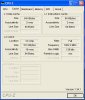
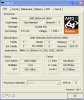
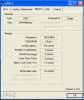
Hi, my computer was starting to get slugish from all the adware and spyware and viruses.... etc. So today I Formated my harddrive, and my computer works like a dream(after hours of installing programs) anyway, I know a 2800+. isnt that fast so i was hoping to overclock, and speed up my computer. I attached some screenshots of cpuid on my computer to give evry spec possible. I also i have 2.5 gb of ram in this thing. thanks so much guys -Nick
Attached Images
File Type: jpg cache.jpg (84.5 KB, 6 views)
File Type: jpg cpu.jpg (93.6 KB, 8 views)
File Type: jpg mainboard.jpg (84.5 KB, 2 views)
File Type: jpg memory.jpg (78.3 KB, 5 views)
File Type: jpg spd.jpg (89.1 KB, 3 views)

Last edited by awsskater892; 07-06-2006 at 07:04 AM.
Reply With Quote
  #2  
Old 07-06-2006
Rik's Avatar
Rik Rik is offline
Banned
 
Location: UK-Maidenhead
Member since: May 2005, 4,983 posts
System specs
Before you attempt to overclock your pc you must think about heat!! If you only have a stock cpu heat sink and fan then you wont get very far.

As you increase processor speed you increase heat output, and that needs to be dealt with.
Reply With Quote
You can remove this banner by registering, join the TS Community for free.
  #3  
Old 07-06-2006
TechSpot Member
 
Member since: Jun 2006, 212 posts
well eventually im gonna get a AMD Athlon 64 3400+ Newcastle 1600MHz HT 512KB L2 Cache Socket 754 Processor. and its 2.4GHz, but ive read that you can overclock it up to 2.65Ghz or even 2.7Ghz. So i wanna try it out, not alot, i just wanna learn how to do it. thanks -Nick
Reply With Quote
  #4  
Old 07-06-2006
KingCody's Avatar
TechSpot Maniac
 
Member since: Oct 2005, 1,559 posts
System specs
first off, you need to verify that your mobo can overclock the CPU without overclocking the PCI/AGP bus as well, if it can't then you won't be able to get anything out of it.

to overclock you need to understand how your speeds are determined.
1. BUS (or FSB) = system speed (external CPU speed)
2. HTT (hypertransport bus) = direct link from CPU to memory
3. CORE CLOCK = CPU internal speed
4. CPU MULTIPLIER = determines CORE CLOCK speed when multiplied by the BUS
5. HTT MULTIPLIER = determines HTT speed when multiplied by the BUS
6. RAM DIVIDER = determines RAM speed when divided by the CORE CLOCK

here is your default settings as a reference:
1. BUS = 200MHz
2. HHT = 800MHz (1600MT/s via DDR)
3. CORE CLOCK = 1.8GHz
4. CPU MULTIPLIER = 9
5. HTT MULTIPLIER = 4
6. RAM DIVIDER = 0

once you understand those terms and what they do, it's pretty easy. but you should keep a few things in mind:
1. try to keep the HTT as close to 800MHz as possible (if it's a little less that's OK, but don't overclock it alot).
2. you cannot raise the CPU multiplier above 9, so the only way to overclock it is to raise the BUS
3. your RAM may not be able to run as fast as the BUS. for instance if you raise your BUS to 250MHz, you also raise the RAM speed to 250MHz, some RAM can run at that speed, some can't. if your's can't then you will need to set a RAM divider to bring it back down around 200MHz.
4. DON'T RAISE THE V0LTAGE ON ANYTHING UNTIL YOU'VE REACHED THE MAXIMUM STABLE OVERCLOCK ON DEFAULT VOLTAGES. OVERVOLTING CAN FRY YOUR COMPONENTS. only raise the voltage if you are willing to risk frying your components. that being said, if you decide to raise the voltage, use the smallest increments possible.

start off with a small overclock by raising the BUS to 220, save and reboot. if it boots then you just overclocked your CPU by 180MHz. to go higher you will likely have to lower the HTT multiplier and set a RAM divider, but see what you can get without that first.

P.S. if it won't boot, use the CMOS jumper to set the BIOS back to defaults.

good luck
Reply With Quote
  #5  
Old 07-06-2006
KingCody's Avatar
TechSpot Maniac
 
Member since: Oct 2005, 1,559 posts
System specs
Quote:
Originally Posted by awsskater892
well eventually im gonna get a AMD Athlon 64 3400+ Newcastle 1600MHz HT 512KB L2 Cache Socket 754 Processor
instead of another socket-754 processor, you should consider uprading to a socket-939 processor and mobo instead. they perform much better, and they can utilize your RAM much better with dual channel. it's also cheap to upgrade now that AM2 is out.

also, I noticed from your CPUz screenshots that your RAM is PC3200 but it's only running at PC2700 speed. this is probably due to having all the RAM slots filled up. many motherboards downclock the RAM when all the slots are filled up.

since your system is only single channel, it only uses additonal RAM sticks when the first one is full. I can almost guarantee that you are not utilizing 2.5GB of RAM, chances are you're not even using 1GB, nevermind 2.5GB. try removing a 512MB stick and see if it brings your RAM speed back up to 200MHz
Reply With Quote
Reply
Thread Tools

Forum Jump


All times are GMT -4. The time now is 08:11 PM.