Welcome to the TechSpot OpenBoards. Please read the FAQ if you have any questions. Sign up or Login to participate.
|
|||||||
Begin your free trial now
Pay-as-you-go options starting at $10/user/month
snp2sxp.sys Blue Screen (BSOD) Problem.
|
|
Thread Tools | Search this Thread |
|
#1
|
|||
|
|||
|
snp2sxp.sys Blue Screen (BSOD) Problem.
Hi...
I've encountered problem as well, and the blue screen error was: Stop: 0x0000007E (0xC0000005, 0xEEB048DB, 0xEC663AA3, 0xEC6637A8) snp2sxp.sys - Address EEB048DB base at EEAFE000 Datestamp 449756C1 Even after installing Service Pack 2's fix (KB900485) and restarted, the same thing happened. Whenever i opened 'Amcap', the blue screen appeared. Please help me out as i'm really frustrated and had been looking for solution but to no avail. Thanks in advance. |
|
#2
|
|||
|
|||
|
Hello and welcome to Techspot.
From what I can gather snp2sxp.sys is a usb camera driver. It`s difficult to be sure as there`s very little info available for that file. Try uninstalling and/or updating the driver. See if that helps. Failing that, go HERE and follow the instructions. If that still doesn`t help, attach 5 or 6 of your latest minidumps here. Regards Howard
Last edited by howard_hopkinso; 08-18-2006 at 02:06 AM.. |
|
#3
|
|||
|
|||
|
Quote:
Hi. I've tried uninstalling the software and the driver for the webcam for about 10 times, and the same thing happened after i reboot and tried to open the program. Is there anything to do with the services.msc? I modified the services.msc using black viper's tweak for Windows XP Service Pack 2. Also, i would like to post my minidumps here, but should i post all or the last file from the minidumps folder? Should i zip the minidump first? When i bought the webcam, i tried it in my workplace which has Service Pack 1 and it was ok, but when i went home to try it on my Service Pack 2 PC, this error occured. It could not have been my hardware (RAM, Bios, Motherboard) as i've just bought new hardwares around June this year. I was suspecting the Service Pack 2 problem and possibly the consequence of my services.msc tweak. Please advice, thank you! Note: I'll post my minidumps when i reach home after work. |
|
#4
|
|||
|
|||
|
I don`t know whether your tweaking of the Windows services has caused this problem. However, you could try resetting the services to the defaults. See HERE. See if this has any effect.
What exactly is Amcap? Does you system only crash, when you try to use this particular programme? If you post your minidumps, we only require 5 or 6 of your very latest dump files. Regards Howard
|
|
#5
|
|||
|
|||
|
Quote:
I really appreciate your advice, and i'll give it a try tonight (resetting the services to default and posting of minidumps) Thank you! |
|
|
|
#6
|
|||
|
|||
|
Even resetting services to the default, restart, there's no use, same thing happened.
I tried from uninstalling (deleting the snp2sxp.sys from windows/system32/driver) and reinstalling, cleaning the registry and many more, but still can't find the solution. Minidump files are zipped and available for download from the link below. http://www.mysharebox.com/dl.php?key=6085900 Please help me as i'm in the state of desperation. |
|
#7
|
|||
|
|||
|
Your minidumps are corrupt and unreadable.
Try attaching them here. Regards Howard
|
|
#8
|
|||
|
|||
|
minidump reposted hope that it will work.
|
|
#9
|
|||
|
|||
|
Both your minidumps crash at snp2sxp.sys and reference SNCAMD.SYS.
I believe these are both part of your usb camera drives. It seems they are either flakey drivers or they are causing a conflict. In either case, you should uninstall them and uninstall Amcap as well. You may be as well getting a different web cam, seeing as how this one is causing you so many problems. Regards Howard
Last edited by howard_hopkinso; 08-19-2006 at 06:01 AM.. |
|
#10
|
|||
|
|||
|
Quote:
|
|
#11
|
|||
|
|||
|
Unless you can find some updated drivers that don`t crash your system, it`s the only solution I can think of.
Is the webcam really worth the trouble? Only you can decide. Regards Howard
|
|
#12
|
|||
|
|||
|
Quote:
Umm... like i said i tried it in my workplace pc with service pack 1 and it was ok, but when i tried it at home pc with service pack 2, these crash happened. And like i said even after applied patch for fixing stop error 0x0000007E, it doesn't help, so i assume that there's something wrong with my service pack 2 and i'm missing something. There must be some way, which... i believe some how the crash could be fixed. |
|
#13
|
|||
|
|||
|
I SOLVED THE BLUE SCREEN snp2sxp.sys PROBLEM
Listen up body
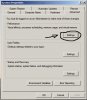
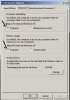
BrotherLucI've encountered the same problem as you have, the blue screen error Stop: 0x0000007E (0xC0000005, 0xEEB048DB, 0xEC663AA3, 0xEC6637A8) snp2sxp.sys - Address EEB048DB base at EEAFE000 Datestamp 449756C1 and i know ho to solve it, so you sould change your Proccesor scheduling and the memory usage. Go to "My Computer" --> 'Advanced" --> "Performance Settings" Then, in "Performance Options" go to the "Advanced" and change the Proccesor scheduling from 'background sevices" to "Programs" after it, go to the "Memory usage" and change the "Adjust for best peformance of" from "System cache" to "Programs" You can see the attached screenshots as well, to see where exactly to change it I did it and i solved this problem, the characteristics of my machine are Lenovo 3000N100 with Windows XP Home Edition SP2 MEE ( Middle East edition)
|
|
#14
|
|||
|
|||
|
Quote:
IT WORKED! You are truly a genius! Thanks a million buddy! God bless you! |
|
#15
|
|||
|
|||
|
Thanx for Blessing
It was my pleasure to help you, i suffered too long from this problem ... when i finally discovered how to solve it !!!
|
|
#16
|
|||
|
|||
|
Quote:
|
|
#17
|
|||
|
|||
|
too long it's about two weeks. instinctively i wanted to check how about if i change the proccesor scheduling or the memory usage, due to the fact that it was a virtual memory file "snp2sxp.sys" which could be sensitive to be disadvantaged of sharing less memory the same way as the proccesor sharing .
so i changed and it worked !!!!
|
|
#18
|
|||
|
|||
|
Quote:
|
![]() |
| Similar Topics | ||||
| Topic | Replies | Forum | ||
Help, blue screen of death error (BSOD)
|
9 | Windows BSOD, Freezing, Restarting Help | ||
Had a bsod blue screen of death
|
6 | Windows BSOD, Freezing, Restarting Help | ||
Blue screen. (BSOD)
|
10 | Other Hardware | ||
Blue Screen (BSOD) with SB X-Fi Extreme card
|
2 | Audio and Video | ||
blue screen bsod irql
|
5 | Windows BSOD, Freezing, Restarting Help | ||
| Thread Tools | Search this Thread |
|
|
All times are GMT -4. The time now is 01:12 AM.


Help, blue screen of death error (BSOD)