Welcome to the TechSpot OpenBoards. Please read the FAQ if you have any questions. Login to participate.

Go Back   TechSpot OpenBoards > Hardware & Tweaking > Overclocking, Cooling and Modding

heat question (speedfan pic)

Reply
Bookmark / Share this page
Thread Tools
  #1  
Old 09-08-2007
gamerguy53's Avatar
TechSpot Member
 
Member since: Apr 2007, 53 posts
System specs
heat question (speedfan pic)

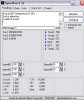
I would like someone to interpret this for me and give me some advice please cuz in my BIOS my cpu looks a lil hot

http://i218.photobucket.com/albums/c.../speedfan1.jpg
Reply With Quote
  #2  
Old 09-09-2007
Tmagic650's Avatar
TechSpot Evangelist
 
Location: Billings, Montana USA
Member since: Aug 2006, 7,065 posts
System specs
Select the Automatic Fan Speed box in Speedfan. It is also showing that no fans are running. Open your case and verify that all fans are running properly
Reply With Quote
You can remove this banner by registering, join the TS Community for free.
  #3  
Old 09-09-2007
TechSpot Booster
 
Location: California; Northern.
Member since: Jul 2007, 711 posts
System specs
What is "temp.#1" referring to? 127C=260.6F! That has to be some kind of misprint there. Use a different program to get your PC's temps. Try "Everest". Another program is required here. That readout cannot be right. Whichever component that is supposed to be monitoring...would all ready be out of commission. (for sure). Good Luck.
Reply With Quote
  #4  
Old 09-09-2007
Tmagic650's Avatar
TechSpot Evangelist
 
Location: Billings, Montana USA
Member since: Aug 2006, 7,065 posts
System specs
"What is "temp.#1" referring to? 127C=260.6F!"...

There is no indication of any fan RPMs. The computer would long ago be toast if this was correct.

As I said, open the case and verify that all the fans are clean and running properly. Don't depend on any program to tell you this. Evidently this version of Speedfan is not compatible with your motherboard or its bios
Reply With Quote
  #5  
Old 09-09-2007
AlbertLionheart's Avatar
TechSpot Guru
 
Location: UKkers
Member since: Jun 2007, 2,260 posts
System specs
You could also go to http://www.majorgeeks.com/download4181.html and get a copy of everest home - see what that tells you. But as Tmagic650 says, there is no better way than to take the lid off and have a look at your fans.
Reply With Quote
  #6  
Old 09-09-2007
Tmagic650's Avatar
TechSpot Evangelist
 
Location: Billings, Montana USA
Member since: Aug 2006, 7,065 posts
System specs
I'll be curious to find out if Everest will work for gamerguy53... As usual, we have no clue what his harware consists of
Reply With Quote
  #7  
Old 09-10-2007
AlbertLionheart's Avatar
TechSpot Guru
 
Location: UKkers
Member since: Jun 2007, 2,260 posts
System specs
Everest is just another SpeedFan type of reporting software. There is no reason why it should not work!
Reply With Quote
You can remove this banner by registering, join the TS Community for free.
  #8  
Old 09-10-2007
SNGX1275's Avatar
TS Special Forces
 
Location: Rolla, Missouri, USA
Member since: Feb 2002, 8,215 posts
System specs
Here is the way I see it:

Temp1: Wrong, ignore it, who knows what its monitoring, but its nothing that is really that hot.
Temp2: Probably your motherboard.
Temp3: CPU
Temp: See #1 replace hot with cold.
Core: May be like Temp. Could be ambient or maybe motherboard, but 19C is pretty cold, really doubt it is your processor because if your processor was running that cold you'd have to have a pretty nice custom cooling setup, and in that case you'd know the temps and which ones to ignore so you wouldn't have asked this question.
Reply With Quote
  #9  
Old 09-10-2007
AlbertLionheart's Avatar
TechSpot Guru
 
Location: UKkers
Member since: Jun 2007, 2,260 posts
System specs
I think he's gone!
Reply With Quote
  #10  
Old 09-10-2007
Tmagic650's Avatar
TechSpot Evangelist
 
Location: Billings, Montana USA
Member since: Aug 2006, 7,065 posts
System specs
Another hit and run post!

Everest tells me that it doesn't support my Cedar Mill Celeron D CPU fully, but I like its detailed reporting
Reply With Quote
  #11  
Old 09-10-2007
AlbertLionheart's Avatar
TechSpot Guru
 
Location: UKkers
Member since: Jun 2007, 2,260 posts
System specs
Me too - but I am disappointed that it gets so confused about the GPU values. I think it makes them up as I was pretty certain there is no thermometer on the graphics card.
Reply With Quote
  #12  
Old 09-10-2007
Tmagic650's Avatar
TechSpot Evangelist
 
Location: Billings, Montana USA
Member since: Aug 2006, 7,065 posts
System specs
There may be a thermal diode or other solidstate device under the GPU die, that sends a signal through the cards buss to the motherboard
Reply With Quote
  #13  
Old 09-10-2007
AlbertLionheart's Avatar
TechSpot Guru
 
Location: UKkers
Member since: Jun 2007, 2,260 posts
System specs
I wondered about that - but with two PCiE cards why are there not 2 GPU values? Not that I am worried as the system seems stable (famous last words - watch this thing refuse to boot tomorrow!).
Reply With Quote
  #14  
Old 09-10-2007
Tmagic650's Avatar
TechSpot Evangelist
 
Location: Billings, Montana USA
Member since: Aug 2006, 7,065 posts
System specs
Maybe Everest (Lavalys) will update the software to read SLI type 2-Video card values eventually
Reply With Quote
  #15  
Old 09-10-2007
SNGX1275's Avatar
TS Special Forces
 
Location: Rolla, Missouri, USA
Member since: Feb 2002, 8,215 posts
System specs
I must be missing something....
Reply With Quote
  #16  
Old 09-10-2007
Tmagic650's Avatar
TechSpot Evangelist
 
Location: Billings, Montana USA
Member since: Aug 2006, 7,065 posts
System specs
My Speedfan readings: 1 front fan, 1 CPU fan. The CPU Fan is the lower RPMs
Attached Images
File Type: jpg Speedfan.bmp.jpg (69.7 KB, 9 views)
Reply With Quote
  #17  
Old 09-10-2007
gamerguy53's Avatar
TechSpot Member
 
Member since: Apr 2007, 53 posts
System specs
where do u find the temps in everest
(sory for taking long to post)
Reply With Quote
  #18  
Old 09-10-2007
gamerguy53's Avatar
TechSpot Member
 
Member since: Apr 2007, 53 posts
System specs
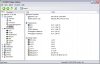
also why does so much stuff show up as unknown
http://i218.photobucket.com/albums/c...3/everest1.jpg
Reply With Quote
  #19  
Old 09-11-2007
AlbertLionheart's Avatar
TechSpot Guru
 
Location: UKkers
Member since: Jun 2007, 2,260 posts
System specs
to answer two questions:
Temps are in sensor
Missing stuff is because the everest cannot find motherboard data - don't worry as it is probably newer than everest!
Reply With Quote
  #20  
Old 09-11-2007
SNGX1275's Avatar
TS Special Forces
 
Location: Rolla, Missouri, USA
Member since: Feb 2002, 8,215 posts
System specs
Quote:
Originally Posted by Tmagic650
My Speedfan readings: 1 front fan, 1 CPU fan. The CPU Fan is the lower RPMs
Those blade tips are moving at mach 5.5 to 12.5! depending on whether they are 80mm or 120mm and which speed I used. Watch your fingers
Reply With Quote
Reply
Thread Tools

Forum Jump

Similar Topics
Thread Thread Starter Forum Replies Last Post
speedfan question cjmagnum Overclocking, Cooling and Modding 4 06-29-2007 03:14 PM
HEAT HEAT HEAT Gateway heat woes GameJunkie72792 Mobile Computing 3 06-23-2007 05:44 PM
Question on speedfan? ingeborgdot Misc. Software & Utilities 1 12-21-2006 08:34 PM
Another question on SpeedFan if anyone can help? torrenter Misc. Software & Utilities 2 06-24-2006 01:55 PM
Use "heat transfer" compound between P4 & heat sink? macx CPUs, Chipsets and Mobos 3 09-18-2005 08:06 AM


All times are GMT -4. The time now is 06:17 AM.