also @ TechSpot: AMD Radeon HD 7770 & Radeon HD 7750 Review
Welcome to the TechSpot OpenBoards. Please read the FAQ if you have any questions. Sign up or Login to participate.

Go Back   TechSpot OpenBoards > Software > Software Apps

Download Now:

RegCleaner 4.3 Help

Thread Tools Search this Thread
  #1  
Old 09-27-2007
TechSpot Member
 
Member since: Sep 2007, 116 posts
RegCleaner 4.3 Help

how to use this software RegCleaner 4.3 ?
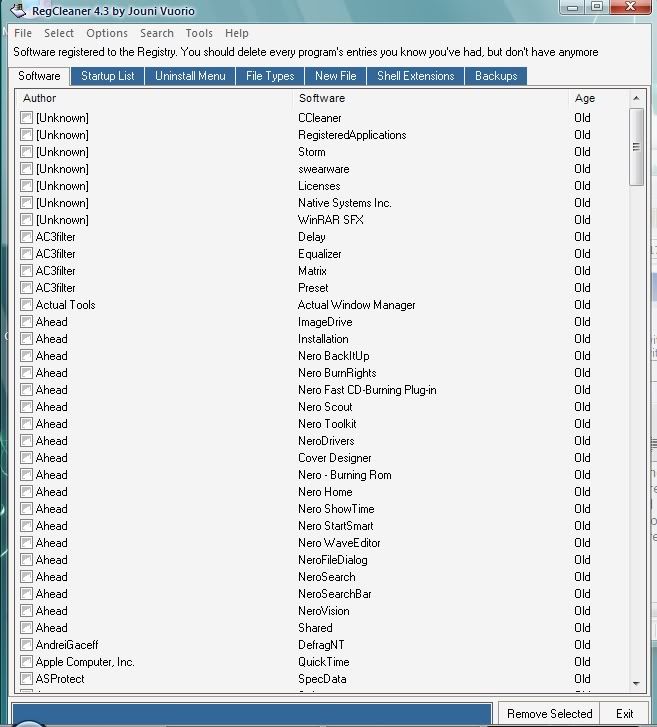
i can see many item in my software list,startup list,uninstall menu,file types,and others.how can deleted it without damage my system?
there are too many files i don't know,just now i try to create a restore point and remove all the item in software list.but it damage my system,so i restore my system to early time.
here is my software list,shell extensions,files types,someone help me check which software i need to remove from my system?
Attached Files
File Type: txt software.txt (7.1 KB, 0 views)
File Type: txt shell extensions.txt (27.2 KB, 0 views)
File Type: txt files types.txt (8.0 KB, 0 views)

Last edited by wen9x88; 09-27-2007 at 09:17 AM..
  #2  
Old 09-27-2007
evilfantasy's Avatar
Banned
 
Location: Tulsa, OK
Member since: Sep 2007, 428 posts
Try using a Registry cleaner that is less aggressive then RegCleaner.

Quote:
Remove invalid registry entries:
Frankly, the registry is overrated as a speed tweak, in general, but it does get large and can contain many invalid references. [COLOR="Red"]The registry is not an area for even the average computer user to be playing around in.[/COLOR] The good news is CCleaner has a safe registry cleaner built in, so why not clean out old, invalid entries?
[url=http://www.techspot.com/downloads/132-ccleaner.html] [U]CCleaner Download[/U][/url]

Click the [B]"Registry"[/B] button.
Click [B]"Scan for Issues."[/B]
Click [B]"Fix selected Issues."[/B]
[COLOR="Blue"]You will be prompted to back up the registry. For the first run I would suggest doing so.[/COLOR]
Thats it, your done, a safe, fast registry clean.
  #3  
Old 09-28-2007
Bobbye's Avatar
Helper on the Fringe
 
Location: Florida
Member since: Mar 2007, 15,046 posts
I use RegCleaner and would never advise it for an inexperienced user. First, when you don't know what an entry is, you search for information, just like I do. Too many users are asking for Registry Cleaners and don't have a clue how to use them!m This is not an area you want to fool around in.

Get Tune Up Utilities- it has a Registry cleaner that will backup and remove what need to be removed. An inexperienced should not be asking how to use a Registry Cleaner because they should not have one!

http://www.tune-up.com/products/tuneup-utilities/

"someone help me check which software i need to remove from my system" You don't remove the software through a Registry Cleaner!
  #4  
Old 09-29-2007
Tedster's Avatar
Techspot old timer.....
 
Location: Petersburg, VA
Member since: Feb 2005, 10,005 posts
System specs
use crap cleaner (CCleaner)- not only free, but pretty much automated.
Closed Thread

Similar Topics
Topic Replies Forum
RegCleaner = BSOD 7 Windows BSOD, Freezing, Restarting Help
Regedit,Msconfig,Hijackthis,RegCleaner and Antivirus sites not working 1 Virus and Malware Removal

Thread Tools Search this Thread
Search this Thread:

Advanced Search
All times are GMT -4. The time now is 11:43 AM.