also @ TechSpot: Weekend Open Forum: Imagining Google's own country

Computer infected by virus

Discussion in 'Virus and Malware Removal' started by meadow, Oct 26, 2012.

Post New Reply
  1. meadow Newcomer, in training Posts: 83

    My computer was infected by virus.
    I followed 5-steps 1. Ran window security essentials to scan the computer, 2. Downloaded and ran MBAM. 3. downloaded GMER. when I ran it, get "load error", then pc restarted. It took much longer time to up, after just a few second, it restarted again, again. I tried to started computer in safe mode, but my userid and password don't work.I managed to squeeze in another time of MBAM, it didn't make difference.

    -----------------------------------------------------------------------------
    here is log of mbam:
    Malwarebytes Anti-Malware 1.65.1.1000
    www.malwarebytes.org

    Database version: v2012.09.29.05

    Windows XP Service Pack 3 x86 NTFS
    Internet Explorer 8.0.6001.18702
    userid :: computername[administrator]

    10/26/2012 1:10:17 PM
    mbam-log-2012-10-26 (13-10-17).txt

    Scan type: Quick scan
    Scan options enabled: Memory | Startup | Registry | File System | Heuristics/Extra | Heuristics/Shuriken | PUP | PUM
    Scan options disabled: P2P
    Objects scanned: 241822
    Time elapsed: 11 minute(s), 10 second(s)

    Memory Processes Detected: 0
    (No malicious items detected)

    Memory Modules Detected: 0
    (No malicious items detected)

    Registry Keys Detected: 0
    (No malicious items detected)

    Registry Values Detected: 0
    (No malicious items detected)

    Registry Data Items Detected: 6
    HKCU\SOFTWARE\Microsoft\Windows\CurrentVersion\Explorer\Advanced|Start_ShowControlPanel (PUM.Hijack.StartMenu) -> Bad: (0) Good: (1) -> Quarantined and repaired successfully.
    HKCU\SOFTWARE\Microsoft\Windows\CurrentVersion\Explorer\Advanced|Start_ShowHelp (PUM.Hijack.StartMenu) -> Bad: (0) Good: (1) -> Quarantined and repaired successfully.
    HKCU\SOFTWARE\Microsoft\Windows\CurrentVersion\Explorer\Advanced|Start_ShowMyComputer (PUM.Hijack.StartMenu) -> Bad: (0) Good: (1) -> Quarantined and repaired successfully.
    HKCU\SOFTWARE\Microsoft\Windows\CurrentVersion\Explorer\Advanced|Start_ShowMyDocs (PUM.Hijack.StartMenu) -> Bad: (0) Good: (1) -> Quarantined and repaired successfully.
    HKCU\SOFTWARE\Microsoft\Windows\CurrentVersion\Explorer\Advanced|Start_ShowRun (PUM.Hijack.StartMenu) -> Bad: (0) Good: (1) -> Quarantined and repaired successfully.
    HKCU\SOFTWARE\Microsoft\Windows\CurrentVersion\Explorer\Advanced|Start_ShowSearch (PUM.Hijack.StartMenu) -> Bad: (0) Good: (1) -> Quarantined and repaired successfully.

    Folders Detected: 0
    (No malicious items detected)

    Files Detected: 0
    (No malicious items detected)
    ------------------------------------------------------------

    Please help!
  2. Broni Malware Annihilator Posts: 39,243   +175

    Are you saying that the computer is in restart loop?
  3. meadow Newcomer, in training Posts: 83

    Yes, it restarted by itself once it is up for three times today. And it took long time to get to logon screen. Now I am not sure it will ever get to logon screen now, it has been hanged on blue "DELL" screen for over 20 minutes. I have to shut it down by push the power button.
    By the way, the error I got when I ran GMER is "Load Drive ("C:\Docum~1\userID\local~1\Temp\kwdyqkob.sys"), error 0xC000010E:cannot create a statble subkey under a volatile parent key".
  4. Broni Malware Annihilator Posts: 39,243   +175

    I'm not sure if I understand. Is the computer bootable or not?
  5. meadow Newcomer, in training Posts: 83

    It is not bootable. Can you do something about it?
  6. Broni Malware Annihilator Posts: 39,243   +175

    Let's try to boot your computer using the Ultimate Boot CD for Windows (UBCD4win).

    Please print this guide for future reference!

    You will need a blank CD, a clean computer and a flash drive.

    Please follow the steps below and let me know if you were successful. If you were unable to create the UBCD4win, please tell me what error messages you got and/or what steps you got hung up on.

    :step1:

    1. Download and Run Ultimate Boot CD for Windows
    • Save it to your Desktop.
    • Double-Click on the UBCD4Win.EXE that you just downloaded to your desktop.
    • Follow all of the instructions/prompts that come up.
      NOTES:
      • Do not install to a folder with spaces in it's name.
      • Your Anti-Virus may report viruses or trojans when you extract UBCD4Win, these are "False-Positives." Read HERE for information regarding the files that normally trigger AV software.
    2. Insert your XP CD with SP1/SP2/SP3 into a CD Rom drive
    • Double-Click on UBCD4WinBuilder.exe located in your C:\ubcd4win folder.
    • Click "I agree" to the Builders License.
    • Click NO to Search for Windows Installation Files
    • Make the following selections from the Main Screen that pops up:
      • Builder
        • Source:(path to Windows installation files)
          • Enter the path to the drive where your XP CD is located.
          • You can click on the "..." button on the right to navigate to the path as well.
        • Custom: (include files and folders from this directory)
          • No information is necessary, leave blank.
        • Output: (C:\ubcd4win\BartPE)
          • Keep the default BartPE
      • Media output
        • Choose Create ISO image
        • Do not choose Burn to CD/DVD


        Please note: If your XP install disc is SP1 then please .....
        1. Disable- DComLaunch Service
        2. Enable- LargeIDE Fix

          This can be done by pressing the "Plugin" button and checking or unchecking the appropriate selections

        Also note: If you have a Dell XP install disc you will need to follow the instructions here
        http://www.ubcd4win.com/faq.htm#dell

      3. Click on the "Build" button
      • You will see the Windows EULA message. Click on I Agree
      • You will now see the Build Screen. Let it run it's course
      • When the Build is finished you can click close, then exit


      4. Burn your ISO file to CD
      • Please see HERE on how to burn an ISO to CD.

    ==========

    :step2:

    Next, from your clean computer:

    Download Farbar Recovery Scan Tool
    and save it to your flash drive.

    Now plug your flashdrive back into your sick computer and follow the next instructions:

    ==========

    :step3:

    1. Restart Your sick Computer Using the UBCD4Win Disc That You Have Created
    • Insert the UBCD4Win disc in to one of your CD/DVD drives.
    • Restart your computer.
      • The computer should choose to boot from the UBCD4Win CD automatically. If it doesn't and you are asked if you want to boot from CD, then choose that option.
    • In the window that pops up select Launch The Ultimate Boot CD For Windows and press Enter.
      • It may take a little longer for the Desktop to appear than it does when you start your computer normally. Just let the process run itself until the desktop appears.
    • Once the desktop appears, you will receive a message asking: Do you want to start Network support?
      • Click on Yes if you want to use the PE environment to get online post your log and reply by way of an Ethernet connection.
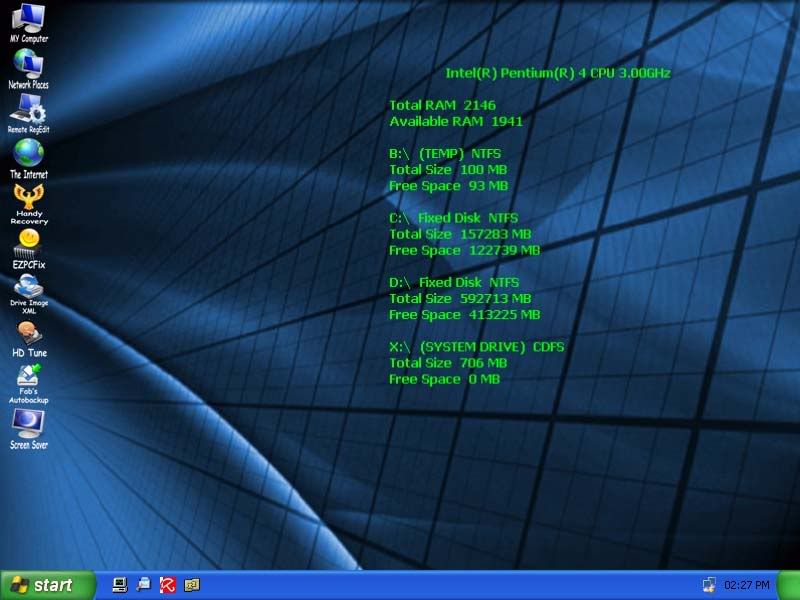
    • You should now have a desktop that looks like this:
      [IMG]

    ==========

    :step4:

    • Single click My computer from your UBCD4W desktop to navigate to the Farbar Recovery Scan Tool you saved to your flash drive.
    • Double click on it to begin running the tool.
    • When the tool opens click Yes to disclaimer.
    • Press Scan button.
    • It will make a log (FRST.txt) on the flash drive. Please copy and paste it to your next reply.
     
  7. meadow Newcomer, in training Posts: 83

    At step 1: 1. download and run UBCD for window, while tring to download UBCD4win.exe, I got error message "Setup:CoCreateInstance failed, code 0x80040154, class not registered". I continued and download the UBCD4win to my c:\UBCD4Win folder.
    at step1:2, (question: what is XP CD with SP1/SP2/SP3 ?)
    I double-clicked UBCD4WinBuilder.exe on C:\UBCD4Win, clicked "I agree", click "No" to search for window installation files,
    then on the main screen, under Builder- source path to windows installation files, I enter d: that is where my cd rom drive is, Custom and Output, I did what you suggested...
    under Media output, I did what you suggested too.
    at step 1:3, I clicked on "build" button, a eror message window pop up "Invalid Source Path cannot find file (D:\j386\setupldr.bin)"

    I cannot go any further.
    I only have 2 disc come with my clean DELL computer, one marked with Restore Disk: D-series, the other disk has only one file D610XPSP3.tib, I tried both cd for step1:3, none of them worked.
    where did I do wrong?
    Thank you so much for your help.
  8. Broni Malware Annihilator Posts: 39,243   +175

    You will need a USB flash drive.

    Download GETxPUD.exe to the desktop of your clean computer
    • Run GETxPUD.exe
    • A new folder will appear on the desktop.
    • Open the GETxPUD folder and click on the get&burn.bat
    • The program will download xpud_0.9.2.iso, and upon finished will open BurnCDCC ready to burn the image.
    • Click on Start and follow the prompts to burn the image to a CD.
    • Next download rst.sh to your USB flash drive
    • Remove the USB & CD and insert it in the sick computer
    • Boot the Sick computer with the CD you just burned
    • The computer must be set to boot from the CD
    • Gently tap F12 and choose to boot from the CD
    • Follow the prompts
    • A Welcome to xPUD screen will appear
    • Press File
    • Expand mnt
    • sda1,2...usually corresponds to your HDD
    • sdb1 is likely your USB
    • Click on the folder that represents your USB drive (sdb1 ?)
    • Confirm that you see rst.sh that you downloaded there
    • Press Tool at the top
    • Choose Open Terminal
    • Type bash rst.sh
    • Press Enter
    • After it has finished a report will be located on your USB drive named enum.log
    • Remove the USB drive and insert it back in your working computer and navigate to enum.log

      Please note - all text entries are case sensitive
    Copy and paste the enum.log for my review
  9. meadow Newcomer, in training Posts: 83

    Here is enum.log

    31.8M Oct 26 19:28 /mnt/sda1/WINDOWS/system32/config/software
    6.0M Oct 29 20:16 /mnt/sda1/WINDOWS/system32/config/system

    31.5M Sep 23 00:57 /sda1/~/RP757/~SOFTWARE
    31.5M Sep 23 05:57 /sda1/~/RP758/~SOFTWARE
    31.5M Sep 23 13:47 /sda1/~/RP759/~SOFTWARE
    31.5M Sep 24 00:57 /sda1/~/RP760/~SOFTWARE
    31.5M Sep 24 11:57 /sda1/~/RP761/~SOFTWARE
    31.5M Sep 24 13:47 /sda1/~/RP762/~SOFTWARE
    31.5M Sep 24 23:57 /sda1/~/RP763/~SOFTWARE
    31.5M Sep 25 10:57 /sda1/~/RP764/~SOFTWARE
    31.5M Sep 26 00:57 /sda1/~/RP766/~SOFTWARE
    31.5M Sep 26 11:45 /sda1/~/RP767/~SOFTWARE
    31.5M Sep 26 13:47 /sda1/~/RP768/~SOFTWARE
    31.5M Sep 26 23:57 /sda1/~/RP769/~SOFTWARE
    31.5M Sep 27 10:57 /sda1/~/RP770/~SOFTWARE
    31.5M Sep 27 13:47 /sda1/~/RP771/~SOFTWARE
    31.5M Sep 27 23:57 /sda1/~/RP772/~SOFTWARE
    31.5M Sep 28 10:57 /sda1/~/RP773/~SOFTWARE
    31.5M Sep 28 13:47 /sda1/~/RP774/~SOFTWARE
    31.5M Sep 28 23:57 /sda1/~/RP775/~SOFTWARE
    31.5M Sep 29 10:45 /sda1/~/RP776/~SOFTWARE
    31.5M Sep 29 13:47 /sda1/~/RP777/~SOFTWARE
    31.5M Sep 30 00:45 /sda1/~/RP778/~SOFTWARE
    31.5M Sep 30 05:57 /sda1/~/RP779/~SOFTWARE
    31.5M Sep 30 13:47 /sda1/~/RP780/~SOFTWARE
    31.5M Oct 1 00:57 /sda1/~/RP781/~SOFTWARE
    31.5M Oct 1 11:57 /sda1/~/RP782/~SOFTWARE
    31.5M Oct 1 13:47 /sda1/~/RP783/~SOFTWARE
    31.5M Oct 2 00:57 /sda1/~/RP784/~SOFTWARE
    31.5M Oct 2 11:57 /sda1/~/RP785/~SOFTWARE
    31.5M Oct 3 00:57 /sda1/~/RP787/~SOFTWARE
    31.5M Oct 3 11:57 /sda1/~/RP788/~SOFTWARE
    31.5M Oct 3 13:47 /sda1/~/RP789/~SOFTWARE
    31.5M Oct 3 23:57 /sda1/~/RP790/~SOFTWARE
    31.5M Oct 4 10:45 /sda1/~/RP791/~SOFTWARE
    31.5M Oct 4 13:47 /sda1/~/RP792/~SOFTWARE
    31.5M Oct 4 23:57 /sda1/~/RP793/~SOFTWARE
    31.5M Oct 5 10:57 /sda1/~/RP794/~SOFTWARE
    31.5M Oct 5 20:58 /sda1/~/RP795/~SOFTWARE
    31.5M Oct 6 07:45 /sda1/~/RP796/~SOFTWARE
    31.5M Oct 6 17:57 /sda1/~/RP797/~SOFTWARE
    31.5M Oct 7 04:57 /sda1/~/RP798/~SOFTWARE
    31.5M Oct 7 15:57 /sda1/~/RP799/~SOFTWARE
    31.5M Oct 8 02:45 /sda1/~/RP800/~SOFTWARE
    31.5M Oct 8 12:57 /sda1/~/RP801/~SOFTWARE
    31.5M Oct 8 23:57 /sda1/~/RP802/~SOFTWARE
    31.5M Oct 9 10:57 /sda1/~/RP803/~SOFTWARE
    31.5M Oct 9 21:22 /sda1/~/RP804/~SOFTWARE
    31.5M Oct 10 07:45 /sda1/~/RP805/~SOFTWARE
    31.5M Oct 10 18:28 /sda1/~/RP806/~SOFTWARE
    31.5M Oct 11 14:57 /sda1/~/RP808/~SOFTWARE
    31.5M Oct 12 01:57 /sda1/~/RP809/~SOFTWARE
    31.5M Oct 12 12:45 /sda1/~/RP810/~SOFTWARE
    31.6M Oct 12 22:57 /sda1/~/RP811/~SOFTWARE
    31.6M Oct 13 09:57 /sda1/~/RP812/~SOFTWARE
    31.6M Oct 13 20:57 /sda1/~/RP813/~SOFTWARE
    31.6M Oct 14 07:57 /sda1/~/RP814/~SOFTWARE
    31.6M Oct 14 18:57 /sda1/~/RP815/~SOFTWARE
    31.6M Oct 15 05:45 /sda1/~/RP816/~SOFTWARE
    31.6M Oct 15 15:54 /sda1/~/RP817/~SOFTWARE
    31.6M Oct 16 02:57 /sda1/~/RP818/~SOFTWARE
    31.6M Oct 16 14:37 /sda1/~/RP819/~SOFTWARE
    31.6M Oct 17 00:57 /sda1/~/RP820/~SOFTWARE
    31.6M Oct 17 10:57 /sda1/~/RP821/~SOFTWARE
    31.6M Oct 17 21:57 /sda1/~/RP822/~SOFTWARE
    31.6M Oct 18 08:45 /sda1/~/RP823/~SOFTWARE
    31.6M Oct 19 06:08 /sda1/~/RP824/~SOFTWARE
    31.6M Oct 20 07:07 /sda1/~/RP825/~SOFTWARE
    31.6M Oct 20 18:07 /sda1/~/RP826/~SOFTWARE
    31.6M Oct 21 05:07 /sda1/~/RP827/~SOFTWARE
    31.6M Oct 21 16:07 /sda1/~/RP828/~SOFTWARE
    31.6M Oct 22 03:07 /sda1/~/RP829/~SOFTWARE
    31.5M Sep 25 13:47 /sda1/~/RP765/~SOFTWARE
    31.5M Oct 2 13:52 /sda1/~/RP786/~SOFTWARE
    31.5M Oct 11 04:45 /sda1/~/RP807/~SOFTWARE
    5.8M Sep 23 00:57 /sda1/~/RP757/~SYSTEM
    5.8M Sep 23 05:57 /sda1/~/RP758/~SYSTEM
    5.8M Sep 23 13:47 /sda1/~/RP759/~SYSTEM
    5.8M Sep 24 00:57 /sda1/~/RP760/~SYSTEM
    5.8M Sep 24 11:57 /sda1/~/RP761/~SYSTEM
    5.8M Sep 24 13:47 /sda1/~/RP762/~SYSTEM
    5.8M Sep 24 23:57 /sda1/~/RP763/~SYSTEM
    5.8M Sep 25 10:57 /sda1/~/RP764/~SYSTEM
    5.8M Sep 26 00:57 /sda1/~/RP766/~SYSTEM
    5.8M Sep 26 11:45 /sda1/~/RP767/~SYSTEM
    5.8M Sep 26 13:47 /sda1/~/RP768/~SYSTEM
    5.8M Sep 26 23:57 /sda1/~/RP769/~SYSTEM
    5.8M Sep 27 10:57 /sda1/~/RP770/~SYSTEM
    5.8M Sep 27 13:47 /sda1/~/RP771/~SYSTEM
    5.8M Sep 27 23:57 /sda1/~/RP772/~SYSTEM
    5.8M Sep 28 10:57 /sda1/~/RP773/~SYSTEM
    5.8M Sep 28 13:47 /sda1/~/RP774/~SYSTEM
    5.8M Sep 28 23:57 /sda1/~/RP775/~SYSTEM
    5.8M Sep 29 10:45 /sda1/~/RP776/~SYSTEM
    5.8M Sep 29 13:47 /sda1/~/RP777/~SYSTEM
    5.8M Sep 30 00:45 /sda1/~/RP778/~SYSTEM
    5.8M Sep 30 05:57 /sda1/~/RP779/~SYSTEM
    5.8M Sep 30 13:47 /sda1/~/RP780/~SYSTEM
    5.8M Oct 1 00:57 /sda1/~/RP781/~SYSTEM
    5.8M Oct 1 11:57 /sda1/~/RP782/~SYSTEM
    5.8M Oct 1 13:47 /sda1/~/RP783/~SYSTEM
    5.8M Oct 2 00:57 /sda1/~/RP784/~SYSTEM
    5.8M Oct 2 11:57 /sda1/~/RP785/~SYSTEM
    5.8M Oct 3 00:57 /sda1/~/RP787/~SYSTEM
    5.8M Oct 3 11:57 /sda1/~/RP788/~SYSTEM
    5.8M Oct 3 13:47 /sda1/~/RP789/~SYSTEM
    5.8M Oct 3 23:57 /sda1/~/RP790/~SYSTEM
    5.8M Oct 4 10:45 /sda1/~/RP791/~SYSTEM
    5.8M Oct 4 13:47 /sda1/~/RP792/~SYSTEM
    5.8M Oct 4 23:57 /sda1/~/RP793/~SYSTEM
    5.8M Oct 5 10:57 /sda1/~/RP794/~SYSTEM
    5.8M Oct 5 20:58 /sda1/~/RP795/~SYSTEM
    5.8M Oct 6 07:45 /sda1/~/RP796/~SYSTEM
    5.8M Oct 6 17:57 /sda1/~/RP797/~SYSTEM
    5.8M Oct 7 04:57 /sda1/~/RP798/~SYSTEM
    5.8M Oct 7 15:57 /sda1/~/RP799/~SYSTEM
    5.8M Oct 8 02:45 /sda1/~/RP800/~SYSTEM
    5.8M Oct 8 12:57 /sda1/~/RP801/~SYSTEM
    5.8M Oct 8 23:57 /sda1/~/RP802/~SYSTEM
    5.8M Oct 9 10:57 /sda1/~/RP803/~SYSTEM
    5.8M Oct 9 21:22 /sda1/~/RP804/~SYSTEM
    5.8M Oct 10 07:45 /sda1/~/RP805/~SYSTEM
    5.8M Oct 10 18:28 /sda1/~/RP806/~SYSTEM
    5.8M Oct 11 14:57 /sda1/~/RP808/~SYSTEM
    5.8M Oct 12 01:57 /sda1/~/RP809/~SYSTEM
    5.8M Oct 12 12:45 /sda1/~/RP810/~SYSTEM
    5.8M Oct 12 22:57 /sda1/~/RP811/~SYSTEM
    5.8M Oct 13 09:57 /sda1/~/RP812/~SYSTEM
    5.8M Oct 13 20:57 /sda1/~/RP813/~SYSTEM
    5.8M Oct 14 07:57 /sda1/~/RP814/~SYSTEM
    5.8M Oct 14 18:57 /sda1/~/RP815/~SYSTEM
    5.8M Oct 15 05:45 /sda1/~/RP816/~SYSTEM
    5.8M Oct 15 15:54 /sda1/~/RP817/~SYSTEM
    5.8M Oct 16 02:57 /sda1/~/RP818/~SYSTEM
    5.8M Oct 16 14:37 /sda1/~/RP819/~SYSTEM
    5.8M Oct 17 00:57 /sda1/~/RP820/~SYSTEM
    5.8M Oct 17 10:57 /sda1/~/RP821/~SYSTEM
    5.8M Oct 17 21:57 /sda1/~/RP822/~SYSTEM
    5.8M Oct 18 08:45 /sda1/~/RP823/~SYSTEM
    5.9M Oct 19 06:08 /sda1/~/RP824/~SYSTEM
    5.9M Oct 20 07:07 /sda1/~/RP825/~SYSTEM
    5.9M Oct 20 18:07 /sda1/~/RP826/~SYSTEM
    5.9M Oct 21 05:07 /sda1/~/RP827/~SYSTEM
    5.9M Oct 21 16:07 /sda1/~/RP828/~SYSTEM
    5.9M Oct 22 03:07 /sda1/~/RP829/~SYSTEM
    5.8M Sep 25 13:47 /sda1/~/RP765/~SYSTEM
    5.8M Oct 2 13:52 /sda1/~/RP786/~SYSTEM
    5.8M Oct 11 04:45 /sda1/~/RP807/~SYSTEM
    Thank you.
  10. Broni Malware Annihilator Posts: 39,243   +175

    Please open the terminal again from your USB device and type:

    bash rst.sh -r

    Press Enter

    Type 764 and press Enter.

    When done restart your computer normally and see if you can successfully log on now.

    See if you can boot normally.
  11. meadow Newcomer, in training Posts: 83

    I did as you instruced, and it seems didn't produce log file.
    I tried to boot pc up normally, it took little while after enter the userid and passwd, then desktop show up and pc restarted right way.
  12. Broni Malware Annihilator Posts: 39,243   +175

    See if same thing happens in safe mode.
  13. meadow Newcomer, in training Posts: 83

    I can boot up the computer in safe mode.
    Now should I go back to do the 5 steps or else?
    Thanks.
  14. Broni Malware Annihilator Posts: 39,243   +175

    Good :)
    Run this from safe mode.

    Please download ComboFix from Here, Here or Here to your Desktop.

    **Note: In the event you already have Combofix, this is a new version that I need you to download. It is important that it is saved directly to your desktop**
    • Never rename Combofix unless instructed.
    • Close any open browsers.
    • Close/disable all anti virus and anti malware programs so they do not interfere with the running of ComboFix.
    • Very Important! Temporarily disable your anti-virus, script blocking and any anti-malware real-time protection before performing a scan. They can interfere with ComboFix or remove some of its embedded files which may cause "unpredictable results".
    • Click on this link to see a list of programs that should be disabled. The list is not all inclusive. If yours is not listed and you don't know how to disable it, please ask.
    • Close any open browsers.
    • WARNING: Combofix will disconnect your machine from the Internet as soon as it starts
    • Please do not attempt to re-connect your machine back to the Internet until Combofix has completely finished.
    • If there is no internet connection after running Combofix, then restart your computer to restore back your connection.
      If the connection is not there use restore point you created prior to running Combofix.
    • Double click on combofix.exe & follow the prompts.

    • NOTE1. If Combofix asks you to install Recovery Console, please allow it.
      NOTE 2. If Combofix asks you to update the program, always do so.
    • When finished, it will produce a report for you.
    • Please post the "C:\ComboFix.txt"
    **Note 1: Do not mouseclick combofix's window while it's running. That may cause it to stall
    **Note 2 for AVG and CA Internet Security (Total Defense Internet Security) users: ComboFix will not run until AVG/CA Internet Security is uninstalled as a protective measure against the anti-virus. This is because AVG/CA Internet Security "falsely" detects ComboFix (or its embedded files) as a threat and may remove them resulting in the tool not working correctly which in turn can cause "unpredictable results". Since AVG/CA Internet Security cannot be effectively disabled before running ComboFix, the author recommends you to uninstall AVG/CA Internet Security first.
    Use AppRemover to uninstall it: http://www.appremover.com/
    We can reinstall it when we're done with CF.
    **Note 3: If you receive an error "Illegal operation attempted on a registery key that has been marked for deletion", restart computer to fix the issue.
    **Note 4: Some infections may take some significant time to be cured. As long as your computer clock is running Combofix is still working. Be patient.


    Make sure, you re-enable your security programs, when you're done with Combofix.

    ~~~~~~~~~~~~~~~~~~~~~~~~~~~~~~~~~~~~~~~~~~~~~~~~~~~~~~~~~~~~~~~~~~~~~~~~~~~~~~~~~~~~~~~~~~~~~~~~~~
    ~~~~~~~~~~~~~~~~~~~~~~~~~~~~~~~~~~~~~~~~~~~~~~~~~~~~~~~~~~~~~~~~~~~~~~~~~~~~~~~~~~~~~~~~~~~~~~~~~~

    NOTE.
    If, for some reason, Combofix refuses to run, try the following...

    Delete Combofix file, download fresh one, but rename combofix.exe to your_name.exe BEFORE saving it to your desktop.
    Do NOT run it yet.
    Download Rkill (courtesy of BleepingComputer.com) to your desktop.
    There are 2 different versions. If one of them won't run then download and try to run the other one.
    You only need to get one of these to run, not all of them. You may get warnings from your antivirus about this tool, ignore them or shutdown your antivirus.

    rKill.exe: http://www.bleepingcomputer.com/download/rkill/dl/10/
    iExplore.exe (renamed rKill.exe): http://www.bleepingcomputer.com/download/rkill/dl/11/

    Restart computer in safe mode

    • Double-click on the Rkill desktop icon to run the tool.
    • If using Vista or Windows 7 right-click on it and choose Run As Administrator.
    • A black DOS box will briefly flash and then disappear. This is normal and indicates the tool ran successfully.
    • If not, delete the file, then download and use the one provided in Link 2.
    • Do not reboot until instructed.
    • If the tool does not run from any of the links provided, please let me know.

    When the scan is done Notepad will open with rKill.txt log.
    NOTE. rKill.txt log will also be present on your desktop.

    Once you've gotten one of them to run, immediately run your_name.exe by double clicking on it.

    IF you had to run rKill post BOTH logs, rKill.txt and Combofix.txt.
  15. meadow Newcomer, in training Posts: 83

    I have been running Combofix, after Autoscan ran for over 25 minutes, the windowXP logo show up ( screen saver, I believe) and I cannot get rid of it. Ctrl+Alt+Del wouldn't work. So I don't know if it is still scanning or something? till now it is another 25 min. pasted.
    Continue to wait or shut down the computer?
  16. Broni Malware Annihilator Posts: 39,243   +175

    Give it some more time.
  17. meadow Newcomer, in training Posts: 83

    It is over 3 hours. WindowXP logo still float around on the screen. what should I do?
  18. Broni Malware Annihilator Posts: 39,243   +175

    Restart manually to safe mode and try again.
  19. meadow Newcomer, in training Posts: 83

    I restarted, and it is over one hour now, it is still scanning.
    And I noticed the clock is not running.
  20. Broni Malware Annihilator Posts: 39,243   +175

    For x86 (x32) bit systems please download Listparts to your Desktop.
    For x64 bit systems please download Listparts64 to your Desktop.
    Double click on downloaded file to start the program.

    Click on Scan button.

    Scan result will open in Notepad (Result.txt).
    Post it in your next reply.