also @ TechSpot: Leaked next generation iPhone casing photos validate multiple rumors

TechSpot

Download of the Week: Malwarebytes Anti-Malware, HWiNFO32

Discussion in 'TechSpot News and Comments' started by Jos, Aug 27, 2010.

  1. Jos TechSpot Staff

    Taking a little departure from our usual 'Download of the Week' posts today I want to highlight not one, but two programs that we recently became official mirrors for (along with CCEnhancer which was featured last week). The first of them is Malwarebytes Anti-Malware, a simple yet powerful and relatively speedy malware removal tool that's available in free and paid versions. The main difference between the two is real-time monitoring, but if you don't need active scanning against threats, the free version uses the same database and does an excellent job hunting down nasty infections.

    Read the whole story
  2. TomSEA TechSpot Chancellor

    I've been using free Malwarebytes forever it seems. It's a great virus/trojan catch-em tool.
  3. motrin Newcomer, in training

    i use spybot search and destroy also free..
    HWiNFO32 is great! way more information than i comprehend but i'll be looking in to it.

    By the way does any one know a website of some sort that tell you what you pc parts temperature should be ? i wan't to compare
  4. madboyv1 TechSpot Paladin

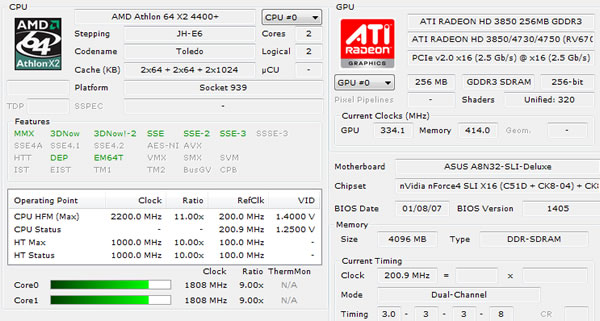
    am I missing something or is HWiNFO32 essentially doing the same thing that CPU-Z does, sans temperatures?
  5. midimench Newcomer, in training

    Motrin. Spybot is a pea shooter compared to Malwarebytes missle launcher. Try it out and see.
  6. teklord TechSpot Enthusiast

    HWiNFO32 looks like something a lot of people I know could use. GPU-z doesn't tell you the exact name of your GPU. Malwarebytes is awesome, highly recommended.
  7. motrin Newcomer, in training

    Malwarebytes is awesome i had a little mishap yesterday and decided to try it out!
    Tho i find it weird that Malwarebyte does not bring bad cookies to my attention and spy bot does..
  8. captaincranky TechSpot Addict

    Usually you need more than one program to find problems if you're "tempting the hand of fate", so to speak, in certain areas of the internet.

    While many people look down on Spybot nowadays, it also has a fine startup manager in the program. Not to mention that its "immunize" function, is equivalent to the "hosts file", which won't allow you to load known bad pages!

    CCleaner and "Advanced System Care", can help you out with cookies, temp files, MRUs and the like also.

    One last thing, the "Tea Timer" in Spybot is a resource hog, using on the order of 100MB of memory.
  9. motrin Newcomer, in training

    yea i bet your right. adding Malwarebytes to my arsenal won't hurt one bit.

    as of right now Tea timer is using 84MB. My question is it worth running? not that it gets in the way of my daily computer usage i just wonder.
  10. captaincranky TechSpot Addict

    I'm not really sure. It was more relevant during the IE6 era, when the browser was easier to penetrate with active X controls. It prevents (?) registry changes without your knowledge, such as would happen in a drive by download situation. Is it effective, not sure. I say, let your paranoia if not your conscience be your guide.

    I have multiple machines, and I do keep the Tea Timer running on my old XP internet box.
  11. Tanlic Newcomer, in training

    I've used Malwarebytes for a couple of years and it's done the job 100% (touch Wood) Only problem I had was I somehow turned on webste blocking and it seen nearly every paged I visited as a threat. Took me half a day to discover what had happened.