also @ TechSpot: Building a Thin Mini-ITX PC: Small and Silent Performance

HP X7000 Wi-Fi Touch Mouse has dedicated Facebook button

By

On November 15, 2011, 1:00 PM

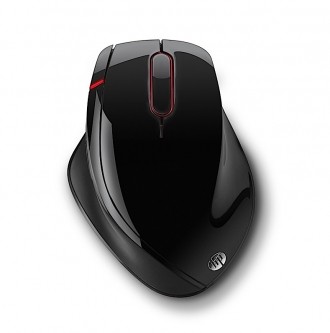
HP has quietly launched their X7000 Wi-Fi Touch Mouse, combining wireless connectivity and touch-sensitive technology into a slick looking pointer. The unique curved shape which arcs to the right, however, means left-handed users need not apply.

We looked at HP’s Wi-Fi Mobile Mouse earlier this year and despite a poor click zone on the primary left and right click buttons, the mouse worked flawlessly. HP has brought that same Wi-Fi technology to the X7000 which means that instead of pairing it with a Bluetooth adapter or a USB dongle, the mouse connects directly to your notebook’s wireless connection.

Additionally the X7000 features a touch-sensitive strip not found on the mobile mouse. This looks similar to the strip found on Microsoft’s Explorer Touch Mouse in that you can speed through web pages with the flick of your finger.

Other technical specifications include an adjustable laser sensor that tops out at 1600 CPI, six programmable buttons (one dedicated button to upload to Facebook), rubber side grip, Teflon feet and nine months of battery life. Do note that you will need a machine running Windows 7 to use the X7000.

Product dimensions of 4.86-inches (L) x 3.52-inches (W) x 1.83-inches (H) indicate this is a full-size desktop-style mouse, something to consider if you were hoping for a slimmer addition to your travel bag. Of course, the mouse could still be used with a traditional desktop, provided you have a wireless card installed or your motherboard supports this feature natively.

HP’s X7000 is available now for $59.99 through the company’s online store.

, , , , ,

Related Products from Product Finder

HP Wi-Fi Mobile Mouse

The HP Wi-Fi Mobile Mouse features traditional left and right mouse click buttons, as well as a clickable scroll wheel that tilts left and right. The center of the scroll wheel is translucent and glows white under certain circumstances. The wheel is a bit unique in that there are no "notches" felt when scrolling. The top deck is plastic with a glossy metallic blue and grey paint scheme. Grey accents encompass the mouse while the bottom half is wrapped with a grippy black rubber material.

9 Reviews

Microsoft Explorer Mouse

Read expert reviews, pros & cons, and product information about Microsoft Explorer Mouse. There are 44 reviews available so far.

29 Reviews

Microsoft Explorer Touch Mouse

Read expert reviews, pros & cons, and product information about Microsoft Explorer Touch Mouse. There are 13 reviews available so far.

8 Reviews

User Comments: 5

Got something to say? Post a comment
  1. OMG! Another average shiny mouse with a button for Facebook!

    Revolutionary!

  2. Why would anyone want a dedicated button for Facebook? O' why?

  3. Why would anyone want a dedicated button for Facebook? O' why?

    Because clicking a button on screen is just soooo much work?

  4. Why is it referred to as a unique shape? This mouse is an exaggerated copy of Logitech's VX Revolution which has been around for years.

  5. A button that instantly kills facebook if it should happen to appear? No...? Something else?

Recently commented stories

Post a new comment

Social Login & Guest Posting TechSpot Members
Login here or sign up for free,
it takes about a minute.
Get complete access to the TechSpot community. Join thousands of technology enthusiasts that contribute and share knowledge in our forum. Get a private inbox, upload your own photo gallery and more.
TechSpot on:

Subscribe to TechSpot

Get free exclusive content, learn about new features and breaking tech news.