Sign up for a new account or log in here:
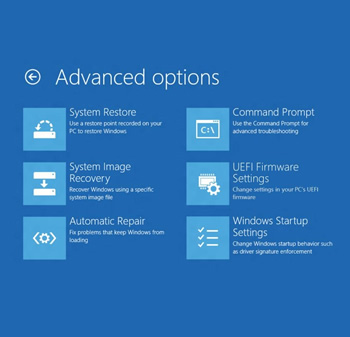
On Microsoft's MSDN blog, the company has revealed in great detail some of the changes we can expect to see to boot options inherent in Windows 8. Most notably, gone are the days of tapping F8 repeatedly. Also gone is the classic, keyboard-driven advanced options menu that has delivered us all to Safe Mode at some point or another and in its stead is a straight-forward, redesigned GUI.
Windows 8 boots fast. Really fast. On a modern system, it boots so quickly there simply isn't time for a keystroke interrupt -- such an interrupt would normally allow users to invoke a fail-safe menu by tapping F8. Of course, this is particularly worrisome for users who find themselves needing to boot into Safe Mode or may otherwise be experiencing issues.
Microsoft engineers decided to tackle this issue utilizing a multi-pronged solution. Their new approach gives users access to advanced startup options, but without all that rapid F8 tapping nonsense.
Firstly, if Windows 8 detects a serious error, it will interrupt the boot process automatically and display advanced boot options. This is not unlike what Windows does already. Secondly, the menu can be explicitly called upon (even automatically) via your computer's UEFI firmware. The third and final option is invoking the menu through Windows itself. One such method is done by booting into Windows 8 and holding shift while clicking restart. Alternatively, you can navigate the Start Menu options for it.
Along with changing the advanced boot menu's behavior, Microsoft has redesigned the menu entirely. These advanced options will now include everything a user might expect in a sensible GUI, including quick access to System Restore, System Image Recovery, command prompt and Windows 8 startup settings.
I must admit, when I first stumbled upon this article I was waiting for a "hold this key during boot" solution similar to Apple computers. Seems like an obvious enough fix, right? However, Microsoft chose not to do it this. As a result, it appears the only way to boot into Safe Mode and so on will be to either configure your UEFI firmware to display those advanced boot options or load up into Windows 8 first, tell Windows you want to reboot into the advanced boot options menu and restart the computer.
Personally, I find not being able to invoke the menu with a key during boot cumbersome. Microsoft makes a decent point though: they chose not to do this because Windows 8 will also appear on touchscreen devices that have no physical keyboard. What do you think?
If you saying that every task in windows 8 is harder then in windows 7 it show that you didnt take the time to learn it cos your totally wrong most of stuff you do in windows 7 can be done the same way if you know how.
If you could do things the same way in Windows 7, why would you need to know how?
I took time to learn it, thought "what the heck are M$ smoking", then restored the disk image of Windows 7 which (thank goodness) I made before downgrading upgrading. ![]()
Your totally right guess I didnt explain with the right word as usual,let me say it again the right way xD.
What I wanted to say is that most of the stuff in windows 7 can be done in windows 8 and that half of it is actually easier in windows 8 actually if you know how.By example if you want to access the most used tools in windows 8 just need to go in the left corner then do a rigth click and youll see a quick access list to the commonly used tools.
I do agree that the métro interface isnt for everyone should have gave us the choice to go classic menu or métro.
What I wanted to say is that most of the stuff in windows 7 can be done in windows 8 and that half of it is actually easier in windows 8 actually if you know how.By example if you want to access the most used tools in windows 8 just need to go in the left corner then do a rigth click and youll see a quick access list to the commonly used tools.
I do agree that the métro interface isnt for everyone should have gave us the choice to go classic menu or métro.
That's why I installed the Classic 8 menu from source forge. At least when I'm in desktop mode, I can still access things the old way. I agree though things are much faster and easier too in Windows 8.
Like anything else, it'll take time for people to get used to something new.
"Personally, I find not being able to invoke the menu with a key during boot cumbersome. Microsoft makes a decent point though: they chose not to do this because Windows 8 will also appear on touchscreen devices that have no physical keyboard. What do you think?"
Stinks. This is a consequence of One Size Fits All software. Would appear that MS is convenienced that the whole world is a cellphone or tablet. Someday - - but NOT in Win/8s life time.
Surely not - I "upgraded" and tried Windows 8 very thoroughly, it was slower and less productive, that's why I returned to Windows 7, and noticed an immediate improvement (I also use Open Suse and Snow Linux, Windows 7 is nearly as quick, Windows 8 just isn't :- that's all on the same hardware, multibooted). Now I keep Windows 8 in a Virtualbox, where it belongs!) ![]()
Need to easily select Safe *before* booting Windows
This is a step backwards, to have to first attempts and fail to boot Windows (with risks of malware integration, file system damage) before the system "knows" to offer boot options, or so you can set the next boot to boot into Safe Mode.
It should be easier to interrupt the boot process and select Safe or Safe Cmd, than "nuke the whole installation" or "refresh Windows and also blow away all my installed software".
Then again, MS doesn't "get" safety, or rather, compromises it for convenience. So we have a RAM tester that writes results of RAM defects to disk and then shows the log after booting Windows (all of which is done through the bad RAM). We also have a Safe Mode that runs whatever is integrated as "screen saver", e.g. while left unattended to do anti-malware scans.
I'm hoping the option to use the Windows 7 "legacy" boot menu will fix this - not because it's what I'm used to, or because I "don't want to learn anything new", but because I want access to non-destructive troubleshooting with a minimum of collateral damage.
1. We had an issue where once we got into a tablet's menus, we couldn't factory reset it. This was solved by plugging a USB mouse in. Apparently sometimes the recovery menu doesn't have the drivers installed. Awesome! Support couldn't figure it out for awhile, so it's a relatively obscure issue, although we're sure it happened with another device (we had an extra mouse plugged in, but it was a composite keyboard driver). We were shipped a replacement device in that instance.
2. Start menus, etc. ARE the way of the past. Just like everyone that's been using "classic desktop" and other "classic" features of Windows for years, you're behind. Linux, OS X, and Windows itself are moving beyond the ways of Windows NT/2000, and now XP too. In 5 years everyone will insist that Start menus are dumb and anyone that still has one on their computer is "running an old hunk of junk that's too archaic to even understand".
2.1 Honestly, I moved from XP to OS X because it was getting behind. When 7 came out, I loved it and went back. I press "Windows Key" then type out what I want, then press enter. The Start menu is just a waste of space that I accidentally click into and wander around for a while before realizing to go back and search what I want.
| Trending | Featured |
Get free exclusive content, learn about new features and breaking tech news.