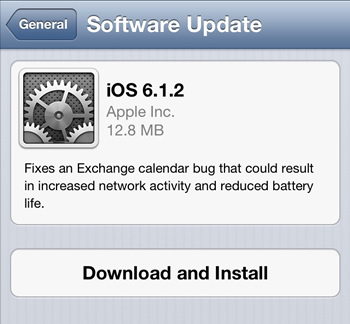
Apple has released yet another iOS update, iOS 6.1.2, to address a few lingering issues still haunting some iOS 6.1 and 6.1.1 users. The iterative update includes fixes an Exchange calendar bug, which in turn also solves the greatly decreased battery life experienced by some iPhone and iPad owners.
Apple's Software Update claims only a single improvement made by iOS 6.1.2: "Fixes an Exchange calendar bug that could result in increased network activity and reduced battery life."
While this is welcome news to many users, what's missing from this description is another rather major change: a fix for the passcode security flaw introduced in iOS 6.1. Although absent from the release notes, various news outlets are reporting 6.1.2 silently resolves the passcode bypass bug.
Once again, the release of iOS 6.1.2 was predicted by German blog iFun, who projected the update would reach iOS users "before 20 February".
With the release of iOS 6.1, Apple introduced broader 4G LTE compatibility to iPhone 5 owners. As a result of that software release though, iPhone 4S owners began to complain about degraded network and call performance. Some cellular network operators, like Vodfone UK, were actually forced to warn their iPhone customers not to upgrade to iOS 6.1 as a result of the bug.
In response, Apple pushed out iOS 6.1.1 about a week and a half ago. The update has seemingly quieted most of those complaints.
As always, it's recommended that jailbreakers wait before upgrading to the latest point release. Although evasi0n worked for 6.1.1 without a needed overhaul, the community has yet to confirm whether or not 6.1.2 will be as straight forward. A recent post by iClarified though suggests things are looking good for the evasi0n team, meaning a quick update to officially support iOS 6.2.1 is likely on the way.