You are using an out of date browser. It may not display this or other websites correctly.
You should upgrade or use an alternative browser.
You should upgrade or use an alternative browser.
F.E.A.R Performance ?
- Thread starter JimShady23
- Start date


SNGX1275
Posts: 10,615 +468
Ok finally got around to doing it.
At 1024x768 (didn't intend on doing this res, did it by accident):
Min FPS 23
Average FPS 49
Max FPS 109
1% below 25 FPS
44% between 25-40
55% above 40
Then I changed to 1280x960 (because my monitor won't do 1600x1200):
Min FPS 15
Average FPS 34
Max FPS 75
31% below 25 FPS
44% between 25-40
25% above 40
Core 2 Duo 6400 with a eVGA 7800GS CO
Ran with trillian, opera, mirc open although I'm not sure that makes a whole lot of difference. I had everything set to maximum before I entered the test, but I didn't see any 16x AA it only let me choose 4x.
At 1024x768 (didn't intend on doing this res, did it by accident):
Min FPS 23
Average FPS 49
Max FPS 109
1% below 25 FPS
44% between 25-40
55% above 40
Then I changed to 1280x960 (because my monitor won't do 1600x1200):
Min FPS 15
Average FPS 34
Max FPS 75
31% below 25 FPS
44% between 25-40
25% above 40
Core 2 Duo 6400 with a eVGA 7800GS CO
Ran with trillian, opera, mirc open although I'm not sure that makes a whole lot of difference. I had everything set to maximum before I entered the test, but I didn't see any 16x AA it only let me choose 4x.


MetalX
Posts: 1,364 +4
My Core 2 system had a worse videocard, and actually was worse for gaming than this oneJimShady23 said:Thought you just has a Core 2 Duo System that you sold ?
Anyways.....
You might get a few FPS better yourself if you got rid of the ancient 40 gb IDE
Jim, do you want me to redo the test, I overclocked my CPU to 2.4GHz stable and I upped to 2GB Dual Channel... it was 1GB Single Channel before...
EDIT: I posted the re-run of the test anyway, and for some reason I got almost the same as you did at 1224x768 (or is it 1024x768) DonNagual, even though your system owns mine and I ran it as 1280x960... BTW this is with an Athlon 64 3200+ @2.4GHz, 2GB Dual Channel DDR400, 7950GT, and with MAXIMUM for all settings.
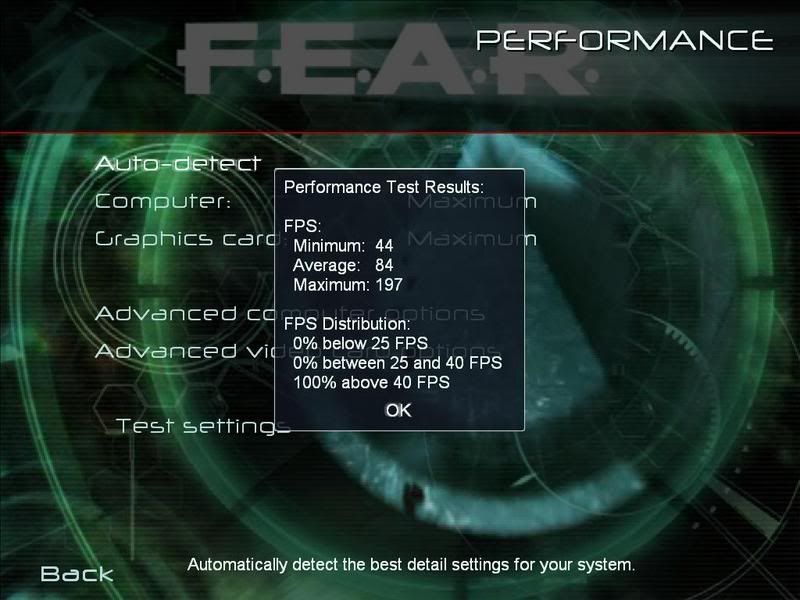
But why the hell can my system beat a Core 2?
MetalX
Posts: 1,364 +4
Yes, but it's not like you have a better CPU, your CPU kicks mine in the *** and then kicks it again in the face. And somehow I got the same average as you... when a 3200+ gets 132 FPS with a given hardware setup in Doom 3, and a Core 2 gets 190 in that same hardware setup... I just thought that was wierd that we got the same average. I thought I'd get at least 10 less than you.

DonNagual
Posts: 2,385 +5
Well, Doom is a much more CPU dependant game compared to F.E.A.R., so I'd expect to get much better results in that game compared to your system.
You probably did, as you ran the test at 1024x768 and I ran it at 1224x768 Another possibility is that test was run with F.E.A.R. version 1.2 (I am downloading 1.7 patch now to see if there is any difference).
I thought I'd get at least 10 less than you
You probably did, as you ran the test at 1024x768 and I ran it at 1224x768
Another possibility is that test was run with F.E.A.R. version 1.2 (I am downloading 1.7 patch now to see if there is any difference).
JimShady23
Posts: 360 +4
Alright
i need to adjust my system according to your resolutions and quality then.
I had my card set to play at 1680x1250 with 16xAA and 16xAF (note: you can not set the AA past 4x in the game, however you can set it to this in your nVIDIA control panal. If you set it to 16xAA in the control panal and tell it to not be application controlled, it will run your card at 16xAA.
But for fun I will run it at exactly what all you guys have done, 4xAA at 1024x768 and 1240x768
I will edit the results to this post.
Update,
Took the 16xAA down to 4x and the FPS didnt go up as much as I thought.
92 average FPS at 1220x768
95 average FPS at 1024x768
i need to adjust my system according to your resolutions and quality then.
I had my card set to play at 1680x1250 with 16xAA and 16xAF (note: you can not set the AA past 4x in the game, however you can set it to this in your nVIDIA control panal. If you set it to 16xAA in the control panal and tell it to not be application controlled, it will run your card at 16xAA.
But for fun I will run it at exactly what all you guys have done, 4xAA at 1024x768 and 1240x768
I will edit the results to this post.
Update,
Took the 16xAA down to 4x and the FPS didnt go up as much as I thought.
92 average FPS at 1220x768
95 average FPS at 1024x768

F.E.A.R Performance
Here is my F.E.A.R Stats
Everything is at maximum, Resolution 1680x1050
Minimum: 98
Average: 147
Maximum: 231
My rig
Intel Core 2 Duo E6600 @ 2750mhz
Corsair Dominator EPP 2x1024 CL3 @ 920mhz
WD Raptor X 10000RPM 16Mb Cache
XFX GeForce 8800GTX XXX (Overclocked by XFX and only card that is certified by Nvidia to do so )
Asus Striker Extreme
Thermal Take Toughpower 750W PSU
X-Fi Xtreme Music
Logitech G-15
MS/Razer Habu
Mirai 22" LCD
ThermalTake Kandalf LCS (its not in stock anywhere but its coming, im using Chieftec BD now)
Stock aircooling on CPU, RAM and GPU
Going to OC more when my LCS comes and the waterblock for GPU has arriwed =)
Total cost for the rig is about 6500 USD (im from sweden and 1 USD = 6.5 SEK)
JimShady23 said:I just really wanted know if there is anyone with a 7900 varient single or in SLI that can post their performance test results from F.E.A.R at max settings with the highest resolution possible.
I just really want to see how much my other componants are bottlenecking my 8800GTX. And if there is much of a differnce between a 7900 series card/s and the performance I am getting.
Please list what type of CPU and such you are using also
The attached pics shows my performance at 1680x1050 with everything else maxed out.
Thanks in advance.
Here is my F.E.A.R Stats
Everything is at maximum, Resolution 1680x1050
Minimum: 98
Average: 147
Maximum: 231
My rig
Intel Core 2 Duo E6600 @ 2750mhz
Corsair Dominator EPP 2x1024 CL3 @ 920mhz
WD Raptor X 10000RPM 16Mb Cache
XFX GeForce 8800GTX XXX (Overclocked by XFX and only card that is certified by Nvidia to do so
) Asus Striker Extreme
Thermal Take Toughpower 750W PSU
X-Fi Xtreme Music
Logitech G-15
MS/Razer Habu
Mirai 22" LCD
ThermalTake Kandalf LCS (its not in stock anywhere but its coming, im using Chieftec BD now)
Stock aircooling on CPU, RAM and GPU
Going to OC more when my LCS comes and the waterblock for GPU has arriwed =)
Total cost for the rig is about 6500 USD (im from sweden and 1 USD = 6.5 SEK)
well im rather pleased with the fps and the system It should be pretty interesting to see if there will be any changes in the fps after OC Im also planning to get one more 8800 and try SLI Its just so expensive! 1100 USD here in sweden =/
Now for a question. =)
What do you think is more important when choosing RAM?
Low latency or high clock speed
It should be pretty interesting to see if there will be any changes in the fps after OC Im also planning to get one more 8800 and try SLI Its just so expensive! 1100 USD here in sweden =/ Now for a question. =)
What do you think is more important when choosing RAM?
Low latency or high clock speed
And that aint good or what? My 2 options where
Corsair Dominator TWIN2X6400C3DF 2048MB, DDR2,2x1GB(KIT),DHX,E.P.P, CL3-4-3-9-2T
800 MHz ( PC2-6400 )
Price: 760 USD
Corsair Dominator TWIN2X8888C4DF 2048MB, DDR2,2x1GB(KIT),DHX,E.P.P, CL4-4-4-12-2T
1111 MHz ( PC2-8888 )
Price: 950 USD
Do you think that I should have gone with the 1111mhz CL4 and pay 200USD more or did I do the right thing by going with the 800mgz CL3 for 200USD less?
Im going to buy a ThermalTake Kandalf LCS with built in watercooling system, do you know if that is any good or do you know some good watercooling systems?
My 2 options whereCorsair Dominator TWIN2X6400C3DF 2048MB, DDR2,2x1GB(KIT),DHX,E.P.P, CL3-4-3-9-2T
800 MHz ( PC2-6400 )
Price: 760 USD
Corsair Dominator TWIN2X8888C4DF 2048MB, DDR2,2x1GB(KIT),DHX,E.P.P, CL4-4-4-12-2T
1111 MHz ( PC2-8888 )
Price: 950 USD
Do you think that I should have gone with the 1111mhz CL4 and pay 200USD more or did I do the right thing by going with the 800mgz CL3 for 200USD less?
Im going to buy a ThermalTake Kandalf LCS with built in watercooling system, do you know if that is any good or do you know some good watercooling systems?
DonNagual
Posts: 2,385 +5
I don't know if there is an easy answer to that. I imagine different people would give you different advice. That is a pretty big price difference in the ram. I probably would have purchased the same ram you did. In fact, I pretty much did (although mine is not the dominator series with the heat spreader.
I admit though that I am just a casual overclocker, nothing extreme. I know nothing about water cooling so can't advise you there.
I admit though that I am just a casual overclocker, nothing extreme. I know nothing about water cooling so can't advise you there.
JimShady23
Posts: 360 +4
Cool Sytem
Yeah that is nuts, especially if you are going to get another 8800GTX....
Since I am not a overclocker I will stick with as tight of latency as possible with my memory.
I just ordered my new parts which consist of these here:
http://www.newegg.com/Product/Product.asp?Item=N82E16819115003
http://www.newegg.com/Product/Product.asp?Item=N82E16813131028
http://www.newegg.com/Product/Product.asp?Item=N82E16820227139
The memory has a CL4-4-4-15 1T (3 above your Corsair but the OCZ runs at 1T out of the box) Would probably equal out IDK
But thats the most I can afford.....Im hoping to get a few 100 for my X2 4200 montherboard and RAM to make up for the $800 i just spent.
Yeah that is nuts, especially if you are going to get another 8800GTX....
Since I am not a overclocker I will stick with as tight of latency as possible with my memory.
I just ordered my new parts which consist of these here:
http://www.newegg.com/Product/Product.asp?Item=N82E16819115003
http://www.newegg.com/Product/Product.asp?Item=N82E16813131028
http://www.newegg.com/Product/Product.asp?Item=N82E16820227139
The memory has a CL4-4-4-15 1T (3 above your Corsair but the OCZ runs at 1T out of the box) Would probably equal out IDK
But thats the most I can afford.....Im hoping to get a few 100 for my X2 4200 montherboard and RAM to make up for the $800 i just spent.
JimShady23
Posts: 360 +4
Dude !!!
We need to set you up with a connection here or somthing cause you getting rippped LoL......
Your machine if you baught it here in the states would be like 1/2 the price you said.....
Get friendly with somone in the US and make them your midddle man for computer parts....(they buy it here in the US and ship it to you)
We need to set you up with a connection here or somthing cause you getting rippped LoL......
Your machine if you baught it here in the states would be like 1/2 the price you said.....
Get friendly with somone in the US and make them your midddle man for computer parts....(they buy it here in the US and ship it to you)
JimShady23
Posts: 360 +4
hipgrip ?
Is the Asus Striker Extreme really worth it ? price to performance ratio or is it just a over rated marketing ploy ?
And tweakboy, the whole point of this thread was to see what others where getting on their performance test.
I wanted to see how close the 7900 series was to my 8800 card..... I know that my cpu and memory are a bottleneck with my 8800, I just wanted to see how big they really where...... And then hipgrip came in with his super machine and smacked me around....
There isnt a real contest here....Just a way for myself and others to see how their hardware fares against others.....
Is the Asus Striker Extreme really worth it ? price to performance ratio or is it just a over rated marketing ploy ?
And tweakboy, the whole point of this thread was to see what others where getting on their performance test.
I wanted to see how close the 7900 series was to my 8800 card..... I know that my cpu and memory are a bottleneck with my 8800, I just wanted to see how big they really where...... And then hipgrip came in with his super machine and smacked me around....
There isnt a real contest here....Just a way for myself and others to see how their hardware fares against others.....
I run a p4 3.06 ghz, 1 mb ram, 512 ati radeon x1300 catalyst video card.
F.E.A.R runs great on it but I think my fps are below 25 and the fps distribution is a bit high. does anyone know how to remedy this
I think i'm running the game at 1024x768x32 res
like I said it works fine and there are very minimal glitches but I feel like I could be running it better.
any help with in game settings and ati catalyst control center would be helpful
thanks
i meant 1 gb of ram sorry
is anyone here ?
F.E.A.R runs great on it but I think my fps are below 25 and the fps distribution is a bit high. does anyone know how to remedy this
I think i'm running the game at 1024x768x32 res
like I said it works fine and there are very minimal glitches but I feel like I could be running it better.
any help with in game settings and ati catalyst control center would be helpful
thanks
i meant 1 gb of ram sorry
is anyone here ?
JimShady23
Posts: 360 +4
Similar threads

- Replies
- 1
- Views
- 307

- Replies
- 3
- Views
- 21


-
TechSpot is dedicated to computer enthusiasts and power users.
Ask a question and give support.
Join the community here, it only takes a minute.