also @ TechSpot: Leaked next generation iPhone casing photos validate multiple rumors

TechSpot

[Solved] Gen:Variant.Kazy.894 ( highjackthis included)

Discussion in 'Virus and Malware Removal' started by Michigan313, Nov 2, 2010.

Thread Status:
Not open for further replies.
  1. Michigan313 Newcomer, in training

    [2010/10/07 17:58:21 | 000,208,966 | ---- | C] () -- C:\Windows\System32\WFP.TMF
    [2010/10/07 17:58:19 | 000,092,918 | ---- | C] () -- C:\Windows\System32\slmgr.vbs
    [2010/10/07 17:57:55 | 000,009,212 | ---- | C] () -- C:\Windows\System32\RacUR.xml
    [2010/10/06 15:39:34 | 002,501,921 | ---- | C] () -- C:\Windows\System32\wlan.tmf
    [2010/10/04 20:33:53 | 000,022,215 | ---- | C] () -- C:\Users\jonathan\Documents\l_ef889272d8804d32bee0c0eb6492600c.jpg
    [2010/10/03 14:26:08 | 000,000,105 | ---- | C] () -- C:\ProgramData\{d36dd326-7280-11d8-97c8-000129760cbe}.log
    [2010/10/03 14:26:00 | 000,000,032 | ---- | C] () -- C:\ProgramData\{051B9612-4D82-42AC-8C63-CD2DCEDC1CB3}.log
    [2010/10/03 14:25:39 | 000,000,032 | ---- | C] () -- C:\ProgramData\{9867824A-C86D-4A83-8F3C-E7A86BE0AFD3}.log
    [2010/10/03 14:24:41 | 000,000,032 | ---- | C] () -- C:\ProgramData\{23F3DA62-2D9E-4A69-B8D5-BE8E9E148092}.log
    [2010/10/03 14:23:31 | 000,000,032 | ---- | C] () -- C:\ProgramData\{4FC670EB-5F02-4B07-90DB-022B86BFEFD0}.log
    [2010/10/03 14:22:25 | 000,000,284 | ---- | C] () -- C:\ProgramData\hpqp.ini
    [2010/08/25 18:52:00 | 000,208,896 | ---- | C] () -- C:\Windows\System32\iglhsip32.dll
    [2010/08/25 18:52:00 | 000,143,360 | ---- | C] () -- C:\Windows\System32\iglhcp32.dll
    [2009/10/07 04:46:36 | 000,025,752 | ---- | C] () -- C:\Windows\System32\drivers\LVPr2Mon.sys
    [2009/10/07 04:23:08 | 000,013,584 | ---- | C] () -- C:\Windows\System32\drivers\iKeyLFT2.dll
    [2008/10/23 02:44:13 | 000,000,109 | ---- | C] () -- C:\ProgramData\{1FBF6C24-C1FD-4101-A42B-0C564F9E8E79}.log
    [2008/10/23 02:38:23 | 000,000,110 | ---- | C] () -- C:\ProgramData\{CB099890-1D5F-11D5-9EA9-0050BAE317E1}.log
    [2008/10/23 02:36:27 | 000,000,105 | ---- | C] () -- C:\ProgramData\{40BF1E83-20EB-11D8-97C5-0009C5020658}.log
    [2008/10/23 02:35:06 | 000,000,107 | ---- | C] () -- C:\ProgramData\{C59C179C-668D-49A9-B6EA-0121CCFC1243}.log
    [2008/07/06 16:29:46 | 000,147,456 | ---- | C] () -- C:\Windows\System32\igfxCoIn_v1518.dll
    [2008/06/29 10:52:14 | 000,004,608 | ---- | C] () -- C:\Windows\System32\HdmiCoin.dll
    [2006/11/02 03:40:29 | 000,013,750 | ---- | C] () -- C:\Windows\System32\pacerprf.ini
    [2006/03/09 05:58:00 | 001,060,424 | ---- | C] () -- C:\Windows\System32\WdfCoInstaller01000.dll

    ========== Custom Scans ==========


    < %SYSTEMDRIVE%\*.* >
    [2010/11/03 19:21:41 | 000,015,388 | ---- | M] () -- C:\aaw7boot.log
    [2006/09/18 17:43:36 | 000,000,024 | ---- | M] () -- C:\autoexec.bat
    [2009/04/11 02:36:36 | 000,333,257 | RHS- | M] () -- C:\bootmgr
    [2010/11/03 19:08:08 | 000,029,295 | ---- | M] () -- C:\ComboFix.txt
    [2006/09/18 17:43:37 | 000,000,010 | ---- | M] () -- C:\config.sys
    [2007/11/07 08:00:40 | 000,017,734 | ---- | M] () -- C:\eula.1028.txt
    [2007/11/07 08:00:40 | 000,017,734 | ---- | M] () -- C:\eula.1031.txt
    [2007/11/07 08:00:40 | 000,010,134 | ---- | M] () -- C:\eula.1033.txt
    [2007/11/07 08:00:40 | 000,017,734 | ---- | M] () -- C:\eula.1036.txt
    [2007/11/07 08:00:40 | 000,017,734 | ---- | M] () -- C:\eula.1040.txt
    [2007/11/07 08:00:40 | 000,000,118 | ---- | M] () -- C:\eula.1041.txt
    [2007/11/07 08:00:40 | 000,017,734 | ---- | M] () -- C:\eula.1042.txt
    [2007/11/07 08:00:40 | 000,017,734 | ---- | M] () -- C:\eula.2052.txt
    [2007/11/07 08:00:40 | 000,017,734 | ---- | M] () -- C:\eula.3082.txt
    [2007/11/07 08:00:40 | 000,001,110 | ---- | M] () -- C:\globdata.ini
    [2007/11/07 08:00:40 | 000,000,843 | ---- | M] () -- C:\install.ini
    [2007/11/07 08:03:18 | 000,076,304 | ---- | M] (Microsoft Corporation) -- C:\install.res.1028.dll
    [2007/11/07 08:03:18 | 000,096,272 | ---- | M] (Microsoft Corporation) -- C:\install.res.1031.dll
    [2007/11/07 08:03:18 | 000,091,152 | ---- | M] (Microsoft Corporation) -- C:\install.res.1033.dll
    [2007/11/07 08:03:18 | 000,097,296 | ---- | M] (Microsoft Corporation) -- C:\install.res.1036.dll
    [2007/11/07 08:03:18 | 000,095,248 | ---- | M] (Microsoft Corporation) -- C:\install.res.1040.dll
    [2007/11/07 08:03:18 | 000,081,424 | ---- | M] (Microsoft Corporation) -- C:\install.res.1041.dll
    [2007/11/07 08:03:18 | 000,079,888 | ---- | M] (Microsoft Corporation) -- C:\install.res.1042.dll
    [2007/11/07 08:03:18 | 000,075,792 | ---- | M] (Microsoft Corporation) -- C:\install.res.2052.dll
    [2007/11/07 08:03:18 | 000,096,272 | ---- | M] (Microsoft Corporation) -- C:\install.res.3082.dll
    [2010/11/02 19:29:57 | 000,000,000 | RHS- | M] () -- C:\IO.SYS
    [2010/11/02 19:29:57 | 000,000,000 | RHS- | M] () -- C:\MSDOS.SYS
    [2010/11/03 19:21:41 | 3462,864,896 | -HS- | M] () -- C:\pagefile.sys
    [2010/10/14 17:37:18 | 000,000,184 | ---- | M] () -- C:\setup.log
    [2007/11/07 08:00:40 | 000,005,686 | ---- | M] () -- C:\vcredist.bmp
    [2007/11/07 08:09:22 | 001,442,522 | ---- | M] () -- C:\VC_RED.cab
    [2007/11/07 08:12:28 | 000,232,960 | ---- | M] () -- C:\VC_RED.MSI

    < %systemroot%\Fonts\*.com >
    [2006/11/02 08:35:34 | 000,026,040 | ---- | M] () -- C:\Windows\Fonts\GlobalMonospace.CompositeFont
    [2006/11/02 08:35:34 | 000,026,489 | ---- | M] () -- C:\Windows\Fonts\GlobalSansSerif.CompositeFont
    [2006/11/02 08:35:34 | 000,029,779 | ---- | M] () -- C:\Windows\Fonts\GlobalSerif.CompositeFont
    [2010/10/08 20:03:44 | 000,037,665 | ---- | M] () -- C:\Windows\Fonts\GlobalUserInterface.CompositeFont

    < %systemroot%\Fonts\*.dll >

    < %systemroot%\Fonts\*.ini >
    [2006/09/18 17:37:34 | 000,000,065 | -H-- | M] () -- C:\Windows\Fonts\desktop.ini

    < %systemroot%\Fonts\*.ini2 >

    < %systemroot%\Fonts\*.exe >

    < %systemroot%\system32\spool\prtprocs\w32x86\*.* >
    [2006/10/26 22:56:12 | 000,033,104 | ---- | M] (Microsoft Corporation) -- C:\Windows\System32\spool\prtprocs\w32x86\msonpppr.dll

    < %systemroot%\REPAIR\*.bak1 >

    < %systemroot%\REPAIR\*.ini >

    < %systemroot%\system32\*.jpg >

    < %systemroot%\*.jpg >

    < %systemroot%\*.png >

    < %systemroot%\*.scr >

    < %systemroot%\*._sy >

    < %APPDATA%\Adobe\Update\*.* >

    < %ALLUSERSPROFILE%\Favorites\*.* >

    < %APPDATA%\Microsoft\*.* >

    < %PROGRAMFILES%\*.* >
    [2008/01/20 22:57:01 | 000,000,174 | -HS- | M] () -- C:\Program Files\desktop.ini

    < %APPDATA%\Update\*.* >

    < %systemroot%\*. /mp /s >

    < %systemroot%\System32\config\*.sav >
    [2008/01/20 23:31:11 | 015,716,352 | ---- | M] () -- C:\Windows\System32\config\COMPONENTS.SAV
    [2008/01/20 23:31:01 | 000,102,400 | ---- | M] () -- C:\Windows\System32\config\DEFAULT.SAV
    [2008/01/20 23:31:12 | 000,020,480 | ---- | M] () -- C:\Windows\System32\config\SECURITY.SAV
    [2006/11/02 06:34:08 | 010,133,504 | ---- | M] () -- C:\Windows\System32\config\SOFTWARE.SAV
    [2006/11/02 06:34:08 | 001,826,816 | ---- | M] () -- C:\Windows\System32\config\SYSTEM.SAV

    < %PROGRAMFILES%\bak. /s >

    < %systemroot%\system32\bak. /s >

    < %ALLUSERSPROFILE%\Start Menu\*.lnk /x >

    < %systemroot%\system32\config\systemprofile\*.dat /x >

    < %systemroot%\*.config >

    < %systemroot%\system32\*.db >

    < %APPDATA%\Microsoft\Internet Explorer\Quick Launch\*.lnk /x >
    [2010/10/30 14:18:15 | 000,000,286 | -HS- | M] () -- C:\Users\jonathan\AppData\Roaming\Microsoft\Internet Explorer\Quick Launch\desktop.ini

    < %USERPROFILE%\Desktop\*.exe >
    [2010/11/03 01:33:06 | 003,899,533 | R--- | M] () -- C:\Users\jonathan\Desktop\ComboFix.exe
    [2010/11/03 19:18:42 | 000,576,000 | ---- | M] (OldTimer Tools) -- C:\Users\jonathan\Desktop\OTL.exe

    < %PROGRAMFILES%\Common Files\*.* >

    < %systemroot%\*.src >

    < %systemroot%\install\*.* >

    < %systemroot%\system32\DLL\*.* >

    < %systemroot%\system32\HelpFiles\*.* >
  2. Michigan313 Newcomer, in training

    < %systemroot%\system32\rundll\*.* >

    < %systemroot%\winn32\*.* >

    < %systemroot%\Java\*.* >

    < %systemroot%\system32\test\*.* >

    < %systemroot%\system32\Rundll32\*.* >

    < %systemroot%\AppPatch\Custom\*.* >

    < %APPDATA%\Roaming\Microsoft\Windows\Recent\*.lnk /x >

    < %PROGRAMFILES%\PC-Doctor\Downloads\*.* >

    < %PROGRAMFILES%\Internet Explorer\*.tmp >

    < %PROGRAMFILES%\Internet Explorer\*.dat >

    < %USERPROFILE%\My Documents\*.exe >

    < %USERPROFILE%\*.exe >

    < %systemroot%\ADDINS\*.* >

    < %systemroot%\assembly\*.bak2 >

    < %systemroot%\Config\*.* >

    < %systemroot%\REPAIR\*.bak2 >

    < %systemroot%\SECURITY\Database\*.sdb /x >
    [2010/10/08 20:21:19 | 000,008,192 | ---- | M] () -- C:\Windows\security\database\edb.chk
    [2010/10/08 20:20:49 | 001,048,576 | ---- | M] () -- C:\Windows\security\database\edb.log
    [2010/10/08 20:20:49 | 001,048,576 | ---- | M] () -- C:\Windows\security\database\edbres00001.jrs
    [2010/10/08 20:20:49 | 001,048,576 | ---- | M] () -- C:\Windows\security\database\edbres00002.jrs
    [2010/10/08 20:20:49 | 001,048,576 | ---- | M] () -- C:\Windows\security\database\edbtmp.log
    [2010/10/08 20:20:49 | 001,056,768 | ---- | M] () -- C:\Windows\security\database\tmp.edb

    < %systemroot%\SYSTEM\*.bak2 >

    < %systemroot%\Web\*.bak2 >

    < %systemroot%\Driver Cache\*.* >

    < %PROGRAMFILES%\Mozilla Firefox\0*.exe >

    < %ProgramFiles%\Microsoft Common\*.* >

    < %ProgramFiles%\TinyProxy. >

    < %USERPROFILE%\Favorites\*.url /x >
    [2010/10/03 16:12:53 | 000,000,402 | -HS- | M] () -- C:\Users\jonathan\Favorites\desktop.ini

    < %systemroot%\system32\*.bk >

    < %systemroot%\*.te >

    < %systemroot%\system32\system32\*.* >

    < %ALLUSERSPROFILE%\*.dat /x >
    [2010/11/03 19:23:31 | 000,000,284 | ---- | M] () -- C:\ProgramData\hpqp.ini
    [2010/10/03 14:26:00 | 000,000,032 | ---- | M] () -- C:\ProgramData\{051B9612-4D82-42AC-8C63-CD2DCEDC1CB3}.log
    [2008/10/23 02:44:34 | 000,000,109 | ---- | M] () -- C:\ProgramData\{1FBF6C24-C1FD-4101-A42B-0C564F9E8E79}.log
    [2010/10/03 14:24:41 | 000,000,032 | ---- | M] () -- C:\ProgramData\{23F3DA62-2D9E-4A69-B8D5-BE8E9E148092}.log
    [2008/10/23 02:38:11 | 000,000,105 | ---- | M] () -- C:\ProgramData\{40BF1E83-20EB-11D8-97C5-0009C5020658}.log
    [2010/10/03 14:23:31 | 000,000,032 | ---- | M] () -- C:\ProgramData\{4FC670EB-5F02-4B07-90DB-022B86BFEFD0}.log
    [2010/10/03 14:25:39 | 000,000,032 | ---- | M] () -- C:\ProgramData\{9867824A-C86D-4A83-8F3C-E7A86BE0AFD3}.log
    [2008/10/23 02:36:16 | 000,000,107 | ---- | M] () -- C:\ProgramData\{C59C179C-668D-49A9-B6EA-0121CCFC1243}.log
    [2008/10/23 02:44:03 | 000,000,110 | ---- | M] () -- C:\ProgramData\{CB099890-1D5F-11D5-9EA9-0050BAE317E1}.log
    [2010/10/03 14:26:09 | 000,000,105 | ---- | M] () -- C:\ProgramData\{d36dd326-7280-11d8-97c8-000129760cbe}.log

    < %systemroot%\system32\drivers\*.rmv >

    < dir /b "%systemroot%\system32\*.exe" | find /i " " /c >

    < dir /b "%systemroot%\*.exe" | find /i " " /c >

    < %PROGRAMFILES%\Microsoft\*.* >

    < %systemroot%\System32\Wbem\proquota.exe >

    < %PROGRAMFILES%\Mozilla Firefox\*.dat >

    < %USERPROFILE%\Cookies\*.txt /x >

    < %SystemRoot%\system32\fonts\*.* >

    < %systemroot%\system32\winlog\*.* >

    < %systemroot%\system32\Language\*.* >

    < %systemroot%\system32\Settings\*.* >

    < %systemroot%\system32\*.quo >

    < %SYSTEMROOT%\AppPatch\*.exe >

    < %SYSTEMROOT%\inf\*.exe >

    < %SYSTEMROOT%\Installer\*.exe >

    < %systemroot%\system32\config\*.bak2 >

    < %systemroot%\system32\Computers\*.* >

    < %SystemRoot%\system32\Sound\*.* >

    < %SystemRoot%\system32\SpecialImg\*.* >

    < %SystemRoot%\system32\code\*.* >

    < %SystemRoot%\system32\draft\*.* >

    < %SystemRoot%\system32\MSSSys\*.* >

    < %ProgramFiles%\Javascript\*.* >

    < %systemroot%\pchealth\helpctr\System\*.exe /s >

    < %systemroot%\Web\*.exe >

    < %systemroot%\system32\msn\*.* >

    < %systemroot%\system32\*.tro >

    < %AppData%\Microsoft\Installer\msupdates\*.* >

    < %ProgramFiles%\Messenger\*.* >

    < %systemroot%\system32\systhem32\*.* >

    < %systemroot%\system\*.exe >

    < HKEY_LOCAL_MACHINE\SOFTWARE\Policies\Microsoft\Windows\WindowsUpdate\AU >

    < HKEY_LOCAL_MACHINE\SOFTWARE\Microsoft\Windows\CurrentVersion\WindowsUpdate\ Auto Update\Results\Install|LastSuccessTime /rs >


    ========== Alternate Data Streams ==========

    @Alternate Data Stream - 99 bytes -> C:\ProgramData\Temp:40751495
    @Alternate Data Stream - 98 bytes -> C:\ProgramData\Temp:E37F3E40
    @Alternate Data Stream - 141 bytes -> C:\ProgramData\Temp:4D5855E9
    @Alternate Data Stream - 103 bytes -> C:\ProgramData\Temp:F43628AB

    < End of report >
  3. Broni Malware Annihilator

    We need to remove old Java version and its remnants...

    Download JavaRa to your desktop and unzip it to its own folder
    • Run JavaRa.exe (Vista users! Right click on JavaRa.exe, click Run As Administrator), pick the language of your choice and click Select. Then click Remove Older Versions.
    • Accept any prompts.

    =======================================================================

    Run OTL
    • Under the Custom Scans/Fixes box at the bottom, paste in the following

      Code:
      :OTL
      O28 - HKLM ShellExecuteHooks: {AEB6717E-7E19-11d0-97EE-00C04FD91972} - Reg Error: Key error. File not found
      @Alternate Data Stream - 99 bytes -> C:\ProgramData\Temp:40751495
      @Alternate Data Stream - 98 bytes -> C:\ProgramData\Temp:E37F3E40
      @Alternate Data Stream - 141 bytes -> C:\ProgramData\Temp:4D5855E9
      @Alternate Data Stream - 103 bytes -> C:\ProgramData\Temp:F43628AB
      
      :Services
      
      :Reg
      
      :Files
      
      :Commands
      [purity]
      [emptytemp]
      [emptyflash]
      [Reboot]
      
    • Then click the Run Fix button at the top
    • Let the program run unhindered, reboot the PC when it is done
    • You will get a log that shows the results of the fix. Please post it.

    =====================================================================

    Last scans....

    1. Download Security Check from HERE, and save it to your Desktop.
    • Double-click SecurityCheck.exe
    • Follow the onscreen instructions inside of the black box.
    • A Notepad document should open automatically called checkup.txt; please post the contents of that document.

      NOTE SecurityCheck may produce some false warning(s), so leave the results reading to me.


    2. Download Temp File Cleaner (TFC)
    • Double click on TFC.exe to run the program.
    • Click on Start button to begin cleaning process.
    • TFC will close all running programs, and it may ask you to restart computer.


    3. Please run a free online scan with the ESET Online Scanner

    • Disable your antivirus program
    • Tick the box next to YES, I accept the Terms of Use
    • Click Start
    • IMPORTANT! UN-check Remove found threats
    • Accept any security warnings from your browser.
    • Check Scan archives
    • Click Start
    • ESET will then download updates for itself, install itself, and begin scanning your computer. Please be patient as this can take some time.
    • When the scan completes, push List of found threats
    • Click on Export to text file , and save the file to your desktop using a unique name, such as ESETScan. Include the contents of this report in your next reply.
    • NOTE. If Eset won't find any threats, it won't produce any log.
  4. Michigan313 Newcomer, in training

    All processes killed
    ========== OTL ==========
    Registry value HKEY_LOCAL_MACHINE\SOFTWARE\Microsoft\Windows\CurrentVersion\Explorer\ShellExecuteHooks\\{AEB6717E-7E19-11d0-97EE-00C04FD91972} deleted successfully.
    Registry key HKEY_LOCAL_MACHINE\SOFTWARE\Classes\CLSID\{AEB6717E-7E19-11d0-97EE-00C04FD91972}\ not found.
    ADS C:\ProgramData\Temp:40751495 deleted successfully.
    ADS C:\ProgramData\Temp:E37F3E40 deleted successfully.
    ADS C:\ProgramData\Temp:4D5855E9 deleted successfully.
    ADS C:\ProgramData\Temp:F43628AB deleted successfully.
    ========== SERVICES/DRIVERS ==========
    ========== REGISTRY ==========
    ========== FILES ==========
    ========== COMMANDS ==========

    [EMPTYTEMP]

    User: All Users

    User: Default
    ->Temp folder emptied: 0 bytes
    ->Temporary Internet Files folder emptied: 0 bytes
    ->Flash cache emptied: 0 bytes

    User: Default User
    ->Temp folder emptied: 0 bytes
    ->Temporary Internet Files folder emptied: 0 bytes
    ->Flash cache emptied: 0 bytes

    User: john
    ->Temp folder emptied: 39581 bytes
    ->Temporary Internet Files folder emptied: 33170 bytes
    ->FireFox cache emptied: 4526318 bytes
    ->Flash cache emptied: 456 bytes

    User: jonathan
    ->Temp folder emptied: 415074 bytes
    ->Temporary Internet Files folder emptied: 2221773 bytes
    ->Java cache emptied: 7588391 bytes
    ->FireFox cache emptied: 86209507 bytes
    ->Flash cache emptied: 668 bytes

    User: Public
    ->Temp folder emptied: 0 bytes

    %systemdrive% .tmp files removed: 0 bytes
    %systemroot% .tmp files removed: 0 bytes
    %systemroot%\System32 .tmp files removed: 0 bytes
    %systemroot%\System32\drivers .tmp files removed: 0 bytes
    Windows Temp folder emptied: 109080 bytes
    %systemroot%\system32\config\systemprofile\Local Settings\Temporary Internet Files folder emptied: 0 bytes
    RecycleBin emptied: 0 bytes

    Total Files Cleaned = 96.00 mb


    [EMPTYFLASH]

    User: All Users

    User: Default
    ->Flash cache emptied: 0 bytes

    User: Default User
    ->Flash cache emptied: 0 bytes

    User: john
    ->Flash cache emptied: 0 bytes

    User: jonathan
    ->Flash cache emptied: 0 bytes

    User: Public

    Total Flash Files Cleaned = 0.00 mb


    OTL by OldTimer - Version 3.2.17.2 log created on 11032010_202023

    Files\Folders moved on Reboot...

    Registry entries deleted on Reboot...


    working on the other two now
  5. Michigan313 Newcomer, in training

    Results of screen317's Security Check version 0.99.5
    Windows Vista Service Pack 2 (UAC is enabled)
    Internet Explorer 8
    ``````````````````````````````
    Antivirus/Firewall Check:

    Windows Firewall Disabled!
    WMI entry may not exist for antivirus; attempting automatic update.
    ```````````````````````````````
    Anti-malware/Other Utilities Check:

    Ad-Aware
    Malwarebytes' Anti-Malware
    HijackThis 2.0.2
    CCleaner
    Java(TM) 6 Update 22
    Out of date Java installed!
    Adobe Flash Player 10.1.85.3
    Adobe Reader 9
    Out of date Adobe Reader installed!
    Mozilla Firefox (3.6.12) Firefox Out of Date!
    ````````````````````````````````
    Process Check:
    objlist.exe by Laurent

    Norton ccSvcHst.exe
    Ad-Aware AAWService.exe
    Ad-Aware AAWTray.exe
    Spybot Teatimer.exe is disabled!
    ````````````````````````````````
    DNS Vulnerability Check:


    ``````````End of Log````````````
  6. Broni Malware Annihilator

    Update Adobe Reader

    You can download it from http://www.adobe.com/products/acrobat/readstep2.html
    After installing the latest Adobe Reader, uninstall all previous versions.
    Note. If you already have Adobe Photoshop® Album Starter Edition installed or do not wish to have it installed UNcheck the box which says Also Download Adobe Photoshop® Album Starter Edition.

    Alternatively, you can uninstall Adobe Reader (33.5 MB), download and install Foxit PDF Reader(3.5MB) from HERE.
    It's a much smaller file to download and uses a lot less resources than Adobe Reader.
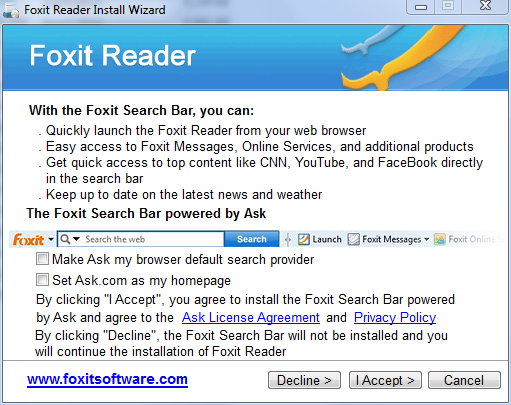
    Note: When installing FoxitReader, make sure to UN-check any pre-checked toolbar, or other garbage.
    On this page:
    [IMG]

    make sure, you have both boxes UN-checked AND (important!) click on Decline button
  7. Michigan313 Newcomer, in training

    C:\Qoobox\Quarantine\C\Windows\System32\syncstream.dll.vir a variant of Win32/Kryptik.HLE trojan
  8. Broni Malware Annihilator

    Your computer is clean [IMG]

    1. We need to reset system restore to prevent your computer from being accidentally reinfected by using some old restore point(s). We'll create fresh, clean restore point, using following OTL script:

    Run OTL

    • Under the Custom Scans/Fixes box at the bottom, paste in the following:

    Code:
    :OTL
    :Commands
    [purity]
    [emptytemp]
    [EMPTYFLASH]
    [CLEARALLRESTOREPOINTS]
    [Reboot]
    • Then click the Run Fix button at the top
    • Let the program run unhindered, reboot the PC when it is done
    • Post resulting log.

    2. Now, we'll remove all tools, we used during our cleaning process

    Clean up with OTL:

    • Double-click OTL.exe to start the program.
    • Close all other programs apart from OTL as this step will require a reboot
    • On the OTL main screen, press the CLEANUP button
    • Say Yes to the prompt and then allow the program to reboot your computer.

    If you still have any tools or logs leftover on your computer you can go ahead and delete those off of your computer now.

    3. Make sure, Windows Updates are current.

    4. If any Trojan was listed among your infection(s), make sure, you change all of your on-line important passwords (bank account(s), secured web sites, etc.) immediately!

    5. Download, and install WOT (Web OF Trust): http://www.mywot.com/. It'll warn you (in most cases) about dangerous web sites.

    6. Run Malwarebytes "Quick scan" once in a while to assure safety of your computer.

    7. Run Temporary File Cleaner (TFC) weekly.

    8. Download and install Secunia Personal Software Inspector (PSI): http://secunia.com/vulnerability_scanning/personal/. The Secunia PSI is a FREE security tool designed to detect vulnerable and out-dated programs and plug-ins which expose your PC to attacks. Run it weekly.

    9. (optional) If you want to keep all your programs up to date, download and install FileHippo Update Checker.
    The Update Checker will scan your computer for installed software, check the versions and then send this information to FileHippo.com to see if there are any newer releases.

    10. Run defrag at your convenience.

    11. Read How did I get infected?, With steps so it does not happen again!: http://www.bleepingcomputer.com/forums/topic2520.html

    12. Please, let me know, how is your computer doing.
  9. Michigan313 Newcomer, in training

    All processes killed
    ========== OTL ==========
    ========== COMMANDS ==========

    [EMPTYTEMP]

    User: All Users

    User: Default
    ->Temp folder emptied: 0 bytes
    ->Temporary Internet Files folder emptied: 0 bytes
    ->Flash cache emptied: 0 bytes

    User: Default User
    ->Temp folder emptied: 0 bytes
    ->Temporary Internet Files folder emptied: 0 bytes
    ->Flash cache emptied: 0 bytes

    User: john
    ->Temp folder emptied: 0 bytes
    ->Temporary Internet Files folder emptied: 0 bytes
    ->FireFox cache emptied: 0 bytes
    ->Flash cache emptied: 0 bytes

    User: jonathan
    ->Temp folder emptied: 2389389 bytes
    ->Temporary Internet Files folder emptied: 1281249 bytes
    ->Java cache emptied: 0 bytes
    ->FireFox cache emptied: 42447601 bytes
    ->Flash cache emptied: 593 bytes

    User: Public
    ->Temp folder emptied: 0 bytes

    %systemdrive% .tmp files removed: 0 bytes
    %systemroot% .tmp files removed: 0 bytes
    %systemroot%\System32 .tmp files removed: 0 bytes
    %systemroot%\System32\drivers .tmp files removed: 0 bytes
    Windows Temp folder emptied: 109080 bytes
    %systemroot%\system32\config\systemprofile\Local Settings\Temporary Internet Files folder emptied: 0 bytes
    RecycleBin emptied: 0 bytes

    Total Files Cleaned = 44.00 mb


    [EMPTYFLASH]

    User: All Users

    User: Default
    ->Flash cache emptied: 0 bytes

    User: Default User
    ->Flash cache emptied: 0 bytes

    User: john
    ->Flash cache emptied: 0 bytes

    User: jonathan
    ->Flash cache emptied: 0 bytes

    User: Public

    Total Flash Files Cleaned = 0.00 mb


    OTL by OldTimer - Version 3.2.17.2 log created on 11042010_001410

    Files\Folders moved on Reboot...

    Registry entries deleted on Reboot...


    webpages still are loading slower then usual is there any fix to that?btw thank you for your help:)
  10. Broni Malware Annihilator

    You're welcome :)

    Which browser?
    Same problem in different browser?
  11. Michigan313 Newcomer, in training

    both firefox and IE the same browser ,pages take more time then they should to load.


    EDIT...nevermind i reset the modem and router and now it is working fine thanks for all of your help.
  12. Broni Malware Annihilator

    Close Firefox. Go Start>All Programs>Mozilla Firefox, click on Mozilla Firefox (safe mode). Same thing?
  13. Michigan313 Newcomer, in training

    its working fine now thank you for all of your help.
  14. Broni Malware Annihilator

    Yeah, it looks like some add-on(s) are giving you issues.
    Disable all add-ons and try to re-enable them one by one to find the culprit.
    Main suspects - toolbars.

    In any case...

    Way to go!! [IMG]
    Good luck and stay safe :)
Thread Status:
Not open for further replies.