also @ TechSpot: Updated Microsoft EULA prohibits class action lawsuits

TechSpot

[Solved] Malware problem: Crashes DOS, Blocks Microsoft/Kaspersky/norton etc

Discussion in 'Virus and Malware Removal' started by mylonite, Oct 10, 2010.

Thread Status:
Not open for further replies.
  1. mylonite Newcomer, in training

    < %PROGRAMFILES%\bak. /s >

    < %systemroot%\system32\bak. /s >

    < %ALLUSERSPROFILE%\Start Menu\*.lnk /x >

    < %systemroot%\system32\config\systemprofile\*.dat /x >

    < %systemroot%\*.config >

    < %systemroot%\system32\*.db >

    < %APPDATA%\Microsoft\Internet Explorer\Quick Launch\*.lnk /x >
    [2006/09/17 18:37:21 | 000,000,125 | -HS- | M] () -- C:\Documents and Settings\YUKIKO\Application Data\Microsoft\Internet Explorer\Quick Launch\desktop.ini
    [2006/07/10 16:12:56 | 000,000,079 | ---- | M] () -- C:\Documents and Settings\YUKIKO\Application Data\Microsoft\Internet Explorer\Quick Launch\デスクトップの表示.scf

    < %USERPROFILE%\Desktop\*.exe >

    < %PROGRAMFILES%\Common Files\*.* >

    < %systemroot%\*.src >

    < %systemroot%\install\*.* >

    < %systemroot%\system32\DLL\*.* >

    < %systemroot%\system32\HelpFiles\*.* >

    < %systemroot%\system32\rundll\*.* >

    < %systemroot%\winn32\*.* >

    < %systemroot%\Java\*.* >

    < %systemroot%\system32\test\*.* >

    < %systemroot%\system32\Rundll32\*.* >

    < %systemroot%\AppPatch\Custom\*.* >

    < %APPDATA%\Roaming\Microsoft\Windows\Recent\*.lnk /x >

    < %PROGRAMFILES%\PC-Doctor\Downloads\*.* >

    < %PROGRAMFILES%\Internet Explorer\*.tmp >

    < %PROGRAMFILES%\Internet Explorer\*.dat >

    < %USERPROFILE%\My Documents\*.exe >

    < %USERPROFILE%\*.exe >

    < %systemroot%\ADDINS\*.* >

    < %systemroot%\assembly\*.bak2 >

    < %systemroot%\Config\*.* >

    < %systemroot%\REPAIR\*.bak2 >

    < %systemroot%\SECURITY\Database\*.sdb /x >

    < %systemroot%\SYSTEM\*.bak2 >

    < %systemroot%\Web\*.bak2 >

    < %systemroot%\Driver Cache\*.* >

    < %PROGRAMFILES%\Mozilla Firefox\0*.exe >

    < %ProgramFiles%\Microsoft Common\*.* >

    < %ProgramFiles%\TinyProxy. >

    < %USERPROFILE%\Favorites\*.url /x >
    [2006/09/17 18:37:20 | 000,000,122 | -HS- | M] () -- C:\Documents and Settings\YUKIKO\Favorites\Desktop.ini

    < %systemroot%\system32\*.bk >

    < %systemroot%\*.te >

    < %systemroot%\system32\system32\*.* >

    < %ALLUSERSPROFILE%\*.dat /x >

    < %systemroot%\system32\drivers\*.rmv >

    < dir /b "%systemroot%\system32\*.exe" | find /i " " /c >

    < dir /b "%systemroot%\*.exe" | find /i " " /c >

    < %PROGRAMFILES%\Microsoft\*.* >

    < %systemroot%\System32\Wbem\proquota.exe >

    < %PROGRAMFILES%\Mozilla Firefox\*.dat >

    < %USERPROFILE%\Cookies\*.txt /x >
    [2009/05/24 15:04:24 | 000,000,067 | -HS- | M] () -- C:\Documents and Settings\YUKIKO\Cookies\desktop.ini
    [2010/10/12 17:18:55 | 000,573,440 | ---- | M] () -- C:\Documents and Settings\YUKIKO\Cookies\index.dat

    < %SystemRoot%\system32\fonts\*.* >

    < %systemroot%\system32\winlog\*.* >

    < %systemroot%\system32\Language\*.* >

    < %systemroot%\system32\Settings\*.* >

    < %systemroot%\system32\*.quo >

    < %SYSTEMROOT%\AppPatch\*.exe >

    < %SYSTEMROOT%\inf\*.exe >
    [2007/06/27 16:11:12 | 000,315,904 | ---- | M] (Microsoft Corporation) -- C:\WINDOWS\inf\unregmp2.exe

    < %SYSTEMROOT%\Installer\*.exe >
    [2006/08/02 01:29:44 | 000,577,536 | ---- | M] (Intel Corporation) -- C:\WINDOWS\Installer\iProInst.exe

    < %systemroot%\system32\config\*.bak2 >

    < %systemroot%\system32\Computers\*.* >

    < %SystemRoot%\system32\Sound\*.* >

    < %SystemRoot%\system32\SpecialImg\*.* >

    < %SystemRoot%\system32\code\*.* >

    < %SystemRoot%\system32\draft\*.* >

    < %SystemRoot%\system32\MSSSys\*.* >

    < %ProgramFiles%\Javascript\*.* >

    < %systemroot%\pchealth\helpctr\System\*.exe /s >

    < %systemroot%\Web\*.exe >

    < %systemroot%\system32\msn\*.* >

    < %systemroot%\system32\*.tro >

    < %AppData%\Microsoft\Installer\msupdates\*.* >

    < %ProgramFiles%\Messenger\*.* >
    [2008/04/14 13:25:48 | 000,033,792 | ---- | M] (Microsoft Corporation) -- C:\Program Files\Messenger\custsat.dll
    [2004/08/04 03:08:58 | 000,004,821 | ---- | M] () -- C:\Program Files\Messenger\logowin.gif
    [2004/08/04 03:08:58 | 000,007,047 | ---- | M] () -- C:\Program Files\Messenger\lvback.gif
    [2008/05/03 01:01:49 | 000,083,968 | ---- | M] (Microsoft Corporation) -- C:\Program Files\Messenger\msgsc.dll
    [2008/04/14 04:30:28 | 000,180,224 | ---- | M] (Microsoft Corporation) -- C:\Program Files\Messenger\msgslang.dll
    [2008/04/14 13:26:19 | 001,695,232 | ---- | M] (Microsoft Corporation) -- C:\Program Files\Messenger\msmsgs.exe
    [2004/08/04 03:08:58 | 000,002,882 | ---- | M] () -- C:\Program Files\Messenger\newalert.wav
    [2004/08/04 03:08:58 | 000,006,156 | ---- | M] () -- C:\Program Files\Messenger\newemail.wav
    [2004/08/04 03:08:58 | 000,006,160 | ---- | M] () -- C:\Program Files\Messenger\online.wav
    [2004/08/04 03:08:58 | 000,004,454 | ---- | M] () -- C:\Program Files\Messenger\type.wav
    [2004/08/04 03:08:58 | 000,140,919 | ---- | M] () -- C:\Program Files\Messenger\xpmsgr.chm
    [1 C:\Program Files\Messenger\*.tmp files -> C:\Program Files\Messenger\*.tmp -> ]

    < %systemroot%\system32\systhem32\*.* >

    < %systemroot%\system\*.exe >

    < HKEY_LOCAL_MACHINE\SOFTWARE\Policies\Microsoft\Windows\WindowsUpdate\AU >

    < HKEY_LOCAL_MACHINE\SOFTWARE\Microsoft\Windows\CurrentVersion\WindowsUpdate\ Auto Update\Results\Install|LastSuccessTime /rs >


    ========== Alternate Data Streams ==========

    @Alternate Data Stream - 123 bytes -> C:\Documents and Settings\All Users\Application Data\TEMP:66E02052

    < End of report >
  2. mylonite Newcomer, in training

    OTL Extras logfile created on: 2010/10/12 17:15:29 - Run 1
    OTL by OldTimer - Version 3.2.15.1 Folder = C:\Documents and Settings\YUKIKO\My Documents\Downloads
    Windows XP Home Edition Service Pack 3 (Version = 5.1.2600) - Type = NTWorkstation
    Internet Explorer (Version = 8.0.6001.18702)
    Locale: 00000411 | Country: 日本 | Language: JPN | Date Format: yyyy/MM/dd

    502.00 Mb Total Physical Memory | 176.00 Mb Available Physical Memory | 35.00% Memory free
    1.00 Gb Paging File | 1.00 Gb Available in Paging File | 66.00% Paging File free
    Paging file location(s): C:\pagefile.sys 756 1512 [binary data]

    %SystemDrive% = C: | %SystemRoot% = C:\WINDOWS | %ProgramFiles% = C:\Program Files
    Drive C: | 37.26 Gb Total Space | 6.66 Gb Free Space | 17.88% Space Free | Partition Type: NTFS
    Drive D: | 12.10 Gb Total Space | 10.42 Gb Free Space | 86.06% Space Free | Partition Type: NTFS

    Computer Name: XXXXXXX | User Name: YUKIKO | Logged in as Administrator.
    Boot Mode: Normal | Scan Mode: Current user | Quick Scan
    Company Name Whitelist: On | Skip Microsoft Files: On | No Company Name Whitelist: On | File Age = 90 Days

    ========== Extra Registry (SafeList) ==========


    ========== File Associations ==========

    [HKEY_LOCAL_MACHINE\SOFTWARE\Classes\<extension>]

    [HKEY_CURRENT_USER\SOFTWARE\Classes\<extension>]
    .html [@ = ChromeHTML] -- Reg Error: Key error. File not found

    ========== Shell Spawning ==========

    [HKEY_LOCAL_MACHINE\SOFTWARE\Classes\<key>\shell\[command]\command]
    batfile [open] -- "%1" %*
    cmdfile [open] -- "%1" %*
    comfile [open] -- "%1" %*
    exefile [open] -- "%1" %*
    htmlfile [edit] -- "C:\Program Files\Microsoft Office\OFFICE11\msohtmed.exe" %1 (Microsoft Corporation)
    piffile [open] -- "%1" %*
    regfile [merge] -- Reg Error: Key error.
    scrfile [config] -- "%1"
    scrfile [install] -- rundll32.exe desk.cpl,InstallScreenSaver %l (Microsoft Corporation)
    scrfile [open] -- "%1" /S
    txtfile [edit] -- Reg Error: Key error.
    Unknown [openas] -- %SystemRoot%\system32\rundll32.exe %SystemRoot%\system32\shell32.dll,OpenAs_RunDLL %1
    Directory [find] -- %SystemRoot%\Explorer.exe (Microsoft Corporation)
    Folder [open] -- %SystemRoot%\Explorer.exe /idlist,%I,%L (Microsoft Corporation)
    Folder [explore] -- %SystemRoot%\Explorer.exe /e,/idlist,%I,%L (Microsoft Corporation)
    Drive [find] -- %SystemRoot%\Explorer.exe (Microsoft Corporation)

    ========== Security Center Settings ==========

    [HKEY_LOCAL_MACHINE\SOFTWARE\Microsoft\Security Center]
    "FirstRunDisabled" = 1
    "AntiVirusDisableNotify" = 0
    "FirewallDisableNotify" = 0
    "UpdatesDisableNotify" = 0
    "AntiVirusOverride" = 0
    "FirewallOverride" = 0

    [HKEY_LOCAL_MACHINE\SOFTWARE\Microsoft\Security Center\Monitoring]

    [HKEY_LOCAL_MACHINE\SOFTWARE\Microsoft\Security Center\Monitoring\AhnlabAntiVirus]

    [HKEY_LOCAL_MACHINE\SOFTWARE\Microsoft\Security Center\Monitoring\ComputerAssociatesAntiVirus]

    [HKEY_LOCAL_MACHINE\SOFTWARE\Microsoft\Security Center\Monitoring\KasperskyAntiVirus]

    [HKEY_LOCAL_MACHINE\SOFTWARE\Microsoft\Security Center\Monitoring\McAfeeAntiVirus]

    [HKEY_LOCAL_MACHINE\SOFTWARE\Microsoft\Security Center\Monitoring\McAfeeFirewall]

    [HKEY_LOCAL_MACHINE\SOFTWARE\Microsoft\Security Center\Monitoring\PandaAntiVirus]

    [HKEY_LOCAL_MACHINE\SOFTWARE\Microsoft\Security Center\Monitoring\PandaFirewall]

    [HKEY_LOCAL_MACHINE\SOFTWARE\Microsoft\Security Center\Monitoring\SophosAntiVirus]

    [HKEY_LOCAL_MACHINE\SOFTWARE\Microsoft\Security Center\Monitoring\SymantecAntiVirus]

    [HKEY_LOCAL_MACHINE\SOFTWARE\Microsoft\Security Center\Monitoring\SymantecFirewall]
    "DisableMonitoring" = 1

    [HKEY_LOCAL_MACHINE\SOFTWARE\Microsoft\Security Center\Monitoring\TinyFirewall]

    [HKEY_LOCAL_MACHINE\SOFTWARE\Microsoft\Security Center\Monitoring\TrendAntiVirus]

    [HKEY_LOCAL_MACHINE\SOFTWARE\Microsoft\Security Center\Monitoring\TrendFirewall]

    [HKEY_LOCAL_MACHINE\SOFTWARE\Microsoft\Security Center\Monitoring\ZoneLabsFirewall]

    ========== System Restore Settings ==========

    [HKEY_LOCAL_MACHINE\SOFTWARE\Microsoft\Windows NT\CurrentVersion\SystemRestore]
    "DisableSR" = 0

    [HKEY_LOCAL_MACHINE\SYSTEM\CurrentControlSet\Services\Sr]
    "Start" = 0

    [HKEY_LOCAL_MACHINE\SYSTEM\CurrentControlSet\Services\SrService]
    "Start" = 2

    ========== Firewall Settings ==========

    [HKEY_LOCAL_MACHINE\SOFTWARE\Policies\Microsoft\WindowsFirewall]

    [HKEY_LOCAL_MACHINE\SOFTWARE\Policies\Microsoft\WindowsFirewall\DomainProfile]

    [HKEY_LOCAL_MACHINE\SOFTWARE\Policies\Microsoft\WindowsFirewall\StandardProfile]

    [HKEY_LOCAL_MACHINE\SYSTEM\CurrentControlSet\Services\SharedAccess\Parameters\FirewallPolicy\DomainProfile]

    [HKEY_LOCAL_MACHINE\SYSTEM\CurrentControlSet\Services\SharedAccess\Parameters\FirewallPolicy\StandardProfile]
    "EnableFirewall" = 1
    "DoNotAllowExceptions" = 0
    "DisableNotifications" = 0

    [HKEY_LOCAL_MACHINE\SYSTEM\CurrentControlSet\Services\SharedAccess\Parameters\FirewallPolicy\StandardProfile\GloballyOpenPorts\List]
    "1900:UDP" = 1900:UDP:LocalSubNet:Disabled:mad:xpsp2res.dll,-22007
    "2869:TCP" = 2869:TCP:LocalSubNet:Disabled:mad:xpsp2res.dll,-22008
    "2541:TCP" = 2541:TCP:*:Enabled:lmzdxmfc

    ========== Authorized Applications List ==========

    [HKEY_LOCAL_MACHINE\SYSTEM\CurrentControlSet\Services\SharedAccess\Parameters\FirewallPolicy\DomainProfile\AuthorizedApplications\List]
    "C:\Program Files\MSN Messenger\livecall.exe" = C:\Program Files\MSN Messenger\livecall.exe:*:Enabled:Windows Live Messenger 8.1 (Phone) -- (Microsoft Corporation)

    [HKEY_LOCAL_MACHINE\SYSTEM\CurrentControlSet\Services\SharedAccess\Parameters\FirewallPolicy\StandardProfile\AuthorizedApplications\List]
    "C:\Documents and Settings\YUKIKO\Local Settings\Application Data\Google\Chrome\Application\chrome.exe" = C:\Documents and Settings\YUKIKO\Local Settings\Application Data\Google\Chrome\Application\chrome.exe:*:Enabled:Google Chrome -- (Google Inc.)
    "C:\Program Files\Mozilla Firefox\firefox.exe" = C:\Program Files\Mozilla Firefox\firefox.exe:*:Enabled:Mozilla Firefox -- (Mozilla Corporation)
    "C:\Program Files\Adobe\Photoshop Album Mini\3.0\Apps\Photoshop Album Starter Edition.exe" = C:\Program Files\Adobe\Photoshop Album Mini\3.0\Apps\Photoshop Album Starter Edition.exe:*:Enabled:Adobe Photoshop Album Mini 3.0 -- (Adobe Systems Incorporated)
    "C:\Program Files\MSN Messenger\livecall.exe" = C:\Program Files\MSN Messenger\livecall.exe:*:Enabled:Windows Live Messenger 8.1 (Phone) -- (Microsoft Corporation)
    "C:\Documents and Settings\YUKIKO\Local Settings\Application Data\Google\Google Talk Plugin\googletalkplugin.dll" = C:\Documents and Settings\YUKIKO\Local Settings\Application Data\Google\Google Talk Plugin\googletalkplugin.dll:*:Enabled:Google Talk Plugin -- (Google)
    "C:\Documents and Settings\YUKIKO\Local Settings\Application Data\Google\Google Talk Plugin\googletalkplugin.exe" = C:\Documents and Settings\YUKIKO\Local Settings\Application Data\Google\Google Talk Plugin\googletalkplugin.exe:*:Enabled:Google Talk Plugin -- (Google)
    "C:\Program Files\iTunes\iTunes.exe" = C:\Program Files\iTunes\iTunes.exe:*:Enabled:iTunes -- (Apple Inc.)


    ========== HKEY_LOCAL_MACHINE Uninstall List ==========

    [HKEY_LOCAL_MACHINE\SOFTWARE\Microsoft\Windows\CurrentVersion\Uninstall]
    "{002D9D5E-29BA-3E6D-9BC4-3D7D6DBC735C}" = Microsoft Visual C++ 2008 ATL Update kb973924 - x86 9.0.30729.4148
    "{013E1BA8-C815-4E27-BCB9-D6B1B2E24094}" = SonicStage Mastering Studio オーディオフィルタ機能 カスタムプリセット
    "{01FDC9FC-4D4F-4DB0-ACD1-D3E8E1D52902}" = Sony MP4 Shared Library
    "{05257AC0-DD20-11D2-AC05-0000F4ADD897}" = HD革命/BackUp (バンドル版)
    "{07287123-B8AC-41CE-8346-3D777245C35B}" = Bonjour
    "{075473F5-846A-448B-BCB3-104AA1760205}" = Roxio DigitalMedia Data
    "{08E55380-1517-4A89-B1FA-CCE7E9EDE4E5}" = 筆ぐるめ Ver.13
    "{0B59411E-1900-463C-AE64-AA106BB2BD58}" = えいご漬け 改訂版(体験版)
    "{0F33B730-E81D-11D3-B72E-00104BC853D6}" = 駅すぱあと
    "{1417F599-1DBD-4499-9375-B2813E9F890C}" = VAIO カメラユーティリティ
    "{1451DE6B-ABE1-4F62-BE9A-B363A17588A2}" = QuickTime
    "{156E4680-CA1F-4D45-AE9F-D6731E37C175}" = Sony FeliCa リーダー/ライター ソフトウェア
    "{18455581-E099-4BA8-BC6B-F34B2F06600C}" = Google Toolbar for Internet Explorer
    "{1A91D1FA-B9B3-4556-9878-5C61059A19B2}" = InterVideo WinDVDX
    "{1BEF9285-5530-426B-A5F1-5836B95C7EB1}" = VAIO Original Screen Saver
    "{1F1C2DFC-2D24-3E06-BCB8-725134ADF989}" = Microsoft Visual C++ 2008 Redistributable - x86 9.0.30729.4148
    "{2063C2E8-3812-4BBD-9998-6610F80C1DD4}" = VAIO Media AC3 Decoder 1.0
    "{22B3CC30-77B8-419C-AA4B-F571FDF5D66D}" = Windows Live Sign-in Assistant
    "{2318C2B1-4965-11d4-9B18-009027A5CD4F}" = Google Toolbar for Internet Explorer
    "{23FB368F-1399-4EAC-817C-4B83ECBE3D83}" = mProSafe
    "{26A24AE4-039D-4CA4-87B4-2F83216021FF}" = Java(TM) 6 Update 21
    "{27337663-2619-11D4-99DC-0000F49094C7}" = Memory Stick Formatter
    "{2A2FF7F5-6F0E-4A5D-A881-39365E718BD6}" = VAIO Cozy Orange Wallpaper
    "{2EF73726-9C12-42A0-952D-9753FBF86E58}" = IFL
    "{31BBD146-CCC2-4E3F-B560-4D3906E2B041}" = CD Burning 4
    "{3248F0A8-6813-11D6-A77B-00B0D0150070}" = J2SE Runtime Environment 5.0 Update 7
    "{326DC400-1FC4-4D7D-946D-06D1EAB93200}" = VAIO Guide
    "{350C97B1-3D7C-4EE8-BAA9-00BCB3D54227}" = WebFldrs XP
    "{3FA365DF-2D68-45ED-8F83-8C8A33E65143}" = Apple Application Support
    "{4021D88F-E224-402F-919E-B3F053B57724}" = Windows Live Messenger
    "{4286E640-B5FB-11DF-AC4B-005056C00008}" = Google Earth
    "{463F8033-9083-4DCE-8A1A-CA588D8EF9AF}" = 静止画色補正
    "{48D2C608-6E46-4978-A2D4-67E34F95E971}" = かんたん登録2
    "{4A03706F-666A-4037-7777-5F2748764D10}" = Java Auto Updater
    "{4BDFD2CE-6329-42E4-9801-9B3D1F10D79B}" = Adobe(R) Photoshop(R) Album Mini 3.0
    "{5299C5E1-70F9-3D1D-A1FA-BDECA4EC8015}" = Google Talk Plugin
    "{560F6B2E-F0DF-44E5-8190-A4A161F0E205}" = VAIO Media 5.0
    "{582C5C46-399D-4A9D-AB9F-C36F6FEC85EA}" = VAIO CameraVJ Screen Saver
    "{5855C127-1F20-404D-B7FB-1FD84D7EAB5E}" = VAIO Media (再配布) 5.0
    "{59452470-A902-477F-9338-9B88101681BD}" = Setting Utility Series
    "{597C68AF-3EF7-4310-8725-2E034914613B}" = Microsoft Office Home Style+
    "{5B82682E-C555-45DA-8E2C-CE6525427AC9}" = Click to DVD 2.5.30
    "{5BEB5AA0-7B78-4D85-8D98-F84CA1E063E9}" = かざポン for VAIO
    "{5BEE8F1F-BD32-4553-8107-500439E43BD7}" = VAIO Update
    "{5E862EC5-40B2-4A7E-A87D-B504E141318A}" = スクリーンセーバーロック2
    "{600D85D0-14E9-4B52-A125-F31668C6BE96}" = FeliCaブラウザエクステンション
    "{61D6E4FB-1A62-4EB1-BE56-929B00C155CF}" = はじめよう! ワイヤレスLAN
    "{63B8FB69-A1B6-425D-B67D-5257B7A1F663}" = Image Converter 2 Plus
    "{63BE6BE8-C96D-4CCD-B6E3-416FEC883D59}" = i-フィルター 4
    "{685BCC47-B8EC-45EC-BBCE-77DF2451502C}" = DVgate Plus
    "{6956856F-B6B3-4BE0-BA0B-8F495BE32033}" = Apple Software Update
    "{69E7A57D-89ED-4C16-A37C-AA53EF059F9A}" = かざしてログオン
    "{6B1F20F2-6321-4669-A58C-33DF8E7517FF}" = VAIO Entertainment Platform
    "{70BF00E7-5187-4C30-8D57-BF9D9E4A5AD3}" = スマート メニュー (Windows Live Toolbar)
    "{7299052b-02a4-4627-81f2-1818da5d550d}" = Microsoft Visual C++ 2005 Redistributable
    "{770657D0-A123-3C07-8E44-1C83EC895118}" = Microsoft Visual C++ 2005 ATL Update kb973923 - x86 8.0.50727.4053
    "{785EB1D4-ECEC-4195-99B4-73C47E187721}" = VAIO Media Integrated Server 5.0
    "{7D90730F-D29E-4386-95F0-BCF79ECF634E}" = Do VAIO バックアップツール
    "{7FDA96DC-0EFF-4BB4-81BD-6CA64831CAA8}" = VAIO Photo Fall WIDE
    "{802AE695-3C5A-48A2-99B4-066298E659A8}" = Smart Network Ver. 2.2.02
    "{81063354-9060-42B2-A000-1EBE96778AA9}" = iTunes
    "{86579038-5AD4-4399-A34C-C6E2E57539E9}" = 大富豪Plus5 体験版
    "{87246AC6-09F0-46FA-8DCA-E425D51EFEAA}" = ホットスポット・ツール
    "{88DA0A52-3372-4803-971A-ADFB961707E8}" = PictureGear Studio 2.0
    "{89F4137D-6C26-4A84-BDB8-2E5A4BB71E00}" = Microsoft Silverlight
    "{8A708DD8-A5E6-11D4-A706-000629E95E20}" = Intel(R) Graphics Media Accelerator Driver for Mobile
    "{8B928BA1-EDEC-4227-A2DA-DD83026C36F5}" = mPfMgr
    "{8DF01556-CD47-418B-88AA-CBCADA8A8D6F}" = ドラネットキッズ入学準備 体験版
    "{8ED3A392-28F1-4375-97AC-BF275B5855F9}" = OpenMG Secure Module 5.0.00
    "{90330411-6000-11D3-8CFE-0150048383C9}" = Microsoft Office Personal Edition 2003
    "{90AF0411-6000-11D3-8CFE-0150048383C9}" = Microsoft Office PowerPoint Viewer 2003
    "{91810AFC-A4F8-4EBA-A5AA-B198BBC81144}" = InterVideo WinDVD for VAIO
    "{934A3213-1CB6-4264-84A2-EE080C017BCA}" = VAIO Tender Green Wallpaper
    "{940475B4-367E-4D27-8841-163E3C980F52}" = Windows Live へのリンク (Windows Live Toolbar)
    "{97BCD719-6ECB-458F-97D6-F38D2E07375E}" = VAIO Aqua Breeze Wallpaper
    "{981029E0-7FC9-4CF3-AB39-6F133621921A}" = Skype Toolbars
    "{9C0EA18A-4C72-11D7-B65B-00C04F790F76}" = AC3 Encoder / Decoder
    "{9CC89556-3578-48DD-8408-04E66EBEF401}" = mXML
    "{9E319E96-ED8E-4B01-9775-C521A1869A25}" = VAIO 省電力設定
    "{9E407618-D9CD-4F39-9490-9ED45294073D}" = Click to DVD 2.0.03 Menu Data
    "{A0EB195B-5876-48E6-879D-33D4B2102610}" = SonicStage 4.4
    "{A0F925BF-5C55-44C2-A4E7-5A4C59791C29}" = mDriver
    "{A3CD0C7C-A012-48B6-BCD8-3756FA177BD4}" = サンリオ タイニーパークV
    "{A5F3B2A6-CB42-11D6-9161-00E02975BB40}" = 一太郎ビューア
    "{A67BB21E-D419-45BB-AB86-7D87D14BBCE2}" = Safari
    "{A92DAB39-4E2C-4304-9AB6-BC44E68B55E2}" = Google Update Helper
    "{A947C2B3-7445-42C4-9063-EE704CACCB22}" = VAIO Hardware Diagnostics
    "{AADEA55D-C834-4BCB-98A3-4B8D1C18F4EE}" = Apple Mobile Device Support
    "{AB467B85-4F52-48C2-AEED-0673D00417B0}" = SonicStage Mastering Studio オーディオフィルタ機能
    "{AB708C9B-97C8-4AC9-899B-DBF226AC9382}" = Roxio DigitalMedia Audio
    "{AC76BA86-7AD7-1041-7B44-A90000000001}" = Adobe Reader 9 - Japanese
    "{AD0DDEC6-4798-4DE5-87DC-4367D694ED06}" = Microsoft .NET Framework 1.1 Japanese Language Pack
    "{AD650226-3335-45BB-9640-D8C973366A1A}" = パーソナルシェルター
    "{ADAB8F0D-D35B-4792-80A0-EF8749D8CF74}" = VAIO Guide Movie Components
    "{AF9A04EB-7D8E-41DE-9EDE-4AB9BB2B71B6}" = VAIO Media Registration Tool 5.0
    "{AFE83615-88BE-47F6-B3E4-A3FEF8B7B57F}_is1" = xrecode II 1.0.0.59
    "{AFF6B50E-C9C5-49BE-92E8-C9CEC98DE3D0}" = Do VAIO
    "{B12665F4-4E93-4AB4-B7FC-37053B524629}" = Roxio DigitalMedia Copy
    "{B6300A7D-C1B6-4A25-861D-4AED96202FCD}" = Readiris Pro 10
    "{B8C8E26C-D3DD-4B5B-A4A5-2BD5922C5169}" = バイオ電子マニュアル
    "{B971BB45-3FEC-4464-BF4F-B3203EC17BE2}" = タイピング競馬 体験版
    "{BA4028C1-47C6-40C7-97A2-C2507675B0AD}" = Windows Live Toolbar RSS フィード検出 (Windows Live Toolbar)
    "{BBFFB027-7D53-4E1B-95BC-35A2216D1D60}" = VAIO Long Battery Life Wallpaper
    "{BDCF2850-450F-4643-9C64-2BFB3631AC83}" = タブ ブラウズ (Windows Live Toolbar)
    "{BE56FEF0-1A0F-4719-B3AD-34B5087AFA6D}" = Sony Video Shared Library
    "{BF3B304B-8A18-452D-A19F-6012CA8418D7}" = SonicStage Mastering Studio 2.2
    "{C58A56A1-33F5-48D0-A84D-88F75A351068}" = VAIO Launcher
    "{C99E6F22-FD0E-4D6E-925A-268AD1C050D6}" = its-moNavi PC
    "{C9D692F4-D762-4A56-801B-9B9EE0AF0C91}" = ATLAS 翻訳パーソナル 2006 LE
    "{CB2F7EDD-9D1F-43C1-90FC-4F52EAE172A1}" = Microsoft .NET Framework 1.1
    "{CD818656-33B7-4B49-808C-7876E9484FAA}" = 「時事通信社・家庭の医学」「血液サラサラ健康事典」
    "{D103C4BA-F905-437A-8049-DB24763BBE36}" = Skype™ 4.2
    "{D30F9503-071B-4354-827D-C72D8E75BB05}" = Edy Viewer
    "{D3B16DA0-1E93-11D5-A26F-009027CB933C}" = So-net簡単スターターV2.3
    "{D97B89AA-D399-4152-81CE-FBB9C3688E36}" = みんなでTV電話スタータ
    "{E1B2DF7C-A176-4A1D-9D32-3CEC5037A524}" = Apple Application Support
    "{E2AA57CD-A819-406F-B422-A9211DA758B5}" = Windows Live Toolbar
    "{E2C94613-2E76-418B-A8E7-0FFFE9EADCDE}" = VAIO オンラインカスタマー登録
    "{E3F7F270-4ADD-3DA6-8B35-A924C134D49F}" = Microsoft Visual C++ 2008 Redistributable - x86 9.0.21022
    "{E5E329DF-6C0D-4B6C-8D96-AF0B3F2A40DA}" = バイオ電子マニュアル データベース
    "{E6AD2F37-3B4A-4EEC-ACDB-28BC08A81648}" = ドラネット小学一年生 体験版
    "{E81667C6-2856-46D6-ABEA-6A2F42166779}" = mCore
    "{ED46C765-9EB0-4D4A-AD6C-29CF7E8007B0}" = SFCard Viewer 2
    "{EE7EB179-5AA2-4B28-AC92-5CBAAF82BA7F}" = SonicStage Mastering Studio プラグイン
    "{EF3D45BB-2260-4008-88EA-492E7744A9DF}" = Sony Utilities DLL
    "{F0BFC7EF-9CF8-44EE-91B0-158884CD87C5}" = mMHouse
    "{F0D85ADD-DD61-4B43-87A0-6DA52A211A8B}" = VAIO Event Service
    "{F132AF7F-7BCA-4EDE-8A7C-958108FE7DBC}" = Realtek High Definition Audio Driver
    "{F41C96F8-3D72-4F94-9E9E-0B4E8F2B0C61}" = かざそうFeliCa
    "{F4F4F84E-804F-4E9A-84D7-C34283F0088F}" = RealUpgrade 1.0
    "{F7FC9307-374E-4017-8E9D-DE1154780480}" = System Requirements Lab for Intel
    "{FB714F13-10C9-48DB-91C9-DDBCCCBF9370}" = VAIO Original Screen Saver VAIO Cozy Screen SD Wide Contents
    "{FC37C108-821D-4EDE-8F40-D5B497586805}" = バイオの設定
    "{FCA651F3-5BDA-4DDA-9E4A-5D87D6914CC4}" = mWlsSafe
    "{FCCB0B43-7A6D-49A4-A5B3-B10F592F4EB6}" = LAN-Express AS IEEE 802.11 Wireless LAN
    "Adobe Flash Player Plugin" = Adobe Flash Player 10 Plugin
    "AdobeESD" = Adobe Download Manager 2.2 (削除のみ)
    "avast5" = avast! Free Antivirus
    "CNXT_MODEM_HDAUDIO_VEN_14F1&DEV_2BFA&SUBSYS_20030003" = HDAUDIO SoftV92 Data Fax Modem with SmartCP
    "GDBase" = 学研電子辞典
    "Google Chrome Frame" = Google Chrome フレーム
    "Google Updater" = Google アップデータ
    "HitmanPro35" = Hitman Pro 3.5
    "IDNMitigationAPIs" = Microsoft Internationalized Domain Names Mitigation APIs
    "ie7" = Windows Internet Explorer 7
    "ie8" = Windows Internet Explorer 8
    "InstallShield_{8ED3A392-28F1-4375-97AC-BF275B5855F9}" = OpenMG Secure Module 5.0.00
    "InstallShield_{D97B89AA-D399-4152-81CE-FBB9C3688E36}" = みんなでTV電話スタータ
    "InterActual Player" = InterActual Player
    "LastFM_is1" = Last.fm 1.5.4.24567
    "Malwarebytes' Anti-Malware_is1" = Malwarebytes' Anti-Malware
    "Microsoft .NET Framework 1.1 (1033)" = Microsoft .NET Framework 1.1
    "MouseSuite98" = Sony USB Mouse
    "Mozilla Firefox (2.0.0.20)" = Mozilla Firefox (2.0.0.20)
    "MSCompPackV1" = Microsoft Compression Client Pack 1.0 for Windows XP
    "MSNINST" = MSN
    "NLSDownlevelMapping" = Microsoft National Language Support Downlevel APIs
    "NoteBurner_is1" = NoteBurner 2.22
    "OCNスタートパック" = OCNスタートパック
    "PC Suite" = PC Suite
    "ProInst" = インテル(R) PROSet/Wireless ソフトウェア
    "RealPlayer 12.0" = RealPlayer
    "SkypeForOE_is1" = Skype Toolbar for Outlook Express
    "VLC media player" = VideoLAN VLC media player 0.8.6e
    "Windows Live Toolbar" = Windows Live Toolbar
    "Windows Media Format Runtime" = Windows Media Format 11 runtime
    "Windows Media Player" = Windows Media Player 11
    "Windows XP Service Pack" = Windows XP Service Pack 3
    "WinRAR archiver" = WinRAR archiver
    "WMFDist11" = Windows Media Format 11 runtime
    "wmp11" = Windows Media Player 11
    "Wudf01000" = Microsoft User-Mode Driver Framework Feature Pack 1.0
    "Yahoo! Internet Mail" = Yahoo! Internet Mail
    "Yahoo! Messenger" = Yahoo! Messenger
    "Yahoo!7 Messenger" = Yahoo!7 Messenger
    "Yahoo!メッセンジャー" = Yahoo!メッセンジャー
    "わが家の家計簿" = わが家の家計簿
  3. mylonite Newcomer, in training

    ========== HKEY_CURRENT_USER Uninstall List ==========

    [HKEY_CURRENT_USER\SOFTWARE\Microsoft\Windows\CurrentVersion\Uninstall]
    "Google Chrome" = Google Chrome

    ========== Last 10 Event Log Errors ==========

    [ Application Events ]
    Error - 2010/10/11 4:49:33 | Computer Name = TOYOMASU | Source = Automatic LiveUpdate Scheduler | ID = 101
    Description =

    Error - 2010/10/11 4:54:33 | Computer Name = TOYOMASU | Source = Automatic LiveUpdate Scheduler | ID = 101
    Description =

    Error - 2010/10/11 4:59:33 | Computer Name = TOYOMASU | Source = Automatic LiveUpdate Scheduler | ID = 101
    Description =

    Error - 2010/10/11 5:04:36 | Computer Name = TOYOMASU | Source = Automatic LiveUpdate Scheduler | ID = 101
    Description =

    Error - 2010/10/11 5:09:37 | Computer Name = TOYOMASU | Source = Automatic LiveUpdate Scheduler | ID = 101
    Description =

    Error - 2010/10/11 5:14:39 | Computer Name = TOYOMASU | Source = Automatic LiveUpdate Scheduler | ID = 101
    Description =

    Error - 2010/10/11 5:19:41 | Computer Name = TOYOMASU | Source = Automatic LiveUpdate Scheduler | ID = 101
    Description =

    Error - 2010/10/11 5:24:41 | Computer Name = TOYOMASU | Source = Automatic LiveUpdate Scheduler | ID = 101
    Description =

    Error - 2010/10/11 5:29:41 | Computer Name = TOYOMASU | Source = Automatic LiveUpdate Scheduler | ID = 101
    Description =

    Error - 2010/10/11 5:34:41 | Computer Name = TOYOMASU | Source = Automatic LiveUpdate Scheduler | ID = 101
    Description =

    [ System Events ]
    Error - 2010/10/11 19:23:11 | Computer Name = TOYOMASU | Source = DCOM | ID = 10005
    Description = サーバー: {4991D34B-80A1-4291-83B6-3328366B9097} を実行するために サービス BITS (引数
    "") を起動しようとしたときに、DCOM でエラー "%1058" が発生しました。

    Error - 2010/10/11 19:23:11 | Computer Name = TOYOMASU | Source = DCOM | ID = 10005
    Description = サーバー: {4991D34B-80A1-4291-83B6-3328366B9097} を実行するために サービス BITS (引数
    "") を起動しようとしたときに、DCOM でエラー "%1058" が発生しました。

    Error - 2010/10/11 23:38:14 | Computer Name = TOYOMASU | Source = Service Control Manager | ID = 7031
    Description = Windows Media Player Network Sharing Service サービスは予期せず終了しました。これは 1
    回発生しています。次の修正動作が 30000 ミリ秒以内に行われます: サービスの再開

    Error - 2010/10/11 23:43:56 | Computer Name = TOYOMASU | Source = Service Control Manager | ID = 7031
    Description = Windows Media Player Network Sharing Service サービスは予期せず終了しました。これは 1
    回発生しています。次の修正動作が 30000 ミリ秒以内に行われます: サービスの再開

    Error - 2010/10/11 23:56:09 | Computer Name = TOYOMASU | Source = Service Control Manager | ID = 7006
    Description = ScRegSetValueExW の呼び出しは FailureActions により次のエラーで失敗しました: %%5

    Error - 2010/10/11 23:56:09 | Computer Name = TOYOMASU | Source = Service Control Manager | ID = 7006
    Description = ScRegSetValueExW の呼び出しは FailureActions により次のエラーで失敗しました: %%5

    Error - 2010/10/11 23:56:09 | Computer Name = TOYOMASU | Source = Service Control Manager | ID = 7006
    Description = ScRegSetValueExW の呼び出しは FailureActions により次のエラーで失敗しました: %%5

    Error - 2010/10/11 23:59:06 | Computer Name = TOYOMASU | Source = Service Control Manager | ID = 7023
    Description = Helper Installer は次のエラーで終了しました: %%126

    Error - 2010/10/12 1:04:24 | Computer Name = TOYOMASU | Source = Service Control Manager | ID = 7031
    Description = Windows Media Player Network Sharing Service サービスは予期せず終了しました。これは 1
    回発生しています。次の修正動作が 30000 ミリ秒以内に行われます: サービスの再開

    Error - 2010/10/12 1:10:28 | Computer Name = TOYOMASU | Source = Service Control Manager | ID = 7031
    Description = Windows Media Player Network Sharing Service サービスは予期せず終了しました。これは 1
    回発生しています。次の修正動作が 30000 ミリ秒以内に行われます: サービスの再開


    < End of report >

    Man that's a lot of posts, perhaps this forum could do with a slight upgrade on the characters allowed in a single post :D

    Thanks for this
  4. mylonite Newcomer, in training

    Only one problem now.DOS crashes when I RUN:

    ipconfig /all from the RUN box, though when I run it from DOS it's fine.

    Hmmmmm seems to be happening on my other computer as well.. Damn it!
  5. Broni Malware Annihilator

    I can't comment until we're done with a whole cleaning procedure....

    We need to remove old Java version and its remnants...

    Download JavaRa to your desktop and unzip it to its own folder
    • Run JavaRa.exe (Vista users! Right click on JavaRa.exe, click Run As Administrator), pick the language of your choice and click Select. Then click Remove Older Versions.
    • Accept any prompts.

    ==========================================================================

    Run OTL
    • Under the Custom Scans/Fixes box at the bottom, paste in the following

      Code:
      :OTL
      IE - HKCU\Software\Microsoft\Windows\CurrentVersion\Internet Settings: "ProxyServer" = proxy.une.edu.au:8080
      FF - prefs.js..network.proxy.autoconfig_url: "http;//proxy.une.edu.au/proxy"
      FF - prefs.js..network.proxy.ftp: "proxy.une.edu.au"
      FF - prefs.js..network.proxy.ftp_port: 8080
      FF - prefs.js..network.proxy.gopher: "proxy.une.edu.au"
      FF - prefs.js..network.proxy.gopher_port: 8080
      FF - prefs.js..network.proxy.http: "proxy.une.edu.au"
      FF - prefs.js..network.proxy.http_port: 8080
      FF - prefs.js..network.proxy.no_proxies_on: "*.local"
      FF - prefs.js..network.proxy.share_proxy_settings: true
      FF - prefs.js..network.proxy.socks: "proxy.une.edu.au"
      FF - prefs.js..network.proxy.socks_port: 8080
      FF - prefs.js..network.proxy.ssl: "proxy.une.edu.au"
      FF - prefs.js..network.proxy.ssl_port: 8080
      O2 - BHO: (no name) - {7E853D72-626A-48EC-A868-BA8D5E23E045} - No CLSID value found.
      O16 - DPF: {8FFBE65D-2C9C-4669-84BD-5829DC0B603C} http://fpdownload.macromedia.com/get.../ultrashim.cab (Reg Error: Key error.)
      @Alternate Data Stream - 123 bytes -> C:\Documents and Settings\All Users\Application Data\TEMP:66E02052
      
      
      :Services
      
      :Reg
      
      :Files
      
      :Commands
      [purity]
      [emptytemp]
      [emptyflash]
      [Reboot]
      
    • Then click the Run Fix button at the top
    • Let the program run unhindered, reboot the PC when it is done
    • You will get a log that shows the results of the fix. Please post it.

    ======================================================================

    Last scans.....

    1. Download Security Check from HERE, and save it to your Desktop.
    • Double-click SecurityCheck.exe
    • Follow the onscreen instructions inside of the black box.
    • A Notepad document should open automatically called checkup.txt; please post the contents of that document.


    2. Download Temp File Cleaner (TFC)
    • Double click on TFC.exe to run the program.
    • Click on Start button to begin cleaning process.
    • TFC will close all running programs, and it may ask you to restart computer.


    3. Please run a free online scan with the ESET Online Scanner

    • Disable your antivirus program
    • Tick the box next to YES, I accept the Terms of Use
    • Click Start
    • IMPORTANT! UN-check Remove found threats
    • Accept any security warnings from your browser.
    • Check Scan archives
    • Click Start
    • ESET will then download updates for itself, install itself, and begin scanning your computer. Please be patient as this can take some time.
    • When the scan completes, push List of found threats
    • Click on Export to text file , and save the file to your desktop using a unique name, such as ESETScan. Include the contents of this report in your next reply.
    • NOTE. If Eset won't find any threats, it won't produce any log.
  6. mylonite Newcomer, in training

    OTL Log

    All processes killed
    ========== OTL ==========
    HKCU\Software\Microsoft\Windows\CurrentVersion\Internet Settings\\ProxyServer| /E : value set successfully!
    Prefs.js: "http;//proxy.une.edu.au/proxy" removed from network.proxy.autoconfig_url
    Prefs.js: "proxy.une.edu.au" removed from network.proxy.ftp
    Prefs.js: 8080 removed from network.proxy.ftp_port
    Prefs.js: "proxy.une.edu.au" removed from network.proxy.gopher
    Prefs.js: 8080 removed from network.proxy.gopher_port
    Prefs.js: "proxy.une.edu.au" removed from network.proxy.http
    Prefs.js: 8080 removed from network.proxy.http_port
    Prefs.js: "*.local" removed from network.proxy.no_proxies_on
    Prefs.js: true removed from network.proxy.share_proxy_settings
    Prefs.js: "proxy.une.edu.au" removed from network.proxy.socks
    Prefs.js: 8080 removed from network.proxy.socks_port
    Prefs.js: "proxy.une.edu.au" removed from network.proxy.ssl
    Prefs.js: 8080 removed from network.proxy.ssl_port
    Registry key HKEY_LOCAL_MACHINE\Software\Microsoft\Windows\CurrentVersion\Explorer\Browser Helper Objects\{7E853D72-626A-48EC-A868-BA8D5E23E045}\ deleted successfully.
    Registry key HKEY_LOCAL_MACHINE\SOFTWARE\Classes\CLSID\{7E853D72-626A-48EC-A868-BA8D5E23E045}\ not found.
    Starting removal of ActiveX control {8FFBE65D-2C9C-4669-84BD-5829DC0B603C}
    C:\WINDOWS\Downloaded Program Files\erma.inf moved successfully.
    Registry key HKEY_LOCAL_MACHINE\SOFTWARE\Microsoft\Code Store Database\Distribution Units\{8FFBE65D-2C9C-4669-84BD-5829DC0B603C}\ deleted successfully.
    Registry key HKEY_LOCAL_MACHINE\SOFTWARE\Classes\CLSID\{8FFBE65D-2C9C-4669-84BD-5829DC0B603C}\ not found.
    Registry key HKEY_LOCAL_MACHINE\SOFTWARE\Microsoft\Active Setup\Installed Components\{8FFBE65D-2C9C-4669-84BD-5829DC0B603C}\ not found.
    Registry key HKEY_LOCAL_MACHINE\SOFTWARE\Classes\CLSID\{8FFBE65D-2C9C-4669-84BD-5829DC0B603C}\ not found.
    ADS C:\Documents and Settings\All Users\Application Data\TEMP:66E02052 deleted successfully.
    ========== SERVICES/DRIVERS ==========
    ========== REGISTRY ==========
    ========== FILES ==========
    ========== COMMANDS ==========

    [EMPTYTEMP]

    User: All Users

    User: Default User
    ->Temp folder emptied: 0 bytes
    ->Temporary Internet Files folder emptied: 0 bytes
    ->Flash cache emptied: 0 bytes

    User: LocalService
    ->Temp folder emptied: 66016 bytes
    ->Temporary Internet Files folder emptied: 33170 bytes

    User: NetworkService
    ->Temp folder emptied: 0 bytes
    ->Temporary Internet Files folder emptied: 0 bytes

    User: YUKIKO
    ->Temp folder emptied: 1601 bytes
    ->Temporary Internet Files folder emptied: 5356308 bytes
    ->Java cache emptied: 0 bytes
    ->FireFox cache emptied: 0 bytes
    ->Google Chrome cache emptied: 8860868 bytes
    ->Flash cache emptied: 456 bytes

    %systemdrive% .tmp files removed: 0 bytes
    %systemroot% .tmp files removed: 0 bytes
    %systemroot%\System32 .tmp files removed: 0 bytes
    %systemroot%\System32\dllcache .tmp files removed: 0 bytes
    %systemroot%\System32\drivers .tmp files removed: 0 bytes
    Windows Temp folder emptied: 0 bytes
    %systemroot%\system32\config\systemprofile\Local Settings\Temp folder emptied: 0 bytes
    %systemroot%\system32\config\systemprofile\Local Settings\Temporary Internet Files folder emptied: 0 bytes
    RecycleBin emptied: 0 bytes

    Total Files Cleaned = 14.00 mb


    [EMPTYFLASH]

    User: All Users

    User: Default User
    ->Flash cache emptied: 0 bytes

    User: LocalService

    User: NetworkService

    User: YUKIKO
    ->Flash cache emptied: 0 bytes

    Total Flash Files Cleaned = 0.00 mb


    OTL by OldTimer - Version 3.2.15.1 log created on 10132010_161247

    Files\Folders moved on Reboot...

    Registry entries deleted on Reboot...
  7. mylonite Newcomer, in training

    ESET scan log

    Attached Files:

  8. mylonite Newcomer, in training

    The Security Check log*^*

    Attached Files:

  9. Broni Malware Annihilator

    Update Firefox, or if you don't use it, uninstall it.

    ================================================================

    Update Adobe Reader

    You can download it from http://www.adobe.com/products/acrobat/readstep2.html
    After installing the latest Adobe Reader, uninstall all previous versions.
    Note. If you already have Adobe Photoshop® Album Starter Edition installed or do not wish to have it installed UNcheck the box which says Also Download Adobe Photoshop® Album Starter Edition.

    Alternatively, you can uninstall Adobe Reader (33.5 MB), download and install Foxit PDF Reader(3.5MB) from HERE.
    It's a much smaller file to download and uses a lot less resources than Adobe Reader.
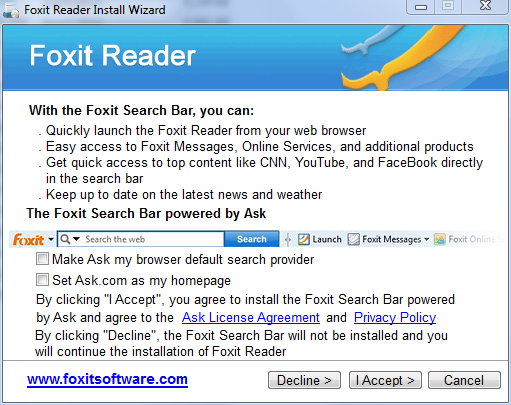
    Note: When installing FoxitReader, make sure to UN-check any pre-checked toolbar, or other garbage.
    On this page:

    [IMG]

    make sure, you have both boxes UN-checked AND (important!) click on Decline button

    =========================================================================

    Your computer is clean [IMG]

    1. We need to reset system restore to prevent your computer from being accidentally reinfected by using some old restore point(s). We'll create fresh, clean restore point, using following OTL script:

    Run OTL

    • Under the Custom Scans/Fixes box at the bottom, paste in the following:

    Code:
    :OTL
    :Commands
    [purity]
    [emptytemp]
    [EMPTYFLASH]
    [CLEARALLRESTOREPOINTS]
    [Reboot]
    • Then click the Run Fix button at the top
    • Let the program run unhindered, reboot the PC when it is done
    • Post resulting log.

    2. Now, we'll remove all tools, we used during our cleaning process

    Clean up with OTL:

    • Double-click OTL.exe to start the program.
    • Close all other programs apart from OTL as this step will require a reboot
    • On the OTL main screen, press the CLEANUP button
    • Say Yes to the prompt and then allow the program to reboot your computer.

    If you still have any tools or logs leftover on your computer you can go ahead and delete those off of your computer now.

    3. Make sure, Windows Updates are current.

    4. If any Trojan was listed among your infection(s), make sure, you change all of your on-line important passwords (bank account(s), secured web sites, etc.) immediately!

    5. Download, and install WOT (Web OF Trust): http://www.mywot.com/. It'll warn you (in most cases) about dangerous web sites.

    6. Run Malwarebytes "Quick scan" once in a while to assure safety of your computer.

    7. Run Temporary File Cleaner (TFC) weekly.

    8. Download and install Secunia Personal Software Inspector (PSI): http://secunia.com/vulnerability_scanning/personal/. The Secunia PSI is a FREE security tool designed to detect vulnerable and out-dated programs and plug-ins which expose your PC to attacks. Run it weekly.

    9. (optional) If you want to keep all your programs up to date, download and install FileHippo Update Checker.
    The Update Checker will scan your computer for installed software, check the versions and then send this information to FileHippo.com to see if there are any newer releases.

    10. Run defrag at your convenience.

    11. Read How did I get infected?, With steps so it does not happen again!: http://www.bleepingcomputer.com/forums/topic2520.html

    12. Please, let me know, how is your computer doing.
  10. mylonite Newcomer, in training

    Thanks Broni!

    The computer is running well at the moment. I can visit all pages again. ipconfig /all still doesn't stay open from the "RUN" or Win R command window. Though it runs from DOS after opening via the Win R "CMD" command. Not sure if this is a major issue.

    I will try and install a driver for the wireless LAN card so I can use the WPA2 PSK protocol with AES encryption on the wireless network I have up and running here.

    I will let you know how the computer runs.

    Thanks very much
  11. Broni Malware Annihilator

    No. It's normal.
  12. mylonite Newcomer, in training

    okeydokey.


    Thanks again Broni you have been very helpful. I'll be sure to return to this website soon so I can fix another old beast that I have in my collection.

    warmest regards,

    J.
  13. Broni Malware Annihilator

    Cool [IMG]
    Good luck and stay safe :)
Thread Status:
Not open for further replies.