
You are using an out of date browser. It may not display this or other websites correctly.
You should upgrade or use an alternative browser.
You should upgrade or use an alternative browser.
What'd you buy yourself today?
- Thread starter Matthew DeCarlo
- Start date
xcylent
Posts: 230 +17
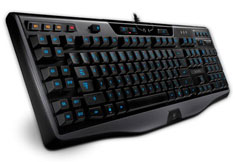
As some of you may know, it is my birthday today, and as a gift my brother and dad bought these for me, to upgrade from an old wired microsoft combo. the difference is phenomenal. I will never use generic peripherals again.
FYI, I dislike mechanical keyboards because they're far too loud for my liking (yes even the cherry brown), and this keyboard is very quiet.
Mouse: Razer Deathadder V2

Keyboard: Logitech G110
FYI, I dislike mechanical keyboards because they're far too loud for my liking (yes even the cherry brown), and this keyboard is very quiet.
Mouse: Razer Deathadder V2
Keyboard: Logitech G110


Bought myself a second one of these - this time for my gaming machine. Now I've gotta use hardlinks to point to parts of my Steam library that will remain on a spindle drive.


I also figure since I have to reinstall everything anyway I might as well dump Windows 8 on here and give it a go. This will be the most painless time to force myself to use it as it would be a quick switch back to 7 and there isn't much software here other than games.
I also figure since I have to reinstall everything anyway I might as well dump Windows 8 on here and give it a go. This will be the most painless time to force myself to use it as it would be a quick switch back to 7 and there isn't much software here other than games.
xcylent
Posts: 230 +17
With some of my leftover Birthday money, I bought this on an impulse buy:
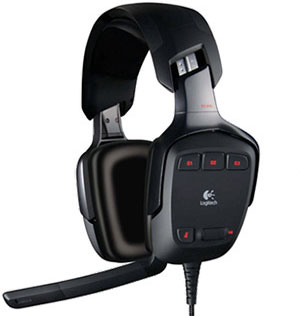
Logitech G35- $110
So far, I'm incredibly happy with it. The ear cups are like caves, and oh so comfortable.
Soundwh*ring in games now is almost too easy, thanks to the 7.1 surround audio.
Music and general sounds are excellent too.
I'd recommend this to anyone, even though it is a bit pricey
Logitech G35- $110
So far, I'm incredibly happy with it. The ear cups are like caves, and oh so comfortable.
Soundwh*ring in games now is almost too easy, thanks to the 7.1 surround audio.
Music and general sounds are excellent too.
I'd recommend this to anyone, even though it is a bit pricey

slh28
Posts: 1,703 +172
The G35 is a great headset as a general purpose one for gaming/music, etc.
Seems like you've got some great gaming peripherals now, which is a very underrated part of a setup IMO. Many people focus too much on specifications and benchmarks rather than what you can actually hear and feel, which is just as important.
Seems like you've got some great gaming peripherals now, which is a very underrated part of a setup IMO. Many people focus too much on specifications and benchmarks rather than what you can actually hear and feel, which is just as important.
FWIW I was able to fix my Steam library using Junction Points as hard linking via mklink did not allow connections to a different drive. Junction Points looked like they were not going to work but when I tried to launch the game even though it's greyed out it says it's looking through files and then the title shows up as installed.

I got this for my second machine:

Been wanting to get an IPS panel. The Asus VS239H-P is relatively inexpensive. There is some bleeding on the lower left corner of the panel.It looked pretty bad when I first plugged it in.I was very pleased to find, however, that once I had taken my calibrator to it, the bleeding became virtually imperceptible -- my brother hadn't noticed it until I pointed it out to him.Even then, he had to come in close to see it.I suppose this can be partly explained by the reduced brightness.Out of the box, the monitor was at 100% brightness, which made the bleeding all too obvious.
I also got this for my gaming machine -- from the same shop:

Right now, I have two machines crammed into my room. Space is not something I take for granted. The desk I use for my gaming machine is just big enough to accommodate a 1920x1080 monitor, a router, a keyboard and mouse.
I'm not too particular about keyboards. I only play first-person-shooters so all I really need are the basic functions. I bought my Logitech a few years ago. It works perfectly all right still but, given limited space, its size and layout restrict mouse movement and necessitate a posture that imposes quite a strain on my right shoulder. The strain can become unbearable after two or three hours.
I've been using the Black Widow TE for two days now and the difference is huge. No more back pains and I finally have room to move the mouse around the way I want.
Been wanting to get an IPS panel. The Asus VS239H-P is relatively inexpensive. There is some bleeding on the lower left corner of the panel.It looked pretty bad when I first plugged it in.I was very pleased to find, however, that once I had taken my calibrator to it, the bleeding became virtually imperceptible -- my brother hadn't noticed it until I pointed it out to him.Even then, he had to come in close to see it.I suppose this can be partly explained by the reduced brightness.Out of the box, the monitor was at 100% brightness, which made the bleeding all too obvious.
I also got this for my gaming machine -- from the same shop:
Right now, I have two machines crammed into my room. Space is not something I take for granted. The desk I use for my gaming machine is just big enough to accommodate a 1920x1080 monitor, a router, a keyboard and mouse.
I'm not too particular about keyboards. I only play first-person-shooters so all I really need are the basic functions. I bought my Logitech a few years ago. It works perfectly all right still but, given limited space, its size and layout restrict mouse movement and necessitate a posture that imposes quite a strain on my right shoulder. The strain can become unbearable after two or three hours.
I've been using the Black Widow TE for two days now and the difference is huge. No more back pains and I finally have room to move the mouse around the way I want.

captaincranky
Posts: 20,429 +9,389
Well, I ordered a 2TB Seagate HDD, ($69.95) @ Newegg, and a couple of 50 packs of my beloved TDK DVD+Rs.
Then there was this lapse of judgement about a month ago:
 That is ostensibly my birthday and Christmas present, plus it saves me from hassling the crowds today. Is it too off topic....?
Then there was this lapse of judgement about a month ago:
Is that a lefty Crafter SAT 12? That's a good guitar! A friend of mine has one. Nice feel, solid quality. My friend is a professional musician and he has actually taken his SAT 12 to the studio a few times. I'd say you made a good call, there, captaincranky. Excellent value for your money.


captaincranky
Posts: 20,429 +9,389
Looks good! I specced it out and it seems they've taken a cue from Apple and are using an IPS screen. That makes a portable ever so much nicer, since you're dealing with widely varying angles of view in different circumstances.
Being a cynic, I'm still not sure of the longevity of any of these snap together keyboard arrangements. The electrical contacts and the snap together keyboard hinge seem like they would be a high wear, high possibility of failure weakness.
Although I have to say, plastics are much improved since the heydays of styrene, and the use of Testor's Formula S' as an intoxicant... I suppose time will tell.
I let this slide on the first bounce, but not this time:
And who among us hasn't longed to hear those very words, told to us by a comely young lady....?
Being a cynic, I'm still not sure of the longevity of any of these snap together keyboard arrangements. The electrical contacts and the snap together keyboard hinge seem like they would be a high wear, high possibility of failure weakness.
Although I have to say, plastics are much improved since the heydays of styrene, and the use of Testor's Formula S' as an intoxicant...
I suppose time will tell.I let this slide on the first bounce, but not this time:

It's much bigger than I expected it to be.
And who among us hasn't longed to hear those very words, told to us by a comely young lady....?
captaincranky
Posts: 20,429 +9,389
Love that Mic! It almost looks like R2D2! In fact, I can almost picture Princess Leia kneeling in front of it.......
Before I forget, you're welcome, it was my pleasure.
Before I forget, you're welcome, it was my pleasure.


SNGX1275
Posts: 10,615 +468
Last week I bought an 8 port 10/100 switch for $2.50 at a university surplus sale. I had a use for it and was fairly excited about my buy, until I plugged it in. It has 2 20?mm fans in it that are crazy loud and it also produces a high pitched whine. I would only be running 3 computers off of it max, so I figured I could just disconnect the fans and it would be fine, but I didn't even attempt to do that because the whine is too loud to ignore. Oh well, only out $2.50. Have an old Trendnet 652-BRP wireless router now acting as a switch (wifi off) in its place.
I didn't purchase these for myself, but I did get them as gifts this Christmas: An LG bluray burner and a Logitec wireless backlit keyboard. I didn't really need the burner portion, but I no longer have a bluray player and when I was looking up bluray drives for gift ideas the burner version of what I wanted was only $10 more.
I didn't purchase these for myself, but I did get them as gifts this Christmas: An LG bluray burner and a Logitec wireless backlit keyboard. I didn't really need the burner portion, but I no longer have a bluray player and when I was looking up bluray drives for gift ideas the burner version of what I wanted was only $10 more.

Benny26
Posts: 1,393 +72

Just ordered through Amazon at £179.
Decided to go all out and try and collect myself some descent parts to do a full new build in mid Feb, starting with this as my main board. I've had my eye on this one for a few month now and it looks perfect for what I want.
captaincranky
Posts: 20,429 +9,389
I glad to see you're "living the dream", and are back on being hell bent for world domination again. All you need now is a flash drive full of "stuxnet" and you should be able to take out every centrifuge in Iran....(y) Keep up the good work....


St1ckM4n
Posts: 2,887 +628

Benny26
Posts: 1,393 +72


Zalman Z11 Plus and the Crucial M4 128gb.
For £50 the Zalman is one hell of a case with the quality and extras, should make a nice home for the 3770K I plan on putting in next.
The Crucial M4: not sure why, but this drive was coming up more and more above average on other drives so I decided to go with it.
Similar threads

- Replies
- 4
- Views
- 2K


- Replies
- 8
- Views
- 4K

- Replies
- 18
- Views
- 3K
G
Latest posts
-
Ubisoft defends $85 day-one DLC after AC Black Flag Resynced gets review-bombed
- Thatsdisgusting replied

-
TechSpot is dedicated to computer enthusiasts and power users.
Ask a question and give support.
Join the community here, it only takes a minute.