also @ TechSpot: Microsoft launches YouTube app, Google demands it taken down

Weekend Open Forum: Your desktop's looks

By

On April 8, 2011, 8:03 PM

For some reason, it's always fascinated me to see how other folks maintain their operating system's desktop. Although most of us keep our virtual workspace somewhere along the lines of "messy but functional," we add personal touches with custom wallpapers, skins, icons, as well as extensions and gadgets. Unfortunately, Googling something like "screensavers" usually returns low quality sites, so it can be tough to find the gems out there.
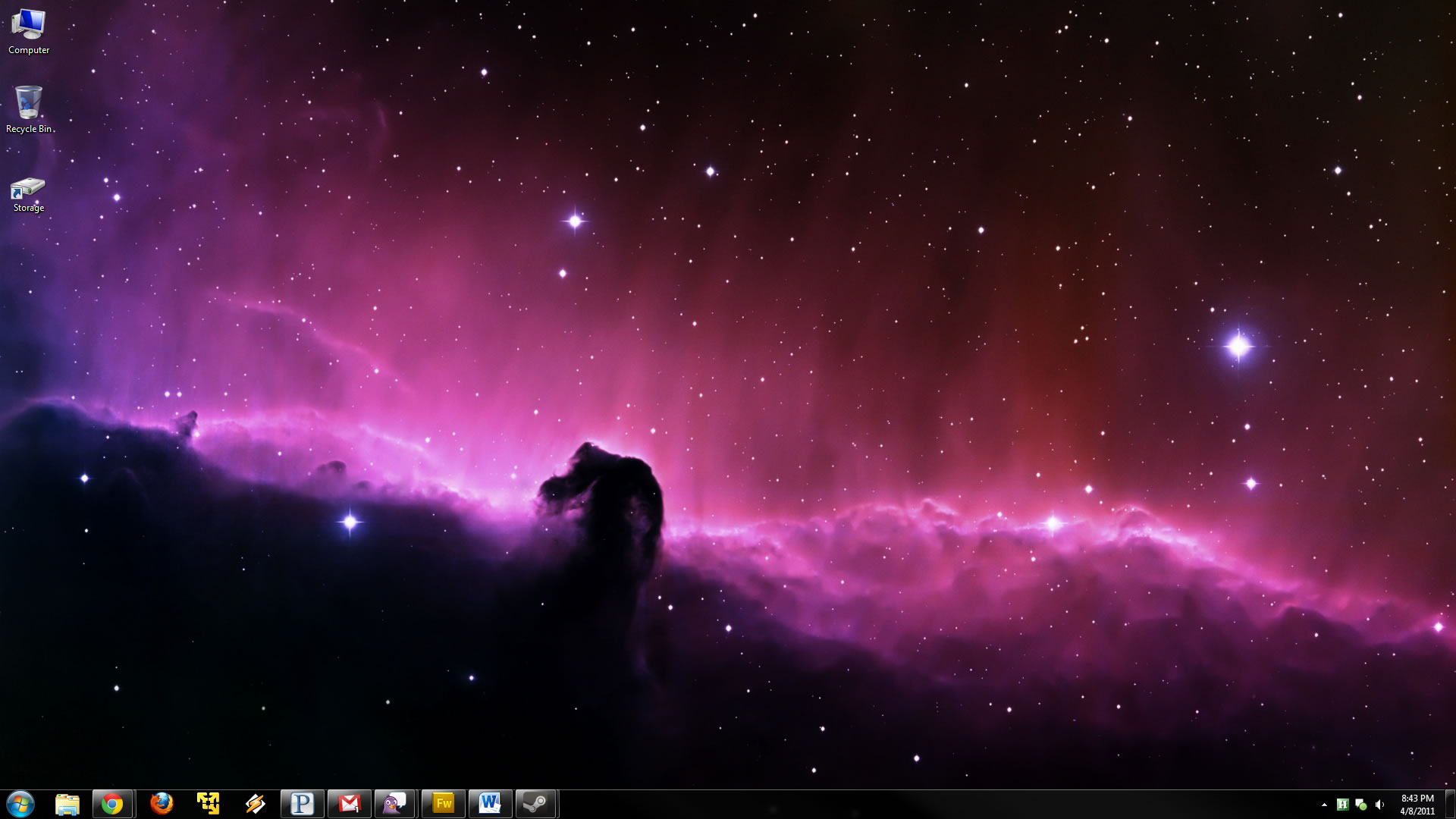
With that in mind, we thought it'd be cool if you shared your desktop's looks along with your favorite resources for related enhancements. I dislike bright themes so I run Windows Aero as dark as possible along with over a hundred 1080p space wallpapers (mostly collected via InterfaceLIFT and Wallbase) rotating every 30 minutes (a native feature of Windows 7). Feel free to use our image gallery if you want to upload a screenshot of your desktop.

No tags on this story

User Comments: 58

Got something to say? Post a comment
  1. Being I still use XP and will for sometime, I like the option of turning off the Desktop Icons and placing the Desktop to the side and set it on Autohide. I have a totally clean Desktop just the way a Desktop should.

  2. i use interfacelift too ... awesome site

  3. I have posted mine but canīt see it in the site...

    By the way, mine is AWESOME !!! XD

    [link]

  4. Ha, mine is a mess, so no showing! It doesn't look too much different from the one on the article though, with the exception that mine is much more cluttered, I have FF as primary browser, and instead of that aurora boreal as background, I got hot/cute women (which is also the preferred topic of argument with my girlfriend -_-).

  5. Staff

    I've added the link to your post Meteorix.

  6. I've been using a theme called Windows Live Clouds, got a bunch of nice pics.

    [link]

  7. I have 2 PCs with Win 7. The Wallpaper is a nonstop slide show display of female "art photography".

    Beyond that, I always install the "Zune" theme in my XP boxes. I think the steel gray is much more tasteful and relaxing than the stock "Royale" theme.

    I'd like to get rid of the orange start button in Zune, but it's always seemed like more trouble than it was worth.

    In Firefox, I always run a theme by Frank Lion, (from the UK), called "300". It's maroon & gold basically, very relaxing, especially when coupled with the battleship metallic gray of Zune. Mr. Lion has been writing skins for FF since he was 15, (at most), and has always shared them freely. For some reason he no longer participates in Mozilla's add on pages. Go here instead: http://franklion.blog.co.uk/

  8. Just realized I still have the default win7 "flag" background, never really thought about it till now XD.

    I have groups of icons all over for games/work/etc.

  9. Here's my okay desktop:

    http://i.imgur.com/f22k3.jpg

    I have a second monitor hooked up but this one sums up just about everything. I'm running rainmeter and an itunes skin mod. I'm using a theme package for ObjectDock and I'm rotating the wallpaper for both monitors randomly.

  10. I just realized I posted as a guest...

    My Okay Desktop

    I created the wallpaper myself taking the high res Okay face straight from reddit. I'm using the Token Icon Set, for any of those who are interested.

    For more info on how I created this look, I have a couple more pictures in my gallery as well, with descriptions.

    Every time this one pops up I still laugh....

    Beaker

  11. I selected a nature scene from the default wallpapers, and I have a bunch of icons which I rarely use and are there just because applications install them (when there's no option to not do that). I rarely view my desktop, so that doesn't matter. It's always overlayed with browser windows and such.

  12. I run a very minimal setup. Neutral-ish brown/cream colour for Aero, only Recycle Bin on desktop, clock + default CPU/RAM monitor as gadgets.

    I change wallpapers manually every 1-3 months - I opt for ones that don't clash with the aero colour (I change if necessary) and ones that don't have hard edges that I can see through taskbar and Opera's aero interface.

    Pinned programs on taskbar are also minimal - I just use start-bar pinning and search. Icons (on bottom right near clock) are also mostly hidden.

    I guess I just like to view my stuff without excess clutter. :P

    [link]

  13. Is that yellow icon in your taskbar VMware player? Just curious =o

  14. Me? On bottom-right? That's a star-icon, and it's my university documents folder, along with Downloads folder link. :P

  15. heres mine...

    [link]

  16. Staff

    Is that yellow icon in your taskbar VMware player? Just curious =o

    Yep.

  17. Meteorix said:

    I have posted mine but canīt see it in the site...

    By the way, mine is AWESOME !!! XD

    [link]

    Noooo it's not

  18. Unfortunately, Googling something like "screensavers" usually returns low quality sites, so it can be tough to find the gems out there.

    Damn that's so right...

    I keep my desktop icon layout as strict as possible (I always have OCD when it comes to computers for some reason) My wallpapers are fantasy and sometimes good NASA space shots...On my XP desktops i always go for the Zune theme.

  19. Here's mine.. Was using this for quite a while.. recently reverted to the regular desktop due to some PC issues.. How does it look? [link]

  20. I've found some good wallpapers at vistawallpapers.com (shows I've held on to this book mark for a while).

  21. Mine's ultra simple. Couldn't live without the wonders of Launchy!

    [link]

  22. http://i.imgur.com/Lw1Y4.jpg

    This is my only computer and it's a gaming PC. I tend not to run anything in the background that will take up resources.

    Up until recently I wasn't running any anti-virus software, but II thought having one just in case was the sensible thing to do, even though I now have Avast disabled as you can see on the bottom right. The other three icons are Fraps and Gamebooster and Catalyst Control Centre.

    And yes, I still use Gmail Notifier.

  23. I normally change my desktop picture every day,ranging from cars,earth,space and girls,just depends on mood and i only have the Computer and recycle bin icons.

    I also get most of my pics from Wallbase.net,i also sometimes use ewallpaper or HDwallpaper.

  24. Before I gave my Acer Ferrari One a format I used to have the Ferrari calender background that came free with it.

    After I formatted it I haven't bothered to reinstall the software.

    However,

    Netbook

    http://i361.photobucket.com/albums/oo60/GeneralAtrox/Desktop
    9-04-2011.jpg?t=1302351100

    Old Desktop snapshot from 2008

    http://i361.photobucket.com/albums/oo60/GeneralAtrox/Mydeskt
    p.jpg?t=1302351100

    An unbelievable change if I was honest. I can't bare a messy desktop anymore!

  25. black wallpaper. black logon screen. everything is blank and clean, to accommodate my clutter files at desktop.

Recently commented stories

Post a new comment

Social Login & Guest Posting TechSpot Members
Login here or sign up for free,
it takes about a minute.
Get complete access to the TechSpot community. Join thousands of technology enthusiasts that contribute and share knowledge in our forum. Get a private inbox, upload your own photo gallery and more.
TechSpot on:

Subscribe to TechSpot

Get free exclusive content, learn about new features and breaking tech news.