Sign up for a new account or log in here:
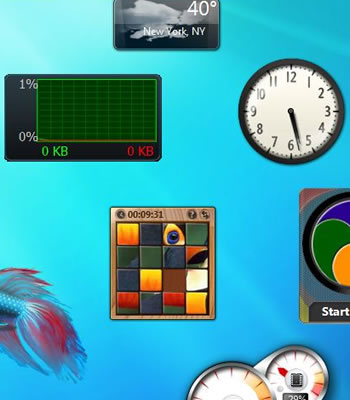
In a security advisory Tuesday, Microsoft urged Windows Vista and 7 users to download a tool that disables the operating system's sidebar and gadgets. The company warned that insecure gadgets could be used to run arbitrary code on a computer, access its files or display objectionable content. In the event of arbitrary code execution, an attacker could take control of the affected system with the ability to install programs, view, change or delete data, or create new accounts with full user rights.
Unfortunately, Microsoft hasn't detailed the vulnerabilities, when (if?) they'll be addressed or whether systems are actively being exploited in the wild. Some have suggested the advisory is merely an attempt to prepare users for the rumored removal of gadgets in Windows 8. Computerworld offers a more plausible explanation, noting that researchers at the Black Hat security conference in Las Vegas on July 26 plan to outline "interesting attack vectors" for creating malicious Windows gadgets.
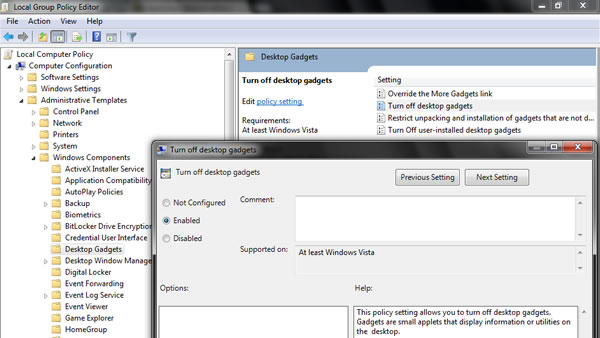
As mentioned, Microsoft offers a utility to disable gadgets, but you can also do this manually via Group Policy, which is available on Windows Vista Business, Enterprise and Ultimate as well as Windows 7 Professional, Enterprise and Ultimate. It seems Windows Starter, Home Basic or Home Premium users will simply have to use Microsoft's tool. To disable the sidebar/gadgets manually, open the Group Policy Editor by searching for gpedit.msc via the Start menu or Run, then:
I always considered them crap anyway. Never used them. Looks like I wasn't wrong.
Rainmeter all the way! ![]()
Guys missing monitoring gadgets, you can use CPUID HWMonitor for time being : http://www.cpuid.com/softwares/hwmonitor.html
@TomSEA:
Exactly! The only thing that cat clock and inaccurate weather app did was slow down my windows startup even more...
I was never really crazy abou the gadgets, I did try some but found they only slowed things down. The larger issue is Microsoft offers a feature that many people use and their responce to a security issue is don't use the feature. I think they want people to use the Metro interface in Windows 8 and want to get rid of gadgets anyways, which is why they are saying don't use gadgets and why they are not giving additional information. I'm not really crazy about the direction Microsoft is going in general; they seem to be offering fewer choices and just telling users what they can/can't use. This is yet another reason I have been playing around with Ubuntu Desktop 12.04 LTS. I'm slowly learning it and can see it as a viable alternative to Windows, at least on the home front. My only real issue is gaming, which Windows does rule in. If only the gaming industry would start releasing Linux based games, then I'd be set.
There is a gadget Ive always used shows things like CPU, ram hd stats etc but weirdly also as built in radio streaming (out of context really) its called Computer Status and I love it ![]()
I have one gadget running, the weather gadget. I like it, I paid for it as part of Windows 7 and I expect a fix for any vulnerabilities so I can keep using it and any others that I so choose!
Not that I want to come off blaming Microsoft, I shouldn't have to worry about running the OS of my choice as is. I am sick of these scum bags that write the software that takes advantage of these vulnerabilities and would like to see stiffer penalties against them.
Gadgets, what are those?
I remove them from my OS install when I customize it; never cared about dynamic things on my desktop; I just use a blank back background to avoid distractions and minimize system resource consumption. If I want to see things, I'll load up apps specific for them, not a problem.
only gadget I use is the Windows CPU meter, which I tricked out to look like actual dash gauges. other than that I really don't use the desktop widgets.
Run! The paranoids are coming!:eek:
Tbh the were the gadget of my life...for the first 10 munutes then I got id of them and never used them again I dont get the use of them when you can alead see the charger of the battery internet connection time and date without them and the currency's just searchthem up on google :P.
Is it just me or do those people who say "My gadgets are very important to me" but dontpost this gadget that is so very important?
Last time I looked at those gadgets, I couldnt find anything that another program wouldnt take care of for me.
AIDA64
Common guys, list your gadgets so that we can find replacements for your "oh so important" gadgets, and get rid of this useless and annoying feature in Windows.
I disabled mine ages ago, Rainmeter FTW! ![]()
So this is really only a security problem if your using 3rd party gadgets not created by Microsoft correct? If you use Microsoft owned and created gadgets your safe? It sounds like it all boils down to whether or not you know just what gadget you are installing, where it came from and do you trust that developer.
Common guys, list your gadgets so that we can find replacements for your "oh so important" gadgets, and get rid of this useless and annoying feature in Windows.
"Useless and annoying" is an opinion, an opinion I don't share with you. I don't want you to find me an replacement for something that simply doesn't need replacing, It works fine as it is thanks.(y)
I never really got into my gadgets. They're always in the way, and I never need them enough to warrant them constantly running. It looks like Metro will have apps on it that update when you look at them though. That'll probably be a good improvement.
I only use one of them. A Weather gadget that tells me the temperature. No biggy. Takes you to MSN if you click it. I'm not paranoid about it though, it'll stay. Hey, I'm using Microsoft software, so I'm used to living on the edge. ![]()
This is why I use rainmeter...
Microsoft is the biggest letters on the block. They've lied about everything possible you can imagine. Updates to fix certain things have been known to be just lies tricks. they only do things in their interest . It's all about power and money and we are the pons.
If your computer is working fine your gadgets are fine. You should always use backup software anyway. Then you have nothing to worry about. If your computer went down a couple mouse clicks and you're totally restored. Don't use Microsoft backup either. I honestly could tell you about personal lives I've proven from Microsoft but a little Internet research you will have overwhelming evidence the company is a bunch of pigs.
This is rubbish. I use mine on 3 pcs fine with no issues. This is just microsofts really tacky attempt at frightening people off win 7 and on to 8. Not happening, took me ages to recover from the vista fiasco, with us reinstalling XP on all our machines, and now this. No, sorry but 7 works fine, no vulnerabilities if the machines are updated and users stay away from dodgy down loads. So MS can go whistle dixie as far as I am concerned. Windows 8 is not going to be forced onto our machines... hell I might even buy a mac instead...!
| Trending | Featured |
Get free exclusive content, learn about new features and breaking tech news.