
The Adobe DNG Converter, a free utility that converts files from more than 350 cameras to DNG, enables you to easily convert camera-specific raw files to a more universal DNG raw file.
Digital Negative was developed to address the lack of an open standard for the proprietary and unique raw files created by each digital camera. DNG allows photographers to archive their raw camera files in a single format for easy cataloging and access in the future. With the format specification freely available, any developer can build software that supports and takes advantage of DNG. For more information, visit the Digital Negative page.
Support for the following cameras has been added. Visit the Camera Raw page for a complete list of supported cameras.
How do I install Adobe DNG Converter?
- Open the downloaded file and double-click the DNG Converter executable file.
- Follow the onscreen instructions.
The DNG Converter is now available in your Programs (Windows) or Applications (macOS) directory. The installation utility is designed to also install a set of color profiles required for the DNG Converter to function properly. These profiles are copied to a common resource location.
How do I convert images to DNG?
- Download and install Adobe DNG Converter
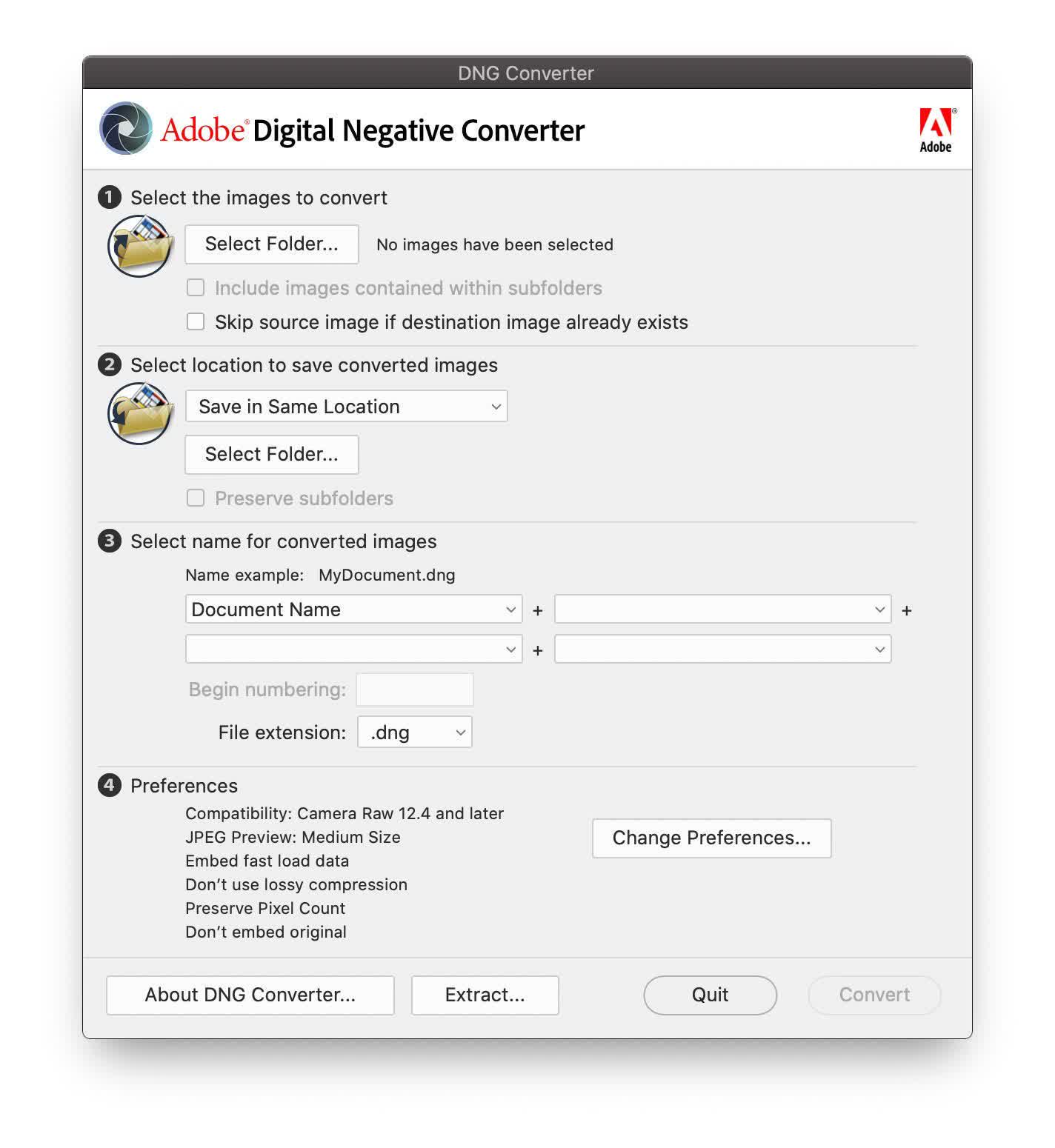
- Launch the DNG Converter by double-clicking its icon. Alternatively, drag and drop individual images or a folder of images directly onto the Adobe DNG Converter icon. This action automatically launches the converter.
- Select the folder of images you'd like to convert to DNG.
- Select the location where you want to save the converted DNG files.
- Select a naming pattern for the new DNG files:
- Document Name: The existing name of the file is used with the DNG extension added.
- Add serial numbers or letters to the name: Advanced patterns; an example of the resulting name appears after Name Example.
- Specify the following additional settings for the DNG file names:
- Begin numbering: Enter the starting serial number if you'd like it to be different from 1.
- File Extension: The file extension is automatically set to DNG. You can choose the extension to be either uppercase or lowercase.
- If necessary, change the compatibility preferences.
- Click Convert. A dialog box showing the status of the conversion appears.
What's New
- Improved performance on Fill Edges, Raw Details Enchance, and Super Resolution
- Premium Presets
- Look and Feel refinements
- Support for new cameras and lenses
- Bug Fixes
Previous release notes:
The Adobe DNG Converter is a free utility that enables you to easily convert camera-specific raw files from more than 700 cameras to the more universal DNG raw format. Digital Negative was developed to address the lack of an open standard for the proprietary and unique raw files created by each digital camera. DNG allows photographers to archive their raw camera files in a single format for easy cataloging and access in the future. With the format specification freely available, any developer can build software that supports and takes advantage of DNG. For more information, visit the Digital Negative page. Support for the following cameras has been added. Visit the Camera Raw page for a complete list of supported cameras.
- DJI Mavic 2 Pro (HasselbladL1D-20c)
- Fujifilm GFX 100 IR
- Fujifilm GFX 100S
- Fujifilm X-E4
- Phase One IQ4 150MP Achromatic
- Samsung Galaxy S21 Rear Main Camera
- Samsung Galaxy S21 Rear Wide Camera
- Samsung Galaxy S21+ Rear Main Camera
- Samsung Galaxy S21+ Rear Wide Camera
- Samsung Galaxy S21 Ultra Rear Main Camera
- Samsung Galaxy S21 Ultra Rear Wide Camera
- Sony Alpha 1 (ILCE-1) ( * ) S14 and S14+ raw compression modes are unsupported.
The Adobe DNG Converter is a free utility that enables you to easily convert camera-specific raw files from more than 700 cameras to the more universal DNG raw format.
Digital Negative was developed to address the lack of an open standard for the proprietary and unique raw files created by each digital camera. DNG allows photographers to archive their raw camera files in a single format for easy cataloging and access in the future. With the format specification freely available, any developer can build software that supports and takes advantage of DNG. For more information, visit the Digital Negative page.
Support for the following cameras has been added. Visit the Camera Raw page for a complete list of supported cameras.
Nikon
- Nikon COOLPIX A1000
Olympus
- Olympus OM-D E-M1X
Sony
- Sony A6400 (ILCE-6400)*
Previous versions:
This update contains the Adobe DNG Converter 11.0.
The Adobe DNG Converter is a free utility that enables you to easily convert camera-specific raw files from more than 600 cameras to the more universal DNG raw format.
Digital Negative was developed to address the lack of an open standard for the proprietary and unique raw files created by each digital camera. DNG allows photographers to archive their raw camera files in a single format for easy cataloging and access in the future. With the format specification freely available, any developer can build software that supports and takes advantage of DNG. For more information, visit the Digital Negative page.
Support for the following cameras has been added. Visit the Camera Raw page for a complete list of supported cameras.
Fujifilm
- Fujifilm X-T100
Pentax
- Pentax K-1 Mark II**
Phase One
- Phase One IQ3 100MP Trichromatic*
Samsung
- Samsung Galaxy S9
- Samsung Galaxy S9+
DNG Key Benefits:
For photographers:
- DNG format helps promote archival confidence, since digital imaging software solutions will be able to open raw files more easily in the future.
- A single raw processing solution enables a more efficient workflow when handling raw files from multiple camera models and manufacturers.
- A publicly documented and readily available specification can be easily adopted by camera manufacturers and updated to accommodate technology changes.
For hardware and software manufacturers:
- DNG removes a potential barrier to new camera adoption, since raw files from new models will be immediately supported by Photoshop and other applications.
- The DNG format allows R&D savings by reducing the need to develop new formats and by simplifying camera testing.
- A common format allows greater control over the quality of conversions by third-party applications.
- The specification allows the addition of private metadata to DNG files, enabling differentiation.
Full list of supported cameras:
- Canon
- Canon EOS 77D (EOS 9000D)
- Canon EOS Digital Rebel T7i (EOS 800D, EOS Kiss X9i)
- Canon EOS M6
- EOS-1D
- EOS-1Ds
- EOS- 1D C
- EOS-1D Mark II
- EOS-1D Mark II N
- EOS-1Ds Mark II
- EOS-1D Mark III
- EOS-1Ds Mark III
- EOS-1D Mark IV
- EOS-1D X
- EOS 5D
- EOS 5D Mark II
- EOS 5D Mark III
- EOS 6D
- EOS 7D
- EOS 10D
- EOS 20D
- EOS 20Da
- EOS 30D
- EOS 40D
- EOS 50D
- EOS 60D
- EOS 60Da
- EOS D30
- EOS D60
- EOS 100D (Rebel SL1/Kiss X7)
- EOS 300D (Digital Rebel/Kiss Digital)
- EOS 350D (Digital Rebel XT/EOS Kiss Digital N)
- EOS 400D (Digital Rebel XTi/EOS Kiss Digital X)
- EOS 450D (Digital Rebel XSi/EOS Kiss X2)
- EOS 500D (Digital Rebel T1i/EOS Kiss X3 Digital)
- EOS 550D (Digital Rebel T2i/EOS Kiss X4 Digital)
- EOS 600D (Rebel T3i / Kiss X5 Digital)
- EOS 650D (Rebel T4i / Kiss X6i)
- EOS 700D (Rebel T5i / Kiss X7i)
- EOS 1000D (Digital Rebel XS/EOS Kiss F)
- EOS 1100D (Rebel T3 / Kiss X50 Digital)
- EOS M
- PowerShot 600
- PowerShot A5
- PowerShot A50
- PowerShot S30
- PowerShot S40
- PowerShot S45
- PowerShot S50
- PowerShot S60
- PowerShot S70
- PowerShot S90
- PowerShot S95
- PowerShot S100
- PowerShot S100V
- PowerShot S110
- PowerShot SX1 IS
- PowerShot SX50 HS
- PowerShot G1
- PowerShot G1 X
- PowerShot G2
- PowerShot G3
- PowerShot G5
- PowerShot G6
- PowerShot G9
- PowerShot G10
- PowerShot G11
- PowerShot G12
- PowerShot G15
- PowerShot Pro70
- PowerShot Pro90 IS
- PowerShot Pro1
- Casio
- EXILIM EX-F1 (DNG)
- EXILIM EX-FC300S (DNG)
- EXILIM EX-FH20 (DNG)
- EXILIM EX-FH25 (DNG)
- EXILIM EX-FH100 (DNG)
- EXILIM EX-ZR700 (DNG)
- EXILIM EX-ZR710 (DNG)
- EXILIM EX-ZR750 (DNG)
- EXILIM EX-ZR1000 (DNG)
- Contax
- N Digital
- Epson
- R-D1
- R-D1s
- R-D1x
- Fujifilm
- FinePix E900
- FinePix F505EXR
- FinePix F550EXR
- FinePix F600EXR
- FinePix F605EXR
- FinePix F700
- FinePix F770EXR
- FinePix F775EXR
- FinePix F800EXR
- FinePix F900EXR
- FinePix HS10
- FinePix HS20EXR
- FinePix HS30EXR
- FinePix HS33EXR
- FinePix HS50EXR
- FinePix IS-1
- FinePix IS Pro
- FinePix S100FS
- FinePix S2 Pro
- FinePix S200 Pro
- FinePix S20 Pro
- FinePix S3 Pro
- FinePix S5 Pro
- FinePix S5000 Z
- FinePix S5200/5600
- FinePix S6000fd/S6500fd
- FinePix S7000 Z
- FinePix S9000/9500
- FinePix S9100/9600
- FinePix SL1000
- X10
- X20
- X100
- X100s
- X-S1
- X-E1
- X-Pro1
- XF1
- Hasselblad
- Hasselblad 503CWD
- Hasselblad CF-22
- Hasselblad CF-22MS
- Hasselblad CF-39
- Hasselblad CF-39MS
- Hasselblad CFH-22
- Hasselblad CFH-39
- Hasselblad CFV
- Hasselbald CFV-50
- Hasselblad H2D-22 (DNG)
- Hasselblad H2D-39 (DNG)
- Hasselblad H3D-22
- Hasselblad H3D-31
- Hasselblad H3D-39
- Hasselblad H3DII-22
- Hasselblad H3DII-31
- Hasselblad H3DII-39
- Hasselblad H3DII-39MS
- Hasselblad H3DII-50
- Hasselblad H4D-31
- Hasselblad H4D-40
- Hasselblad H4D-50
- Hasselblad H4D-50MS
- Hasselblad H4D-60
- Hasselblad H4D-200MS
- Hasselblad H5D-40
- Hasselblad H5D-50
- Hasselblad H5D-60
Native Support:
- Casio
- Exilim EX-F1
- Exilim EX-FC300S
- EXILIM EX-FH20
- EXILIM EX-FH25
- EXILIM EX-FH100
- EXILIM EX-ZR1000
- Exilim EX-ZR700
- Exilim EX-ZR710
- Exilim EX-ZR750
- Hasselblad
- H2D
- H2D-22
- H2D-39
- Leica
- Digital-Modul-R
- M Monochrom
- M (Typ 240)
- M8
- M9
- M-E
- S
- S2
- X1
- X2
- Pentax
- Pentax KP
- K10D
- K20D
- K200D
- K-5
- K-5 II
- K-5 Iis
- K-7
- K-x
- K-30
- Q
- MX-1
- Q-10
- 645D
- Ricoh
- GR Digital
- GR Digital II
- GR Digital III
- GR Digital IV
- GX100
- GX200
- GXR, S10 24-72mm F2.5-4.4 VC
- GXR, GR A12 50mm F2.5 MACRO
- GXR, GR LENS A12 28mm F2.5
- GXR MOUNT A16 24-85mm F3.5-5.
- GXR, GXR P10
- Samsung
- EX2F
- GX-10
- GX-20
- Pro 815
