also @ TechSpot: Building a Thin Mini-ITX PC: Small and Silent Performance

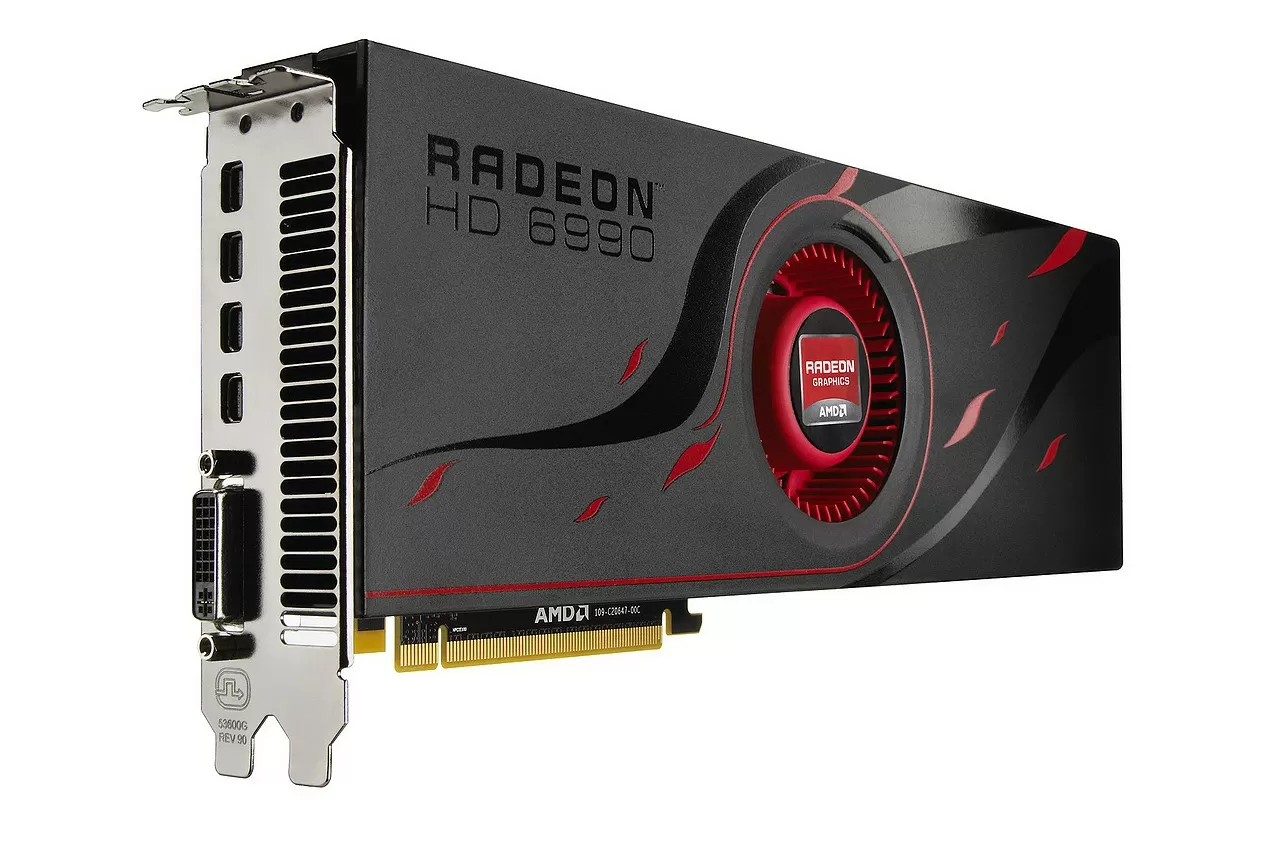
AMD Radeon HD 6990 Review: Sumptuous Dual-GPU Power

By

On March 10, 2011, 4:42 AM Breaking News

AMD introduced its first Radeon HD 6000 graphics card last October, when we reviewed the mid-range Radeon HD 6870. Since then AMD opened up to show its GPU roadmap and the cards that soon thereafter were coming to market.

The high-end Radeon HD 6970 and HD 6950 also arrived late last year, while the dual-GPU version of AMD's last generation graphics series code-named Antilles was expected to arrive shortly after. Coincidentally (or not) both AMD and Nvidia took a few months longer than expected to show its hardcore dual-GPU graphics cards, with the former making the first move to finally unveil the Radeon HD 6990.


Having looked at most of the previous generation Crossfire and SLI products, we are certainly looking forward to see what AMD has in store for us with this dual-GPU monster.

Read the complete review.

, ,

User Comments: 43

Got something to say? Post a comment
  1. Since at one point in this discussion, it was mentioned that more "mature" drivers didn't always equate to as performance increase, I thought I'd throw this tidbit into the mix.

    A video driver discovered by Windows 7 for my Intel IGP (GMA-4500), actually raised the WPI index from 3.5 to 4.3 (Aero), and 4.5 (business & gaming)!

    This isn't the driver that's supposed to be installed with the board (Gigabyte Intel G-41) but at least,it works way better than Gigabyte's proprietary offering.

    I was going to quick, rush out and buy Crysis, until I realized that multiplying by zero, nets a lower product than dividing by zero. That said, it is less of a conundrum.

    The monitor is brighter now, thankfully, since the Dell 23" IPS that I've got connected to it, doesn't have much brill to give away in the first place. (300 Cm^2)

    It's not possible to crossfire 2 GMA-4500s is it? Should I have asked that in the video forum?

  2. Sorry cap'n crossfiring GMA-4500's (or any Intel IGP) is a non-starter.

    I'm glad to hear that Intel are hard at work with their driver revisions.If they are still churning out conventional IGP drivers that increase functionality to such a visible extent then that bodes well for both the older platforms and on-die graphics. Hopefully the mobile sector is included, since that area seems to be a blind spot for most manufacturers.

    I should have added that my musings on the 6990 were almost wholly devoted to gaming and the Almighty Frames Per Second. It was in fact all I could muster to not to head off on a tangent by including UVD3/DXVA issues and clock rates, microstuttering, performance per watt, or the sacrilege of questioning the use of $700+ graphics cards with single TN panel screens and gaming resolutions.

  3. Thanks DBZ, an excellent informative post as always mate.

  4. What I'm really expecting for Nvidia to launch their GTX590 so that 5990 lower its price tag!! Now, that should be taken into account when the "GTX590 beat the $hit out off the 5990". Hopefully, AMD will low its prices, hehe...

  5. grvalderrama said:

    What I'm really expecting for Nvidia to launch their GTX590 so that 5990 lower its price tag!! Now, that should be taken into account when the "GTX590 beat the $hit out off the 5990". Hopefully, AMD will low its prices, hehe...

    Good luck. If they throw two 580's together yes they probably will outperform the 6990, they will also use more power, likely run just as hot, and have a REALLY staggering price tag of $800-$900!

    I'm guessing it will be two 570's. That would be the only way they could compete imo.

    I also wanna say I don't particularly care for this review. Pretty much every review I've seen on the Geforce 580 showed it was significantly slower than the old Radeon 5970. Techspot may be right in their reviews about the 2 cards, but it should also be mentioned alot of those games have been tweaked for Nvidia cards.

    Also, Techspot claims the OC switch is negligible. Other sites show up to a 30fps increase in some situations! Also seeing 87C as the top temp under major stress. Should be lower in actual gaming. Would be interesting to know if there is any fps to be gained with a faster cpu.

    Imo the Geforce 570 is were it's at. You can get SLI'ed for around $600 and they run pretty cool.

    Granted Nvidia's control panel being inferior and the lack of tweaking options makes the Geforce less desirable.

  6. Also, Techspot claims the OC switch is negligible. Other sites show up to a 30fps increase in some situations!.

    You got some review links to back up that bs ?...and no, I don't mean some bs 1280x1024 benches at suicide run clocks.

    Tech Power Up .....mmmm no, not a single benchmark...

    Anand.....and no, again -not even a 4fps difference in any bench...

    Guru 3D.....no again...not even if you further OC the card to 955/5600...

    how about Tech Report?....no!, I'm starting to see a trend...

    OC3D...no....KItguru...nada...Hexus...lucked out again...HardWare France...nope

    Better head back to fanboy school and finish the course.

    Also seeing 87C as the top temp under major stress. Should be lower in actual gaming.

    Yeah, the HD 6990 is a veritable refrigerator...of course, everyone knows thermographs aren't the way to go to measure temps. Ha amateurs!

    Would be interesting to know if there is any fps to be gained with a faster cpu.

    Would also be interesting to know how many trolls spend significant periods of time grasping at straws...I guess we'll both remain in a state of suspense...except your musing might have been answered by Kitguru using a six-core i7 @ 4.33GHz...oh well, at least one of us has an answer

    Imo the Geforce 570 is were it's at. You can get SLI'ed for around $600 and they run pretty cool.

    Yeah...about the same level of performance as two unlocked HD 6950's for $500.

    Granted Nvidia's control panel being inferior and the lack of tweaking options makes the Geforce less desirable.

    When has Catalyst allowed the user to set user defined game profiles?

    I have Catalyst and RadeonPro set up one machine and Nvidia's CP on another. The best and most streamlined functionality doesn't include red in its user GUI. But each to their own...maybe you can take advantage of the "superior" AMD utilities when you install a couple of crossfired 6950's.

  7. Eddo, for god sake...tap the mat...tap the mat!

  8. dividebyzero said:

    Also, Techspot claims the OC switch is negligible. Other sites show up to a 30fps increase in some situations!.

    You got some review links to back up that bs ?...and no, I don't mean some bs 1280x1024 benches at suicide run clocks.

    Tech Power Up .....mmmm no, not a single benchmark...

    Anand.....and no, again -not even a 4fps difference in any bench...

    Guru 3D.....no again...not even if you further OC the card to 955/5600...

    how about Tech Report?....no!, I'm starting to see a trend...

    OC3D...no....KItguru...nada...Hexus...lucked out again...HardWare France...nope

    Better head back to fanboy school and finish the course.

    You'd better re-read what I said since you obviously didn't understand it...particularly the last sentence of that phrase. BTW I'm using a Geforce 570OC right now.

    Would be interesting to know if there is any fps to be gained with a faster cpu.

    Would also be interesting to know how many trolls spend significant periods of time grasping at straws...I guess we'll both remain in a state of suspense...except your musing might have been answered by Kitguru using a six-core i7 @ 4.33GHz...oh well, at least one of us has an answer

    Thanks for the link. You don't have to be an ***** about it.

    Imo the Geforce 570 is were it's at. You can get SLI'ed for around $600 and they run pretty cool.

    Yeah...about the same level of performance as two unlocked HD 6950's for $500.

    ...and also a good chance of voiding your warranty and reducing the life of your card. Bad choice imo.

    Granted Nvidia's control panel being inferior and the lack of tweaking options makes the Geforce less desirable.

    When has Catalyst allowed the user to set user defined game profiles?

    I have Catalyst and RadeonPro set up one machine and Nvidia's CP on another. The best and most streamlined functionality doesn't include red in its user GUI. But each to their own...maybe you can take advantage of the "superior" AMD utilities when you install a couple of crossfired 6950's.

    I'm sure you just love how the page scrolls up to the top after changing a setting. I find it irritating myself.

    Are you referring the the 'Manage 3d settings panel'? ATI Tray Tools can do that + a heck of a lot more. As far as I can see Nvidia owners have no such program that can compare. Rivatuner pretty much sucks in comparison.

  9. I have to say having been a long time ATI fan that my current nVidia GPU and its software is somewhat irritating.

    I much prefer the cleaner, more fluid software that you use to alter settings with the ATI/AMDs.

  10. When has Catalyst allowed the user to set user defined game profiles?

    You must be talking about something completely different. I have a individual game profile ( core/mem speed/3d settings/how many GPU's,etc...etc) for every game I own set,hels, and activated from within CCC since as far back as I can remember.

  11. You must be talking about something completely different. I have a individual game profile ( core/mem speed/3d settings/how many GPU's,etc...etc) for every game I own set,hels, and activated from within CCC since as far back as I can remember.

    I was thinking more along the lines of game launching settings based on .exe.

    I tend to get inundated by customers who can't get their head around having to do the whole profile/save/macro-hotkey thing. As for forcing AA in some OGL -forget it.

    While I haven't spent a lot of time in CCC2 I don't think I've noticed any 'select from installed .exe' type setting. Am I missing something here? If you can post back with a quick step-by-step on setting customizable game profiles that launch automatically upon .exe initialization I'd say my ISP would be eternally grateful

    I tend to use RadeonPro and/or Tray tools. Getting a customer to update the CCC driver in a timely fashion is bad enough -likely helped by the new update prompt feature/ steam- let alone third party utilities.

    While were on the subject of the driver. Any guess on how long it's going to be before AMD decide to fix the cursor sticking in the top righthand corner of the screen? Doesn't affect me in most games, but playing World in Conflict and Soviet Assault is a real pita.

    As I said in my earlier post...

    But each to their own....

    ***********************

    You'd better re-read what I said since you obviously didn't understand it
    You got some review links to back up that bs ?...and no, I don't mean some bs 1280x1024 benches at suicide run clocks.
    IAlso, Techspot claims the OC switch is negligible. Other sites show up to a 30fps increase in some situations!

    Really? I thought it was explanatory. According to your original quote you are expounding that an HD6990 at the 880MHz setting is capable of framerates up to 30fps higher than stock. I said that statement is bs. What's to understand? I don't see you posting any of these “up to 30fps difference” review links.

    BTW I'm using a Geforce 570OC right now.

    Good for you eddo! I would never have guessed judging by the GTX570 plug in your first post. Pretty sly on your part.

    ?ATI Tray Tools can do that + a heck of a lot more. As far as I can see Nvidia owners have no such program that can compare. Rivatuner pretty much sucks in comparison.

    nHancer (think of it as ATI Tray Tools for Nvidia cards...because strangely enough, that's exactly what it is.)

  12. I was thinking more along the lines of game launching settings based on .exe.

    I tend to get inundated by customers who can't get their head around having to do the whole profile/save/macro-hotkey thing. As for forcing AA in some OGL -forget it.

    While I haven't spent a lot of time in CCC2 I don't think I've noticed any 'select from installed .exe' type setting. Am I missing something here? If you can post back with a quick step-by-step on setting customizable game profiles that launch automatically upon .exe initialization I'd say my ISP would be eternally grateful

    I tend to use RadeonPro and/or Tray tools. Getting a customer to update the CCC driver in a timely fashion is bad enough -likely helped by the new update prompt feature/ steam- let alone third party utilities.

    Okay, this is what i was talking about

    [link]

    While were on the subject of the driver. Any guess on how long it's going to be before AMD decide to fix the cursor sticking in the top righthand corner of the screen? Doesn't affect me in most games, but playing World in Conflict and Soviet Assault is a real pita.

    Are you kidding? I think that is now officially regarded a feature!

    I don't have that happen in any game, but I see it on all the forums...I cant even remember how far back that one goes if its the same as the " "oversized cursor thing" I guess I have been lucky and dodged that one.

  13. I've seen video's of the mutant cursor but I've never had to deal with it, and no customer has ever mentioned it. The sticking cursor happens just often enough to make me homicidal. If it happened all the time, I'd get used to making sure that the cursor didn't travel to that corner...but of course it's intermittent.

    Yeah, the CCC preset. Personally I could live with it, but some customers end up going into meltdown mode when they try to set up a few macro's and hotkeys. I wouldn't find it a particularly delightful experience on just the games/benches I use. A quick perusal of my CF rigs exe's

    shows: UT 2004 (Out of Hell mod), Metro 2033, ET:QW, GTA 4, GTA:SA (textures out to around 500%+ of original), CFS3, Crysis Warhead, CoD:MW, Stalker:CoP, Stalker:ShoC Naradnaya Soljanka, Stalker ShoC Oblivion Lost Ult., Stalker:Clear Sky Complete, Far Cry 2, World in Conflict, World in Conflict:Soviet Assault, BFBC2 and an ongoing full-conversion mod of GTA:VC. I recently purged the machine of CoD:WaW, Dead Space, Singularity, Cryostasis, L4D2 and Cataclysm (which I've never actually played-not my bag). Add in FRAPS, CoreTemp, EasyTune, Kombuster, Afterburner, Memset, Everest, Prime95, 3DMark, Furmark, CPU-Z, GPU-Z and a few macro's for auto-complete and spreadsheet apps and it can get crowded pretty fast.

    Want to know what kind of people cant navigate a bucketload of macro's/hotkeys. They are my customers who upon taking delivery of a perfectly setup machine -decide to move all the sliders as far as they they can. Even when you show them the error of their ways, they don't know what they are supposed to be seeing.

    Oops sorry, that pic is a little hard to read -here's the relevent bit. It shouldn't take too long to spot the problem! BTW GPU-Z reported VDDC as 140°C and 142°C

  14. Want to know what kind of people cant navigate a bucketload of macro's/hotkeys. They are my customers who upon taking delivery of a perfectly setup machine -decide to move all the sliders as far as they they can. Even when you show them the error of their ways, they don't know what they are supposed to be seeing.

    And it gets worse than that.....

    Maybe it's just my weird slant on things. I think that if you have someone else build your high test gamer. You should probably stay the hell out of the bios. I would say that 1 out of 5 go straight there, a number of them have ****** things up to the point of not being able to get back into the bios. ...why!?...Why!?

  15. I think it simply comes down to being unable and unwilling to put in the hard yards is setting up the system. Most of my customers realize that they can auto-overclock, and most also realize that it isn't conducive to long-term system stability (or longevity)- but when they see me spend 30-100 hours fine tuning the system for overclock and low voltage, trying out different RAM timings, cooling orientations/combinations etc. I think they get a little overwhelmed but still want to put their mark on the machine -if you know what I mean. Some sort of proprietry statement.

    Consequently I get emails from customers who push the boundries a little further and are elated that the system boots into OS. All good, as I always leave a little performance on the table. Unless I'm water cooling or using a chiller I never push a system to 100% if it's going into the hands of someone who will seldom if ever open the panels to clean the damn thing- unfortunately, a little success makes the budding uberclocker somewhat reckless.

    BTW that HD5970 is basically toast. I told the owner to remove the card and give it a blast of contact cleaner every once in a while to clear the cooling chamber blocks. Not only did he neglect that chore but cooked off the VRM's. The screenshot is a furmark run I did AFTER I backed the clocks down- he had them at the stops on the right hand side.

    I believe he was trying for the Minnesotan Overclocking Technique

    [link] wave:!

  16. I believe he was trying for the Minnesotan Overclocking Technique

    ....ummm helloooo!

    Minnesota winter night -23c.....air exhausted from case via .20v GPU OC'ing method 103c....really Chef!....I expect more from you.:p

    ****How about this here critter? I came across it today.

    [link]

  17. Are you using it ? ( the app, not the GPU as space heater! )

  18. Not yet, just found it. I am going to see if I can patch CF for FM 1.8 (The multi GPU version would never run more than 2 GPU's)

Recently commented stories

Post a new comment

Social Login & Guest Posting TechSpot Members
Login here or sign up for free,
it takes about a minute.
Get complete access to the TechSpot community. Join thousands of technology enthusiasts that contribute and share knowledge in our forum. Get a private inbox, upload your own photo gallery and more.
TechSpot on:

Subscribe to TechSpot

Get free exclusive content, learn about new features and breaking tech news.