
Windows 8 Consumer Preview cracked 1 million downloads shortly after launching last Wednesday and I'm sure many of you have tried it already. Whether you went with a dual-boot, upgrade, clean install or virtual machine, if you're coming from Windows 7 you'll notice significant changes immediately, while others may not be as obvious.
Inevitably, with change comes good and bad – at least until you learn some tricks that get you back up to speed. I know I've been hitting my head against the wall when things don't behave the way they used to. The Start menu's absence is a perfect example of a radical change. Indeed, the duality of the OS may bring some trouble, but as skeptical as I was, I must admit Microsoft has done a pretty good job of easing many of my concerns.
Metro is undoubtedly very touch-oriented and perhaps a beginner's dream come true. For experienced users, it seems like Windows 8 still holds some promise. The devil is in the details, they say, so besides experimenting with a clean install I tried the upgrade option to see how well it worked. Going from a year-old Windows 7 install to the Consumer Preview was as seamless as you could ask for.

File copy dialogs, the task manager and search look better and work faster, and that adds up for an improved experience. I'm not loving Metro on my desktop since there's little I can currently do with the stock apps, but I wonder if that will be true once my most-used programs take full advantage of live tiles.
Without further ado, here's a shortlist of Windows 8 shortcuts and useful quick tricks I've gathered thus far.
The Start menu is no longer there, but there's a hot corner that makes up for it (unfortunately on multiple screens it's somewhat of a pain to use).
- Lower-left corner + Left click Goes to the Start screen (Metro).
- Lower-left corner + Right click Power user shortcut menu (Device Manager, Control Panel, Command Prompt, Power Options, etc.).
- Upper-left corner Shows open window thumbnails, click to switch between them.
- Upper screen limit + Click & Drag on desktop Move to left or right to snap the current desktop or Metro app to one side of the screen.
- Lower-right corner Windows 8 Charm menu or Windows Aero Peak.
- Upper-right corner Shows Windows 8 charm menu.

Left or right click on the lower-left corner and you'll be surprised with
a useful Windows orb replacement.
Windows 8 is very hotkey-heavy, here are some of the shortcuts I find most useful:
- Windows key Shows the new Start screen (Metro).
- Win + type keyword Instant application search (same as in Windows 7).
- Win + D Standard Windows desktop. Also minimizes/restores all open windows in desktop mode.
- Win + Q Shows all installed apps.
- Win + W Instant search for settings.
- Win + F Instant search for files.
- Win + I Settings sidebar (control panel, network, volume, brightness, notifications, and more).
- Win + P Shows multi-monitor options, also useful for connecting an external monitor or projector.
- Win + X Power user shortcut menu (Device Manager, Control Panel, Command Prompt, Power Options, etc.).
- Win + Z Shows App Bar in Metro applications.
- Win + . (period) Snaps the current Metro app to the right side of the screen. Do it twice and it will snap to the left.
- Win + . (period) + Shift Snaps the current Metro app to the left side of the screen.
- Win + J Switches focus between snapped Metro apps.
- Win + Page Up / Down Moves full-screen Metro app to secondary monitor.
- Win + Left / Right arrow Moves and snaps desktop applications in that direction, or to a different monitor.
- Win + Tab Switches between open applications. Similar to using the left-upper hot corner with a mouse.
- Win + L Locks Windows.

You can snap Metro apps or your desktop to the side and continue working on the center of the screen.
Another shortcut lets you switch focus between the two.

Showing all apps at once (Windows Phone style) and searching with a few keystrokes is
the Windows 8 equivalent to the old Programs menu.
Following user posts in our previous Windows 8 articles, I've seen some of you wanting to completely get rid of Metro and get the Windows 7 orb back. If that's the case I'd personally recommend you just stick to Windows 7, but if you already jumped ship there's a trick to do so as discussed on AskVG.
Updated: A second, improved alternative The clever folks at Stardock have released a piece of software called Start 8 that essentially adds a Start button to Windows 8's desktop mode. When you click on it you get a Metro-esque Start menu from where you can search and access other settings.
As we've seen on older betas, Windows 8 CP shows a wallpaper watermark indicating it's not a final build. The lock screen or Metro UI don't have any similar nagging reminder, and spending a majority of my time in the desktop mode, the message is tacky to say the least. Here's a solution I found circulating on a few forums:
- Download this zip file and install the InstallTakeOwnership.reg registry file
- Take Ownership from the shell32.dll.mui file located on C:WindowsSystem32en-US
- Take Ownership from the basebrd.dll.mui file located on C:WindowsBrandingBasebrden-US
- Copy and replace the shell32.dll.mui from the Edited Files to C:WindowsSystem32en-US
- Copy and replace the basebrd.dll.mui from the Edited Files to C:WindowsBrandingBasebrden-US
- Close the Windows Explorer window and open the Command Prompt with Administrator rights (remember that Win + X shortcut?)
- Type mcbuilder, wait for it to finish and reboot.
Drivers Windows 8 won't suffer the same fate Vista did with drivers. Most Windows 7 drivers will work just fine with the new OS. Nvidia advised GeForce owners to use the readily available 295.73 driver set, while AMD decided to release new Radeon drivers for the Consumer Preview.
Recalling storage space after setup Your mileage may vary with a Windows 7 upgrade. It worked great for me but remember this is still beta software. Anyway, if you upgraded you may want to restore files from the Windows.old directory which contains data from your older OS installation and other files used during the setup using the Disk Cleanup tool. Reminder #2: If you upgrade, you can't revert back to Windows 7.
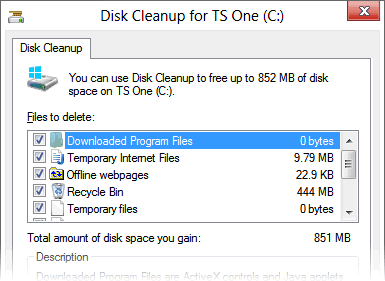
You can recover a few gigabytes worth of storage space if you
clean up after a Windows 8 upgrade.
Upgrading to Windows 8 Windows 8 will offer a complete upgrade option from Windows 7, but the same won't be possible if you are using Vista or XP (or the current Consumer Preview for that matter). System requirements for Windows 8 are essentially the same as Windows 7 (which were similar to Vista), so most semi-modern hardware will run it just fine.
Metro notifications, turning some of those off Windows 8 encourages you to use a Microsoft account so you can take advantage of neat features like SkyDrive or syncing your OS settings across multiple PCs. However, it will also activate other things like the Messaging Metro app, which looks good, but becomes a nag if you are using a different IM client like Trillian or Pidgin. Windows 8 uses notifications that resembles those of Growl on OS X. You can fully manage, and deactivate the Messenger app notifications from the Settings menu.

Windows 8's notifications look good and serve a purpose, but you may want to be
selective about the programs that can interrupt your workflow.
- Native screenshots in Win 8 Although using a third-party tool like Droplr remains the easiest way to grab and share a screenshot, Windows 8 finally adds a screenshot shortcut that doesn't require the snipping tool or another program where you can paste the taken image. Win + Prt Sc does the trick, saving a PNG image file on the Pictures folder.
That's it for now. Did we miss anything important? Have a Windows 8 how-to question? Let us know in the comments and we'll do our best to come up with a solution.