also @ TechSpot: Check your bill: AT&T adds new 'administrative fee' to wireless bills

iOS 6.1.2 fixes Exchange calendar bug, battery drain, passcode flaw

By

On February 19, 2013, 4:30 PM

Apple has released yet another iOS update, iOS 6.1.2, to address a few lingering issues still haunting some iOS 6.1 and 6.1.1 users. The iterative update includes fixes an Exchange calendar bug, which in turn also solves the greatly decreased battery life experienced by some iPhone and iPad owners. 

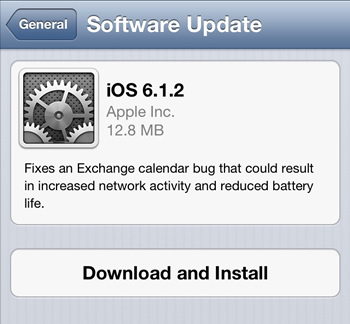
Apple's Software Update claims only a single improvement made by iOS 6.1.2: "Fixes an Exchange calendar bug that could result in increased network activity and reduced battery life."

While this is welcome news to many users, what's missing from this description is another rather major change: a fix for the passcode security flaw introduced in iOS 6.1. Although absent from the release notes, various news outlets are reporting 6.1.2 silently resolves the passcode bypass bug.

Once again, the release of iOS 6.1.2 was predicted by German blog iFun, who projected the update would reach iOS users "before 20 February". 

With the release of iOS 6.1, Apple introduced broader 4G LTE compatibility to iPhone 5 owners. As a result of that software release though, iPhone 4S owners began to complain about degraded network and call performance. Some cellular network operators, like Vodfone UK, were actually forced to warn their iPhone customers not to upgrade to iOS 6.1 as a result of the bug.

In response, Apple pushed out iOS 6.1.1 about a week and a half ago. The update has seemingly quieted most of those complaints.

As always, it's recommended that jailbreakers wait before upgrading to the latest point release. Although evasi0n worked for 6.1.1 without a needed overhaul, the community has yet to confirm whether or not 6.1.2 will be as straight forward. A recent post by iClarified though suggests things are looking good for the evasi0n team, meaning a quick update to officially support iOS 6.2.1 is likely on the way.

, , , , , , , , , , , , , , , ,

Related Products from Product Finder

Apple MacBook Pro 15" Retina - Summer 2012

The Apple MacBook Pro with Retina Display is equipped with a third generation Intel Core i7 processor clocked at 2.3GHz, 8GB of DDR3L 1600MHz RAM, 256GB of flash storage, Intel HD 4000 Graphics, a discrete Nvidia GeForce GT 650M GPU with 1GB of GDDR5 memory and a built-in FaceTime HD camera. It sports a SDXC card reader, HDMI port, two USB 3.0 ports, MagSafe 2 power connector and a dual Thunderbolt ports.

56 Reviews

Apple MacBook Pro 13.3" Retina - Summer 2012

Read expert reviews, pros & cons, and product information about Apple MacBook Pro 13.3" Retina - Summer 2012. There are 47 reviews available so far.

34 Reviews

User Comments: 30

Got something to say? Post a comment
  1. Finally. I go from draining to 65% with an hour of use under 6.1 to 100% to 92% under 6.2.2. Thanks apple.

  2. The calendar bug still exists????? Apple claimed to have fixed this in 6.0.1!

  3. The calendar bug still exists????? Apple claimed to have fixed this in 6.0.1!

    What calendar bug?

  4. There was an issue where if you accept/decline a calendar invite from iOS, it would **** up everything. Made you creator; if you chose to decline it would delete the entire event; etc.

  5. There was an issue where if you accept/decline a calendar invite from iOS, it would **** up everything. Made you creator; if you chose to decline it would delete the entire event; etc.

    hmm interesting. I just switched from the stock calendar app today to Sunrise, but you need a Facebook to log in (even though you can connect LinkedIn and Google calendar to it)

  6. hmm interesting. I just switched from the stock calendar app today to Sunrise, but you need a Facebook to log in (even though you can connect LinkedIn and Google calendar to it)

    Yeah, it caused havoc in our organisation due to the popularity of iPhones as both business and personal phones. It was almost comical, almost depressive..

  7. Yeah, it caused havoc in our organisation due to the popularity of iPhones as both business and personal phones. It was almost comical, almost depressive..

    I love it! But I kinda miss the live date on my home screen (the stock app brought color to my home screen haha)

  8. Nobody has any real expectations Apple will fix this bug for real. This is what, their fourth try? I wish Apple would stop hiring fashion designers and hire real technical experts.

  9. Nobody has any real expectations Apple will fix this bug for real. This is what, their fourth try? I wish Apple would stop hiring fashion designers and hire real technical experts.

    lol. they actually do fix things but sometimes it takes a while haha. I am wondering why they rushed this patch without the passcode fix

  10. There's talk that the passcode glitch was quietly fixed in this update.

  11. There's talk that the passcode glitch was quietly fixed in this update.

    Hmm I heard it was not. Interesting though. I am not surprised why they didn't state it in the release notes... so that people wouldn't know you could exploit this if they came in contact with it.

  12. My wife has tried to update but she keeps getting a message her phone is not connected to WiFi! I am wondering if the problem is with the Apple servers.

  13. The battery drain is worse since I loaded 6.1.2 last night on 4Gs.

  14. I havent been on 4G since the patch. I guess I will see today! I really hope they fix the inconsistencies with Verizon and the iPhone since I get 2G where my friends get 4G with AT&T (iPhone issue)

  15. My wife has tried to update but she keeps getting a message her phone is not connected to WiFi! I am wondering if the problem is with the Apple servers.

    Is it connected to WiFi though? I was reading elsewhere that AT&T? wasn't pushing this out over the cell networks. If you are connected to WiFi and it still won't work, you can update it through iTunes but then it goes from a few meg download to over a gig because it downloads the whole iOS.

  16. It eventually updated around ten o clock.

  17. Is it connected to WiFi though? I was reading elsewhere that AT&T? wasn't pushing this out over the cell networks. If you are connected to WiFi and it still won't work, you can update it through iTunes but then it goes from a few meg download to over a gig because it downloads the whole iOS.

    I think this update was only like 30 mb if I remember correctly.

  18. Yeah, not big, unless you did the update through iTunes, then it dls the entire iOS, so it jumps to something like 1.1GB. So that isn't an ideal method to upgrade, but it should work when OTA/WiFi updates fail.

  19. Yeah, not big, unless you did the update through iTunes, then it dls the entire iOS, so it jumps to something like 1.1GB. So that isn't an ideal method to upgrade, but it should work when OTA/WiFi updates fail.

    Ah I was wondering why it was so huge in iOS vs through the device.

  20. ITunes takes up too much space on the C: drive. I found this out when my wife upgraded her iPhone. My data is kept on a separate partition but iTunes did not have an option to use anything but the C drive so backups of the phone kept failing. As a result of this and other issues I don't rate Apple.

  21. @Railman - Really? I don't have iTunes on a PC anymore, but I'm sure you can have it store data on any drive you want.

    http://support.apple.com/kb/ht1391

  22. Yeah, not big, unless you did the update through iTunes, then it dls the entire iOS, so it jumps to something like 1.1GB. So that isn't an ideal method to upgrade, but it should work when OTA/WiFi updates fail.

    Hey mate, my questions I think been answered? on the phone the update 6.1.2 says 12.0mb, but when I start download, says like 983mb, im like no way??? So if I do it through WIFI it'll be a smaller update??

    please explain..

  23. Yes, wifi update will be smaller. iTunes update gets the whole OS presumably for the ability to do a total restore to your phone if something really bad happens at some point. Whole OS isn't needed for a patch, only the patch.

  24. I put Itunes on my old XP computer on an external drive because it took up too much space.

  25. Yes, wifi update will be smaller. iTunes update gets the whole OS presumably for the ability to do a total restore to your phone if something really bad happens at some point. Whole OS isn't needed for a patch, only the patch.

    Thank you sir, quick story- im down in sydney to see surgeon & rehab work placement so my pc's in queensland, friend lent me his lappy, visited maccas for the free wi-fi, it was broken down or who knows, so this morning spoke to phone com - TELSTRA about my data, 8gigs one time only $20! So..... I've done it the long way but it's now updated.

    thanks again, no doubt I'll be asking more questions or sites to help.

Recently commented stories

Post a new comment

Social Login & Guest Posting TechSpot Members
Login here or sign up for free,
it takes about a minute.
Get complete access to the TechSpot community. Join thousands of technology enthusiasts that contribute and share knowledge in our forum. Get a private inbox, upload your own photo gallery and more.
TechSpot on:

Subscribe to TechSpot

Get free exclusive content, learn about new features and breaking tech news.