AMD unveils OpenClaw to run AI agents locally on Ryzen and Radeon hardware

Skye Jacobs

Posts: 2,010   +58
Staff
The takeaway: AMD is pushing the idea that artificial intelligence agents don't need to live in the cloud. Its new OpenClaw framework – now equipped with two hardware configurations dubbed RyzenClaw and RadeonClaw – is designed to help developers and early adopters run sophisticated large language models entirely on local machines. The aim is clear: bring generative AI performance into the home and reduce dependence on data centers.

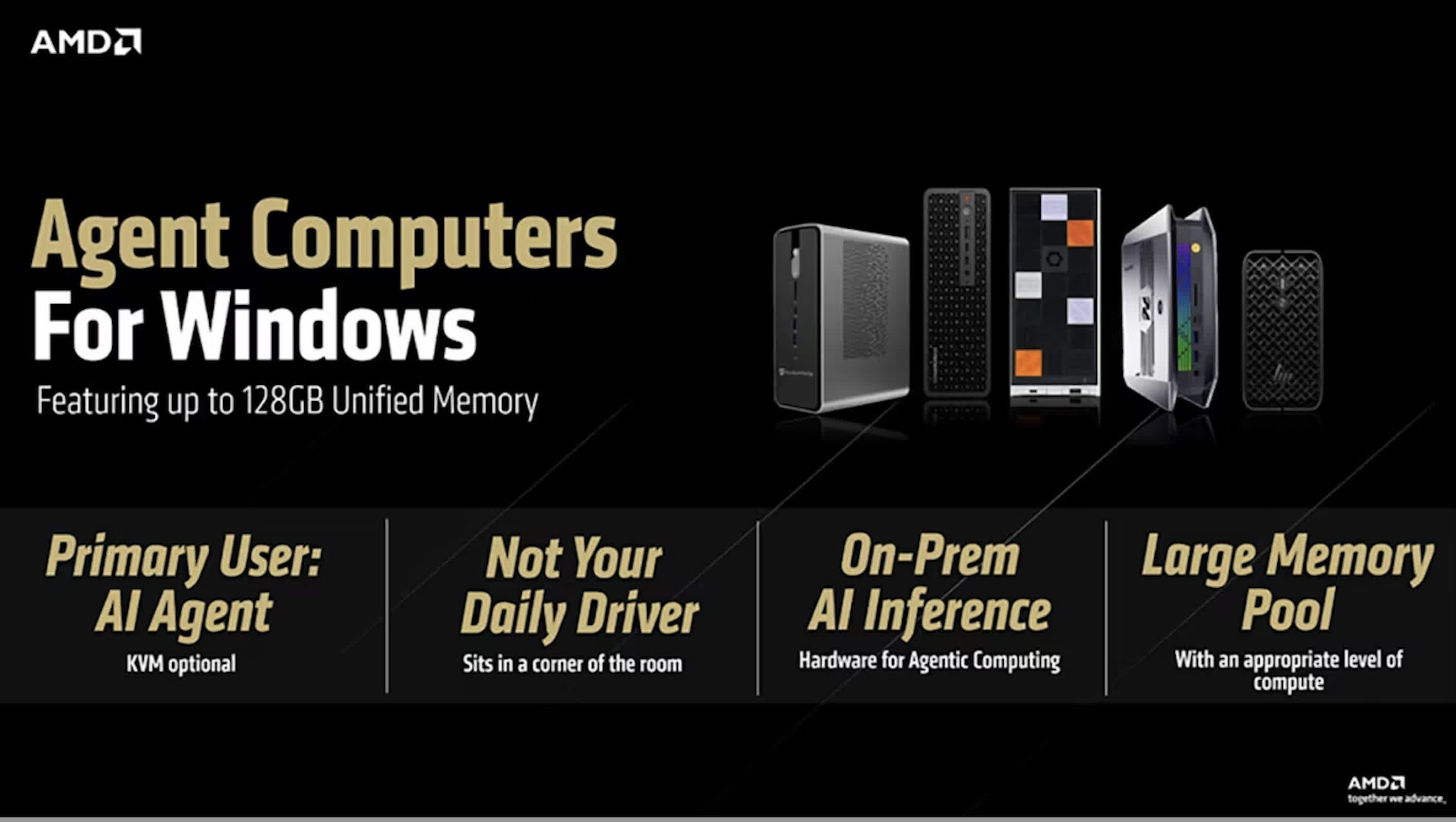
The effort is part of AMD's broader Agent Computer initiative, which argues that the future of AI isn't limited to remote infrastructure. Instead, it envisions a world where users control both their data and their computing environment – where AI assistants operate continuously with reduced network dependence, fewer external subscriptions, and fewer privacy concerns.

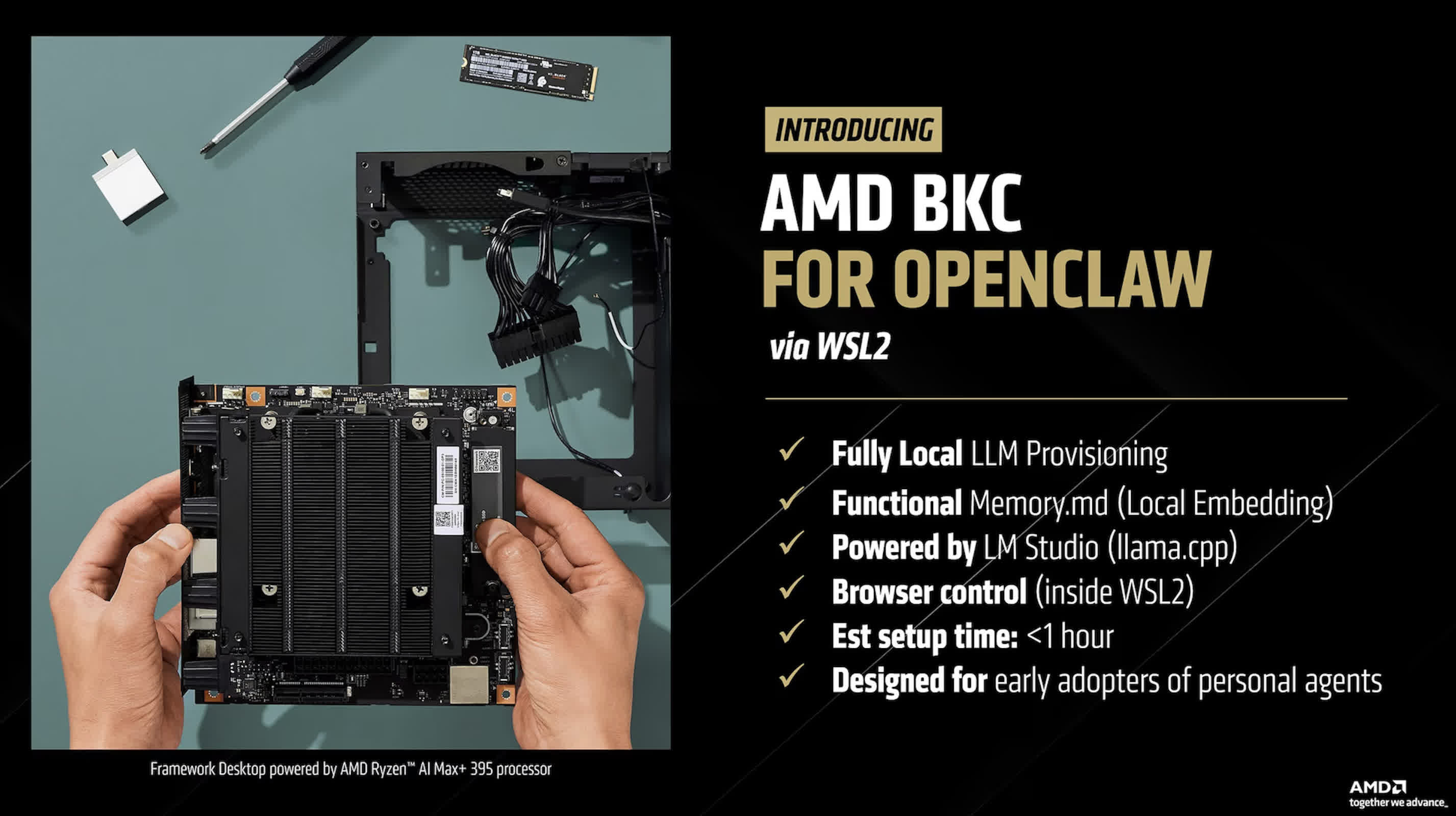
OpenClaw is AMD's latest attempt to turn that principle into a tangible, developer-accessible platform. At a technical level, OpenClaw runs on Windows using the Windows Subsystem for Linux (WSL2), with local inference handled by LM Studio through the llama.cpp backend. This setup allows users to run models such as Qwen 3.5 35B A3B directly on their own hardware.
The system also supports Memory.md, an embedding-based memory framework that stores local context without relying on cloud synchronization. AMD presents the guide as a streamlined way for developers to configure a full OpenClaw environment on Windows when testing AI agent architectures, though it does not specify an expected setup time.

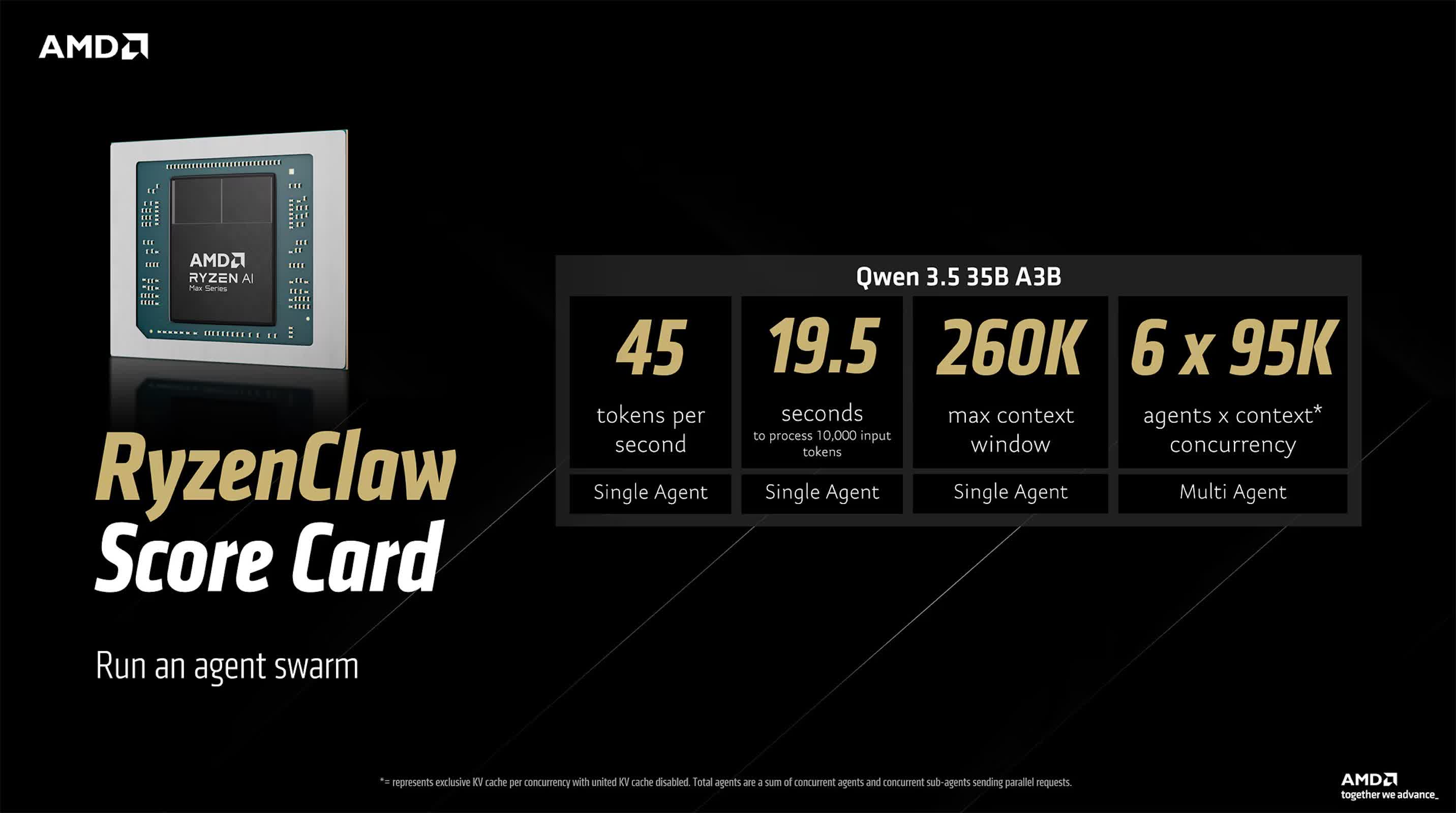
The two configurations represent different paths to the same idea: high-performance, on-device AI. The RyzenClaw configuration is built around AMD's Ryzen AI Max+ processor paired with 128GB of unified memory. AMD recommends allocating roughly 96GB of that memory to variable graphics usage to keep LLM inference running efficiently.
In this configuration, Qwen 3.5 35B A3B generates about 45 tokens per second and can process a 10,000-token input in approximately 19.5 seconds. Its 260,000-token context window is expansive, making it suitable for multi-agent workflows or "agent swarm" testing environments. AMD says the setup can run up to six local AI agents concurrently – a notable figure for a non-datacenter system.

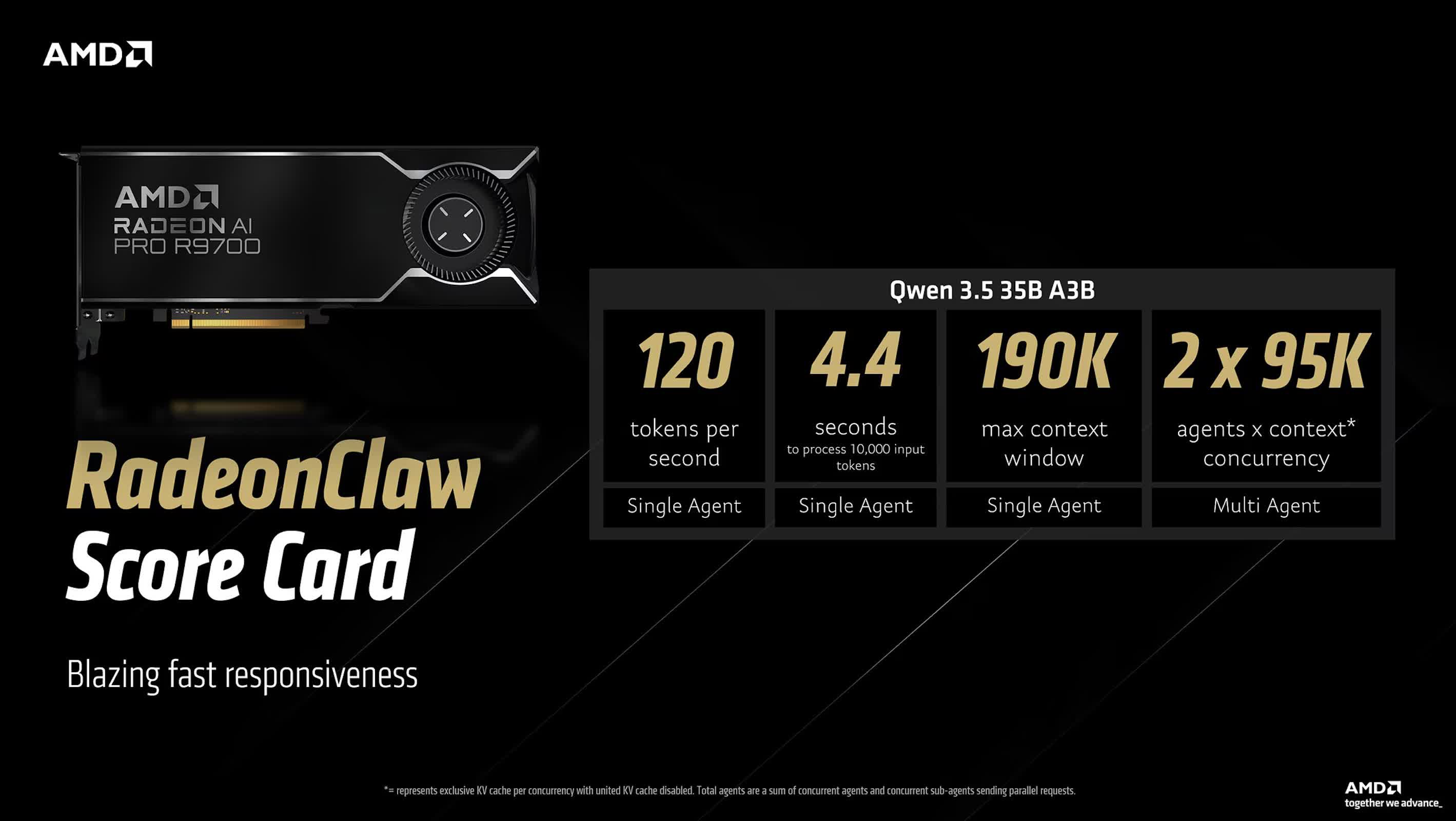
RadeonClaw, by contrast, shifts the computing load to a discrete GPU: the Radeon AI PRO R9700. This workstation card comes with 32GB of dedicated VRAM, which significantly increases throughput. Using the same model, performance climbs to around 120 tokens per second, reducing the time needed to process 10,000 tokens to about 4.4 seconds.
That gain, however, comes with limits as the maximum context window drops to 190,000 tokens, and concurrent agent capacity falls to two. These trade-offs underscore AMD's strategy of offering distinct tuning paths depending on whether developers prioritize context depth or inference speed.

Neither configuration is built for casual users. A desktop built around the Ryzen AI Max+ 395 chip and 128GB of memory such as a Framework Desktop configuration is cited as starting at around $2,700. The RadeonClaw option adds further expense, as the Radeon AI PRO R9700 GPU alone retails for about $1,299.

For now, AMD acknowledges that OpenClaw targets early adopters and engineers experimenting with local AI agents rather than mainstream consumers.
Still, the message behind OpenClaw extends beyond its hardware. AMD is betting that developers will value autonomy and privacy over raw scale, and that local agents running on consumer-grade silicon can bridge the gap between personal computing and distributed AI.

If that idea gains traction, the company could carve out a distinct role in the rapidly evolving AI ecosystem – one that blurs the line between workstation and datacenter performance.

Permalink to story:

 
AMD is spot on IMO. I’m currently researching hardware for my next-gen, pro-home setup and adding the ability to integrate local LLM is most certainly a consideration. I have zero interest in long-term AI cloud subscriptions if there are local alternatives that can work—even if they cost more (up front or otherwise). I’m never opposed to spending some coin to ensure autonomy and avoid vendor lock-in wherever possible. That said, I won’t be any early adopter here either. I prefer to keep distance from bleeding edge as I want longevity in the systems I employ.
 
AMD is spot on IMO. I’m currently researching hardware for my next-gen, pro-home setup and adding the ability to integrate local LLM is most certainly a consideration. I have zero interest in long-term AI cloud subscriptions if there are local alternatives that can work—even if they cost more (up front or otherwise). I’m never opposed to spending some coin to ensure autonomy and avoid vendor lock-in wherever possible. That said, I won’t be any early adopter here either. I prefer to keep distance from bleeding edge as I want longevity in the systems I employ.
I have a used 3070ti for running local AI. It wont run as fast as cloud based stuff, but if you don't mind waiting a couple minutes instead of 30 seconds, it works fine. I got a used Epyc 7343 and 4TB Kioxia drive(~3.8TB or something) with 256GB of DDR4 to put with it and have been running Ollama on it for months now. If I wasn't such a **** waffle with used server hardware addiction I would definitely recommend just buying one of the AMD Ryzen AI 395HX with as much ram as you can shove in it. I've seen benchmarks that show that even though the iGPU on the 395HX is slower than the 3070ti, the large pool of unified memory with LPDDR5X makes a massive difference. And, it's about $8,000 cheaper than an Nvidia pro 6000.

If I learned anything from running local AI, it's MEMORY, MEMORY, MEMORY. Level 1 Tech has a bunch of videos on running local AI on MiniPC's. Would definitely recommend going the minipc route with unified memory. And now that 5090's are pushing $4,000, I definitely thing going the MiniPC route is your best bet. If you have used hardware laying around it's definitely worth your time prototyping with it and you can get okay results. If I had to do real work on my AI setup I would definitely spend some money improving it, but for something that I have control over, experiment with and use semi-seriously, it's fine. Since it is on my local network(I give it access to duck-duck-go, not google search), I can watch what my daughter is using it for and limit access to it if I find her usage to starting to become unhealthy.

One thing to note is that if more than one person tries to use it at once I get like a 90% loss in performance. I think I can fix that with scheduling, but I haven't figured that out yet. I need it to work on one task before it starts on another. If it tries to work on 2 at once it just shits the bed and will even spit out nonsense.
 
I have a used 3070ti for running local AI. It wont run as fast as cloud based stuff, but if you don't mind waiting a couple minutes instead of 30 seconds, it works fine. I got a used Epyc 7343 and 4TB Kioxia drive(~3.8TB or something) with 256GB of DDR4 to put with it and have been running Ollama on it for months now. If I wasn't such a **** waffle with used server hardware addiction I would definitely recommend just buying one of the AMD Ryzen AI 395HX with as much ram as you can shove in it. I've seen benchmarks that show that even though the iGPU on the 395HX is slower than the 3070ti, the large pool of unified memory with LPDDR5X makes a massive difference. And, it's about $8,000 cheaper than an Nvidia pro 6000.

If I learned anything from running local AI, it's MEMORY, MEMORY, MEMORY. Level 1 Tech has a bunch of videos on running local AI on MiniPC's. Would definitely recommend going the minipc route with unified memory. And now that 5090's are pushing $4,000, I definitely thing going the MiniPC route is your best bet. If you have used hardware laying around it's definitely worth your time prototyping with it and you can get okay results. If I had to do real work on my AI setup I would definitely spend some money improving it, but for something that I have control over, experiment with and use semi-seriously, it's fine. Since it is on my local network(I give it access to duck-duck-go, not google search), I can watch what my daughter is using it for and limit access to it if I find her usage to starting to become unhealthy.

One thing to note is that if more than one person tries to use it at once I get like a 90% loss in performance. I think I can fix that with scheduling, but I haven't figured that out yet. I need it to work on one task before it starts on another. If it tries to work on 2 at once it just shits the bed and will even spit out nonsense.
Thanks for the insight :)

Local AI is my preference and direction eventually, but I’m prioritizing architecture currently. I don’t really want to go all-in on expensive AI hardware until I am confident on my overall direction. And I’m happy to wait. I’ll get my local architecture solid, better understand the pros/cons of how to sandbox AI in a way that works for me, and then move to the hardware integration.

I discovered quickly that my smart home stuff had unexpected limitations for usefulness after deployment (once novelty wore off) and I’m taking that lesson into consideration as I try and figure out how best to pull AI into my workflow, and then (maybe) more daily life.

Cheers!
 
Thanks for the insight :)

Local AI is my preference and direction eventually, but I’m prioritizing architecture currently. I don’t really want to go all-in on expensive AI hardware until I am confident on my overall direction. And I’m happy to wait. I’ll get my local architecture solid, better understand the pros/cons of how to sandbox AI in a way that works for me, and then move to the hardware integration.

I discovered quickly that my smart home stuff had unexpected limitations for usefulness after deployment (once novelty wore off) and I’m taking that lesson into consideration as I try and figure out how best to pull AI into my workflow, and then (maybe) more daily life.

Cheers!
Things like Arduinos and Pis are so cheap that I would actually like to convert many of my smart home appliances the mini they get annoying. I pulled apart my "smart" washer awhile ago because I thought it was broken, but all the buttons go through a micro controller and then the outputs goto relays that turn things on or off. I just programmed an Arduino to turn certain relays on and off. The Valve? Relay. the spin motor? Relay. The pump? Relay. The stuff was already in there, it just had a control board between between the buttons on the top and the relays controlling the other electronics in side it. I was surprised at how simple it was and Whirlpool wanted $450 for a new control board. I fixed the whole thing for an Ardiuno I had in a box and a couple hours of my time.

Im getting into tangent territory now. Anyway, best of luck. I had a lot of fun making my own AI and feel even better knowing I know exactly what it's doing. Still some stuff to work out, but 99% of the time, it's fine. I will say that I couldn't get a good way to make it work when I'm off my network, but I found a hack job way to get around it. I had Claude make an android app for us. What it does is that it connects to a teamspeak server that acts as an intermediary between our phones and the AI on my network. Nothing is more perminant than a temporary solution, am I right?
 
I think there's a huuuuuge misunderstanding here, OpenClaw *is not* from AMD. They didn't develop it, they didn't release it. They wrote a document outlining how to install and use it with some AMD-specific utilities/tweaks, but OpenClaw is open source and the developer has no ties to AMD, in fact the dev just recently started working at OpenAI.

To credit AMD for the development and release of OpenClaw is a huge disservice to the actual developer.
 
Cool, I can have a bunch of OpenClaws running around in my house.
I guess it makes sense, the Oscars went to horror movies.
 
Back