Microsoft is pulling the plug on SMS codes, wants you to switch to passkeys

Alfonso Maruccia

Posts: 2,571   +956
Staff
In brief: Despite dating back to 1993 and the GSM era, SMS codes remain fully active across authentication and identity verification workflows. Microsoft is among the bigger tech players pushing to retire the option entirely, offering customers a set of modern, more secure alternatives – though whether users will embrace the change or resist their SMS-ridden habits remains to be seen.

Microsoft has confirmed that SMS-based authentication and account recovery for personal accounts is on its way out. The company argues that plaintext SMS codes are no longer fit for purpose in secure authentication, particularly now that stronger alternatives are widely available across Windows and mobile platforms.

Redmond had signaled the shift earlier this year, and is now formalizing it through an updated support page.

The company characterizes SMS-based authentication as an active security liability, citing how cybercriminals increasingly exploit plaintext mobile messages to run fraud campaigns. SMS authentication is also susceptible to phishing, SIM-swapping, and other sophisticated attack vectors.

Also check out: Are Passwords Dead? What Are Passkeys, and Why Everyone's Talking About Them

In its place, Microsoft is steering users toward passwordless accounts, passkeys, and verified secondary email addresses. Passkeys are the clear priority – an allegedly phishing-resistant authentication method that becomes significantly harder to "crack" when paired with hardware biometrics or a device PIN.

Signing in with a passkey also eliminates the wait for SMS codes, which have a well-documented reputation for unreliability. On the account recovery side, passkeys and verified email addresses offer a more resilient fallback, especially for users who change phone numbers or lose access to their original device.
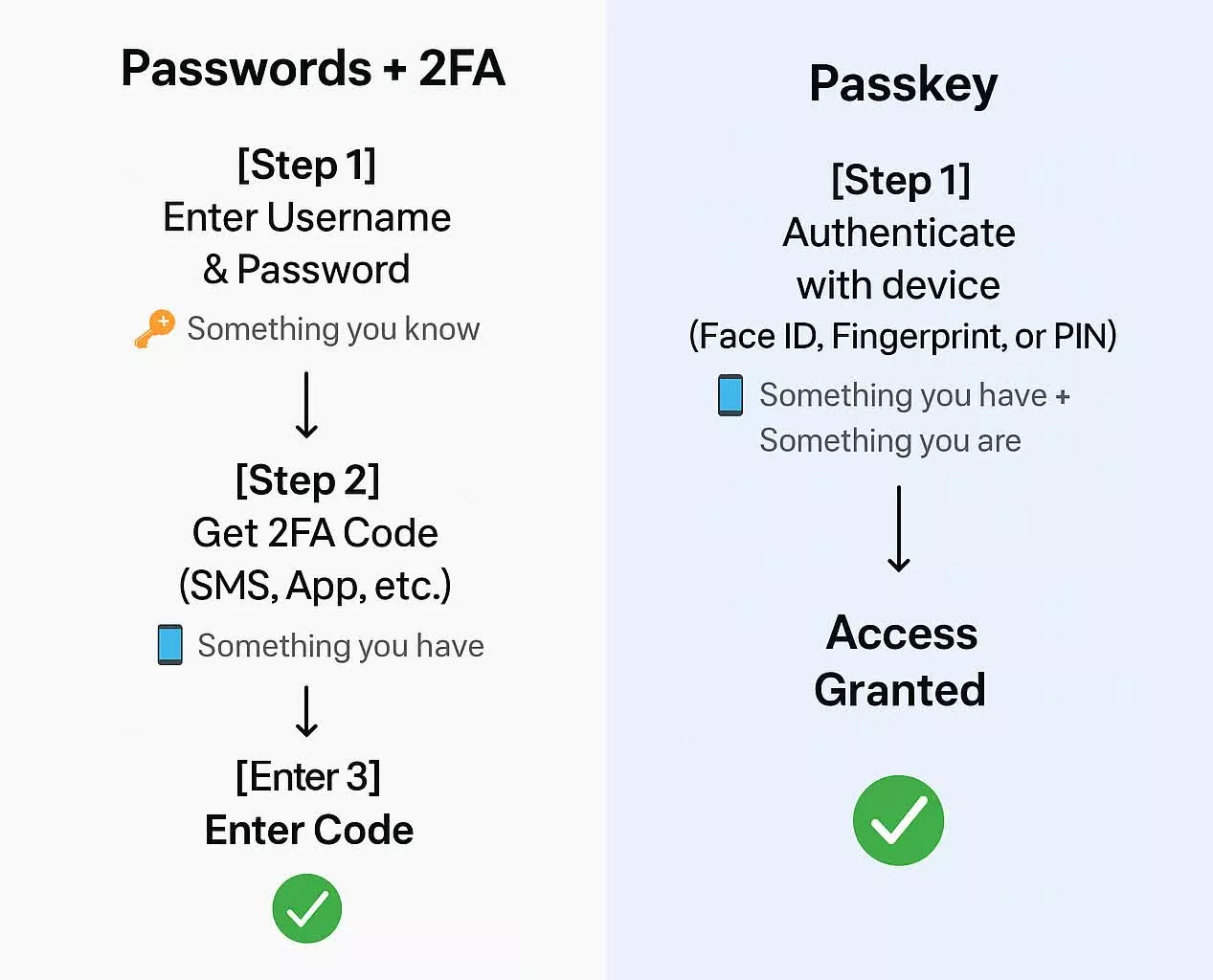
In practical terms, Microsoft is going to phase out SMS authentication with a redesigned authentication experience. When the user tries to sign in, the company will provide a new option to "sign in faster" after creating an on-device passkey. Microsoft's instructions include several passkey options, such as the ability to save the newly created key in password managers, smartphones, or Windows Hello's biometric hardware.

Microsoft is framing passkeys as an unambiguous upgrade over legacy mobile authentication that would render decades-old SMS tech obsolete. That said, the phase-out may create friction for users who still rely on traditional SMS verification in their day-to-day workflows.

In any case, Redmond says it "is committed to advancing security standards through secure by default experiences," adding that passkeys and verified (secondary) emails will help customers "stay ahead" of evolving threats.

Permalink to story:

 
My authenticator is still broken after 2 years of trying to get ms authenticator to work. Guess imma get locked out of intune with this. Thanks MS!
 
My son plays Minecraft from time to time, a handful of years ago when I setup Minecraft for him I linked my MS account to it so I could monitor how often he plays.

He doesn't play as much as he used to, in fact it's been 4 or 5 months since he last played it. Just last week he said he wanted to play Minecraft, but it was asking for my login info. I go to log in and I can't type in my password, my MS login attempts kept asking me for a Passkey that's linked to my account. WTF? Passkey? I don't have a passkey and why is it asking me for one if I never created one? The only other option was to scan the QR code.....WTF is going on here?

I had to log into my MS account online and find the login options and disable it asking for a passkey. Screw MS and it's forced passkey crap, they just auto setup my account to use a passkey.

I'm not keen on keeping things linked to my phone for log in purposes. I don't keep any usernames or passwords for apps saved on my phone that I use and I don't require my phone to be used as a passkey for accounts.
 
Passkey workflows are really only viable if you have one single device, or a password manager that 1. consistently works with all passkeys; and 2. works across all your devices.

It has been my experience that most people have more than one device at this point, and no password manager works with all passkey providers. I get that they are technically better, but so are OTP codes, and those can be used with traditional passwords, mimic a consistent workflow, and pretty much every password manager supports all OTP codes (with a few minor exceptions, such as OKTA; or with password managers offering a separate, dedicated app).

Also, for those in the US, I suspect passkeys will have fewer constitutional protections than passwords do. Like how you can be compelled to give up your biometric data for logins, or if you password is found written down while executing a search warrant, those accounts can be included in a case as evidence - but passwords are protected under your fifth amendment rights against self incrimination. Until the law catches up with reality, and software catches up to a multi-device, multi-standard passkey world, a password + 2FA OTP seems like the more robust solution to me.
 
I'll stick with my local account created automatically with a Rufus installer of the latest Windows 11 ISO.
 
Microcrap's Authenticator is a POS, like most of their software. I recently got a new phone and had to migrate my 2FA authenticator codes. Fortunately, I keep most of them in Aegis, which made the switch efortless, took like 3 seconds. However, I still have a couple of codes in MS's auth, due to work restrictions. The new phone imported them, but neither of them worked, requiring me to "rescan the QR code". Which means contacting the IT department for a new code. Tipical M$ bullshit.

And yeah, passkeys don't do **** for desktop PCs, so give us a break.
 
Here's what will happen. Consumers, businesses, government will be "convinced" that passkeys are safer than passwords + 2FA. Everyone switches then low and behold someone hacks it and they want
everyone to switch back to passwords & 2FA. 🤣 :mad:
 
Passwords are a stupid, confusing, inconsistent mess that don't enhance security in any shape or form. It's a glorified cookie. You don't have to take my word, all big profile security experts say the same thing.

BTW Microsoft also pushes "passwordless" logins, because with some mind trick they believe that 1 factor authentication is more secure than 2 factors. No comment.
 
Microsoft also pushes "passwordless" logins, because with some mind trick they believe that 1 factor authentication is more secure than 2 factors. No comment.
Microsoft's passwordless login -is- 2FA. Why not learn the basics of a scheme before attempting to debate it? It requires something you own -- a specific device -- with something you are or know -- a passkey, or your biometric factors. Not to mention that your basic premise is false: one secure factor beats two insecure factors.
 
Microsoft's passwordless login -is- 2FA. Why not learn the basics of a scheme before attempting to debate it? It requires something you own -- a specific device -- with something you are or know -- a passkey, or your biometric factors. Not to mention that your basic premise is false: one secure factor beats two insecure factors.
Biometrics are trivially easy for someone to bypass if they have one of your devices, and a passkey that you know and have to type in......that's what we call a password. Which MS claims is bad, unless they give it to you.
 
Microsoft's passwordless login -is- 2FA. Why not learn the basics of a scheme before attempting to debate it? It requires something you own -- a specific device -- with something you are or know -- a passkey, or your biometric factors. Not to mention that your basic premise is false: one secure factor beats two insecure factors.
At the risk of taking the bait: is this trolling, or am I missing something?

As I understand it, the passkey is the thing you "own", not the thing you "know". Its not dissimilar to a public encryption key: you could memorize it, it is just plaintext, if you're one of those people that memorize Pi out to the 'thousandth' place, but no one will realistically do that for all their accounts. The thing you "know" is whatever you use to unlock the device; e.g. your biometric data (which is just another thing you "own") or the device PIN, which is what lets you transmit the passkey. So in order to get into your account that is secured with a passkey, they need to steal the device it is stored on and get either a copy of your biometrics used to unlock the device or learn your PIN; I.e. two factors. But if you were the type to memorize a passkey, and someone were to beat that passkey memorization out of you, they could likely get into the account it was for without needing your device at all. And in the case of storing the passkey in a password manager, they would need to steal a copy of your password database, and then the password and/or key file needed to decrypt it; I.e. two or more factors.

imo, if you want to be super extra secure:
1. Passwords in a password manager (which should all be long, randomly generated character strings)
2. 2FA OTP codes in a separate app, ideally with its own password (which ideally would be a long passphrase)
3. Password manager secured with password (another long passphrase) & either a hardware key or a key file

Now in order to gain access to any given account, someone would need to gain access to your OTP code app, get a copy of your password manager's database, steal your hardware key or key file, and learn two different passphrases. And do it all without you noticing.

But you'll have to explain this one to me: how is one factor better than two when it comes to security?
 
Biometrics are trivially easy for someone to bypass if they have one of your devices
If an attacker has one of your devices, bypassing SMS is even easier. Nor does passwordless login have to rely on biometrics. If you consider it insecure, use a pin or a rolling authenticator code.

Honestly, some people are so anxious to knock Microsoft, you deny basica reality. These schemes are more secure than sending a password over the open Internet, then responding to a plaintext SMS message.

, and a passkey that you know and have to type in......that's what we call a password.
We're speaking of FIDO2 passkeys here, which are not passwords. You may be thinking of a pin, which one could indeed call a password, but is a little harder to spoof, since it never leaves your device.

But if you were the type to memorize a passkey, and someone were to beat that passkey memorization out of you, they could likely get into the account it was for without needing your device at all.
But they can't. Whether you're speaking of a FIDO passkey or a pin, they are tied to a specific device. I could tell you my pin now is "1234", and that does you absolutely no good without access to the device that pin is associated with.

But you'll have to explain this one to me: how is one factor better than two when it comes to security?
I think you've misread my statement. I was responding to the claim that any two factors are inherently better than any (different) single factor. Mathematically, this is false. If you use 2FA with each factor being 90% secure, that's more vulnerable than a single factor 99.9% secure.
 
Last edited:
I think you've misread my statement. I was responding to the claim that any two factors are inherently better than any (different) single factor. Mathematically, this is false. If you use 2FA with each factor being 90% secure, that's more vulnerable than a single factor 99.9% secure.
I don't think that is true, either. For 2FA, you need to beat both, not either factor; its a parallel probability, not a serial one.

So Factor 1 (F1) failure is 10% chance, and Factor 2 (F2) is also 10%, then your probability of account compromise is:

F1_fail = 1-0.9 = 0.1 (10%)
F2_fail = 1-0.9 = 0.1 (10%)

F1+F2_fail = 0.1*0.1 = 0.01 (1%)

F1+F2_secure = 1-0.01=0.99 (99%)

So, two "90% secure" factors combine to "99% secure", or nearly as secure as your single "99.9% secure" factor. And this proves that combining multiple "less secure" factors increases their combined security. If you were to add a third factor of "90% secure", you get to "99.9% secure".

Of course, this all begs the question: what would preclude you from using the "99.9% factor" as one of your factors, and getting the following:

F1_fail = 1-0.999 = 0.001 (0.1%)
F2_fail = 1-0.9 = 0.1 (10%)

F1+F2_fail = 0.001*0.1 = 0.0001 (0.01%)

F1+F2_secure = 1-0.0001 = 0.9999 (99.99%)


All this is to say: you can't really compare apples to oranges here. Yes, it is plausible for a given single factors to be more secure than multiple factors. But nothing precludes those single factors from being combined into multiple factors, and that combination will absolutely be more secure. All this said, "security level" itself isn't really a thing. Security is a binary: an encryption is either broken or it is not; a password is either spilled or it is not. And over a long enough period of time, every security measure fails: computing catches up to brute force encryptions, mathematics advances to sophisticatedly break encryptions, passwords spill, etc. It isn't a case of individual factors being "90% secure" or "99.9% secure", but every factor being "100% secure, until it isn't" and having additional factors provides a bulwark against an account being compromised in the interim between one factor failing and it being replaced or fixed (e.g. an OTP code keeping your account secure in the event of a password leaking, until you can change that password). Because if we re-run the math with 100% secure and 90% secure, we get:

F1_fail = 1-1 = 0 (0%)
F2_fail = 1-0.9 = 0.1 (10%)

F1+F2_fail = 0*0.1 = 0 (0%)

F1+F2_secure = 1-0 = 1 (100%)

tl;dr - your premise only works if you assume your single factor can never be combined with additional factors; no other factors could ever be combined; and it ignores that security is a binary, and it only becomes a probability once it is already fundamentally broken (old hashing schemes, spilled passwords, encryption schemes that were later discovered to have flawed implementations, etc)
 
So, two "90% secure" factors combine to "99% secure", or nearly as secure as your single "99.9% secure" factor.
Were you joking? 99% has ten times the failure rate of a 99.9% system. Your math has certainly proven my point for me. There is nothing inherently more secure about having multiple factors. You must consider the inherent security of each in isolation -- and transmitting cleartext SMS messages is far from secure.

Of course, this all begs the question: what would preclude you from using the "99.9% factor" as one of your factors
That's just the point that exposes the fallacy here. Nothing precludes you from using a pin, biometric factor, or FIDO2 key in conjunction with additional factors.

tl;dr - your premise only works if you assume your single factor can never be combined with additional factors; no other factors could ever be combined; and it ignores that security is a binary
I'm sorry, this isn't even remotely correct-- as your own math demonstrated. A single 99.9% factor beats two, three, or even a dozen factors that combine to any value lower than that ... whether or not that single factor can indeed be combined with others.
 
But they can't. Whether you're speaking of a FIDO passkey or a pin, they are tied to a specific device. I could tell you my pin now is "1234", and that does you absolutely no good without access to the device that pin is associated with.
Didn't spot this right away.

When it comes to hardware keys, nothing precludes you from having multiple hardware keys. One for each device, even. And those are highly mobile, they aren't tied to a specific device either. If I lose me phone, I still have my NFC FIDO key. If my computer dies, I can just pull my USB FIDO key and move it to my new computer. If either key dies, I still have the other one to get into my account.

But for passkeys, moving them between devices after device failure or loss is effectively impossible. You could do it proactively, though - and the easiest way to do that is via storing them in a password manager. And while, on paper, a passkey is a passkey is a passkey, and every password manager can store them, no problem, I know in practice that actually passing them between password manager and service you're logging into is easier said than done. For example, I know that using Bitwarden, Firefox, and Google, you can save the Google passkey to Bitwarden on Firefox, but Google cannot read/access that passkey on Firefox (but it can on Bitwarden on Chrome). Meanwhile, if you bring this up with each company, all three point their fingers at the other two: Google says blame Firefox, Firefox says blame Bitwarden, Bitwarden says blame Google. In a similar vein, I have had trouble getting Amazon to save their passkey to password managers, instead of my hardware; they just didn't want to do it last time I tried.

So I will stick to my hardware keys, but I have yet to run into a single service, via any browser or password manager that couldn't handle a hardware key. I suspect the problem is that FIDO is an actual standard, while passkeys are not following any kind of standard, but I honestly don't know this for certain.
 
Were you joking? 99% has ten times the failure rate of a 99.9% system. Your math has certainly proven my point for me. There is nothing inherently more secure about having multiple factors. You must consider the inherent security of each in isolation -- and transmitting cleartext SMS messages is far from secure.


That's just the point that exposes the fallacy here. Nothing precludes you from using a pin, biometric factor, or FIDO2 key in conjunction with additional factors.


I'm sorry, this isn't even remotely correct-- as your own math demonstrated. A single 99.9% factor beats two, three, or even a dozen factors that combine to any value lower than that ... whether or not that single factor can indeed be combined with others.
You're ignoring that if a factor has <1 for its security, it is already fundamentally broken. Like using an MD5 hash when that can be brute forced by modern desktop GPUs in a matter of minutes or hours for most password lengths.

A security factor should have 100% effectiveness, nothing less. "More compute time needed than is left before the heat death of the universe" type challenges. And the multiple factors is meant to protect an account for the moment when a factor stops having 100% effectiveness, until that broken factor can be replaced or fixed. You just ignored that part of the point entirely.
 
You're ignoring that if a factor has <1 for its security, it is already fundamentally broken. A security factor should have 100% effectiveness, nothing less.
Oops! No factor in the world offers perfect 100% security. Even a cryptographic key that, while it cannot be computationally broken, may still be guessed, stolen, or social-engineered into being revealed. You need to rethink your thought processes here. Even a simple 8-character password is effectively unbreakable, if randomly chosen. We use 2FA, however, because passwords have so many other attack vectors.
 
Last edited:
I love when a service issues a passkey to one of my devices and then assumes I'll somehow magically have it available on all my devices including those from completely different platforms (I.e., Windows vs MacOS).
Yeah, I don't have fingerprint reader on any of my PCs, my tablet fingerprint reader is on the edge of the tablet (Samsung "innovation") and really hard to use. And I don't trust my face will always be readable by camera A vs. camera B vs. camera C, and one of my laptops doesn't even have a camera. I have Google and Microsoft authenticator apps on my phone, wouldn't mind using those more.
 
Back