Old BitLocker vulnerability exploited to bypass encryption on updated Windows 11

Alfonso Maruccia

Posts: 2,557   +948
Staff
Facepalm: BitLocker is a full volume encryption feature introduced by Microsoft with Windows Vista. The technology can apparently keep users' data safe thanks to AES and other advanced encryption algorithms, but it isn't safe from bugs and serious hacking attempts.
According to a presentation shown during the recently held Chaos Communication Congress at the Chaos Computer Club (CCC), Windows BitLocker can be screwed without a screwdriver. A Hacker named Thomas Lambertz found a way to exploit an old, supposedly fixed vulnerability in Microsoft's encryption tech, bypassing many security features to compromise a fully-updated Windows 11 setting.

The software vulnerability abused by Lambertz is also known as bitpixie (CVE-2023-21563). Microsoft has known about it since 2022 but never managed to effectively address the issue. The CVE-2023-21563 flaw is a "BitLocker Security Feature Bypass Vulnerability," Microsoft said. A successful attack could bypass full volume encryption and access protected data, though it would need physical access to the target system.

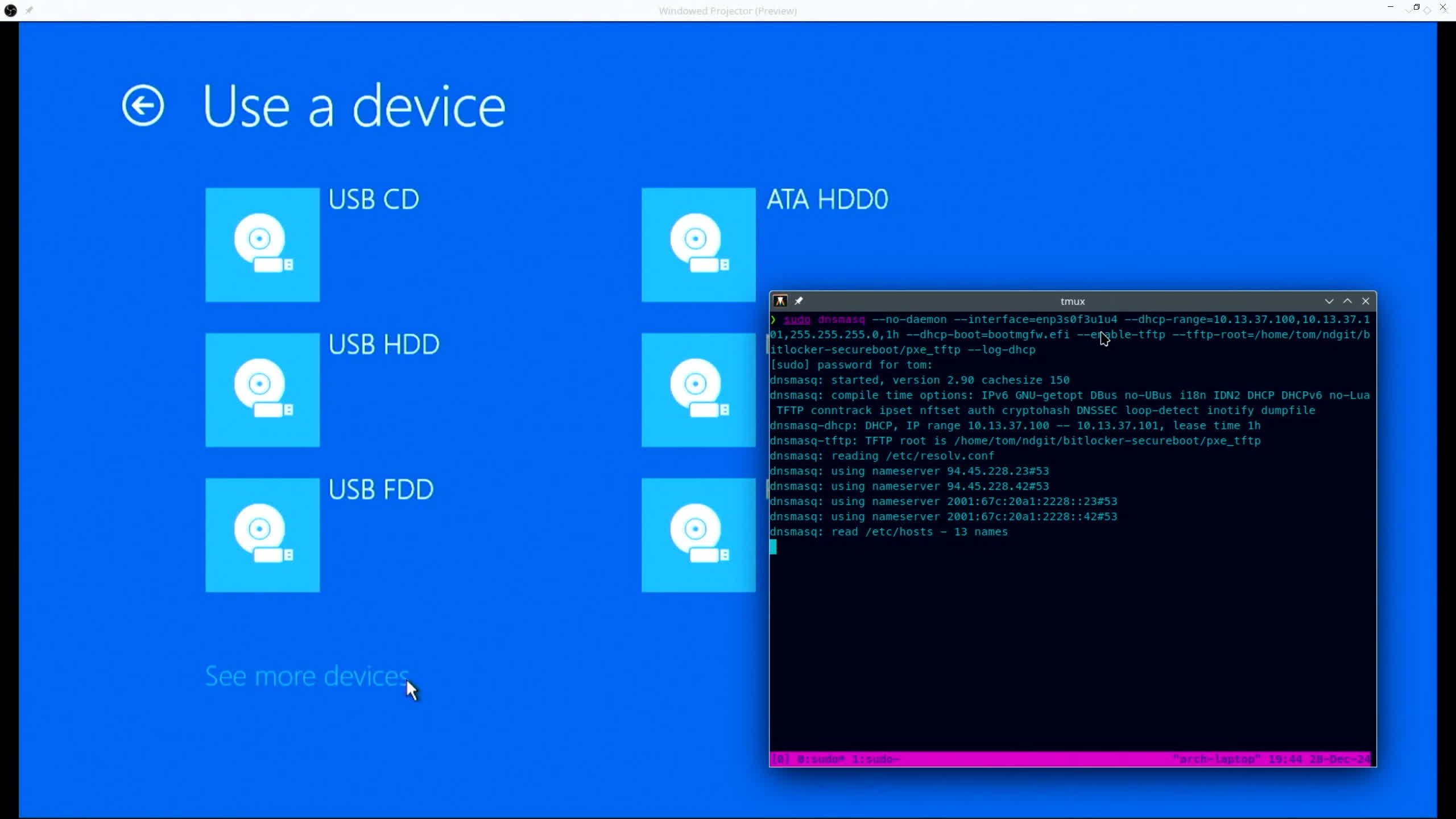
Lambertz was able to "repurpose" the bitpixie bug using the controversial Secure Boot technology to load an outdated Windows bootloader. The bootloader is instrumental for extracting the encryption key into memory, which can then be retrieved by using a Linux OS. The hack requires a one-time physical access to the target system, plus a working network connection.
The new bitpixie attack sounds impractical from a consumer standpoint, but the enterprise sector is a completely different matter. Many corporate clients use BitLocker to secure their PC fleets, Lambertz noted, and the encryption technology is now being enabled by default on newer Windows 11 installations. The popular "Device Encryption" mode doesn't need an additional password, which means users can "unseal" a BitLocker volume by just booting Windows with their normal user accounts.

This BitLocker configuration has been broken for a while, the hacker said, and can be attacked from both hardware and software sides to decrypt a drive's data. In his hour-long presentation, Lambertz explained how Secure Boot and TPM work, the role of PXE boot and BCD bootloaders, what the new exploit needs to run, and more.

Lambertz's presentation is in English, and was recently uploaded on CCC's official platform for video and audio content. The CCC collective is the largest association of hackers in Europe, with 7,700 registered members who have been working tirelessly since 1981 to hack almost everyone and everything.

Permalink to story:

 
"A successful attack could bypass full volume encryption and access protected data, though it would need physical access to the target system."

What a monstrous hacker. I'm so scared...
 
The physical access requirement may not be a problem for most desktop systems, but any lost laptop, or scrapping an old system with the hard drive still supposedly protected by Bitlocker (without wiping the drive), could still provide that physical access needed to allow an attacker in to see your stuff.

It says that this vulnerability applies to Windows 11, but I'm not so sure Windows 10 or Windows Server is out of the woods. If you can change the version of Windows that is being booted, then wouldn't any Windows system that can boot that vulnerable bootloader be affected?

Sounds like the fix is to revoke whatever security certificate the outdated bootloader is using so that Secure Boot doesn't recognize it. Not sure if that is possible. The whole reason for Secure Boot is to prevent arbitrary code from executing on the system, as soon as someone can execute arbitrary code on your system, it's presumably game over (as long as the decryption key is stored somewhere on-device).
 
Microsoft needs to make Bitlocker more user friendly tbh. The amount of steps you need to take in order for it to "properly" protect your pc isn't shown to you in the GUI for setting it up lol. There's no option to require the bitlocker key during system boot, there's no option to require a usb with your bitlocker key to be plugged in in order to access the pc, I believe it still defaults to 128bit encryption even with the new encryption method...it's a joke. The fact that you have to dig through the group policy editor to learn that bitlocker has many hidden settings that enhance it is a joke, they should be in the GUI during setup.

Also, judging by the UI in this screenshot, this "hack" won't work if you set bitlocker up to require a special usb stick to be inserted in order to boot into the OS. What you're seeing in the screenshot wouldn't be possible to load at all but we'll never know considering how vague this article is when referrencing a proper bitlocker setup.
 
I'll stick with TrueCrypt.

Must be ok , to be around this long, think I read about it a long long time ago , they are quite brutal if forget password I think, or is there a final master key . plus I think it hid itself from casual file explorer , long ago memory . Pretty sure NSA, 5 eyes will know it safe or not
 
Bitlocker, Secure boot and TPM not safe, no, how can that be?
The Window Gods said we must use these to keep our PC impenetrable, and they know all.
I also use bitlocker, including for external drives.

What this hack does is booting vulnerable boot loader using network boot, e.g. pxe boot.
That vulnerable boot loader gives out the key.
So we need to disable network boot.
 
Last edited:
Ha ha, encryption service
I like when no 1 ask for it, but its shoveled in ur throat
 
Oh hey look, turns out TPM isn't magic after all! Wow!

So, we need this on Windows 11 because......?
Because old tpm 1.x max out at sha1 which is no longer considered secure.
Tpm2 allows sha256 or higher.

Tpm is not only for bitlocker.
Enterprise client certificate, offline music and video streaming decryption keys etc. are stored in tpm instead of files in storage.
 
it would need physical access to the target system

Physical access (such as theft) is the ONLY use case for disk encryption. So it has totally failed at that. I have been using Veracrypt for years instead... Its free and from what I can tell, actually effective.
 
"A successful attack could bypass full volume encryption and access protected data, though it would need physical access to the target system."

What a monstrous hacker. I'm so scared...
Well when your computer is stolen, your data may be much more valuable than the data on it. Such as copies of your ID, banking details, personal photos that can be used to black mail you... The only use of disk encryption is if someone gains physical access. Use Veracrypt instead.
 
After replacing an aged laptop, I found out that something similar to boot locker is now enabled by default on Windows 11 Home. I turned it off. I'm not that careless with any of my "data devices." Besides, I replaced the hard drive with a drive 4X bigger, and installed OpenSuSE Linux in a dual-boot configuration. Windows 11 will rarely see the light of day on my new laptop.
 
Well when your computer is stolen, your data may be much more valuable than the data on it. Such as copies of your ID, banking details, personal photos that can be used to black mail you... The only use of disk encryption is if someone gains physical access. Use Veracrypt instead.
Some of us are actually careful with portable devices and with HDs that we sell from old PCs. Old HDs are easy to wipe with a live version of linux and HDPARM. Even more so now with NVME drives and the utilities built into the BIOS of modern motherboards.

Also, just because you don't think Veracrypt has any issues, does not mean that it really does not. Issues like this may go undiscovered for a long time before SURPRISE!

I never, repeat NEVER, use my phone, my laptop, or my iPad to access or keep any sensitive data. The closest I get to that is 2FA on my phone.
 
This makes me wonder how many more issues are lurking in the shadows of anything that is supposedly secure.
 
Back