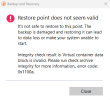
I made a Paragon back up, it is on a separate disk from my (C drive, this was done of Paragon's free software.
Following my Windows 11 re-installation - no problems, I downloaded and installed Paragon Backup and Recovery 18 Community Edition.
I have also downloaded and installed Paragon Paragon SOF on a memory stick.
It in turn has located the backup that I wish to re-install.
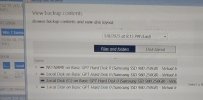
In trying to install this backup I get as far as View backup contents, Browse backup contents and view disk layout.
Now clicking on any of the disks >, also Files and Folders nothing happens, no drop downs appear - see attached.
drive, this was done of Paragon's free software.Following my Windows 11 re-installation - no problems, I downloaded and installed Paragon Backup and Recovery 18 Community Edition.
I have also downloaded and installed Paragon Paragon SOF on a memory stick.
It in turn has located the backup that I wish to re-install.
In trying to install this backup I get as far as View backup contents, Browse backup contents and view disk layout.
Now clicking on any of the disks >, also Files and Folders nothing happens, no drop downs appear - see attached.
Attachments
Last edited: