Windows Recall returns to Copilot+ PCs as an optional feature

Skye Jacobs

Posts: 1,967   +58
Staff
A hot potato: Microsoft likely thought it was doing Copilot+ PC users a service with its original introduction of Recall, an AI-powered feature meant to help people find and remember things they've previously seen on their computer. Instead, users were thoroughly dismayed by the lax privacy and security, forcing Redmond to pull the feature back shortly after it debuted. Now, it is returning with enhanced safety measures that Microsoft hopes will win back the community.
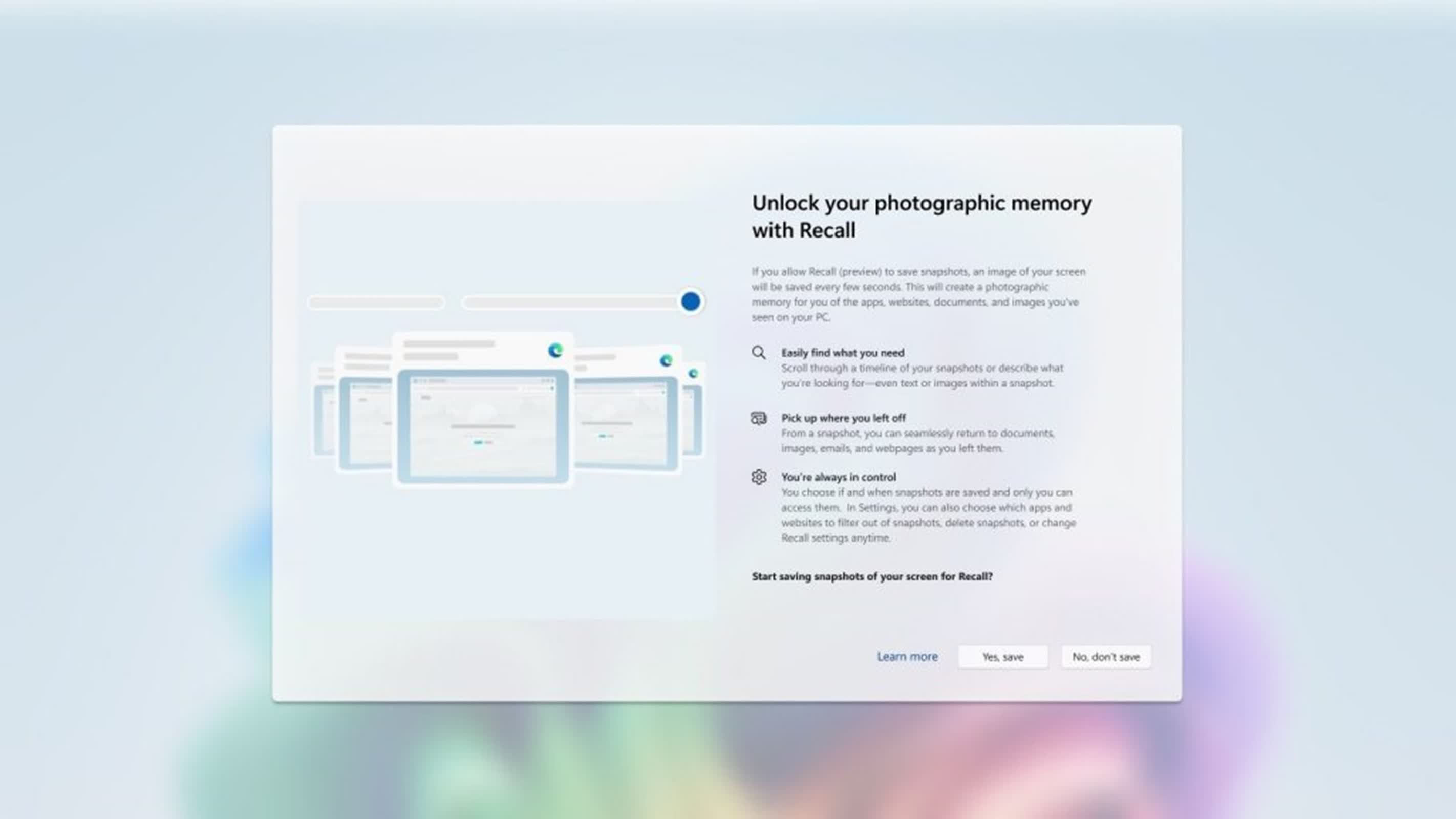
Microsoft is set to reintroduce its Recall feature for Copilot+ PCs after addressing security concerns that ultimately led to Redmond pulling it back in June, according to the company's president of OS security and enterprise, David Weston.

The security community had significant concerns about Recall when it was first announced. Weston goes into great detail about the new features, which may pave the way to acceptance this time – after users and experts have thoroughly vetted it.

Perhaps most significantly, Recall is now designed as opt-in, giving users full control over their data. "If a user doesn't proactively choose to turn it on, it will be off, and snapshots will not be taken or saved," according to Weston. "Users can also remove recall entirely by using the optional features settings in Windows."

This appears to be a reversal of what Microsoft said earlier this month when Recall was found in a list of features you could disable, Tom's Hardware noted. Now, Recall remains inactive by default unless users enable it during setup. Tom's also notes that not all of the upgrades outlined by Weston are brand new, with some detailed in previous posts.

Still, there are some significant enhancements outlined in this update.

All sensitive data in Recall, including snapshots and associated information, is encrypted. The encryption keys are safeguarded by the Trusted Platform Module (TPM) and linked to the user's Windows Hello Enhanced Sign-in Security identity.

Recall's services operate within a secure Virtualization-based Security Enclave (VBS Enclave), ensuring that only user-requested information leaves the secure environment. The feature leverages Windows Hello Enhanced Sign-in Security for authorizing Recall-related operations, such as changing settings and accessing the Recall user interface. Additional security measures, like rate-limiting and anti-hammering, act against potential malware attacks.

At the heart of the architecture is the Secure Settings, a protected data store within the VBS Enclave that safeguards security configuration data. Complementing this is the Semantic Index, which transforms images and text into encrypted vectors for search.

To store user data securely, the Snapshot Store houses encrypted snapshots along with their associated metadata. Users interact with the system through the Recall User Experience, an interface designed for accessing and searching saved information. Snapshot Service operates as a background process, handling the saving and querying of data within the VBS Enclave.
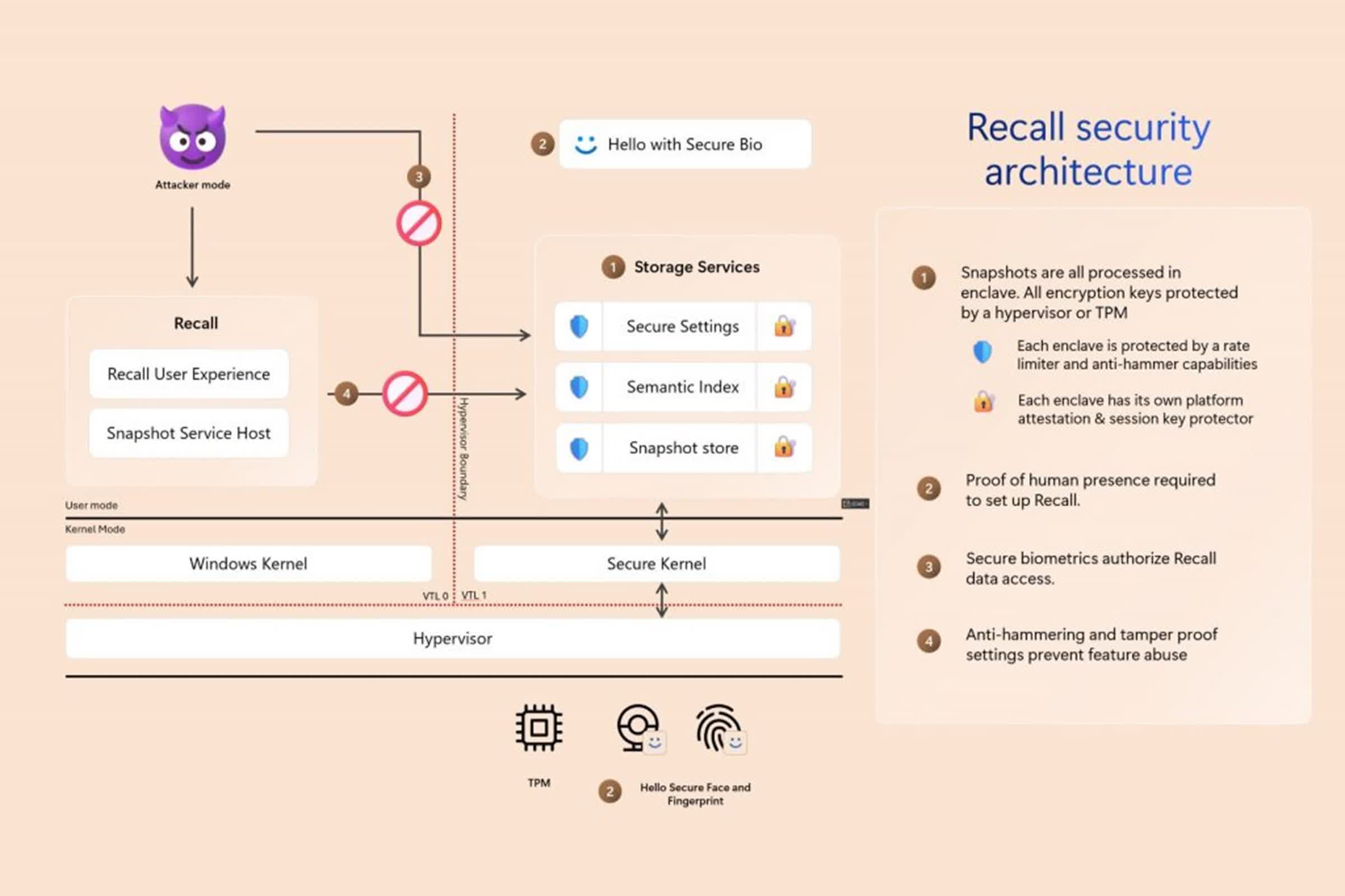
Snapshots are only accessible after users authenticate using their Windows Hello credentials. To prevent potential system overload from malicious requests, Recall uses concurrency protection and monotonic counters.

Recall also offers a range of privacy controls. All snapshots and associated information are stored locally on the device, and no data is shared with Microsoft or third parties. Users can delete snapshots, pause the feature, or turn it off entirely at their discretion. The system also provides filtering options for specific apps or websites, automatically excludes in-private browsing sessions, and employs sensitive content filtering to minimize the storage of passwords and personal information.

"You are always in control, and you can delete snapshots, pause, or turn them off at any time," Weston said. "Any future options for the user to share data will require fully informed explicit action by the user."

Recall is designed to operate exclusively on Copilot+ PCs that meet the Secured-core standard. These systems come equipped with BitLocker or Device Encryption for data protection, TPM 2.0 for secure key management, and virtualization-based security with hypervisor-enforced code integrity.

Furthermore, these PCs utilize Measured Boot and System Guard Secure Launch to verify system integrity during startup, as well as Kernel DMA Protection to guard against peripheral-based attacks.

Permalink to story:

 
Good heavens, why would anyone who cares even a little bit about privacy and security still be running Windows at all, at this point?
 
No one seriously ever asked for this! What is the point?

For people with dementia??
Perhaps, though I'd say opt-in security nightmares are mainly designed for people who love to live dangerously.
And this one WILL cause serious and embarrassing problems for many of those.
WAIT FOR IT. Gonna happen for sure!
 
No one seriously ever asked for this! What is the point?

For people with dementia??
Just ask any college professor: Gen Z does not use a folder structure to store files. They all just dump it wherever it saves to by default, whether that is the "downloads" folder", the root of My Documents/My Music/My Pictures, etc. Then, they just search for it. This is likely a result of neither Android nor iOS really supporting file browsers, apps having full control over file locations, and making file browsing completely opaque to the user.

Now, there is something to be said for abandoning folders: sometimes something really does belong in two folders, and using tags to organize and locate files makes more sense. But this could be accomplished with a basic database. It doesn't need AI. It doesn't need to read the files. It just needs to read the file name and any metadata tags the user applies to the file.
 
That is because no one taught them. My kids do but that is because I(and their mother) taught them good organizational skills and digital file management.
I mean, fair, but that doesn't change the fact that they didn't learn because they stuck to mobile devices, and their parents didn't sit them down in front a desktop/laptop and teach them good practices for file organization.

And if you have ever used a DAM (like Lightroom or Adobe Bridge), you already know that a database of files, organized by searchable tags, really is superior to folder trees from a UX standpoint. Folder trees make perfect sense for software to use and organize their files, but its awkward for a person to learn (especially once you start getting into a enough layers). The issue is Microsoft's implementation of a "DAM" across windows handles things by reading the files itself, scanning them with their "AI" to auto-tag things because Gen Z doesn't know how to tag files, either (tbf, again, most Millenials and Gen X don't know how to either, unless they do graphic design). DAM/file tagging doesn't have to be a privacy concern, but in Microsoft's infinite wisdom, they turned it into one.
 
I mean, fair, but that doesn't change the fact that they didn't learn because they stuck to mobile devices, and their parents didn't sit them down in front a desktop/laptop and teach them good practices for file organization.

And if you have ever used a DAM (like Lightroom or Adobe Bridge), you already know that a database of files, organized by searchable tags, really is superior to folder trees from a UX standpoint. Folder trees make perfect sense for software to use and organize their files, but its awkward for a person to learn (especially once you start getting into a enough layers). The issue is Microsoft's implementation of a "DAM" across windows handles things by reading the files itself, scanning them with their "AI" to auto-tag things because Gen Z doesn't know how to tag files, either (tbf, again, most Millenials and Gen X don't know how to either, unless they do graphic design). DAM/file tagging doesn't have to be a privacy concern, but in Microsoft's infinite wisdom, they turned it into one.
I'm not going to debate this endlessly. Computers exist to serve people. File structures should therefore also exist, and be organized, to serve people. Any data the OS or a program needs to store should be encapsulated in a cabinet type file away from the general view of the user. The rest of the file system should be readily, easily accessible and understood by the user.
 
I'm not going to debate this endlessly. Computers exist to serve people. File structures should therefore also exist, and be organized, to serve people. Any data the OS or a program needs to store should be encapsulated in a cabinet type file away from the general view of the user. The rest of the file system should be readily, easily accessible and understood by the user.
I wasn't arguing with you, but ok? Folder trees have their uses, file databases have their uses. Gens Z & Alpha knows how to use the later and not the former, broadly speaking. Microsoft made a pretty decent folder tree explorer, but is utterly failing at creating a file database. None of this contradicts what you said.
 
Back