also @ TechSpot: Next iPad rumored to be 33% lighter and thinner thanks to new touchscreen tech

SVChost.exe trojan, memory process help!

Discussion in 'Virus and Malware Removal' started by BWashburn, Aug 3, 2012.

  1. BWashburn TechSpot Member Posts: 58

    Ok I downloaded the program to a USB drive from another computer because I could not get it to download to my (infected) computer. Now the set-up went smooth. Then I proceeded to check all the boxes you said to excluding the dvd/cd drive. When scan started these boxes began to pop up and I thought maybe if I just left it it would continue. But no it stopped until I chose an option which I went with the recomended unless skip was an only option. I work from 7am to 5pm and I had ran this program last night at 9 and let it do its thing till I came home today and it stopped by itself at 49 percent. here are the logs you requested.

    Status: Vulnerability (events: 12)
    8/12/2012 9:33:56 PM Vulnerability vulnerability http://www.securelist.com/en/advisories/43267 C:\Documents and Settings\All Users\HP\HP Deskjet 3000 J310 series\Help\flash\FlashPla.exe Low
    8/12/2012 10:33:19 PM Vulnerability vulnerability http://www.securelist.com/en/advisories/46809 C:\Program Files (x86)\DAEMON Tools Lite\DTLite.exe Low
    8/12/2012 10:35:49 PM Vulnerability vulnerability http://www.securelist.com/en/advisories/49472 C:\Program Files (x86)\Java\jre6\bin\java.exe Low
    8/12/2012 10:37:53 PM Vulnerability vulnerability http://www.securelist.com/en/advisories/49831 C:\Program Files (x86)\Pidgin\pidgin.exe Low
    8/12/2012 10:39:54 PM Vulnerability vulnerability http://www.securelist.com/en/advisories/43267 C:\ProgramData\HP\HP Deskjet 3000 J310 series\Help\flash\FlashPla.exe Low
    8/12/2012 10:44:01 PM Vulnerability vulnerability http://www.securelist.com/en/advisories/43267 C:\Users\All Users\HP\HP Deskjet 3000 J310 series\Help\flash\FlashPla.exe Low
    8/12/2012 11:03:06 PM Vulnerability vulnerability http://www.securelist.com/en/advisories/49086 C:\Windows\SysWOW64\Adobe\Shockwave 11\SwInit.exe Low
    8/13/2012 6:38:59 AM Vulnerability vulnerability http://www.securelist.com/en/advisories/46809 c:\Program Files (x86)\DAEMON Tools Lite\DTLite.exe Low
    8/13/2012 6:47:27 AM Vulnerability vulnerability http://www.securelist.com/en/advisories/49831 c:\Program Files (x86)\Pidgin\pidgin.exe Low
    8/13/2012 6:47:28 AM Vulnerability vulnerability http://www.securelist.com/en/advisories/47447 c:\Program Files (x86)\QuickTime\QuickTimePlayer.exe Low
    8/13/2012 6:51:22 AM Vulnerability vulnerability http://www.securelist.com/en/advisories/49472 c:\Program Files (x86)\Java\jre6\bin\java.exe Low
    8/13/2012 6:54:25 AM Vulnerability vulnerability http://www.securelist.com/en/advisories/43267 c:\ProgramData\HP\HP Deskjet 3000 J310 series\Help\flash\FlashPla.exe Low
    Status: Deleted (events: 16)
    8/13/2012 6:43:06 AM Deleted Trojan program Trojan.Win64.TDSS.a C:\Documents and Settings\All Users\Microsoft\Windows\DRM\97BC.tmp High
    8/13/2012 6:43:06 AM Deleted Trojan program Trojan.Win64.TDSS.a C:\Documents and Settings\All Users\Microsoft\Windows\DRM\97BC.tmp//MPRESS High
    8/13/2012 6:43:50 AM Deleted Trojan program Trojan.Win64.TDSS.a C:\Documents and Settings\All Users\Microsoft\Windows\DRM\97BD.tmp High
    8/13/2012 6:43:50 AM Deleted Trojan program Trojan.Win64.TDSS.a C:\Documents and Settings\All Users\Microsoft\Windows\DRM\97BD.tmp//MPRESS High
    8/13/2012 6:43:28 AM Deleted Trojan program Trojan.Win32.TDSS.istv C:\Documents and Settings\All Users\Microsoft\Windows\DRM\97BC.tmp.dat High
    8/13/2012 6:44:38 AM Deleted Trojan program Trojan.Win32.TDSS.istw C:\Documents and Settings\All Users\Microsoft\Windows\DRM\9DB0.tmp High
    8/13/2012 6:45:36 AM Deleted Trojan program Backdoor.Win32.ZAccess.uvz C:\FRST\Quarantine\{1ae38341-e383-e5cb-ae21-864215ad12c4}\U\80000064.@ High
    8/13/2012 5:39:55 PM Deleted Trojan program Rootkit.Win32.TDSS.gq C:\TDSSKiller_Quarantine\11.07.2012_22.36.09\mbr0000\tdlfs0000\tsk0009.dta High
    8/13/2012 5:39:34 PM Deleted Trojan program Rootkit.Boot.Pihar.b C:\TDSSKiller_Quarantine\11.07.2012_22.36.09\mbr0000\mbr0000\tsk0000.dta High
    8/13/2012 5:39:34 PM Deleted Trojan program Rootkit.Boot.Pihar.b C:\TDSSKiller_Quarantine\11.07.2012_22.36.09\mbr0000\mbr0000\tsk0000.dta//HDDImage High
    8/13/2012 5:39:48 PM Deleted Trojan program Rootkit.Boot.Pihar.b C:\TDSSKiller_Quarantine\11.07.2012_22.36.09\mbr0000\mbr0000\tsk0001.dta High
    8/13/2012 5:39:48 PM Deleted Trojan program Rootkit.Boot.Pihar.b C:\TDSSKiller_Quarantine\11.07.2012_22.36.09\mbr0000\mbr0000\tsk0001.dta//vbr0 High
    8/13/2012 5:40:02 PM Deleted Trojan program Trojan.Win32.Miner.dw C:\Windows\Installer\{1ae38341-e383-e5cb-ae21-864215ad12c4}\U\00000008.@ High
    8/13/2012 5:40:02 PM Deleted Trojan program Trojan.Win32.Miner.dw C:\Windows\Installer\{1ae38341-e383-e5cb-ae21-864215ad12c4}\U\00000008.@//data0000.res High
    8/13/2012 5:40:05 PM Deleted Trojan program Backdoor.Win32.ZAccess.mbs C:\Windows\Installer\{1ae38341-e383-e5cb-ae21-864215ad12c4}\U\000000cb.@ High
    8/13/2012 6:08:54 PM Deleted Trojan program Backdoor.Win32.ZAccess.mbs c:\Windows\Installer\{1ae38341-e383-e5cb-ae21-864215ad12c4}\U\000000cb.@ High
    Status: Absent (events: 10)
    8/13/2012 5:41:54 PM Not found Trojan program Backdoor.Win64.ZAccess.bs C:\FRST\Quarantine\Desktop.ini High
    8/13/2012 5:41:54 PM Not found Trojan program Trojan.Win64.TDSS.a C:\ProgramData\Microsoft\Windows\DRM\97BD.tmp//MPRESS High
    8/13/2012 5:41:54 PM Not found Trojan program Trojan.Win32.TDSS.istw C:\ProgramData\Microsoft\Windows\DRM\9DB0.tmp High
    8/13/2012 5:41:54 PM Not found Trojan program Trojan.Win32.TDSS.istv C:\ProgramData\Microsoft\Windows\DRM\97BC.tmp.dat High
    8/13/2012 5:41:54 PM Not found Trojan program Trojan.Win64.TDSS.a C:\ProgramData\Microsoft\Windows\DRM\97BC.tmp//MPRESS High
    8/13/2012 5:41:54 PM Not found Trojan program Trojan.Win64.TDSS.a C:\Users\All Users\Microsoft\Windows\DRM\97BD.tmp//MPRESS High
    8/13/2012 5:41:54 PM Not found Trojan program Trojan.Win32.TDSS.istv C:\Users\All Users\Microsoft\Windows\DRM\97BC.tmp.dat High
    8/13/2012 5:41:54 PM Not found Trojan program Trojan.Win32.TDSS.istw C:\Users\All Users\Microsoft\Windows\DRM\9DB0.tmp High
    8/13/2012 5:41:54 PM Not found Trojan program Trojan.Win64.TDSS.a C:\Users\All Users\Microsoft\Windows\DRM\97BC.tmp//MPRESS High
    8/13/2012 5:41:54 PM Not found Trojan program Backdoor.Win64.ZAccess.br C:\Windows\Installer\{1ae38341-e383-e5cb-ae21-864215ad12c4}\n High
    Status: Quarantined (events: 5)
    8/13/2012 6:45:33 AM Quarantined Trojan program HEUR:Backdoor.Win64.Generic C:\FRST\Quarantine\{1ae38341-e383-e5cb-ae21-864215ad12c4}\U\80000000.@ High
    8/13/2012 5:39:51 PM Quarantined Trojan program HEUR:Trojan.Win32.Generic C:\TDSSKiller_Quarantine\11.07.2012_22.36.09\mbr0000\tdlfs0000\tsk0000.dta High
    8/13/2012 5:39:58 PM Quarantined Trojan program HEUR:Trojan.Win32.Generic C:\TDSSKiller_Quarantine\11.07.2012_22.36.09\mbr0000\tdlfs0000\tsk0014.dta High
    8/13/2012 5:40:09 PM Quarantined Trojan program HEUR:Backdoor.Win64.Generic C:\Windows\Installer\{1ae38341-e383-e5cb-ae21-864215ad12c4}\U\80000000.@ High
    8/13/2012 6:14:35 PM Quarantined Trojan program HEUR:Backdoor.Win64.Generic c:\Windows\Installer\{1ae38341-e383-e5cb-ae21-864215ad12c4}\U\80000000.@ High
    Status: Detected (events: 1)
    8/13/2012 8:47:30 PM Detected Trojan program Backdoor.Win32.ZAccess.oun C:\Windows\assembly\GAC_32\Desktop.ini High
    Status: Will be deleted when the computer is restarted (events: 2)
    8/13/2012 5:41:54 PM Will be deleted when the computer is restarted Trojan program Backdoor.Win64.ZAccess.bs C:\Windows\assembly\GAC_64\Desktop.ini High
    8/13/2012 5:40:13 PM Will be deleted when the computer is restarted Trojan program Backdoor.Win64.ZAccess.br C:\Windows\SysWOW64\config\systemprofile\AppData\Local\{1ae38341-e383-e5cb-ae21-864215ad12c4}\n High
    Status: Will be disinfected when the computer is restarted (events: 1)
    8/13/2012 5:41:20 PM Will be disinfected when the computer is restarted virus Virus.Win64.ZAccess.b C:\Windows\System32\services.exe High
    Status: Disinfected (events: 1)
    8/13/2012 5:43:27 PM Disinfected virus Virus.Win64.ZAccess.b c:\Windows\System32\services.exe High
  2. Jay Pfoutz Malware Helper Posts: 4,286   +49

    Please download and run TDSSKiller to your desktop as outlined below:

    Doubleclick on TDSSKiller.exe to run the application, then click on Change parameters.

    For Windows XP, double-click to start.
    For Vista or Windows 7, do a right-click on the program, select Run as Administrator to start, & when prompted Allow to run.


    [IMG]

    -------------------------

    Check the boxes beside Verify Driver Digital Signature and Detect TDLFS file system, then click OK.

    [IMG]

    ------------------------

    Click the Start Scan button.

    [IMG]

    -----------------------

    If a suspicious object is detected, the default action will be Skip, click on Continue
    If you get the warning about a file UnsignedFile.Multi.Generic or LockedFile.Multi.Generic please choose
    Skip and click on Continue


    [IMG]

    ----------------------

    If malicious objects are found, they will show in the Scan results and offer three (3) options.

    Ensure Cure is selected, then click Continue => Reboot now to finish the cleaning process.
    Note: If Cure is not available, please choose Skip instead, do not choose Delete unless instructed.


    [IMG]


    --------------------

    A report will be created in your root directory, (usually C:\ folder) in the form of "TDSSKiller.[Version]_[Date]_[Time]_log.txt". Please copy and paste its contents on your next reply.
    Sometimes these logs can be very large, in that case please attach it or zip it up and attach it.

    -------------------

    Here's a summary of what to do if you would like to print it out:

    If a suspicious object is detected, the default action will be Skip, click on Continue
    If you get the warning about a file UnsignedFile.Multi.Generic or LockedFile.Multi.Generic please choose
    Skip and click on Continue

    If malicious objects are found, they will show in the Scan results and offer three (3) options.

    Ensure Cure is selected, then click Continue => Reboot now to finish the cleaning process.
    Note: If Cure is not available, please choose Skip instead, do not choose Delete unless instructed.
  3. BWashburn TechSpot Member Posts: 58

    Here is the log you requested.

    Attached Files:

  4. Jay Pfoutz Malware Helper Posts: 4,286   +49

    Now, please run TDSSKiller once more and post a log, and then...

    Please download aswMBR from here

    • Save aswMBR.exe to your Desktop
    • Double click aswMBR.exe to run it
    • Click the Scan button to start the scan as illustrated below

    [IMG]

    Note: Do not take action against any **Rootkit** entries until I have reviewed the log. Often there are false positives

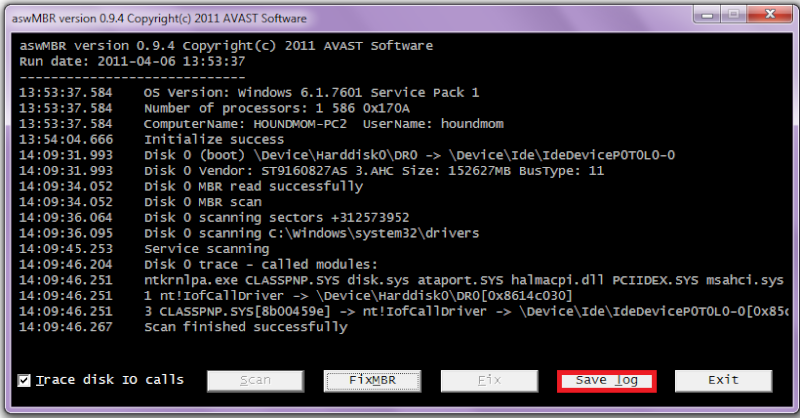
    • Once the scan finishes click Save log to save the log to your Desktop
      [IMG]
    • Copy and paste the contents of aswMBR.txt back here for review
  5. BWashburn TechSpot Member Posts: 58

    Here is the updated log for TDSS.

    Attached Files:

  6. BWashburn TechSpot Member Posts: 58

    ..and here is the other log you requested.

    aswMBR version 0.9.9.1665 Copyright(c) 2011 AVAST Software
    Run date: 2012-08-15 12:47:39
    -----------------------------
    12:47:39.429 OS Version: Windows x64 6.1.7601 Service Pack 1
    12:47:39.429 Number of processors: 2 586 0x603
    12:47:39.429 ComputerName: UER-HP UserName: Uer
    12:47:42.079 Initialize success
    12:58:16.333 AVAST engine defs: 12081503
    12:59:23.638 Disk 0 (boot) \Device\Harddisk0\DR0 -> \Device\00000064
    12:59:23.648 Disk 0 Vendor: Hitachi_ JP4O Size: 953869MB BusType: 11
    12:59:23.688 Disk 0 MBR read successfully
    12:59:23.688 Disk 0 MBR scan
    12:59:23.698 Disk 0 unknown MBR code
    12:59:23.708 Disk 0 Partition 1 80 (A) 07 HPFS/NTFS NTFS 100 MB offset 2048
    12:59:23.718 Disk 0 Partition 2 00 07 HPFS/NTFS NTFS 941412 MB offset 206848
    12:59:23.758 Disk 0 Partition 3 00 07 HPFS/NTFS NTFS 12355 MB offset 1928218624
    12:59:23.818 Disk 0 scanning C:\Windows\system32\drivers
    12:59:32.738 Service scanning
    12:59:54.794 Modules scanning
    12:59:54.824 Disk 0 trace - called modules:
    12:59:54.844 ntoskrnl.exe CLASSPNP.SYS disk.sys amdxata.sys storport.sys hal.dll amdsata.sys
    12:59:54.854 1 nt!IofCallDriver -> \Device\Harddisk0\DR0[0xfffffa80076fc060]
    12:59:55.064 3 CLASSPNP.SYS[fffff8800277943f] -> nt!IofCallDriver -> [0xfffffa800763ab80]
    12:59:55.074 5 amdxata.sys[fffff8800167e7a8] -> nt!IofCallDriver -> \Device\00000064[0xfffffa80076367d0]
    12:59:57.184 AVAST engine scan C:\Windows
    13:00:02.110 AVAST engine scan C:\Windows\system32
    13:02:56.131 AVAST engine scan C:\Windows\system32\drivers
    13:03:08.963 AVAST engine scan C:\Users\Uer
    13:11:00.037 AVAST engine scan C:\ProgramData
    13:13:04.712 Scan finished successfully
    13:13:13.788 Disk 0 MBR has been saved successfully to "C:\Users\Uer\Desktop\MBR.dat"
    13:13:13.798 The log file has been saved successfully to "C:\Users\Uer\Desktop\aswMBR.txt"
     
  7. Jay Pfoutz Malware Helper Posts: 4,286   +49

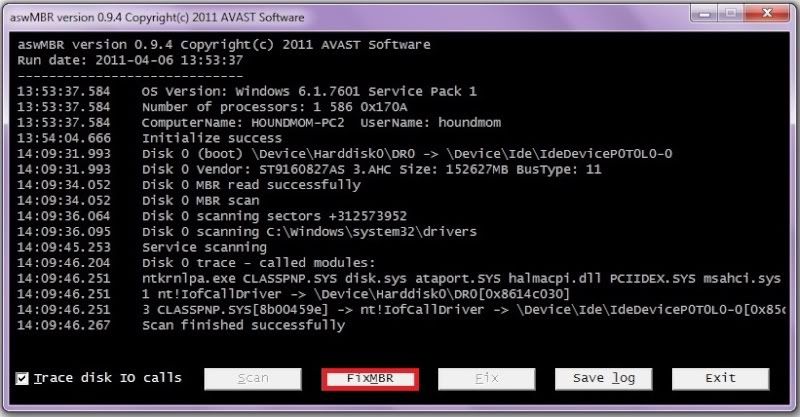
    We need to fix the Master Boot Record using aswMBR now.

    • Double click aswMBR.exe to run it like before
    • Once the scan finishes click FixMBR to remove the infection as illustrated below

    [IMG]


    • Once the scan finishes click Save log to save the log to your Desktop
      [IMG]
    • Copy and paste the contents of aswMBR.txt back here for review
  8. BWashburn TechSpot Member Posts: 58

    Here is the updated scan and fix for the MBR. Notice: my computer has been running alot more smoothly than before so I am assuming that is a good thing. My AVG has not popped up with any threats so so far so good!
    aswMBR version 0.9.9.1665 Copyright(c) 2011 AVAST Software
    Run date: 2012-08-16 15:24:54
    -----------------------------
    15:24:54.572 OS Version: Windows x64 6.1.7601 Service Pack 1
    15:24:54.572 Number of processors: 2 586 0x603
    15:24:54.573 ComputerName: UER-HP UserName: Uer
    15:24:58.086 Initialize success
    15:25:04.321 AVAST engine defs: 12081503
    15:25:09.656 Disk 0 (boot) \Device\Harddisk0\DR0 -> \Device\00000064
    15:25:09.666 Disk 0 Vendor: Hitachi_ JP4O Size: 953869MB BusType: 11
    15:25:09.691 Disk 0 MBR read successfully
    15:25:09.696 Disk 0 MBR scan
    15:25:09.704 Disk 0 unknown MBR code
    15:25:09.724 Disk 0 Partition 1 80 (A) 07 HPFS/NTFS NTFS 100 MB offset 2048
    15:25:09.738 Disk 0 Partition 2 00 07 HPFS/NTFS NTFS 941412 MB offset 206848
    15:25:09.778 Disk 0 Partition 3 00 07 HPFS/NTFS NTFS 12355 MB offset 1928218624
    15:25:09.857 Disk 0 scanning C:\Windows\system32\drivers
    15:25:21.520 Service scanning
    15:25:45.746 Modules scanning
    15:25:45.747 Disk 0 trace - called modules:
    15:25:45.764 ntoskrnl.exe CLASSPNP.SYS disk.sys amdxata.sys storport.sys hal.dll amdsata.sys
    15:25:45.764 1 nt!IofCallDriver -> \Device\Harddisk0\DR0[0xfffffa80076fc060]
    15:25:45.765 3 CLASSPNP.SYS[fffff8800277943f] -> nt!IofCallDriver -> [0xfffffa800763ab80]
    15:25:45.765 5 amdxata.sys[fffff8800167e7a8] -> nt!IofCallDriver -> \Device\00000064[0xfffffa80076367d0]
    15:25:51.247 AVAST engine scan C:\Windows
    15:25:56.694 AVAST engine scan C:\Windows\system32
    15:28:38.849 AVAST engine scan C:\Windows\system32\drivers
    15:28:51.616 AVAST engine scan C:\Users\Uer
    15:37:41.036 AVAST engine scan C:\ProgramData
    15:39:27.354 Scan finished successfully
    15:41:03.686 Verifying
    15:41:13.720 Disk 0 Windows 601 MBR fixed successfully
    15:41:26.193 Disk 0 MBR has been saved successfully to "C:\Users\Uer\Desktop\MBR.dat"
    15:41:26.201 The log file has been saved successfully to "C:\Users\Uer\Desktop\aswMBR.txt"
  9. Jay Pfoutz Malware Helper Posts: 4,286   +49

    Okay...now time to verify.

    Please run a general scan with aswMBR and post a log.
  10. BWashburn TechSpot Member Posts: 58

    aswMBR version 0.9.9.1665 Copyright(c) 2011 AVAST Software
    Run date: 2012-08-17 15:23:22
    -----------------------------
    15:23:22.087 OS Version: Windows x64 6.1.7601 Service Pack 1
    15:23:22.087 Number of processors: 2 586 0x603
    15:23:22.087 ComputerName: UER-HP UserName: Uer
    15:23:24.724 Initialize success
    15:33:45.976 AVAST engine defs: 12081700
    15:35:18.241 Disk 0 (boot) \Device\Harddisk0\DR0 -> \Device\00000064
    15:35:18.249 Disk 0 Vendor: Hitachi_ JP4O Size: 953869MB BusType: 11
    15:35:18.279 Disk 0 MBR read successfully
    15:35:18.281 Disk 0 MBR scan
    15:35:18.286 Disk 0 Windows 7 default MBR code
    15:35:18.316 Disk 0 Partition 1 80 (A) 07 HPFS/NTFS NTFS 100 MB offset 2048
    15:35:18.359 Disk 0 Partition 2 00 07 HPFS/NTFS NTFS 941412 MB offset 206848
    15:35:18.399 Disk 0 Partition 3 00 07 HPFS/NTFS NTFS 12355 MB offset 1928218624
    15:35:18.559 Disk 0 scanning C:\Windows\system32\drivers
    15:35:59.024 Service scanning
    15:36:22.716 Modules scanning
    15:36:22.716 Disk 0 trace - called modules:
    15:36:22.794 ntoskrnl.exe CLASSPNP.SYS disk.sys amdxata.sys storport.sys hal.dll amdsata.sys
    15:36:22.810 1 nt!IofCallDriver -> \Device\Harddisk0\DR0[0xfffffa80076fc060]
    15:36:22.810 3 CLASSPNP.SYS[fffff8800277943f] -> nt!IofCallDriver -> [0xfffffa800763ab80]
    15:36:22.810 5 amdxata.sys[fffff8800167e7a8] -> nt!IofCallDriver -> \Device\00000064[0xfffffa80076367d0]
    15:36:25.908 AVAST engine scan C:\Windows
    15:36:38.315 AVAST engine scan C:\Windows\system32
    15:40:01.348 AVAST engine scan C:\Windows\system32\drivers
    15:40:19.208 AVAST engine scan C:\Users\Uer
    15:49:13.179 AVAST engine scan C:\ProgramData
    15:53:25.309 Scan finished successfully
    15:55:37.965 Disk 0 MBR has been saved successfully to "C:\Users\Uer\Desktop\MBR.dat"
    15:55:37.973 The log file has been saved successfully to "C:\Users\Uer\Desktop\aswMBR.txt"
  11. Jay Pfoutz Malware Helper Posts: 4,286   +49

    Good! :D

    ESET Online Scan

    Please run a free online scan with the ESET Online Scanner
    • Tick the box next to YES, I accept the Terms of Use
    • Click Start
    • When asked, allow the ActiveX control to install
    • Click Start
    • Make sure that the options Remove found threats and the option Scan unwanted applications is checked
    • Click Scan (This scan can take several hours, so please be patient)
    • Once the scan is completed, you may close the window
    • Use Notepad to open the logfile located at C:\Program Files\EsetOnlineScanner\log.txt
    • Copy and paste that log as a reply to this topic
  12. BWashburn TechSpot Member Posts: 58

    this is all that was in the log you requested...also it did detect 34 infected files but it also cleaned them. my avg also popped up during the scan with all the same trojans saying I was infected should I run a scan with that and see if they still pop up?
    ESETSmartInstaller@High as CAB hook log:
    OnlineScanner64.ocx - registred OK
    OnlineScanner.ocx - registred OK
  13. Jay Pfoutz Malware Helper Posts: 4,286   +49

    Sure, let me know what your antivirus says in the scan.
  14. BWashburn TechSpot Member Posts: 58

    104 warnings. Which were all tracking cookies. they were all either healed or moved to virus vault. Everything seems to be running great!!!
  15. Jay Pfoutz Malware Helper Posts: 4,286   +49

    Ahahah, nice! :) Alrighty then...

    Your logs appear to be clean. If there are no more issues, then we shall clean up!

    Clean up System Restore

    Now, to get you off to a clean start, we will be creating a new Restore Point, then clearing the old ones to make sure you do not get reinfected, in case you need to "restore back."

    To manually create a new Restore Point
    • Go to Control Panel and select System and Maintenance
    • Select System
    • On the left select Advance System Settings and accept the warning if you get one
    • Select System Protection Tab
    • Select Create at the bottom
    • Type in a name I.e. Clean
    • Select Create
    Now we can purge the infected ones
    • Go back to the System and Maintenance page
    • Select Performance Information and Tools
    • On the left select Open Disk Cleanup
    • Select Files from all users and accept the warning if you get one
    • In the drop down box select your main drive I.e. C
    • For a few moments the system will make some calculations:
      [IMG]
    • Select the More Options tab
      [IMG]
    • In the System Restore and Shadow Backups select Clean up
      [IMG]
    • Select Delete on the pop up
    • Select OK
    • Select Delete

    Run OTC to remove our tools

    To remove all of the tools we used and the files and folders they created, please do the following:
    Please download OTC.exe by OldTimer:
    • Save it to your Desktop.
    • Double click OTC.exe.
    • Click the CleanUp! button.
    • If you are prompted to Reboot during the cleanup, select Yes.
    • The tool will delete itself once it finishes.
    Note: If any tool, file or folder (belonging to the program we have used) hasn't been deleted, please delete it manually.

    Purge old temporary files

    Download CCleaner Slim and save it to your Desktop - Alternate download link

    When the file has been saved, go to your Desktop and double-click on ccsetupxxx_slim.exe
    Follow the prompts to install the program.

    * Double-click the CCleaner shortcut on the desktop to start the program.
    * Click on the Options block on the left, then choose Cookies.
    * Under Cookies to Delete, highlight any cookies you would like to retain permanently
    * Click the right arrow > to move them to the Cookies to Keep window.
    * Go into Options > Advanced & uncheck Only delete files in Windows Temp folders older than 48 hours
    * Click Cleaner on the left then Run Cleaner on the right to run the program.
    * Important: Make sure that ALL browser windows are closed before selecting Run Cleaner

    Caution: Only use the Registry feature if you are very familiar with the registry.
    Always back up your registry before making any changes. Exit CCleaner after it has completed it's process.

    Security Check

    Please download Security Check by screen317 from SpywareInfoforum.org or Changelog.fr.
    • Save it to your Desktop.
    • Double click SecurityCheck.exe and follow the onscreen instructions inside of the black box.
    • A Notepad document should open automatically called checkup.txt; please post the contents of that document.

    Tell me in your next reply, if you have completed these tasks:
    • Cleaned System Restore
    • Ran OTC
    • Ran CCleaner
    • Ran Security Check
    Also, let me know how your computer is running, and don't forget to post the contents of the Security Check log.
  16. BWashburn TechSpot Member Posts: 58

    Ran into a problem creating a restore point.
    The restore point could not be created for the following reason:
    The writer experienced a transient error. If the backup process is retried, the error may not reoccur. (0x800423F3) Please try again.

    I tried to create it again and recieved the same message.
  17. Jay Pfoutz Malware Helper Posts: 4,286   +49

    Turn off System Restore, then turn it back on. See if that helps, and then try again.
  18. BWashburn TechSpot Member Posts: 58

    Ok I have two available drives. One is my OS (C) and the other is HP_Recovery (D). Now by default (D) was turned off and (C) was turned on when I tried creating a restore point. I have retried (C) by turning off system protection then turning it back on and I still received that message. I then turned on (D) and got the same message there. I have turned (D) off again and (C) on. Not sure if I am going about the right way of turning off system restore or what you meant by it?
  19. Jay Pfoutz Malware Helper Posts: 4,286   +49

    1. Click the Start button
    2. From the Start Menu, type Run in start search and press enter
    7. Type: regsvr32 wmiutils.dll (You should get a prompt that the file was registered successfully)
    8. Type: net stop winmgmt (press y to stop the service)
    9. Type: net start winmgmt (automatically starts the service)

    Then let me know if it helped.
  20. BWashburn TechSpot Member Posts: 58

    Nope it did not help. That file was registered successfully, but when I typed net stop in the run box a black screen popped up then went away so fast I couldnt even see what it said nor type anything. Did the same thing with net start and the same thing happened.