

What is Unreal Engine?
Unreal Engine is a 3D game engine developed by Epic Games, developers of Fortnite. It's one of the most established and well regarded game creation and 3D visualization tools.
Unreal Engine has been used to create many popular games like PUBG, the Final Fantasy VII Remake, Street Fighter 5, Borderlands 3, Gears 5, Batman: Arkham City, and Valorant. Below is a tech demo of the upcoming The Witcher 4, running on UE:
How much storage do you need for Unreal Engine?
Unreal Engine 5 typically requires around 30 – 40 GB for a minimal installation, but a full setup with optional components can exceed 100 GB. During installation, you may need up to 120 – 130 GB of free space due to temporary files. For ongoing use, it's recommended to have at least 256 GB of free space, especially for large projects.
What are other Unreal Engine 5 system requirements?
Unreal Engine 5.x requires a 64-bit Windows 10 or later operating system, a quad-core Intel or AMD processor, 8 GB or more of RAM (16 GB+ recommended), and a DirectX 12-compatible GPU such as an NVIDIA GTX 1080 or AMD RX Vega 64 or better. SSD storage is strongly recommended for faster load times and better performance.
Does it cost to use Unreal Engine 5?
Unreal Engine 5 is free to download and use for individuals, small businesses, and educational institutions. Game developers owe a 5% royalty on gross revenue exceeding $1 million per product, though revenue from the Epic Games Store is exempt. Starting January 1, 2025, this royalty rate drops to 3.5% if the game launches on the Epic Games Store before or simultaneously with other platforms.
Which is easier to use, Unity or Unreal Engine?
Unity is generally considered easier to use for beginners, especially those new to game development or coding. Its interface is more streamlined, and it uses C#, a programming language that many find more accessible than Unreal's C++.
Unreal Engine is more powerful out of the box for high-end graphics and realistic rendering, but it has a steeper learning curve. However, its Blueprint visual scripting system helps non-programmers create complex logic without writing code, which can ease the experience for some users.
Why is packaging my UE project taking forever or failing?
Long packaging times or failures are often related to large content files, missing dependencies, or plugins not being correctly set up for your target platform. Clean your project, remove unused assets, and make sure only necessary plugins are enabled. Always check the Output Log for specific errors.
Why is my UE5 project running so slow in the editor?
Performance issues in UE5 are often due to Lumen and Nanite being enabled by default. If you're on lower-end hardware or working on a large scene, try disabling Lumen or switching to the "Unlit" view mode, and ensure Virtual Shadow Maps are off. Also, reduce scalability settings and enable "Use Less CPU when in Background."
Features
FBX, USD, and Alembic support
Connect to media production pipelines, with support for industry standards like FBX, USD, and Alembic. First-class USD support enables users to collaborate better with team members and work in parallel. Unreal Engine can read a USD file from anywhere on disk without a time-consuming full import, and write back changes to it as overrides; reloading the USD payload instantly updates changes made by other users upstream.
Python scripting
Integrate Unreal Engine into your pipeline and automate your workflows with full support for the industry standard Python scripting in the Unreal Editor. You can construct asset management pipelines, automate data preparation workflows, procedurally lay out content in a level, and create custom UIs to control the Unreal Editor.
Datasmith: seamless data conversion
Convert entire scenes – including animation and metadata – from 3ds Max, Revit, SketchUp Pro, Cinema 4D, Rhino, SolidWorks, Catia, and a whole host of other DCC, CAD, and BIM formats at high fidelity with Datasmith. Nondestructive re-importing means you can continue to iterate in your source package without losing downstream changes. Access to metadata opens doors to automated data preparation through Python scripting or Visual Dataprep.
Visual Dataprep
Easily automate data preparation workflows – even if you're not a programmer – with a simplified visual tool that lets you create a "recipe" of filters and operators that you can save and reuse on other scenes or projects. Make LODs, set up Lightmap UVs, substitute materials, and delete or merge objects based on factors such as class, name, metadata tags, or size.
LiDAR point cloud support
Aggregate and use huge datasets captured from the real world, with the ability to import, visualize, edit, and interact with point clouds acquired from laser scanning devices directly within Unreal Engine. Point clouds can be used to visualize locations and to give accurate context to newly designed elements.
The Unreal Editor
Unreal Engine includes the Unreal Editor, an integrated development environment available on Linux, macOS, and Windows for content authoring and game level development. With support for Multi-User Editing, artists, designers, and developers can simultaneously make changes to the same Unreal Engine project in a safe and reliable way, while the ability to run the full Unreal Editor in VR mode means you can build in a WYSIWYG environment.
Landscape and terrain tools
Create massive-scale open world environments and terrains with mountains, valleys, and even caves, with the Landscape system. Add multiple height map and paint layers, and sculpt and paint them independently of each other. Users can also nondestructively edit their landscape with a layer reserved for splines, and create unique custom brushes in Blueprint, and use them to adapt landscapes based on other elements.
Scalable foliage
Automatically cover your huge outdoor environments with different types of grass, flowers, small rocks, or your mesh of choice using the Grass Tool, and create vast forests filled with many different kinds of trees and bushes with the Procedural Foliage Tool that simulates how a forest grows over the years.
Sky, cloud, and environment lighting
Author and render realistic or stylized skies, clouds, and other atmospheric effects with full artistic freedom, with a Volumetric Cloud component that can interact with Sky Atmosphere, Sky Light, and up to two directional lights. Components can be lit and shadowed dynamically, in line with time-of-day updates in real time.
Water system
Create believable bodies of water within your landscapes with a Water system that gives you the ability to define oceans, lakes, rivers, and islands using splines. Built-in fluid simulation enables characters and objects to realistically interact with the water; the fluid also responds to Terrain, such as reflecting ripples off the shore, and reacting to river flow maps.
Robust multiplayer support
For over two decades, Unreal Engine's multiplayer framework has been battle-tested across many platforms and game types to produce some of the industry's most compelling multiplayer experiences. Unreal Engine ships with a scalable and proven client/server architecture out of the box to bring instant viability to any project's multiplayer component.
Advanced artificial intelligence (AI)
Give AI-controlled characters increased spatial awareness of the world around them and enable them to make smarter movements with Unreal Engine's gameplay framework and artificial intelligence system, controlled through either Blueprints or Behavior Trees. Dynamic navigation mesh updates in real time as you move objects for optimal pathing at all times, while Smart Objects enable you to create meaningful gameplay interactions.
Multi-platform development
With Unreal Engine, you can deliver content on a comprehensive range of desktop, console, and mobile platforms, including Windows, macOS, and Linux PCs; PlayStation 4, PlayStation 5, Xbox One, Xbox Series X, and Nintendo Switch; and iOS and Android mobile devices.
XR (AR, VR, and MR) support
Unreal Engine provides the highest-quality solution for creating augmented reality (AR), virtual reality (VR), and mixed reality (MR) experiences thanks to native integration with the most popular platforms including Oculus VR, SteamVR, HoloLens 2, PlayStation VR2, ARKit, and ARCore. And with support for OpenXR, you can future-proof your applications for new devices.
What's New
The release of Unreal Engine 5.7 brings further improvements to the UE5 toolset. This release delivers improvements in a wide variety of areas, including Rendering, Character and Animation, Worldbuilding, PCG, and more.
This release includes improvements submitted by our community of Unreal Engine developers on GitHub. Thank you to each of these contributors to Unreal Engine 5.7:
AlexanderVeselov-arm, AlexBlackfrost, Almax27, andreibazi, az6667, Bit-Rot, Brian-PD, brpendle-ti, bturner, chrysos8201, ckendal3, ColinGulliver, CookiePLMonster, Darcy3000s, dasherman-ea, davidbaack, dmergele, DoubleDeez, DrewWeth, DTG-Will-Marshall, dyanikoglu, erebel55, Eric2-Praxinos, Erlandys, faisa-believer, foobit, gamethread, geordiemhall, glecko, GreenLightning, guansdu, H3mul, IngSubstance, iniside, jamesfAnet, jamespark-unreal, JasonCoombs, jdamdami, jerobarraco, jeysym, Jiboo, JohnJFarrow, Jordonbc, jorge-axiomvfx, jorgenpt, jpritchard1010, KaosSpectrum, KarimLUCCIN, KeithRare, kimkun07-k, kissSimple, klukule, KXOC, laurencei, lclara-BARB, LHG-JonAnderJimenez, ligazetom, LightKL, lsandersljungberg, LucaFranzo98, Maigo, MarcusSvensson92, Mario-Azcona, MartinWickhamFB, Mattiwatti, melku, michael-buschbeck-ms, Minus4-44, moumee, nickdarnell, phochstrasser, PICO-XR, QRare, r457-Ao2, rdunnington, reduf, redxdev, RiotJDebern, rohyunsang, sareali, serhanio, SilverWinter0511, slonopotamus, SoulSharer, sportbikerr1, ssutherland-riot, SukenderDontNod, Sythenz, teddemunnik, tioez326, tokyocplusplus, Tt-Wes, tustanivsky, Vaei, vladbelousoff, vogoltsov, WangKan, Wizzard033, wmiller, x157, yangskyboxlabs, yoonbigbear, zachlute-arenanet, ZeroEightSix, ZeroErrors, zhou-
Rendering
MegaLights (Beta)

MegaLights is now in Beta, with improvements to noise reduction and overall performance. This also brings support for the following features:
- Directional Light
- Niagara Particle Lights
- Translucency
- Hair Strands
Niagara Heterogeneous Volumes
Heterogeneous Volumes is now in Beta. This update focuses on improvements to shadow-casting with the following new features:
- Cascade shadows for the directional light.
- Beer Shadow Map support for Epic scalability, which provides:
- Drastically improved shadow creation time.
- Constant-time shadow query.
- Shadow Mask pre-pass, which removes added VGPR pressure in Deferred Lighting.
- Enabling shadow casting no longer requires an editor restart and shader compilation.
Substrate
Substrate materials, which are production-ready and enabled by default as of UE 5.7, represent a modular, physically grounded material framework that replaces the fixed shading models with a system designed for expressive control, scalable performance, and long-term flexibility.
It supports two rendering paths:
- The Adaptive GBuffer, which enables advanced features like per-pixel topology and layered closures on modern hardware.
- The Blendable GBuffer, a simplified fallback that ensures broad platform compatibility.
Nanite Foliage and Skinning (Experimental)
- Nanite Foliage is an industry-leading rendering path, which at its core is comprised of three integral systems:
- Nanite Assemblies, which manage the foliage part instances into one cohesive unit.
- Nanite Skinning, which determines the dynamic behavior it will have with systems like wind.
- Nanite Voxels, which are pixel sized voxels that are able to retain details, animation and material characteristics based on the distance from the camera, all at a fraction of the original cost.
When combined, this allows for more robust worlds to be imagined with lifelike and animated foliage that can be delivered within a 60fps budget on current generation hardware.
New Features:
- Nanite Assemblies, for building foliage assets using instanced parts to keep asset sizes small.
- Blueprint API for building Nanite Assemblies.
- As well as in-editor tooling to facilitate Nanite Assembly creation from selections.
- Importer support for USD. Exposed USD schemas to use in DCC tools to mark up scenes to import as assemblies.
- Skeletal Mesh-driven dynamic wind; trees are skeletal meshes and the new Dynamic Wind plugin enables procedural wind to affect their bones.
- Nanite Voxels, for efficiently rendering foliage geometry in the distance.
- TSR Thin Geometry detection to better handle foliage.
SMAA (Experimental)
Mobile and desktop renderers now support Subpixel Morphological Anti-Aliasing (SMAA). You can enable it with the mobile renderer using the CVar r.Mobile.AntiAliasing=5, and with the desktop renderer using the CVar r.AntiAliasingMethod=5.
This feature improves visual fidelity by providing high-quality edge smoothing with minimal performance impact, it is an efficient technique for mobile games.
- SMAA anti-aliasing is enabled on all platforms.
- Adjust quality settings using r.SMAA.Quality
- Adjust edge detection between color or luminance using r.SMAA.EdgeMode
- Improve edge smoothness without heavy GPU cost.
Currently an experimental feature. The quality settings provide for tuning tradeoffs between performance or visual fidelity.
Character and Animation
Motion Matching Chooser Integration (Experimental)
In UE 5.7, we've brought our first iteration of Motion Matching integrated into Choosers! We're doing this because it gives users control over what assets are valid for selection in Motion Matching, something that in previous releases was only possible at the database level, not at the individual asset level.
This means you can search for the best pose, but also filter the per asset results based on extra conditions like game logic through the Chooser.
A new Pose Search field in the Choosers manages this complexity, along with integrated debugging from Motion Matching into Choosers.
This feature is Experimental.
Blendshapes and Sculpting Tools
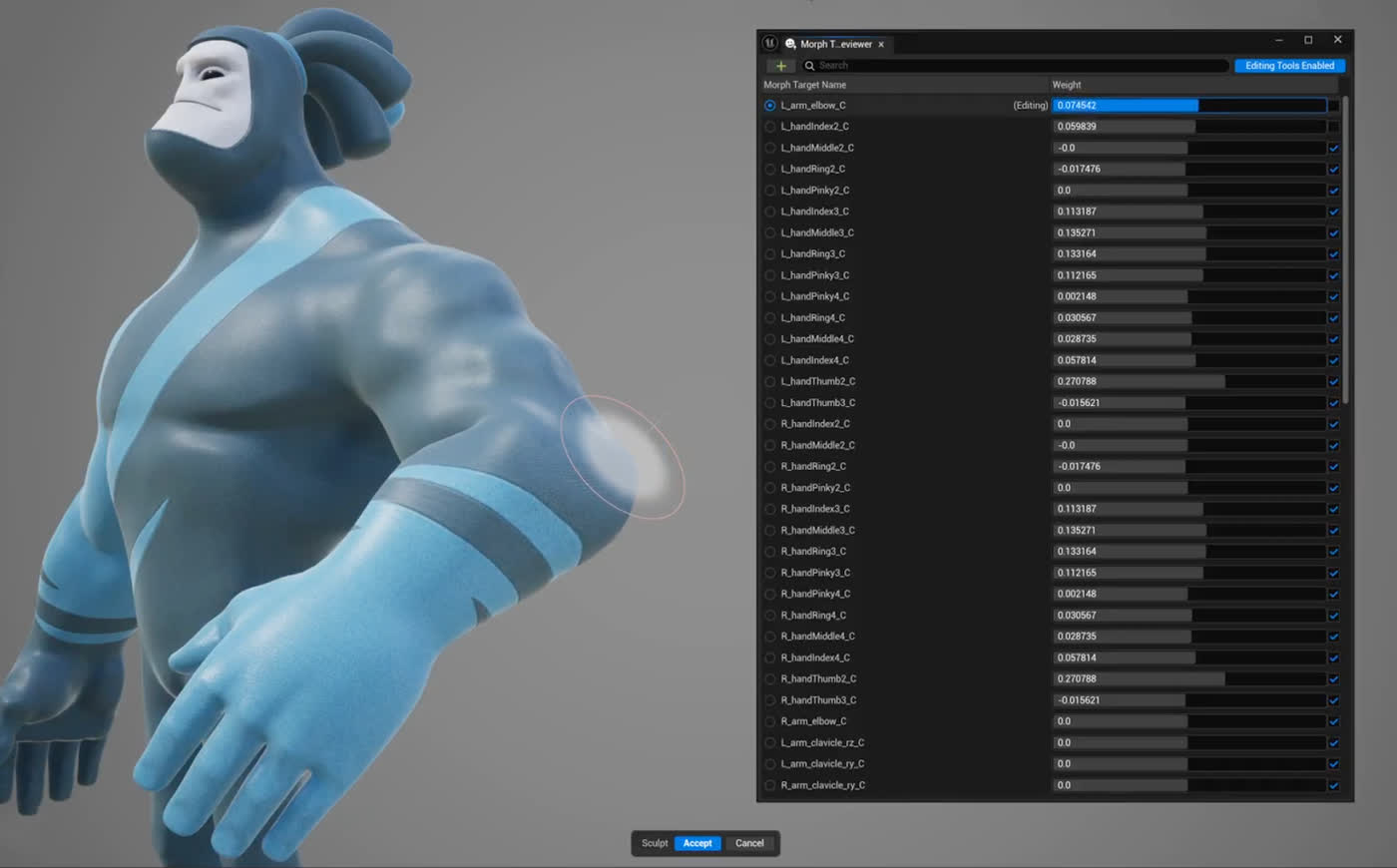
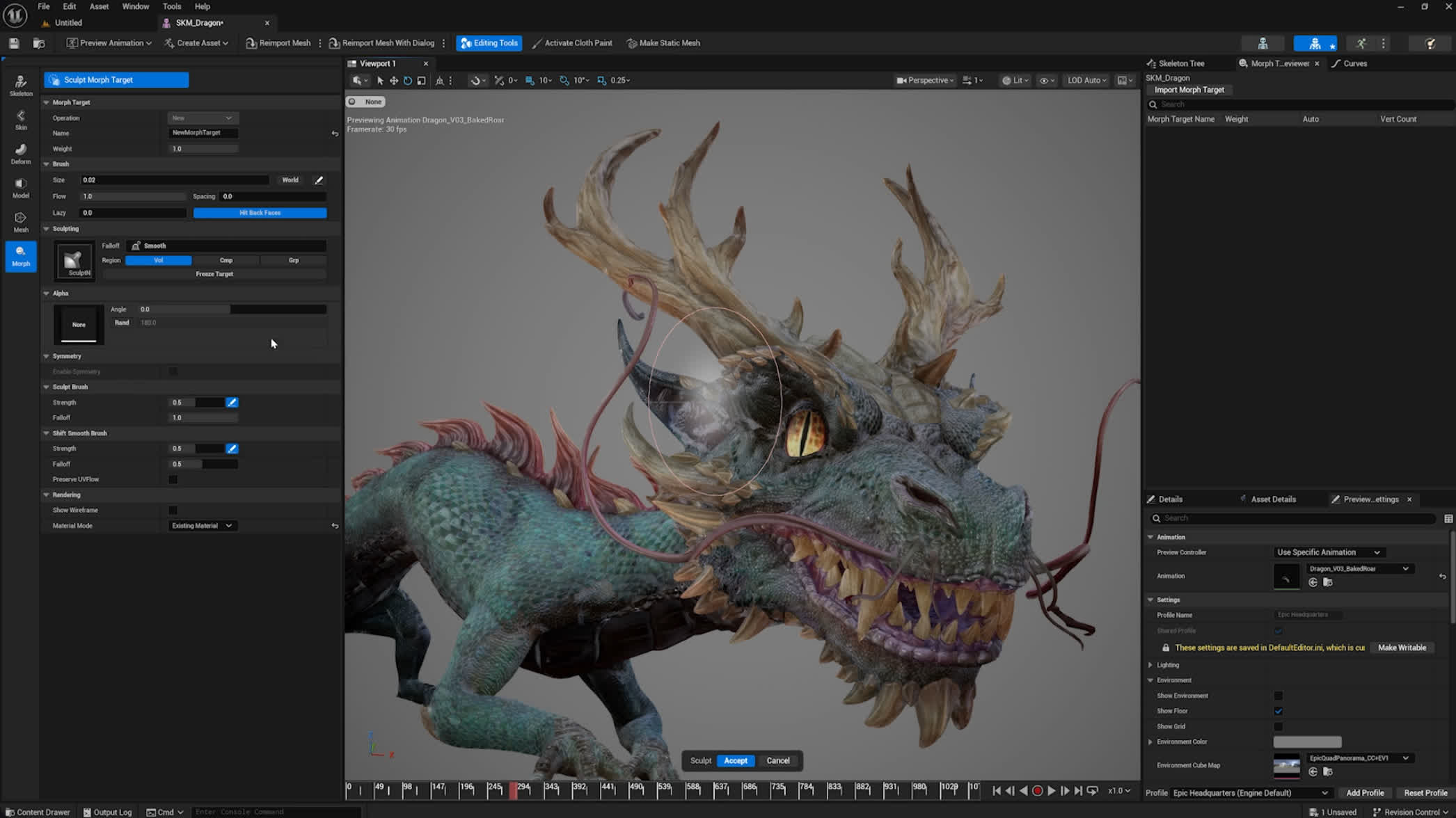
Bring the flexibility of industry-standard sculpting workflows into Unreal Engine. This is an update on the Skeletal Editor tools that now provides the ability to create and edit morph shapes, bones, and skin weights seamlessly.
- Instantly move between placing bones, painting weights, and sculpting blendshapes on a Skeletal Mesh.
- New Morph Target Viewer.
- Shapes adapt to changes in mesh topology .
- Equip animators with expressive tools for studio-quality performances.
World Collisions for Control Rig Physics
Bring level collisions into your Control Rig Physics simulations. Use existing world geometry and physics bodies to create believable contacts, pushes, and interactions.
- World collision support in Control Rig physics with one-way interactions.
- Use level meshes and physics bodies as colliders.
- Drive contact with props, floors, and environment during sim and playback.
Control Rig Dependency View
Understand how rig elements connect and update over time with a dedicated Dependency View. Visualize relationships between controls, bones, and modules to simplify debugging.
- Explore parent-child and metadata relationships at a glance.
- Debug rigs and modules with clearer visibility into data flow.
- Familiar dependency structure visualization.
FBIK and Retargeting Performance
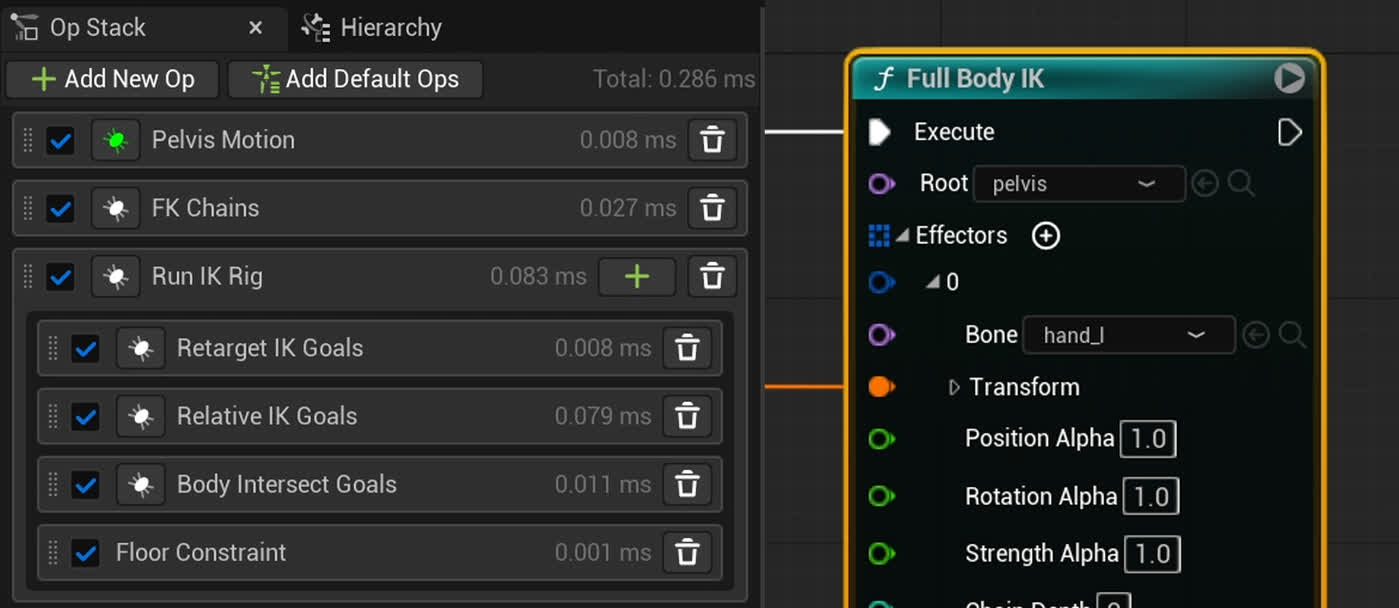
We added performance improvements and control in Full Body IK and IK Retargeter. This provides a way for you to have performant retargeting at runtime.
- Improve posing with FBIK without a heavy performance cost (~20% speed increase).
- Use the stretch limb solver in IK Rig for performant runtime retargets.
- Use the FK rotation mode Copy Local for faster rotation transfer per chain.
- Enable performance profiling on the retarget stack.
- Add a LOD threshold per retarget operator.
Better Foot Contact and Proportioned Retargeting
We improved the IK Retargeter for better handling of ground contact and vast proportioned characters.
This provides a better transfer of animation across a large variety of characters, so you can do faster art direction. You can now do all the following:
- Define crotch height to prevent the pelvis from crashing to the ground, and maintain vertical motion.
- Add the floor constraint to feet to maintain vertical position when close to the floor.
- Use the FK translation mode Orient and Scale to transfer bone translation data.
- Add the Stretch Chain operator to match the source retarget chain or scale it.
- Use the Stretch Limb solver to control squash and stretch of limbs.
- Change the pivot of the Source Scale to a different bone for motion capture or gameplay.
- Add the Filter Bones operator to remove high frequency noise while retargeting on larger characters.
Spatially Aware Retargeting (Experimental)
Spatially Aware Retargeting provides a way for artists to transfer animations between different characters without having to worry about self collision.
This reduces the need to clean up the animation after a retarget.
- We added a Body Interactions operator to push IK goals out using physics to prevent self collision.
- We added a Relative IK operator to move IK goals relative to contact lengths from the source to the target.
Sequence Validator (Experimental)
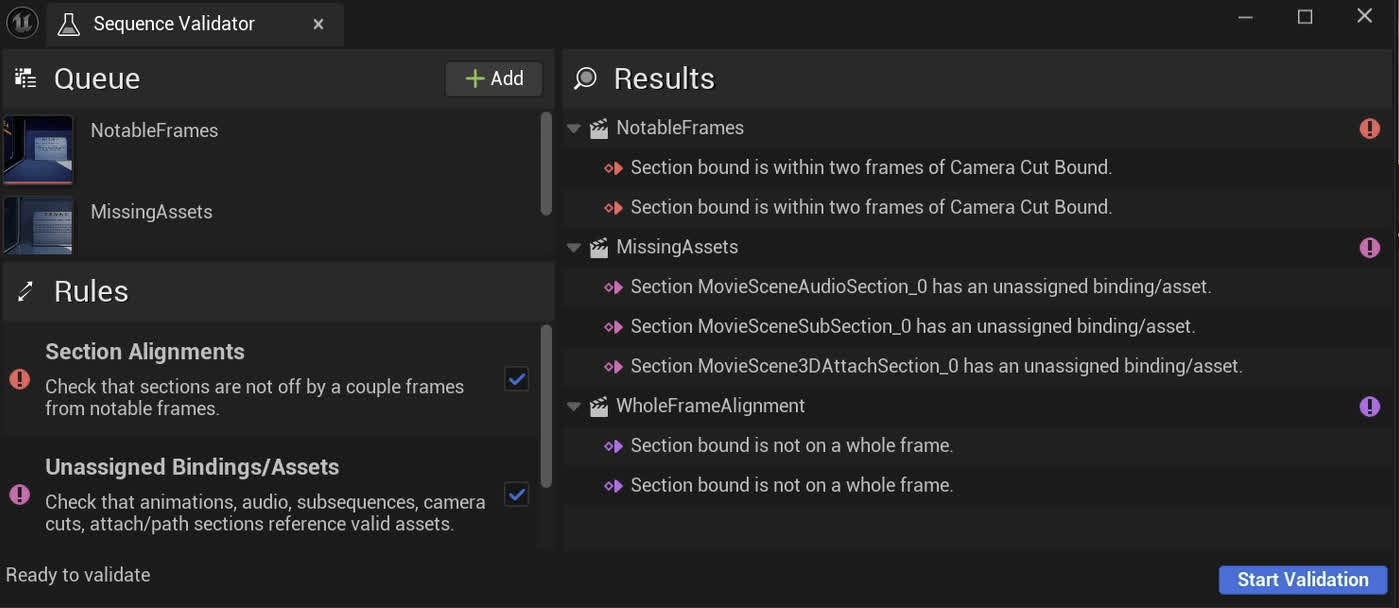
The Sequence Validator provides a way for cinematic artists to check if there are any content errors in their sequences. This reduces the amount of potential issues that can happen during a production while working in Sequencer.
Using it, you can:
- Queue multiple sequences and their sequence hierarchies for potential issues.
- Check if sections in a sequence are off from the camera cut or playback range.
- Check if there are any unassigned bindings or assets on sections.
- Check if sections start and/or end on whole frames.
- Review results and navigate directly to where the problem is in each sequence.
Ease Curve (Beta) and UX Improvements
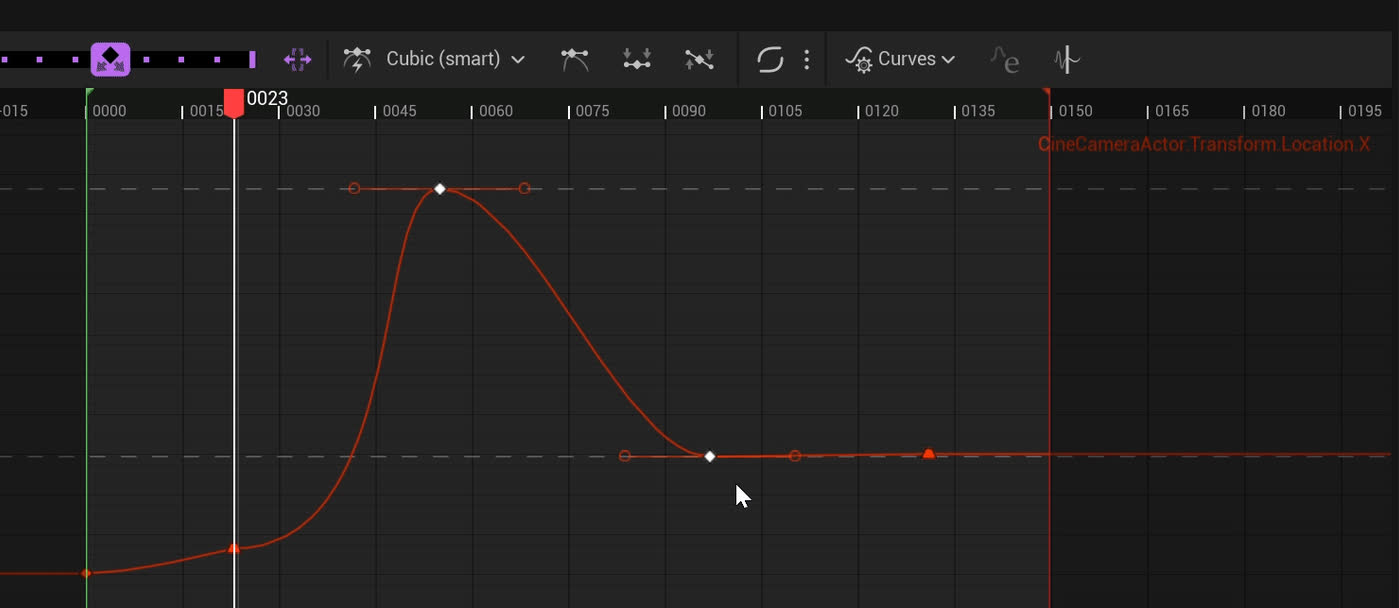
You can now use the Ease Curve tool from Motion Design in Sequencer. You can enable it using the Ease Curve plugin
Additionally, this update brings more cohesive behaviors for better usability so you can iterate faster.
- Use the Ease Curve tool to apply and save different Ease Curve presets in Sequencer, Curve Editor, and UMG.
- Adjust scale similar to the Details panel in the Sequencer tree using scale lock.
- Improved timeline display of sequence hierarchies to display both current and parent sequence time.
- Expand Blueprint and Python capabilities for accessing track states (Solo, Mute, Deactivate, Lock, and Pin).
- Improved transform baking to include time warp.
- Added new Binding ID and Sequence ID columns to the navigation tool.
The Ease Curve Tool is currently in Beta.
Dataless Mutable (Experimental)
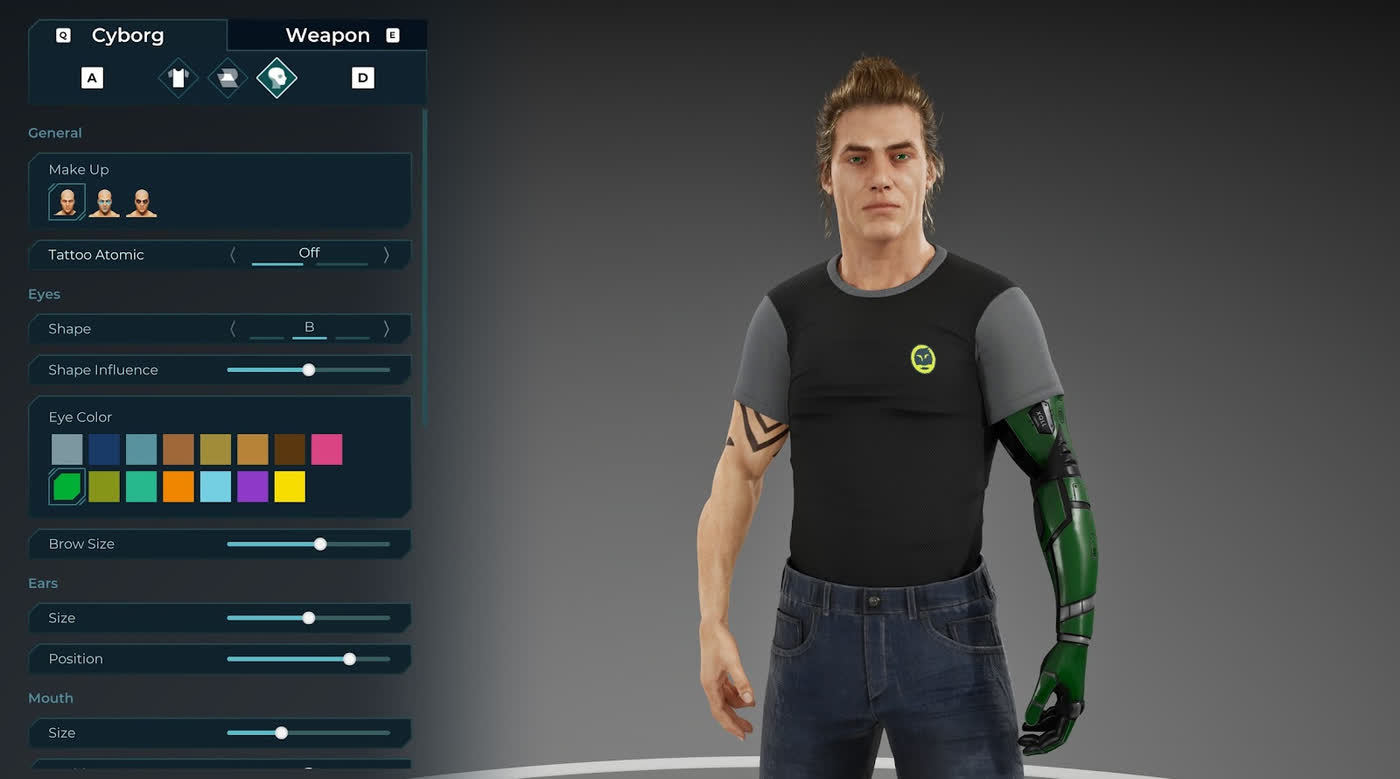
Speed up iteration and streamline your workflow with dataless Customizable Objects. Parameter inputs are handled at runtime instead of compile time, giving you faster compiles, better encryption, and smaller packages.
- Convert any Customizable Object to dataless.
- Enjoy faster compile times with runtime parameter handling.
- Use encryption and packaging just like any other UE asset.
Selection Sets
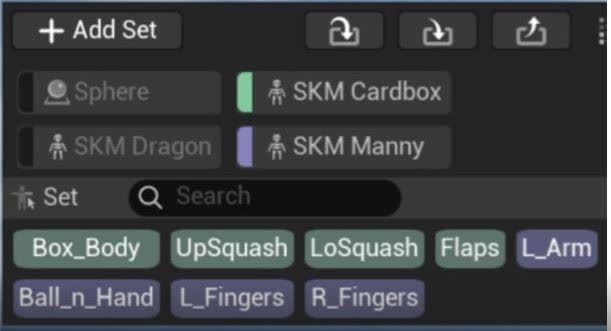
Animators need quick access to multiple selections throughout their process. This may be multiple controls within one rig, but may also be multiple controls and/or transforms across various assets. Currently animators rely on custom tools like Gui Pickers to do this, so we wanted to build a more native version, similar to popular plugins in other tools.
Animation Mode UX and QOL
We made improvements to Animation Mode.
Our Constraints, Space Switching, and Snapper tools are now consolidated into one new Constraint window..
Also related to Constraints, we added a few new options to the creation process.
- Current Frame: This is the previous standard functionality. It makes an ON key at the current frame and compensates all keys forward.
- From Start (new): Takes the current frame's offset and keys it on the first frame of your shot instead of the current frame.
- Infinite (new): Doesn't add keys. Instead, it applies the current frame's offset to the entire sequence.
Pose Library, Tween Tools, Constraints, Selection Sets (new) and Animation Layers now toggle their corresponding windows on or off based on their icon state. Their position and size within your layout is also saved.
You can assign toggling these windows to hotkeys.
Unreal Engine 5.6 Changelog
We're excited to announce that Unreal Engine 5.6 is now available for download.
With this release, one of our key goals was to empower you to build super-high-fidelity, large-scale open worlds that run smoothly at 60 FPS across current-generation hardware. We've also made major strides toward a truly engine-first animation and rigging workflow, reducing the need for DCC round-tripping. Plus, MetaHumans can now be fully authored directly within the engine, unlocking a more streamlined and efficient creative process.
Beyond that, Unreal Engine 5.6 is packed with enhancements designed to help you work faster and smarter. You'll find quicker access to essential tools, better asset organization, and significant updates to our procedural and virtual production toolsets – all designed to help you get to production faster.
Powerful, high-fidelity 60 FPS open worlds
Unreal Engine 5.6 delivers the optimized toolsets you need to build and deliver games that consistently render at 60 FPS on current-generation consoles, high-end PCs, and modern mobile devices.
The Hardware Ray Tracing (HWRT) system enhancements are designed to deliver even greater performance for Lumen Global Illumination. By eliminating key CPU bottlenecks, you can author more complex scenes while maintaining a smoother 60 FPS frame rate.
In addition, we've made significant improvements to the overall Unreal Engine performance when streaming static content in and out at runtime. With the Fast Geometry Streaming Plugin (Experimental), you can have a greater amount of immutable static geometry in your worlds that will load faster with constant frame rates. Additionally, all projects will benefit from further improvements over content streaming such as asynchronous physics state creation and destruction.
We've also included updated device profiles that are optimized for 60 FPS and tailored for current-generation consoles and desktop platforms. These enable you to meet performance targets, minimize setup, and deliver smoother high-fidelity games to your players.
Accelerated animation authoring
This release brings you the biggest update yet to our in-editor animation toolsets, enabling you to animate with greater speed, precision, and control.
Animations can be edited visually and intuitively with the complete redesign of Motion Trails. Unified for both actors and character controls, you can adjust your arcs and spacing directly in the viewport; choose from styles like Dashed, Time-based, and Heat/Speed mode; and access features that include pinning, offsets, and spaces for even more precision.
Tween Tools have also been revamped to enable you to fine-tune animation on controls or selected keys more quickly. We've also added new Hotkeys to control the sliders indirectly, as well as the ability to toggle between different slider types and switch into Overshoot mode. And, with the addition of the new Time Offset slider, you can create and edit with even greater control.
We've redesigned the Curve Editor toolbar for speed and performance, making it easier and cleaner for you to manipulate key frames. We've streamlined and consolidated icons, and embedded our new Tween tools directly within the curve editor interface to give you quicker access. We've also added a new Lattice tool and Smart Key snapping feature for greater control over dense keyframe data.
The latest Sequencer updates enable you to take better control of your timelines. You can navigate complex hierarchies with the new Sequencer Navigation Tool, and sync animation, dialogue, and effects confidently using real-time Audio Scrubbing. We've also expanded Sequencer's ability to scale relatively (Experimental) based on localized audio, enabling sequences to match the timing from different languages.
We've also introduced new Experimental solutions to enable more in-editor rigging workflows.
You can now create and sculpt morph targets (Experimental) directly in-editor with the Skeletal Mesh Editor. It leverages Unreal Engine's built-in modeling tools, enabling you to easily edit pre-existing morph targets and sculpt blend shapes during PIE (Play-in-Editor).
Plus, you can also now bring an unparalleled amount of realism to your digital animations with Control Rig Physics (Experimental) making it easy to add procedural physics motion to character rigs for more dynamic movement. We've also added an Experimental new built-in ragdoll physics feature within the rig to create more lifelike responsive animations.
In-engine MetaHuman creation
We're excited to announce that MetaHuman Creator is now fully embedded within Unreal Engine and includes a slew of additional enhancements, as does MetaHuman Animator.
MetaHuman Creator now offers the ability to create a near infinite range of plausible body shapes, just as you can for faces, while a new Unreal Engine Outfit asset makes it possible to generate complete outfits for MetaHumans that will automatically resize to fit them. And with the significant expansion of MetaHuman's database of real-world scan data for faces as well as bodies, you can create a more varied range of higher-fidelity characters.
In addition, MetaHuman Animator now enables you to capture actors' performances in real time on most webcams and many smartphones, as well as from audio.
And you can now expect to see MetaHumans in more places, with new licensing options in the UE EULA that enable MetaHumans to be used with any engine or creative software; see the MetaHuman website for more details. The expanded ecosystem also includes new plugins for DCCs and integration with the Fab marketplace.
To learn more about all of the new enhancements to MetaHumans, check out the MetaHuman blog.
Simplified UX/UI experience
We've updated the editor to deliver faster workflows, smarter content organization, and quicker access to the tools and settings you need to stay efficient.
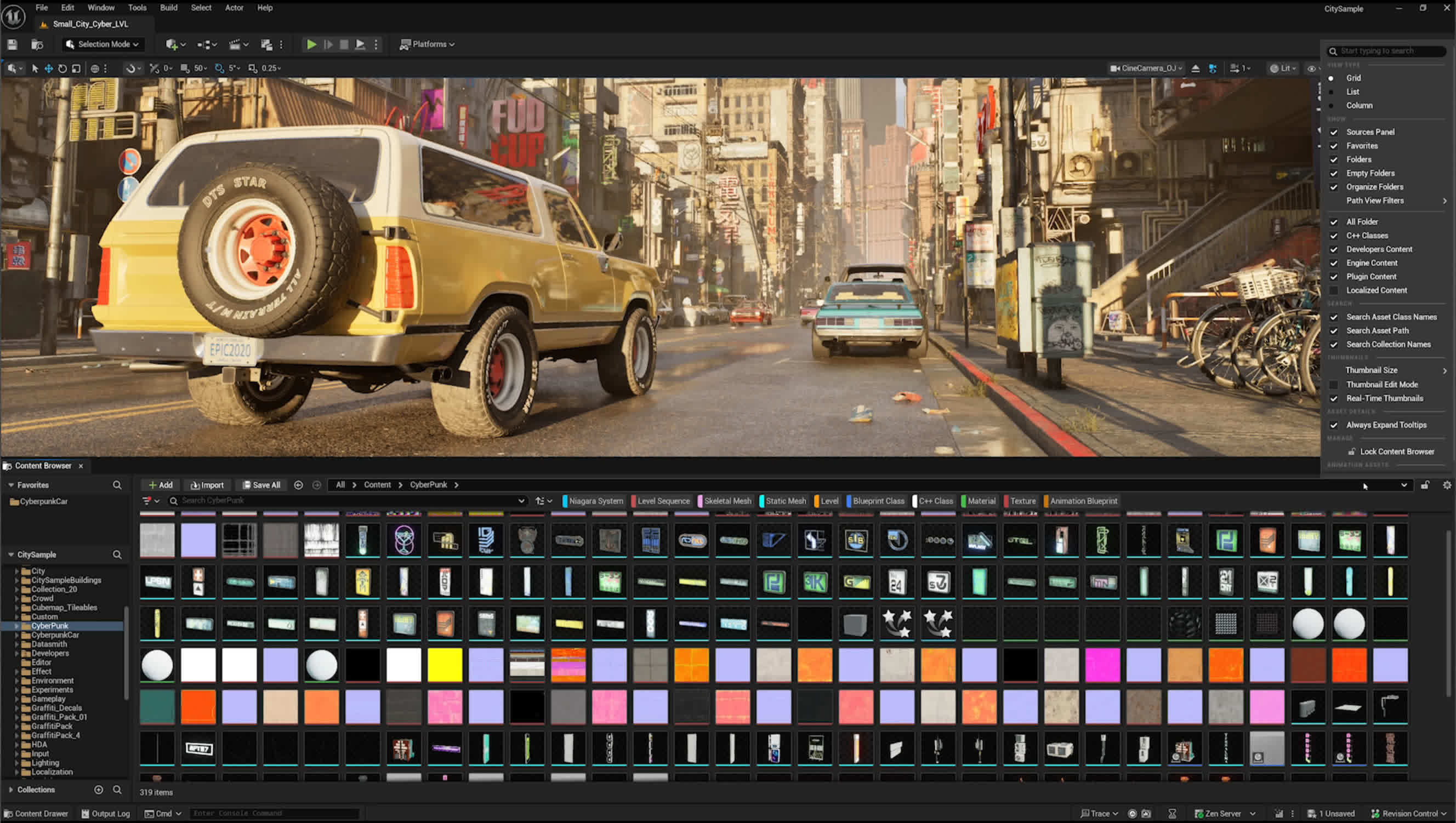
The redesigned Content Browser enhances asset organization and viewing, along with smoother thumbnail resizing and seamless support for both horizontal and vertical orientations.
We've redesigned the Viewport Toolbar's Section Menus and Quick Access Controls for faster access to essential tools. The toolbar now resizes dynamically to show relevant tool options, with dedicated controls for Selection and Modeling modes, and a consistent look across Asset Editors.
Improved developer iteration
You can now accelerate your workflows and deliver content faster across target platforms and devices with developer tools designed for faster iteration.
The Project Launcher UI (Beta) has been completely redesigned for improved usability and efficiency, making it faster to create and manage device launch profiles.
The streamlined interface enables quick selection of the builds, cooking, and device deployment configurations.
Zen Streaming is now Beta; the feature enhances productivity by eliminating the time-consuming steps of full packaged builds and copy/install deployments, streamlining content iteration and testing on your target platform.
You can now also speed up cooking times with Incremental Cook (Experimental), which analyzes asset changes and cooks only updates, helping you iterate faster on target devices.
Faster worldbuilding with procedural tools
We've enhanced the PCG framework so you can create worlds and manage complex scenes efficiently, and with better GPU-driven performance.
The Node Graph UX (Beta)has been updated to support inline constant, making it easier for you to create, drag and drop, and manipulate elements. We've also introduced a new 3D viewport (Beta) that means you can preview points, textures, and meshes directly in the viewport, and customizable graph templates with node filtering to help streamline your workflow, with faster in-context iteration.
Major improvements to GPU (Beta) performance improvements boost stability, particularly in managing instances within dense, complex scenes. By reducing CPU overhead, the system now enables smoother and more efficient GPU-based spawning at runtime, giving you greater flexibility and precision when working with instancing.
The overall PCG performance (Beta) has also been improved with multithreading support, enabling the system to distribute workloads more efficiently across multiple cores for faster processing, smoother interactions, and a more responsive experience, especially in complex or large-scale environments.
Finally, creating and updating Biomes (Experimental) is now faster and more intuitive with the PCG Biome Core v2 plugin, where new features like per-biome blending and biome layering support give you greater control to build rich, organic environments more efficiently.
Enhanced cinematic & performance capture workflows
A suite of new integrated tools offers better control of your production pipelines, including streamlined performance capture and cinematic rendering.
Mocap Manager (Experimental) is a new end-to-end solution for visualizing, recording, and managing performance capture, all within the Unreal Editor. It helps teams speed up creation by guiding them through asset management, mocap stage setup, performer/character configurations, Live Link data previewing, and more.
We've also now integrated Capture Manager (Experimental) with Live Link Hub, offering precise control over ingesting and processing MetaHuman takes from mobile devices, video files, and stereo head mounted cameras (HMCs). You can easily manage and distribute multiple facial performances with third-party facial capture systems across the Unreal Engine and MetaHuman ecosystem.
In cinematics, we've released a new pipeline-friendly Cinematic Assembly Toolset (CAT) (Experimental). With everything from swappable project configurations and customizable naming tokens to reusable cinematic templates, the toolset works alongside integrated tools like Take Recorder and Movie Render Queue to help you manage your shot management pipeline from start to finish.
Finally, you can now accelerate your rendering workflows with the new Quick Render (Beta) feature, enabling you to render stills and sequences from viewport and selected cameras to disk with a single click using the settings defined in Movie Render Graph.
And there's more!
These are just some of the new features and enhancements in Unreal Engine 5.6. Check out the release notes to see the full feature list.
