

Paint.NET is an image and photo editing application for Windows. It features an intuitive user interface with support for layers, unlimited undo, special effects, and a wide variety of useful and powerful tools. An active and growing online community provides friendly help, tutorials, and plugins.
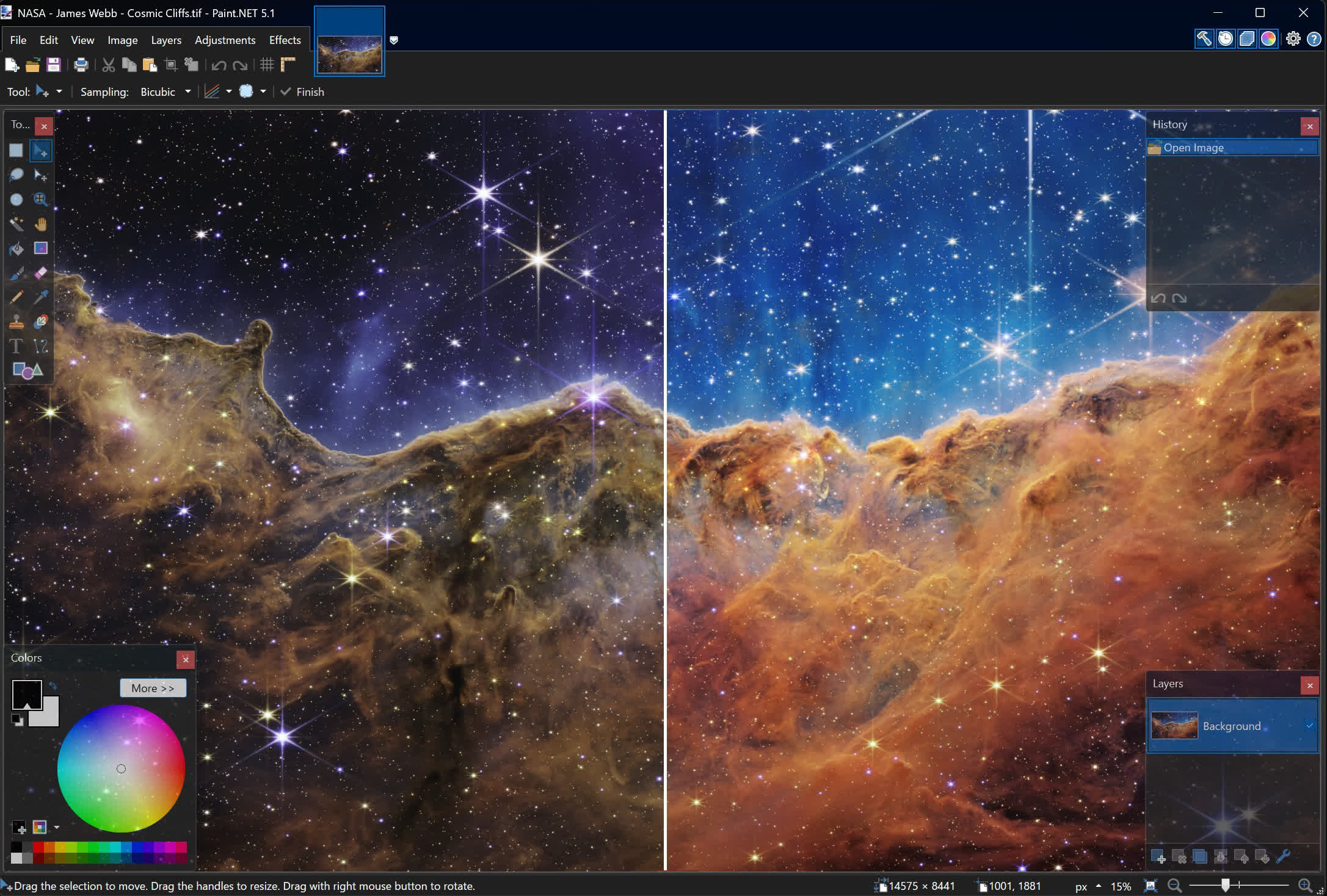
It started development as an undergraduate college senior design project mentored by Microsoft, and is now maintained and developed by Rick Brewster. Originally intended as a free replacement for the Paint app that comes with Windows, it has grown into a powerful yet simple image and photo editor tool. It has been compared to other digital photo editing software packages such as Adobe Photoshop, Corel Paint Shop Pro, Microsoft Photo Editor, and The GIMP.
Is Paint.NET a good replacement for MS Paint?
Paint.NET is a great replacement for Microsoft Paint. It offers a similar simple interface and practically the same features, plus extra editing options that could come in handy for anyone looking to do some more advanced editing.
Is Paint.NET like Photoshop?
Paint.NET is similar to Photoshop in that they are both image editors with support for advanced features like layers, drawing tools, special effects and unlimited history revision. However, the tools in Paint.NET have far less reach than the ones found in Photoshop. Adobe Photoshop is the industry standard for graphics editing and was conceived with professionals in mind.
Is Paint.NET free or a paid application?
To help finance the project, Paint.NET developers offer the app in two versions: the classic version which you can download here free of charge, and a paid Windows Store version. If you would like to support the project, the Windows Store version offers some extra features which include automatic background updates, easy installation onto all of your Windows devices, and improved reliability.
Features
- The web installer is also provided, which will download and run the correct installer for any supported CPU and OS.
- Performance in many areas has been substantially improved, and overall memory usage has also been greatly reduced (especially when more than 1 image is open).
- The user interface has been refreshed with new icons, and visual styling has been enhanced for Aero Glass (Windows 7 / Vista only).
- Upgraded to use the latest .NET Framework 3.5 SP1, which has many built-in performance improvements.
- New effect: Blurs -> Surface Blur, by Ed Harvey
- New effect: Distort -> Dents, by Ed Harvey
- New effect: Distort -> Crystalize, by Ed Harvey
- The font manager for the Text Tool has been completely rewritten, resulting in increased performance and better reliability. On Windows 7, the quality of text is much better as a result of using DirectWrite (this also works on Windows Vista if you have installed DirectX 11).
- The built-in updater now has the ability to download updates in the background, and will wait until you exit Paint.NET to install them. In previous versions, the download happened in the foreground, and you had to wait for the entire process to complete before you could use Paint.NET again.
- Now includes a Russian translation.
What's New
- New: Added a Kazakh (kk) translation
- Updated the bundled DDS FileType Plus plugin to v1.12.14 (thanks @null54!)
- Updated the bundled JPEG XL FileType plugin to v1.2.1 (thanks @null54!)
Changes since 5.1.10:
- Fixed the DxgiAdapterService not implementing IDxgiAdapterService2 due to a bad merge conflict
Changes in 5.1.10 that were new since 5.1.9:
- New: Added a Romanian (RO) translation
- Fixed a crash (BadNumberException) when moving selected pixels off-canvas, then modifying the selection, then moving the selected pixels back on-canvas
- Changed Effects->Noise->Add Noise's Coverage property to be a float instead of an integer
- Fixed a rare crash when the system wakes from sleep
- Fixed a small GCHandle leak
- Fixed HlslTernaryFunctionEffect when using 3 value parameters
- Added IDxgiAdapterService2 for plugin use
- Updated the bundled AvifFileType plugin to v3.13.1 (thanks @null54!)
- Updated the bundled JPEG XL FileType plugin to v1.2.0, which improves support for HBD/HDR image loading (thanks @null54!)
- Updated the bundled WebP FileType plugin to v1.6.0 (thanks @null54!)
Changes since 5.1.8:
- New: Added Bulgarian (bg) translation
- Fixed: The Levels and Auto-Level adjustments were crashing with panoramic images due to a bug in Direct2D that caused it to attempt allocating a texture that was too large
- Fixed: Using a non-solid fill pattern with a non-opaque color was resulting in the wrong colors being drawn to the layer due to a mixup between straight and premultiplied alpha
- Fixed: Non-CMYK images with an embedded CMYK color profile were being rendered with completely wrong colors
- Fixed a few small memory leaks
Changes since 5.1.7:
- Fixed an issue where a JPEG with an XYZ color profile was taking a very long time to load
- Fixed the ability to use relative paths to open images via paintdotnet.exe when Paint.NET is already open
- New: Added +/- buttons in the toolbar for the Text tool's font size
- Improved the robustness of file saving in pathological scenarios (e.g. power outage at the very end of saving)
- Added a /resetWindows command-line parameter to assist in troubleshooting scenarios
- Updated the bundled DDSFileTypePlus plugin to v1.12.13 (thanks @null54!)
Previous release notes
- Fixed a bug in the UI system that was causing the brush tools to occasionally process pointer input events twice.
- Updated the bundled JpegXLFileType plugin to v1.1.3 (thanks @null54!).
- New: JPEG XL (*.jxl) images are now supported by way of bundling @null54's JpegXLFileType plugin
- Fixed the Levels adjustment not honoring the active selection.
- Fixed some more mouse cursor issues when completing certain actions with certain tools.
- Fixed some keyboard shortcuts in the Adjustments menu not working reliably.
- Fixed most cases of tooltips blinking on/off when drawn near the bottom of the screen (thanks @toe_head2001!).
- Fixed some new high-DPI scaling issues in toolbar dropdowns.
- Improved quantization quality for Effects->Color-Quantize and when saving an image at 8-bit depth and below. This was done by merging octree node colors in linear gamma space.
- Fixed some incorrect background text color rendering in the status bar.
- Updated the bundled AvifFileType plugin to v3.12.1, which improves conversion from HDR images utilizing the Rec. 2020 PQ color space (thanks @null54).
- Updated the bundled WebpFileType plugin to v1.5.0 (thanks @null54!).
- Fixed: Installation on Windows Server will no longer fail with an error about a missing srclient DLL.
- Improved: When saving an image fails due to Windows Defender's "Controlled Folder Access" setting, the error message will mention that instead of being a generic "I/O failure" message.
- New: GIF Comment metadata is now preserved. It maps to EXIF Photo.UserComment tags.
- Improved: Consolidated the number of threads used for Async Present from 3 per image (canvas, left ruler, top ruler) to 3 total.
- Improved: ColorManagementEffect now supports DxgiColorSpace color contexts (for plugin developers).
Changes since 5.1.2:
- Fixed: Some PNG metadata from text chunks is now preserved (Author, Comment, Copyright, and Description).
- Fixed some issues with snapping tool windows when there are multiple monitors with different scaling levels. Sometimes the snapping boundaries would be calculated in the wrong coordinate space and cause snapping to happen at seemingly arbitrary (and weird) locations.
- Improved frame rate, frame pacing, and responsiveness of the canvas when using CPU- or GPU-intensive tools such as Move Selected Pixels.
- Fixed an off-by-1 error in the Median Blur effect that was producing incorrect results, especially with radius=1.
- Fixed a crash in the Levels adjustment's UI due to some improper value clamping.
- Fixed the Red Eye Removal effect so it no longer crashes if the canvas zoom level does not show the whole image.
- Fixed the Red Eye Removal effect so that it properly clips to the active selection.
- Fixed: View -> Zoom to Selection no longer adjusts the zoom level slightly if used twice in a row.
- Improved: The Color properties for the Clouds effect now have Reset buttons, which will reset them to the current Primary and Secondary colors.
- Fixed: When opening an image with a CMYK color profile, it will be ignored and removed if the image is actually RGB.
- Fixed some issues with the mouse cursor briefly being a generic arrow instead of the tool's requested cursor.
- Fixed: The installer will no longer silently die on Windows 10 pre-v21H2. It will now correctly show an error message stating that Windows 10 v21H2 is required, and the exit code will be ERROR_OLD_WIN_VERSION.
- Substantially improved UI responsiveness when modifying a complex selection with a combine mode other than Replace
- Fixed: Tooltips now respect dark mode (thanks @toe_head2001!)
- Fixed: The Text tool's "Sharp (Modern)" rendering mode has been reverted to use Natural Symmetric rendering instead of Natural Symmetric Downsampled. (See discussion here. cc @Leahsarah)
- Reduced the performance cost of the circle "preview cursor" that all of the brush tools use.
- Fixed PdnZoomBlurEffect when the AlphaMode property was set to Straight.
- Fixed PdnZoomBlurEffect when the BorderMode was set to Soft.
- New: HlslUnaryFunctionEffect (for GPU effect plugin developers) now has FrexpMantissaPortion, FrexpExponentPortion, ModfIntegerPortion, and ModfFractionalPortion. These provide access to the Frexp and Modf HLSL instructions.
- New: Plugins may now implement custom DirectWrite IInlineObjects.
- New: IEffectConfigForm.Close() is now public, and may be used by plugins that are hosting other effects via IEffectsService2.
- New: Added an accelerator key for Image -> Rotate 90° Counter-clockwise.
- New: Added accelerator keys to the View menu for the Inches, Centimeters, and Pixels choices.
- Changed to use the Windows thread pool instead of the .NET portable thread pool.
Previous release notes
- Improved (reduced) CPU and GPU usage of the canvas, which leaves more CPU time for things like input processing. This was done by enabling VSync while also utilizing the DXGI Frame Latency Waitable Handle to minimize latency.
- Fixed some screen blanking issues for some systems that have buggy MPO (multiplane overlay) support.
- Fixed flickering and mouse trails for systems that have NVIDIA Fast VSync enabled (NVIDIA driver bug).
- Fixed a hang while making changes to the Transparency Checkerboard Brightness setting when certain legacy plugins are installed.
- Fixed a crash in the Levels adjustment UI if it was canceled or closed too quickly.
- Added a /diagnostics command-line parameter that shows the diagnostics info without having to start up the whole app.
- Added convenience constructors to most of Direct2D's built-in effects (for GPU effect plugin authors).
- Added a PrimitiveBlendEffect for GPU effect plugins. This wraps ID2D1BlendTransform which is normally only available for use within the transform graph of a custom effect.
- Added ability for plugins to work with CMYK (PixelFormats.Cmyk32/64 and ColorCmyk32/64 structs)
- Updated the DDS FileType Plus plugin to v1.12.12.0 (thanks @null54!)
Previous release notes
This is a major update to Paint.NET that includes a raft of technology upgrades including full color management, support for HDR and Wide Color Gamut displays, major improvements to input latency and memory usage, and new and revamped blur effects. In addition, the migration of effects and adjustments to the GPU has been completed, further improving their performance and quality. There are also some new canvas customization settings.
Color Management
Paint.NET finally has full color management support, a feature commonly found in more expensive or complicated imaging software. This ensures that images with embedded color profiles look the way they're supposed to, as originally captured by a camera or as intended by the author. Most cellphone cameras nowadays will take photos in a wide gamut color space like Display P3, and now those photos will have correct colors, brightness, and saturation when opened in Paint.NET.
Here's an example using a NASA photograph of the Cosmic Cliffs nebula taken by the James Webb telescope (source). It was captured in infrared and then shifted to the visible light spectrum, and the final result uses the ProPhoto RGB color space so as to utilize a very large spectrum of colors.
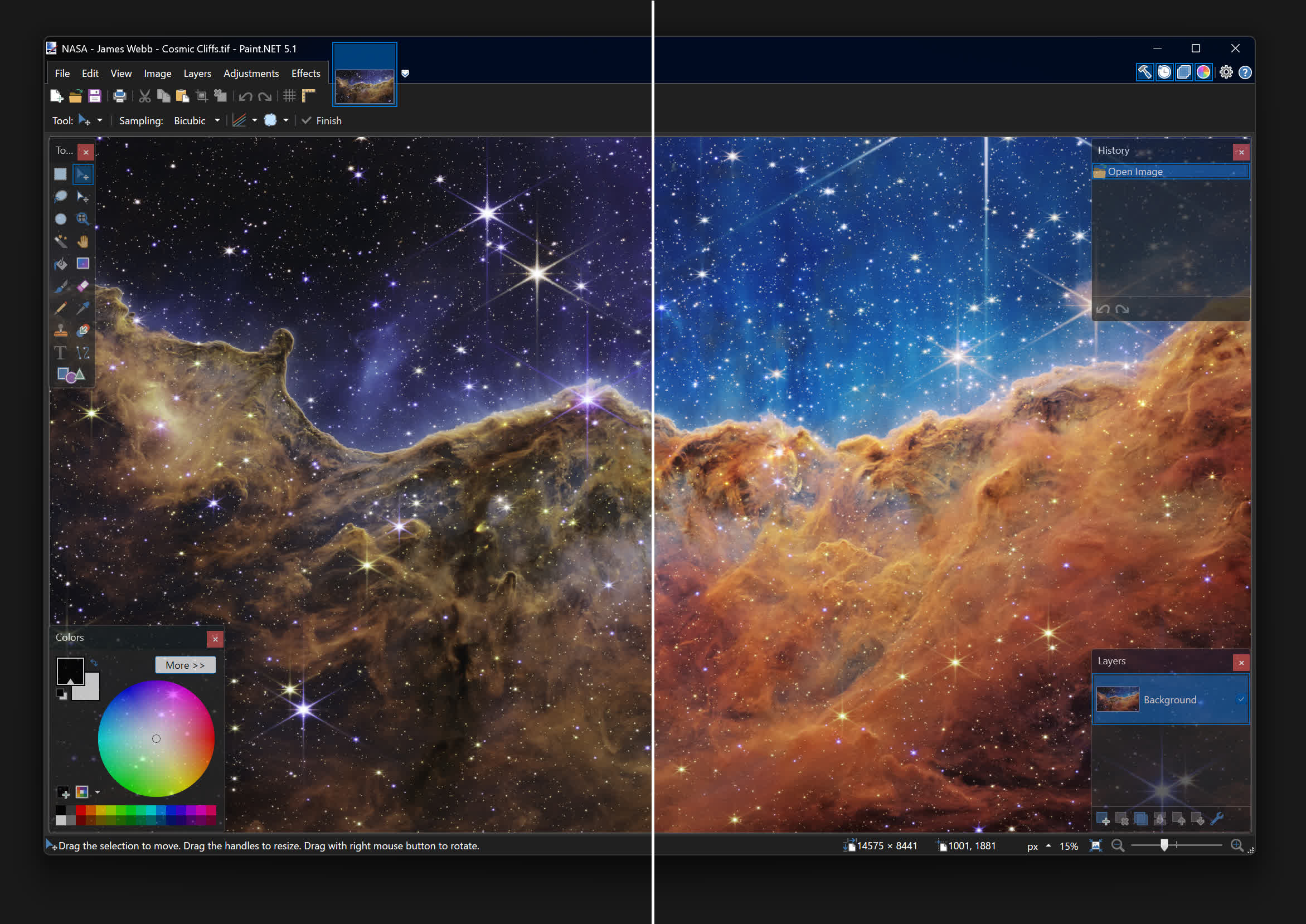
On the left is how the image looks if the color profile is ignored, as you'd see in Paint.NET 5.0 and earlier. On the right, however, the color profile is being applied in real-time to ensure that everything looks exactly as NASA intended it to.
Color Management is configured in Settings, but there isn't much that needs to be configured. Windows Advanced Color, enabled by default, is used to provide one-click color management support for your display. When the display is configured for High Dynamic Range (HDR) or Wide Color Gamut (WCG) mode, this enables high bit-depth output (e.g. 10-bits or more) and use of the display's full color gamut. Windows then ensures accurate and consistent color reproduction, based on what the display itself tells the system via EDID.
Displays configured for Standard Dynamic Range (SDR) do not support Windows Advanced Color, so Paint.NET will run in sRGB mode which ensures consistent color reproduction. Color accuracy is then dependent on the display itself being configured for sRGB color output.
There are instructions to guide you through enabling HDR or WCG for your display over in Windows Display Settings. A status section gives clear information about the state of color management and the display:
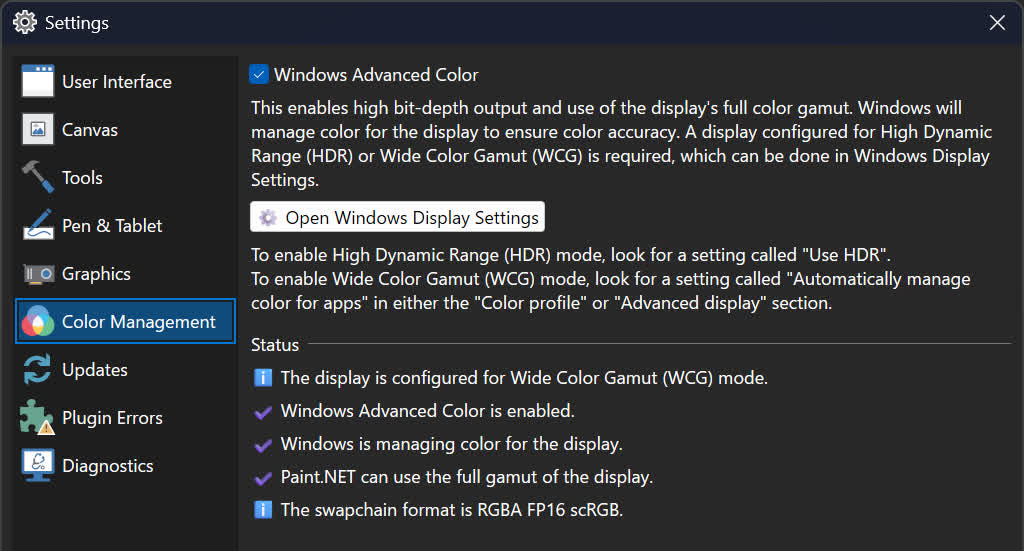
Wide Color Gamut mode is new for Windows 11 v24H2, and is essentially an upgraded SDR mode with high bit-depth output support, automatic color management, desktop composition in linear gamma and at FP16 precision, and none of the fussiness of HDR mode. Your monitor does not transition to HDR mode when this is enabled – it is still operating in SDR mode. I highly recommend checking this out if it is available on your system.
The new Image -> Color Profile dialog replaces the Image -> Apply Embedded Color Profile command introduced in 5.0, which was a one-way "destructive" process that converted the image to the sRGB color space and then removed the embedded color profile.
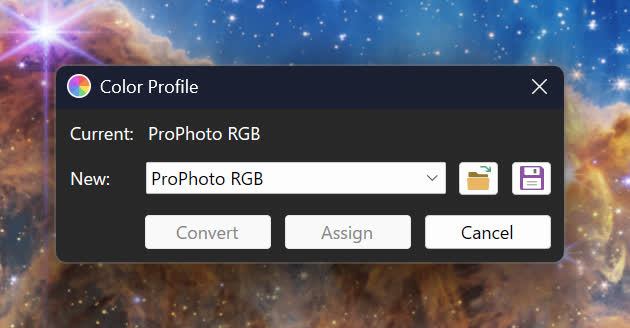
Here you can select from the image's current color profile, as well as sRGB, Adobe RGB, Display P3, and ProPhoto RGB. Or, you can import a color profile from any *.icc/*.icm file. You can also export the current image's color profile to a file. I'm planning to revise and expand this dialog as I received feedback about it from the community.
The Convert button will transform the image from its current color profile to the newly selected one. It will still appear the same on-screen, modulo any precision or gamut limitations. You will then be able to edit the image in the new color space defined by the new color profile.
The Assign button will change the color profile but not transform the colors of the image, usually resulting in it looking very different. This is useful when you have an image that has the wrong color profile embedded in it, or where the color profile was removed (such as when using "image crushers" that remove all metadata). Another possible use of this is to assign the Display P3 profile to an image to increase its saturation in a way that many people like (some feel that sRGB is undersaturated when displayed correctly).
GPU effects and plugins will automatically participate in color management unless they opt-out of it. The default WorkingSpaceLinear color context will convert the image to linear gamma in a way that is correct for the image's color profile. The linearized image is then fed into the effect, which will do its rendering, and then the output of that effect will be converted back to the (non-linearized) color space defined by the image's color profile. There are also many new APIs for working with colors and color profiles, for both GPU and CPU effects.
I'd like to give a special mention and big thanks to Clinton Ingram (aka @saucecontrol), not only for his PhotoSauce library, but for the hours and hours and hours of time he patiently discussed color management with me on Discord. This dialogue spanned several months, during which I slowly learned to crawl and then eventually walk in this extremely complicated, highly technical, and difficult problem space. This feature would not have been possible without his guidance!
New and Updated Effects
There are two new blur effects, some updates to existing effects, and all* built-in adjustments and effects have now been fully migrated to run on the GPU.
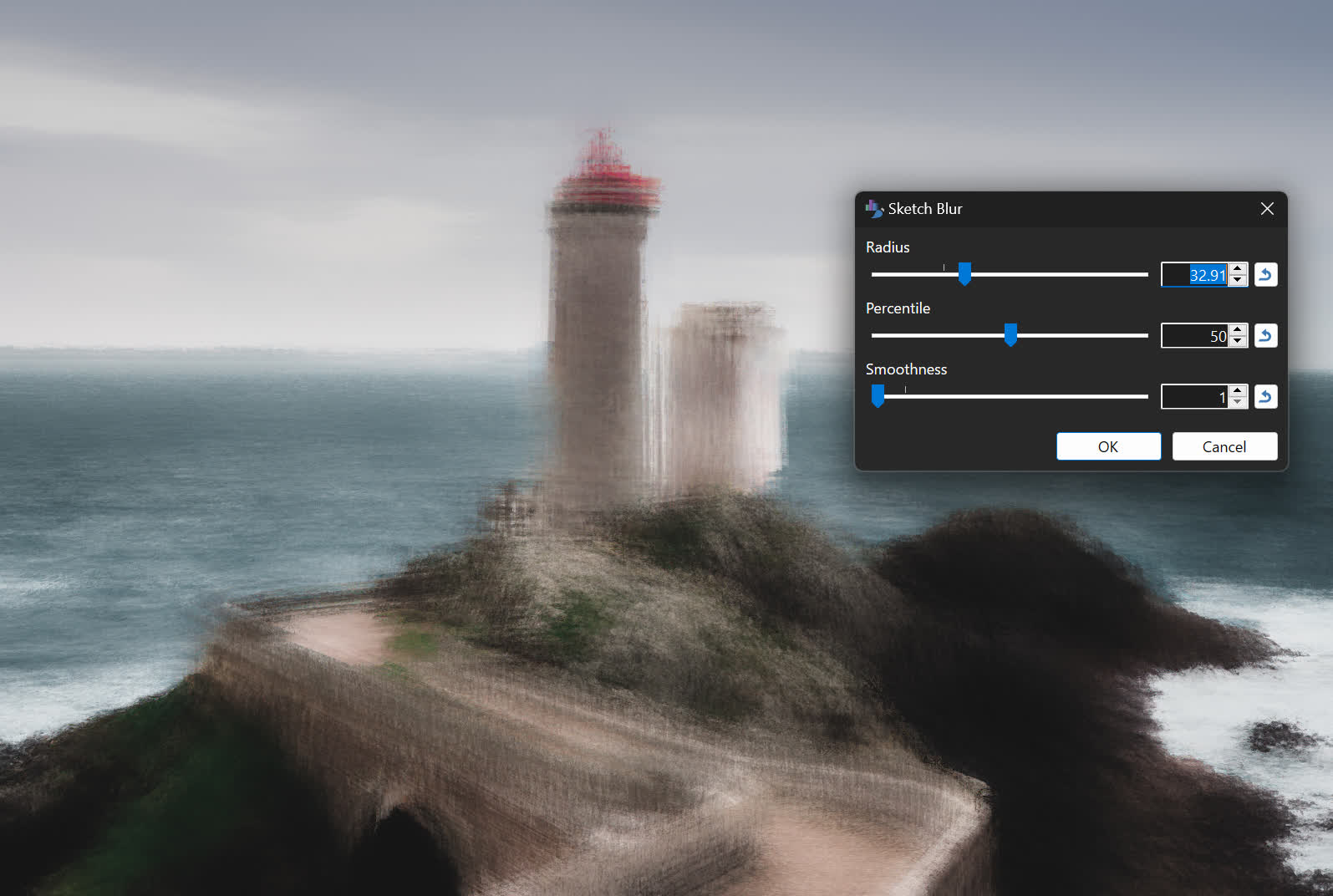
Sketch Blur is a new blur effect unique to Paint.NET. It was adapted from Andrey Akinshin's (website, twitter) implementation of the P² Quantile Estimator algorithm, which is used to calculate an approximation of the median for a stream of values. You can read more about this effect over here, where I released it as a plugin for 5.0 under the name Median Sketch. It has been further optimized since the release of the plugin, with respect to both performance and quality.
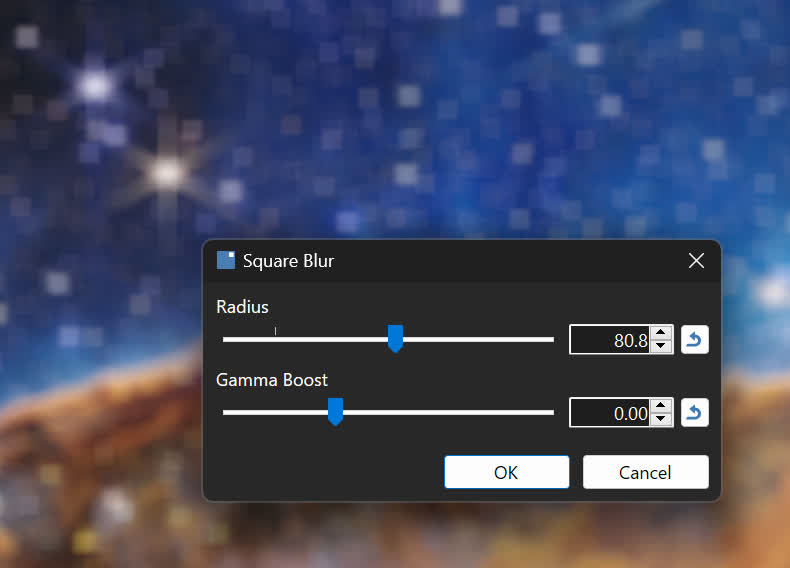
Square Blur is a very simple blur effect that computes the average color of the surrounding square area around each pixel. It could even be considered a very high-performance, but very inaccurate approximation, of the Bokeh Blur effect (which averages out the surrounding circular area).
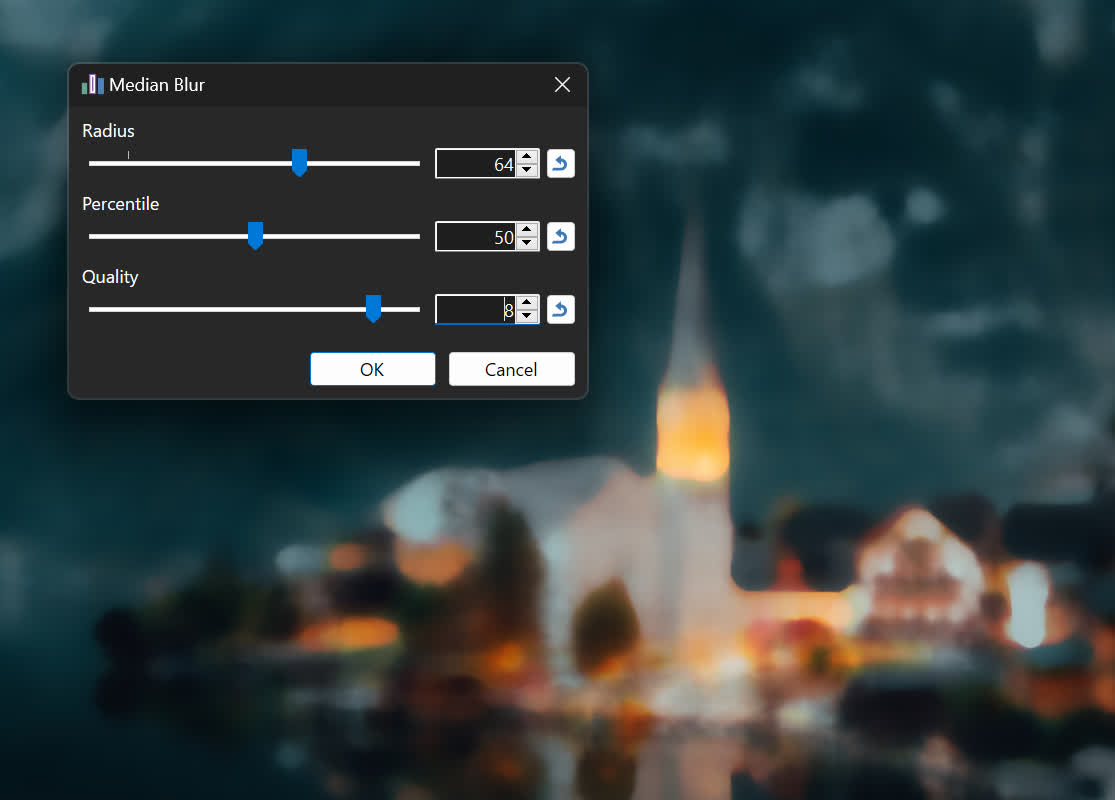
Median Blur is a rewrite of the old Noise->Median effect. It accomplishes the same thing but uses the GPU for rendering. It is based on @_koh_'s "Hi-Lo" algorithm which cleverly uses a binary search approach to calculating the median at a specific precision. You can fine-tune the precision (quality) for the result you want to achieve; lower values produce an interesting posterized look. This effect is also Paint.NET's first foray into the realm of compute shaders, the use of which unlocked more than a 3x performance improvement over the original pixel shader implementation!
Auto-Level, Curves, Levels, Oil Painting, Reduce Noise, Surface Blur, and Outline have also been converted to run on the GPU. This completes the transition to a fully GPU-enabled effect system that was started with last year's 5.0 release.
ALL of the built-in GPU effects are available for use by GPU effect plugins, where you can use them as part of a larger Direct2D effect graph to do all sorts of sophisticated and creative image processing. I highly recommend checking out CodeLab, which has been updated to support GPU effect development. @BoltBait's GPU Accelerated Plugin Pack is also a rich source of useful and interesting GPU effects (and some non-GPU effects!), and has always been an essential addition to Paint.NET. There is also source code (on GitHub) for a set of sample effects that I wrote to illustrate how to work with the GPU effect system, which has now been updated for 5.1. Lastly, there is API documentation for both the built-in GPU effects and the set of built-in and extended Direct2D effects.
In addition, plugins can now make use of the HistogramEffect2 analysis effect. Compared to Direct2D's built-in HistogramEffect, it is more precise, can calculate up to 4096 bins (vs. 256), and works on any image size (vs. a max of 4096x4096).
* There are actually 2 effects that still do not run on the GPU. The first is Colors->Quantize, whose algorithm isn't amenable to running on the GPU. The second is Photo->Red Eye Removal, which is actually just a wrapper for a GDI+ effect.
Canvas Customization
The new Canvas settings section has two new settings to let you customize the canvas to your liking. The first is a simple toggle for the drop shadow, and the second is the ability to change the border color (sometimes called the "background" color). In addition, the Transparency Checkerboard Brightness setting has found a new home here.
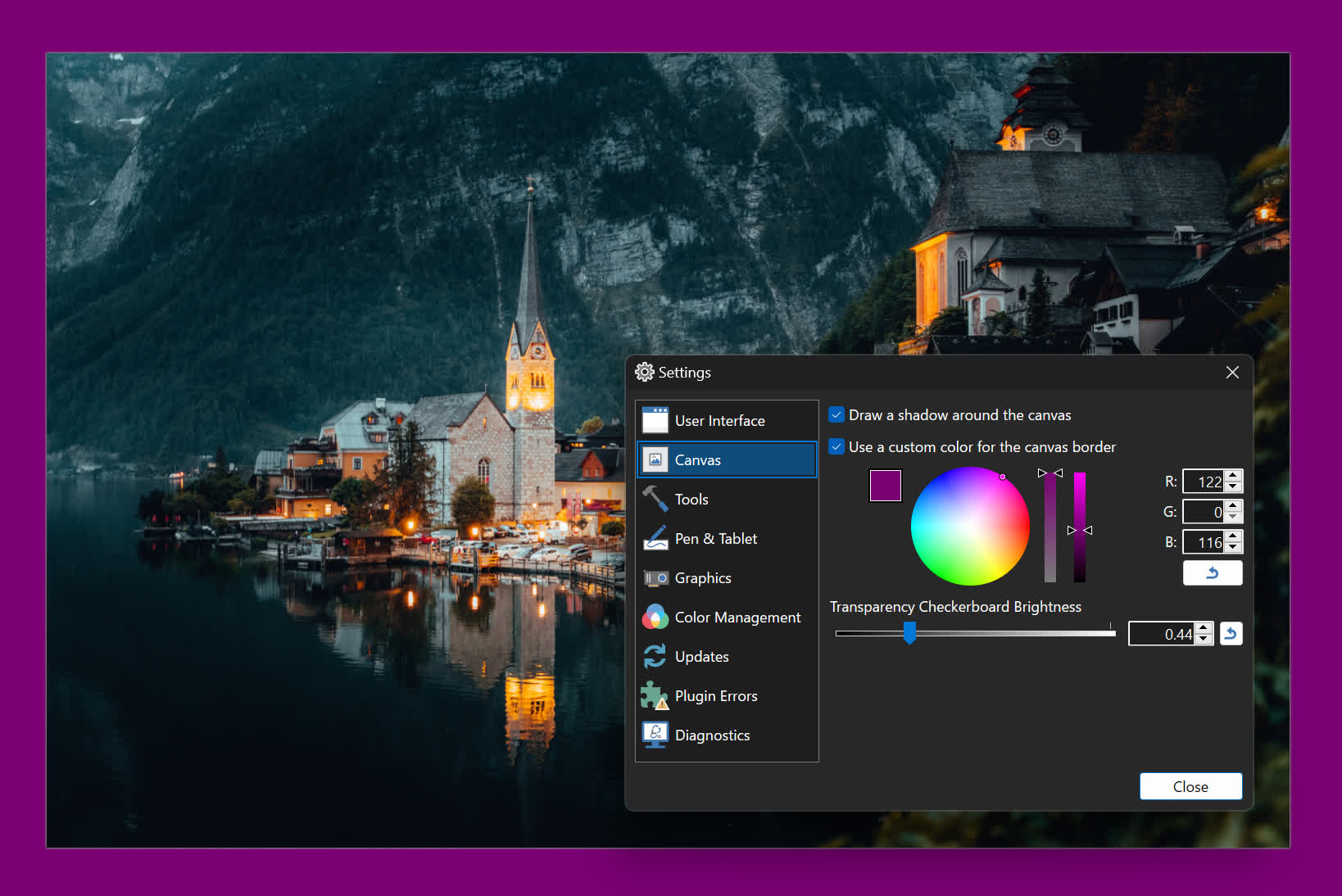
You might be wondering ... why? Well, there are 3 big reasons for adding these, and I'll list them in decreasing order of importance:
- Accessibility. Being able to customize the color of the canvas border is important for some people who are using high-contrast themes. Paint.NET doesn't really know what to do with these for some of its theme colors, and this allows folks to set a color that is comfortable for their eyes and lighting conditions.
- Contrast. Sometimes when you're editing an image, the drop shadow can trick your eyes into thinking the image is a slightly different size than it actually is. In addition, it can be important to have the ability to change the canvas border color because light bleeds. Whether you realize it or not, the color of the canvas border can slightly and subtly affect your perception of the colors in the image. Changing that allows you to choose a color that is neutral for the images you are working on.
- Fun. Some people just want a purple canvas ¯\_(ã)_/¯ This is a bonus/corollary feature and was not the primary motivation for developing it.
Memory Usage and Input Latency
Last but not least, let's talk about two important fundamentals: memory usage and input latency (or "lag"). I've been chipping away at these little by little over the years, but in 5.1 there have been breakthrough improvements for both of them.
With regard to memory usage, there are two big optimizations that have came through. The first changes the canvas tile cache so that it now moves tiles to the CPU instead of copying them, which saves quite a lot of CPU memory. The second optimization changes how swapchains are handled: instead of 1 per image tab, there are only 2 that are shared between all of the them: one for the visible tab, and a spare to help prevent flickering when switching tabs. The more images you open, the more GPU memory is saved – sometimes several gigabytes! More information on these two optimizations can be found in the release notes for a beta build released back in August.
With regard to input latency, there are two upgrades that greatly improve things here. The first is the adoption of DXGI Flip Model, which is the presentation technology designed by Microsoft to reduce input latency and power consumption for DirectX games and applications. The second is something I call Async Present, which moves the call to IDXGISwapChain::Present() (or IDXGISwapChain1::Present1()) to a dedicated, high-priority background thread. In simple terms, this means that the CPU and GPU work are better parallelized: while the GPU is busy finalizing and pushing pixels over to the display, the CPU (specifically the UI thread) can continue receiving and processing input. This has produced very noticeable improvements to input latency and smoothness on most systems.

