Sign up for a new account or log in here:
With the release of the dual-GPU AMD Radeon HD 6990, closely followed by the competing Nvidia GeForce GTX 590 we saw graphics card performance reach new heights. With bandwidth throughput in excess of 300GB/s, these cards can consume more power than entire computer systems. Moreover, the two GPUs on board of either product are so complex that combined make up for 11,000 million transistors.

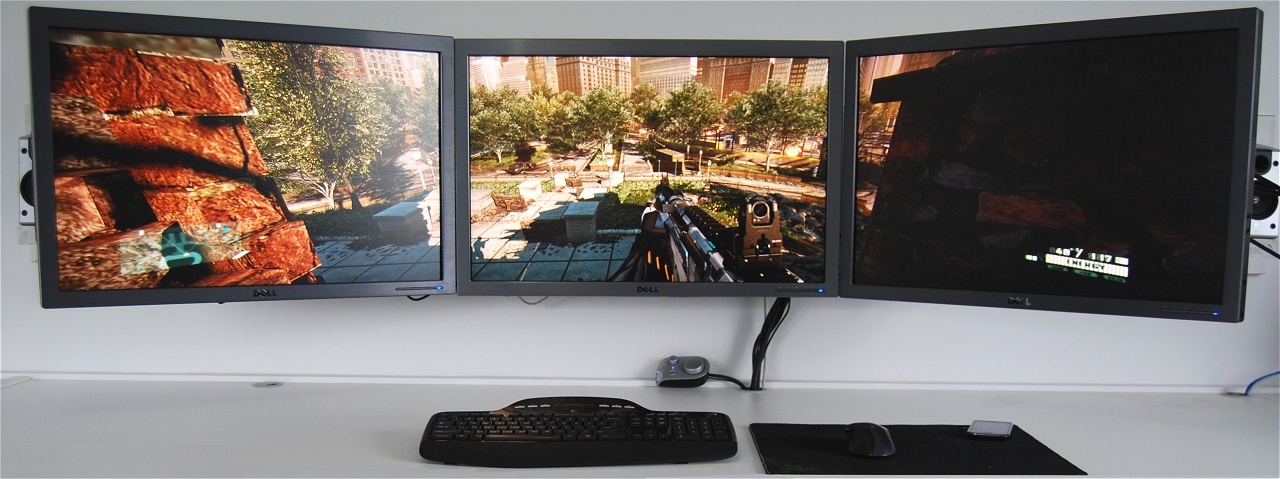
By utilizing three monitors games can become roughly 3x more demanding as the graphics card is required to render an overwhelmingly higher number of pixels. Whereas we commonly test graphics cards at single monitor resolutions of 1680x1050 (22”), 1920x1200 (24”) and 2560x1600 (30”), today we are taking these and adding two more LCD monitors for effective resolutions of 5040x1050, 5760x1200 and 7680x1600.
Nice review, keep up the good work. ![]()
Very good! I don't think I'll ever want to game with that kind of setup but definately an interesting read ![]()
I'd love to game with three displays, but the cost is offputting right now.
Seeing those 3 30" displays makes me so jealous though!!
Be interesting to see the effects of SLI/CF GPUs though. ![]()
Bezels + peripheral screen stretching + the performance hit = no thanks. I love my two HD 6950's, and i could easily pick up two more Samsung BX2431's, but i'm not impressed. Multi-monitor gaming is still early and it will get better... i will wait til then.
11 billion, not million transistors.
3 monitors is just overkill. Everything you need is displayed in the middle one. Good review by the way.
heres a question : can u run the three monitors in portrait mode? for a resolution of 4800*2560 with 3 2560x1600 screens?
oh and i wouldnt ever bother with 3 monitors....i'd rather invest in a projector and let the game envelope me
It's a review that I like, only a small correction: most games Radeon cards are better, not equal to GeForce cards.Please correct your conclusion.As resolution grows GeForce cards lose more ground so the crown certainly goes to Radeon 6990 card.
Yeah, you have to rename the Crysis 2 executable to FEAR.exe in order to get decent crossfire performance from it. Oh, and don't forget to change the autolauncher's ini file as well otherwise when you try to update it won't work
.
Ahh bugs...
heres a question : can u run the three monitors in portrait mode? for a resolution of 4800*2560 with 3 2560x1600 screens?
oh and i wouldnt ever bother with 3 monitors....i'd rather invest in a projector and let the game envelope me
What about the middle in portrait and the outer two in landscape? I have always wondered whether or not this would actually work for some games rather than the long band of peripheral vision that is the standard alternative.
Hmmmm...
I was happy to see this article although it puts 3 monitor gaming in an unfavorable light... Almost as if the writer is intimidated by the setup and it looked like the fear spread to the first few posts. First off, I have 3 Hanns-G 27in monitors that cost 300$ a piece(shipping included), a 6870 cost me 200$ and a rebate, A Ph2x6 (200$), an ASUS C.A. IV mob0 (200).. that's what... 1500$ so far? The cost has been extremely exaggerated by the writer(although im sure you can find a way to make it cost 5000$). I don't have a lot of money or "deep pockets"...Matter of fact, @this exact moment i don't have a dollar in my account. But if i manage my money i can have 300$ here and there to spend on what i want, or justify that i need just like most of the people that read this site are can also. If not, maybe "high-power" computing/gaming isn't the thing you need to be thinking about. The major points for me are: for computing, its like having multiple books open when your studying, your productivity and comprehension go up so dramatically that you wonder how come you haven't been doing this all along. And with gaming, Seeing something/absorbing information in your peripheral s as heart pumping and surreal as it is in real life, it really feels like your doing more. Triple monitor gaming/computing REALLY needs to be experienced. Don't let an intimidated opinion scare you off, hold you back, or give you more excuses.
I was happy to see this article although it puts 3 monitor gaming in an unfavorable light... Almost as if the writer is intimidated by the setup and it looked like the fear spread to the first few posts. First off, I have 3 Hanns-G 27in monitors that cost 300$ a piece(shipping included).......Don't let an intimidated opinion scare you off, hold you back, or give you more excuses.
That's nice, but 27" isn't the same as 30". It's not the size difference that sets them apart, it's the huge 2560x1600 resolution, which is nearly double the pixel count of a 1920x1080 panel. Most 30" monitors use higher quality IPS screens as opposed to traditional TFT screens, and cost upwards of $900, so even if you only spend about $2700 for the monitors, that's still a hell of a lot money for just 3 components. You could put together 2 amazing builds for that much money.
@Superpeter: While your opinion is fine and dandy (and I agree with the later half of your post to a degree), the whole point of the review was to put the two most powerful consumer level single PCB graphics cards to the test in triple monitor configurations to the test. It, in no way is geared for general productivity, as you would NOT need by any stretch of the imagination need the 590 or the 6990 for general producitivity. If anything, it puts the graphics cards in unfavorable light rather than the concept of a multi display set up, as they are the biggest and baddest and yet they struggle (albeit at the higher/highest settings) to play games at these advertised but otherwise monstrous resolutions.
For normal computing tasks, two monitors tend to be the sweet spot, not 3+. While your multiple books example makes sense, we are not multi tasking individuals when it comes to say, reading comprehension. You cannot reasonably have one eye on one book, one eye on another, and read/comprehend both, you have to switch back and forth between books. This is true with multiple screen layouts, we are still paying attention to one window/display at a time, but the extra real estate works best when we aren't covering one window over another, allowing that peripheral vision to kick in when say, you have something that gives a visual cue when something changes, or in your programming example, allows you to have all your palettes open and still have an acceptable space to code in. However, there is a limit to this, particularly when your eyes begin to hunt for windows or update notifications, and you start becoming engrossed in the space you are not using or with too much going on hit the limit for information overload.
After all this TL;DR I'll say this in response, I've used 2/3/4/5/6 monitor setups in productivity scenarios, and 3 was the absolute limit for me when using multiple non-full display windows (IE, not tiling on each individual display or across all displays). Two definitely was simpler for me to use and I (and others who tried a similar set of monitors) felt I was much more productive on two than three, though both were MUCH MUCH better than a single display.
That's nice, but 27" isn't the same as 30". It's not the size difference that sets them apart, it's the huge 2560x1600 resolution, and cost upwards of $900
80+ inches of viewing space with 5760x1200 pixels in HD shipped to my front door for the 900$ price of one of your supposed monitor seems more than "Nice". Sounds like the intelligent alternative.
IPS panels, which usually cost at a significant premium over standard TN panels offer much better color reproduction, higher color depth, often better gamut ranges, usually better absolute blacks and gradient grays (CFL ftw in that respect), and mimumum color/contrast phasing when viewed at an angle. They are generally the CHOICE monitor tech for anyone involving in design, and absolute resolution with these kind of monitors is prized moreso than total resolution in mutiple monitor setups.
However they aren't that great for gaming since their response times are not nearly as fast as TN monitors, so I'd be questioning why someone would be getting three+ of the 5ms monster size IPS panels for the sake of gaming...
Great review Steve, I was just about to ask you when you were going to get on this after seeing your 3 x 30" dells.
I have a suggestion for you. Try running the same setup with triple or quad CF/SLI and check out the CPU scaling when you go above the 3.7 Ghz mark
I have found that the 'resolution bound' bottleneck is removed.
I disagree with that assessment. I just setup a 3 x 1 Lanscape on 3 x 25" monitors and its the greatest thing since sliced bread for AV editing and PSE...etc. Not having to switch back and forth and having full view of all of the material being edited is fantastic.
Yes you can. Here are the available layouts Punk.
[link]
?? 5ms is well fast enough
@madboyv1: i agree with you in that i believe i viewed the article in the wrong light, Is was to showcase the graphics cards, not necessarily the monitor setup. I wanted to strongly express that it doesn't have to cost a person as much as the writer explains to get an amazing experience out of a setup close in size to this one.
Also @madboyv1: That's cool that 2 monitor computing is for you. I had two monitors for a while until I saved up for my third. I liked it WAY more than one. 2 screens made me wonder if i was going overboard with three but it always felt like something was wrong, like my shoes were on the wrong feet or something... I had them side by side in landscape mode, Maybe if i had them arranged differently i may have stayed with 2monitors, but three is the magic for me.
Its was listed correctly in the article. 11,000 million is 11 billion.
Hey Red
I have to say I agree there. Having used 2 displays for some time (and now being stuck with one til my motherboard arrives!) I've got a new found respect for just how much more efficient having more than one is!
I've always wanted 3, and its possible one day I will (having to replace whole PC no doubt will delay it now) and I can't wait, because the amount of desktop real estate it will give me for other tasks is what I want it for most.
It makes working on big documents or images so much easier when you can give one program one whole display, and another to another one. To have an extra screen would make it even more awesome! ![]()
@Superpeter: With a custom or ultra thin bezel, 3 in portrait would probably be magic for me as well, but for now I'll stick with my two, probably wait for marginal price/tech improvements in display technology before trying again.
@red1776: I meant to more or less address your disagreement retroactively twice, once right after the quoted text, and once in the "paragraph" after that. It may not have been read that way however:
"...or in your programming example, allows you to have all your palettes open and still have an acceptable space to code in." - This applies to your usage.
"...3 was the absolute limit for me when using multiple non-full display windows (IE, not tiling on each individual display or across all displays)." - this is the contrapositive to your usage.
It all depends on how someone wants to use thier screen If you're full screening everything having more than one monitor ends up being pointless. if you tend to have a considerable number of docklets/applets and individual windows, you can end up running into imformation overload very quickly after 2 monitors worth of screen space. Three and more, in my opinnion is best used as you described, but ultimately less useful if you're not using that space actively, which becomes increasingly difficult depending on what you're trying to do.
@madvoy: what i do @ my home to help compensate for bezels in my viewing area is I have the monitors that are to the left and right of the center; their bezels are directly BEHIND the middle monitor so i only see the with of one bezel between screens. I never understood why in all the pictures and reviews i see the monitors are always put edge to edge. Stacking the bezels is infinitely more pleasing (to me) unless you like the double bezels in your picture
I have to say I agree there. Having used 2 displays for some time (and now being stuck with one til my motherboard arrives!) I've got a new found respect for just how much more efficient having more than one is!
I've always wanted 3, and its possible one day I will (having to replace whole PC no doubt will delay it now) and I can't wait, because the amount of desktop real estate it will give me for other tasks is what I want it for most.
It makes working on big documents or images so much easier when you can give one program one whole display, and another to another one. To have an extra screen would make it even more awesome!
Hi Leek,
This is why I like this setup so much. i do a lot of A/V editing and PSE/Adobe InDesign/Creative Suite stuff.
[link]
For the first time, 5760x1200 is playable with the newest games at 60 fps by the HD6990 CF and GTX590 SLI. The power is there now but the 40nm chips are primitive, hot, loud and power consuming. I think something in the line of a HD7950 Cf and a 650W PSU on an i5 2500k would be perfect come this Christmas. Not too far off. So far, the Asus Pro Art 1920x1200 IPS display is the definite piece of this build.
@madvoy: what i do @ my home to help compensate for bezels in my viewing area is I have the monitors that are to the left and right of the center; their bezels are directly BEHIND the middle monitor so i only see the with of one bezel between screens. I never understood why in all the pictures and reviews i see the monitors are always put edge to edge. Stacking the bezels is infinitely more pleasing (to me) unless you like the double bezels in your picture
Yeah I've thought of that too, but when you have half an inch to almost a full inch of bezel with even one, it's annoying. When I actually have my two screens "edge to edge" I do what you do with the overlapping. =)
By your own logic you wont...or ever should build system.
Huh? the 40nm Gpu is what is current technology, how is it primitive? by that logic the 28nm will be primitive as soon as they exist.
As far as the 'hot and loud' aspect, current materials (the same materials that will be used for the 28nm chips) have been found to run acceptably up to a 100c. thermal limit. the next gens clocks will be pushed to that limit the same as the previous generations for performance sake. and unless there is a break-through in fan blade design, they are not getting any cooler or quieter. If you think that your mythical 7950 is going to run at 40c....its not going to happen.
From Guru3D;
GTX 280 load:
Full 3D performance mode: varies - worst case TDP 236W @ 85c
GTX 580 load:
Subjective obtained GPU power consumption = TDP 280 Watts @ 87c
There is a fighting chance that the next offerings from red and green will be more power hungry and warmer still. Not to mention that the latest generation of GpU's are the first to run roughshod over the PCI-SIG's 300w limit.
if you are awaiting the '7000/600' series to be a stone cold, mute, run on cooking grease eco friendly affair...you are going to be disappointed there Luay
| Trending | Featured |
Get free exclusive content, learn about new features and breaking tech news.