Microsoft is adding images to Notepad, and users are wondering why

Alfonso Maruccia

Posts: 2,602   +978
Staff
Editor's take: Microsoft is having a tough time leaving Windows Notepad well enough alone. The classic text editor is effectively gone, replaced by a "new" version that keeps accumulating a growing list of features Windows users never asked for.
Microsoft is reportedly working on yet another "advanced" Notepad feature that has little to do with basic text editing. According to unnamed sources cited by Windows Latest, the application will soon support inserting images into text-based documents.

Developers in Redmond have been testing image support in internal Notepad builds, the sources said, and have found no significant impact on performance. The feature is tied to Markdown support, which Notepad gained in 2025 along with expanded formatting options.

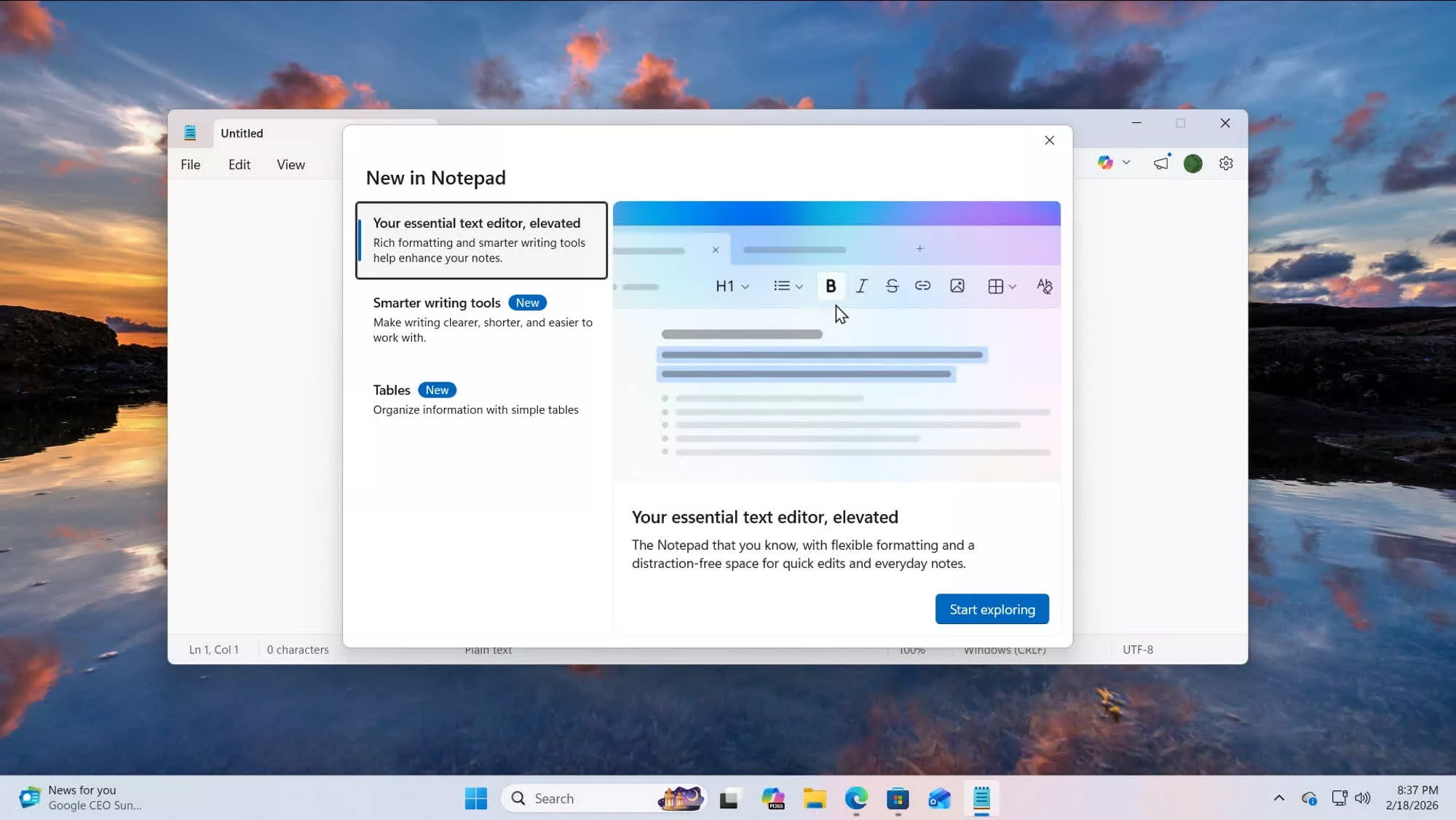
Recent Notepad updates released to beta testers in the Windows Insider program already include a new "Image" button, visible in the app's "What's New" dialog. The button is not yet functional but is expected to become operational in the coming months.

Like other formatting features, image support will reportedly be optional and can be disabled in Notepad's settings. According to internal sources, Microsoft is positioning the addition as a way to increase Notepad's "flexibility" and enhance note-taking workflows.

Microsoft now describes Notepad as an "elevated" text editor, complete with rich formatting options and AI-powered writing tools tied to Copilot. The app also supports tables, a feature built on the Markdown functionality introduced earlier.

In effect, Notepad has replaced WordPad as the native rich-text editor in Windows 11. Microsoft retired WordPad in 2024, removing a tool that had survived decades of policy shifts dating back to the Windows 95 era. Users who need a simple but capable document editor must now either install a third-party suite such as LibreOffice or adopt the Markdown-based workflow Microsoft is promoting in the newly "elevated" Notepad.

A growing number of frustrated users see Notepad as a symbol of what they believe is wrong with Windows 11. Microsoft is using the text editor to showcase new AI features and advanced formatting options, critics argue, while users contend with increasing reliability and security concerns.

The company was recently forced to patch a remote code execution vulnerability in Notepad. A basic note-taking app would not typically require network-connected features, yet Microsoft continues to expand the app's scope – leaving some users wary of the potential trade-offs.

Permalink to story:

 
I still use vi as my default editor. I'm never going to get used to these fancy editors like notepad.
 
I don't understand why they didn't just keep WordPad around and shove the AI features into that, and keep Notepad the way it was. Seems like they just made it extra complicated for themselves.
Because notepad has name recognition. Nobody but turbonerds ever used word pad. But regular folk had a chance of using notepad for something, and office is already full of AI slop.
 
And I replaced Notepad with EditPad Pro years ago and I too have never looked back.

Yes, I bought EditPad Pro.
 
I don't understand why they didn't just keep WordPad around and shove the AI features into that, and keep Notepad the way it was. Seems like they just made it extra complicated for themselves.
Exactly THIS!

A more useful WordPad would actually be good for people that don't need/want full office.

But why kill WordPad and then turn Notepad into WordPad? It makes no sense outside of a completely defunct corporate culture and byzantine management structure.
 
Notepad used to be perfect for quickly striping nontext out of content, but now it's useless.

I've switched to EditPlus as it's replacement as I already own it for other tasks although it's a bit overpowered for that purpose. I probably should check out other basic text editors.
 
People are confused. You can simply turn off Markdown support in the toolbar. All formatting goes away, all buttons go away, and you can have your good old notepad back. The complaints in the article are far overstated:

Notepad used to be perfect for quickly striping nontext out of content, but now it's useless.
Notepad still strips non-text elements out when I paste in web content, including links, bold text, and more.
Exactly THIS!

A more useful WordPad would actually be good for people that don't need/want full office.

But why kill WordPad and then turn Notepad into WordPad? It makes no sense outside of a completely defunct corporate culture and byzantine management structure.
Microsoft still provides Word, Excel, and PowerPoint for free for users, albeit through the web with an account (and thus little footprint on your computer). Personally I wouldn't use it because it's entirely in the cloud, but for most personal users that makes sense. Google does the same thing.

Notepad still creates plaintext files unlike with WordPad's default file format (RTF). Even the markdown formatted files are still text files. All they would do is emphasize a message *this way* and make lists by putting a dash or numbering the beginning of each line. I think all the changes Microsoft has made to Notepad make it better so far.
 
You complain to Microsoft that Windows is bloated. They remove WordPad (because it allegedly competes with Office) to "debloat" it. You complain again, "I didn't mean that" So, they feel guilty and break and Notepad instead. ✍️
 
Why? I'll tell you ONE reason. Because just as with anything MS does, ANY attachment will of course default to being uploaded to the MS cloud unless you figure out a way to prevent it.
 
I'd rather they spent the time doing something useful like fixing (rewriting) search, doing a proper job of the massively underwhelming and half-baked new start menu or putting all the settings into a single app rather than the 15 (each with the look and feel of a different OS version) it is currently.
 
I don't understand why they didn't just keep WordPad around and shove the AI features into that, and keep Notepad the way it was. Seems like they just made it extra complicated for themselves.

No idea. They also have OneNote and Word for fancy stuff. The number of note-taking-people without an Office license will be extremely limited.
 
Next up: PowerPoint for browsing the web, Word for streaming music, and Excel becomes file explorer (probably with a better search function). Windows will be renamed to CoPilot, btw.
 
Microsoft always doing some amazing things:
1) Making more bugs (or they consider them 'features')
2) Spend time on making things worse (e.g. Notepad)
3) Force everyone to use cloud, left people without cloud to switch Linux or Mac
4) Changing all kind of interface even they are working well
5) Spend resources on something people not really use (e.g. Co-Pilot)
 
I keep the "Classic" Notepad from the previous Windows versions.

Yes, it's still working if you find it, and there is no reason to use the telemetry one.

If you search on the net you can find it and download it or copy from W10 setup, but just be sure (with Virus Scan) that that's the one.
 
People are confused. You can simply turn off Markdown support in the toolbar. All formatting goes away, all buttons go away, and you can have your good old notepad back. The complaints in the article are far overstated:


Notepad still strips non-text elements out when I paste in web content, including links, bold text, and more.

Microsoft still provides Word, Excel, and PowerPoint for free for users, albeit through the web with an account (and thus little footprint on your computer). Personally I wouldn't use it because it's entirely in the cloud, but for most personal users that makes sense. Google does the same thing.

Notepad still creates plaintext files unlike with WordPad's default file format (RTF). Even the markdown formatted files are still text files. All they would do is emphasize a message *this way* and make lists by putting a dash or numbering the beginning of each line. I think all the changes Microsoft has made to Notepad make it better so far.
You're right that the criticism is overblown, and you can just turn off all the new features in the settings. In addition to that, it's also worth noting that if you don't like the new UWP notepad, you can just uninstall it like any other program in the settings app, and enable the classic win32 notepad on the "optional features" page.

While I don't want to defend microsoft, it's becoming abundantly clear that the people complaining about this kind of stuff are nowhere near as tech literate as they want to believe they are, and even basic, easily available settings scare them.
 
People are confused. You can simply turn off Markdown support in the toolbar. All formatting goes away, all buttons go away, and you can have your good old notepad back. The complaints in the article are far overstated:


Notepad still strips non-text elements out when I paste in web content, including links, bold text, and more.

Microsoft still provides Word, Excel, and PowerPoint for free for users, albeit through the web with an account (and thus little footprint on your computer). Personally I wouldn't use it because it's entirely in the cloud, but for most personal users that makes sense. Google does the same thing.

Notepad still creates plaintext files unlike with WordPad's default file format (RTF). Even the markdown formatted files are still text files. All they would do is emphasize a message *this way* and make lists by putting a dash or numbering the beginning of each line. I think all the changes Microsoft has made to Notepad make it better so far.
I don't have time for an app that mostly is plain text. And that every day is slipping farther away from that. Which means I would have to constantly verify that it still is doing the primary thing that it used to do. Ridiculous.

Obviously, WordPad isn't plain text. No one did or would argue that.

There are thousands of text editors out there if you need other feature levels. Notepad had a nice niche that it has abandoned, so I abandoned it. I've moved on to notepad3 for my direct replacement with Typora and EditPlus when I need other features.
 
Back