Microsoft's ReFS file system resurfaces in latest Windows 11 build

Alfonso Maruccia

Posts: 2,515   +935
Staff
In context: Microsoft introduced the original version of ReFS in 2012 alongside the enterprise-focused Windows Server 2012. At the time, the company stated that the new file system was intended to replace NTFS. However, NTFS remains the de facto standard for storage and file management in modern Windows versions.

At last, Microsoft appears to be taking action with its Resilient File System (ReFS) technology. Despite being 14 years old, the storage format remains largely unfamiliar to most Windows users. However, it is now being offered as an optional choice in a recent Windows 11 preview build.

Discovered by a prolific Windows insider, the new option appears in Windows 11 Build 27823. According to him, a hidden menu – accessed via an invisible button – allows users to format partitions and unallocated disk space using a new "Flexible Storage" option. A pop-up menu then provides two file system choices: the default NTFS format or the ReFS technology.
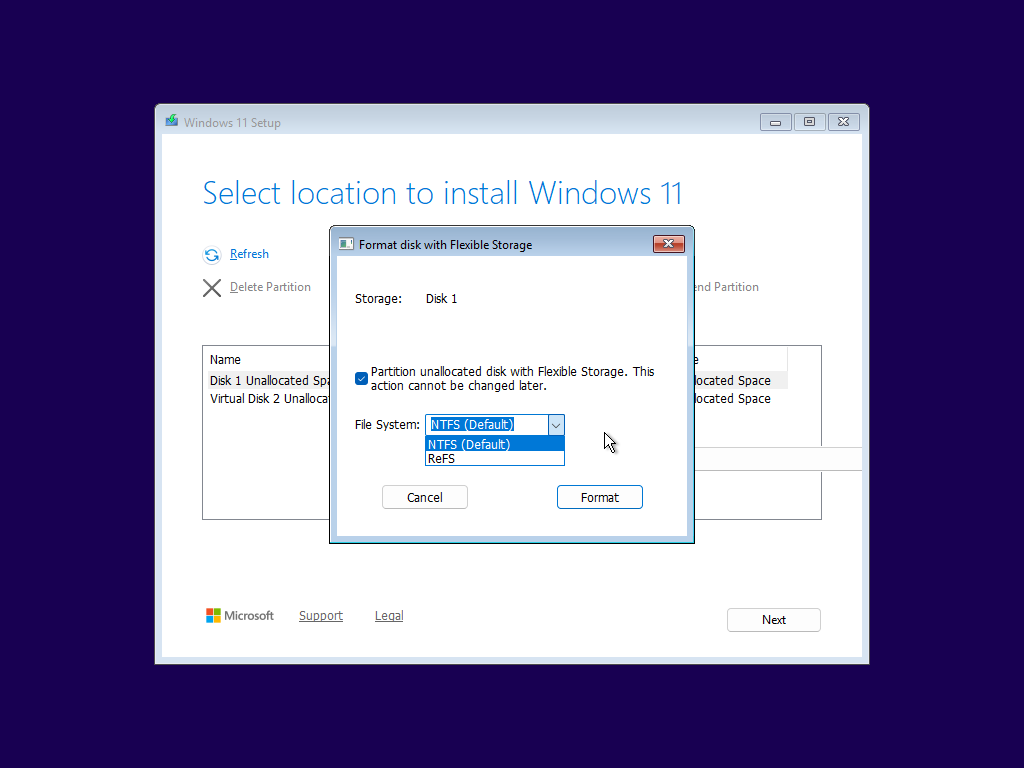
I was unable to find any particularly relevant information about the "Flexible Storage" moniker on Google, so it's unclear exactly what Microsoft means by this term. Meanwhile, Redmond provides a basic overview of ReFS on its Microsoft Learn network. The new file system is designed to support larger storage capacities, improve efficiency in scaling large datasets, and offer greater resiliency against data corruption.

Designed as the "next generation" of Windows file systems and a potential replacement for NTFS, ReFS offers significant improvements over the aging storage technology, which dates back to Windows NT 3.1. A ReFS partition can be formatted up to 35 petabytes and can even contain a single file as large as the entire volume. In contrast, NTFS volumes max out at 256 terabytes.

ReFS introduces advanced features such as block cloning, file-level snapshots, and more. However, it lacks traditional NTFS capabilities (see a comparison table here), including bootable volumes, file compression, encryption, short file names, and support for removable media. Microsoft states that these features are unavailable "at this time," suggesting they may be added in the future... or perhaps not.

Despite being a highly advanced storage technology, ReFS remains an enterprise and server-focused solution for now. The hidden menu discovered in Windows 11 Build 27823 could indicate Microsoft's intent to bring ReFS to consumer versions of Windows.

Meanwhile, the open-source community is working on unofficial ReFS documentation, and the German company Paragon Software offers its own closed-source ReFS driver.

Permalink to story:

 
"However, it lacks traditional NTFS capabilities, including bootable volumes, file compression, encryption, short file names, and support for removable media."

You can't boot from a ReFS volume, you can't compress it, you can't encrypt it, and can't use it on removable media. Might as well just call it BMFS (BM as in taking a crap.)
 
"However, it lacks traditional NTFS capabilities, including bootable volumes, file compression, encryption, short file names, and support for removable media."

You can't boot from a ReFS volume, you can't compress it, you can't encrypt it, and can't use it on removable media. Might as well just call it BMFS (BM as in taking a crap.)

Yeah, I just don't get why those features aren't options yet, especially considering how bad NTFS's performance is relative to other file systems out there.
 
It wasn't designed to do all of the things NTFS can do, despite being touted as a potential replacement. A lot of those features are missing simply because ReFS doesn't need them. Does an encrypting file system provide more security over, say, Bitlocker (which you can use with ReFS)? They address different threat models, but one should arguably not be relying on file system level encryption to defeat those specific threat models (you might call it a "code smell" - a bad practice disguised with a filesystem level patch). The same goes for filesystem level compression in terms of its utility. Not saying that these shouldn't be added, just saying that ReFS was prioritized to do other things well, and sacrificing those features doesn't really cause much issue.

ReFS has a long ways to go before it becomes a system-level file system replacement to NTFS though, and since Microsoft historically has kept ReFS in the more expensive editions of Windows as a differentiation point, it would mildly surprise me to see them bring ReFS to W11 Home unless the play is for market share.
 
"Insufficient information always invites danger" - Mr. Spock

So in other words...

Until we know ALOT more about what M$ intends to do with it, or what it is actually capable of, then we'll just have to wait for them to move forward with releasing some more details :D
 
Last edited:
It’s over a decade old and is still missing features?!? And before someone replies with “it’s for enterprise “ - one of those features is file encryption!

Guess what... The answer is "it's for enterprise". It's meant to do certain things, and Not do itself others that while you could consider basic from a consumer perspective, are normally delegated to other "levels" or components of your architecture in enterprise.
 
Despite this being 'enterprise' oriented it doesn't hold a candle to EXT4 or BtrFS. M$py should adopt both EXT4 and BtrFS as standards, which are both more secure and faster than NTFS and ReFS.
 
NCC One seven Oh One. No bloody A, B, C or D!

Eww. Of course, while Trek in the main consisted of less bullshit than Star Wars, mostly still bullshit. They did some interesting bits with Data....though they didn't comprehend Data as do I. Lore as well. HAHAHAHAHAHAH
 
"However, it lacks traditional NTFS capabilities, including bootable volumes, file compression, encryption, short file names, and support for removable media."

You can't boot from a ReFS volume, you can't compress it, you can't encrypt it, and can't use it on removable media. Might as well just call it BMFS (BM as in taking a crap.)
it has compression

ReFS 3.9
Version of formatted by Windows 11 Enterprise v22H2.
Version of formatted by Windows 11 Enterprise Insider Preview build 22598 and Windows Server Insider Preview build 25099.
Added post process compression with LZ4 & ZSTD, transparent decompression.
 
When enterprises use ReFS, they are most of the time using it in virtual machines stored on an enterprise level SAN. Those things have build in compression, encryption and deduplication already. Because of that litterally no one (in the enterprise space that is) will need it or miss it in the filesystem.
 
When enterprises use ReFS, they are most of the time using it in virtual machines stored on an enterprise level SAN. Those things have build in compression, encryption and deduplication already. Because of that litterally no one (in the enterprise space that is) will need it or miss it in the filesystem.
while this is true REFS has dedupe support
 
Why in the world would this be included in an insider build as a format option during the installation of Windows, if you can't even create a bootable volume with it? Makes zero sense.
 
Back