

Blender is an open source software for 3D modeling, rendering, animation, post-production, interactive creation and playback. Available for Windows, Linux, Irix, Sun Solaris, FreeBSD or macOS.
What are the best ways to learn Blender as a complete beginner?
Most beginners start with YouTube tutorials, especially series that cover the UI and basic modeling techniques. Channels like Blender Guru's "Donut Tutorial" are widely recommended. After that, diving into small projects and using Blender's own manual can help solidify learning.
What render engine should I use: Cycles or Eevee?
Eevee is real-time and great for previews or stylized visuals, while Cycles provides photorealistic results at the cost of longer render times. Many users switch between both depending on the project and hardware capabilities.
What are the system requirements to run Blender?
Blender runs on Windows, macOS, and Linux. While it can work on modest hardware, a 64-bit quad-core CPU, 16 GB RAM, and a graphics card with at least 4 GB VRAM are recommended for smooth performance, especially when using Cycles rendering or high-poly scenes.
Can I run Blender on my laptop?
Yes, Blender can run on most modern laptops, but performance depends on your hardware. For best results, a dedicated GPU and at least 8 GB of RAM are recommended. If your laptop struggles, you can adjust settings to optimize speed.
Features
Modeling
- A range of 3D object types including polygon meshes, NURBS surfaces, Bezier and B-spline curves, metaballs, vector fonts (TrueType, PostScript, OpenType)
- 'Smooth proxy' style catmull-clark subdivision surfaces
- Boolean mesh functions
Animation
- Armature (skeleton) deformation with forward/inverse kinematics, auto skinning and interactive 3D paint for vertex weighting
- Non-linear animation mixer with automated walk cycles along paths
- Constraint system
- Vertex key framing for morphing, with controlling sliders
- Character animation pose editor
Realtime 3D/game creation
- Graphical editor for defining interactive behavior without programming
- Collision detection and dynamics simulation
- Supports all OpenGL lighting modes, including transparencies, Animated and reflection-mapped textures
- Playback of games and interactive 3D content without compiling or preprocessing
- Audio, using the fmod toolkit
- Multi-layering of Scenes for overlay interfaces
Rendering
- Very fast inbuilt raytracer
- Integral support for the famous Yafray render engine
- Oversampling, motion blur, post-production effects, fields, non-square pixels
- Environment maps, halos, lens flares, fog
- Various surface shaders such as Lambert, Phong, Oren-nayar, Blinn, Toon
- Edge rendering for toon shading
What's New
Node-powered physics, online asset libraries, and fierce new features throughout with 2 years of LTS updates.
Music to your Nodes
Imagine driving your nodes with imported audio files, how does that sound? The Sample Sound Frequencies node, coupled with the new Sound socket, brings audio-reactive animations and simulations to Geometry Nodes.
Sound files can be loaded directly into the node tree. To hear them during playback, add them to the Video Sequencer as well, and set Playback Sync to "Sync to Audio".
Geometry Nodes
Bevel and be well. A new node enters the chat: Mesh Bevel.
The long awaited power of detailed procedural control over the edges or vertices.
Physics: Solved
Reimagined, node based: Blender 5.2. LTS introduces a brand new procedural approach to physics for hair and cloth simulations.
The power behind experimental node-based physics lies within the new built-in XPBD Solver node.
While built-in assets contain use-case specific declarative systems around it, advanced users can customize the simulations further. Adapt existing node groups by editing constraints as needed or create a new simulation system from scratch.
Bundle Up
Blender 5.0 introduced the concept of bundles, which can now be attached to geometry to carry arbitrary data across modifier and object boundaries.
Use new Get Geometry Bundle and Set Geometry bundle nodes to unlock new workflows and possibilities.
Lists
- New core data type that allows storing a sequence of arbitrary length (e.g. numbers or strings). Lots of new nodes were added to provide control.
- Create lists through Field to List and Closure to List nodes.
- Access lists with List Length and Get List Item nodes.
- Modify lists with classic Math nodes as well as new Filter List and Sort List nodes.
Attributes
- The Capture Attribute node now supports selection.
- The new Rename Attribute node renames attributes with a specific prefix.
- The Get Attribute Names node outputs a list of the names of attributes in a geometry, optionally filtered by domain and data type.
- The new Transfer Attributes node can transfer an arbitrary number of attributes from one geometry to another.
- Attributes can now be stored as 4D float vectors (note that Geometry Nodes currently only operate on 3D vectors).
Strings
- Geometry Nodes now support String fields.
- The Find in String node can now find the first occurrence from the end.
- Remove specific characters at the start or end of a string with the new Trim String node.
- Reverse the character order in a string with the new Reverse String.
- Switch between upper and lower case through the new Set String Case.
- String and String to ValueBaseinput.
- Split text into a list based on a delimiter with new Split String node.
Empty Objects
- Geometry nodes modifiers can be now applied to empties. Recommended use: custom effectors for simulations, procedural effects that don't require original geometry.
Curves
- You can now access built-in attributes to control the computation of the final curve with the new Set NURBS Order and Set NURBS Weight nodes.
Node Tools
- Node tools inputs are remembered between operator invocations.
- Node tool inputs can now be assigned in Python.
Performance
- Internal fields pre-evaluation deduplication.
- Face corner evaluation is now avoided in some sampling nodes.
- Preferences: configure a new call stack depth limit for Geometry Nodes.
Other
- New in: Collection Children node for accessing all the Child Objects and Collections of a Collection as a list.
- New in: Principal Component Analysis nodes.
- 3 new building block nodes associated with Merge by Distance for expanded control over merging.
- Node group inputs: new Scene Frame default input type.
- Object sockets can now have Self Object as a default input mode.
- Access the internal attribute which tells instances what geometry to instance with the new Instance Reference node.
- Extract a single component of a geometry or edit it in a new simpler way with the Get Geometry Component node.
- Closures can now be called recursively.
- Display data-block name in Viewer Node.
- Data-blocks sockets can now be compared to each other and to None.
- Bone Info: New "Exists" output.
Blender 5.1.2 Release notes
Performance
In Blender 5.1 the evaluation performance of the animation system has seen a boost (#149405). In short: Actions and Shapekeys evaluate a lot faster. The effect will be more noticeable on armatures with a lot of keyed bones and shapekeys with a lot of vertices.
All tests are an average time per frame when playing back. The tests were run on a 12 core 24 thread CPU (AMD Ryzen 9 9900X) on Linux. For benchmarks on different systems see the Daily Benchmarks.
- Action evaluation speed was tested with an armature of 2600 bones that are keyed for ~1000 frames.
- Shapekey evaluation speed was tested with a mesh of around 1 million vertices.
- Production file speed was tested with the Hi, my name is Amy file from the Blender Studio.
Animation
- New operator to replace the action on multiple objects (0760e3a380, Manual). This operator looks at the action of the active object and finds all users of said action. Then it replaces the action of all those users with a different action that can be chosen in a popup. This operator can be found in the 3D viewport under "(Object or Pose)->Animation" and in the Action editor under "Action". There is a version of this operator that creates a new action instead. It can be found just below the "Replace Action" operator and is called "Replace with new Action".
- A new F-Curve modifier was added called "Gaussian Smooth" (2cbfb36a8b, Manual). This allows to non-destructively smooth F-Curves. For technical reasons, the modifier has to be in the first position of the modifier stack to work.
Blender 5.0 Release Notes
Blender 5.0 introduces a completely overhauled color management pipeline that natively supports wide-gamut and HDR color spaces.
HDReady
Blender can now display and export HDR and wide-gamut colors for both images and video.
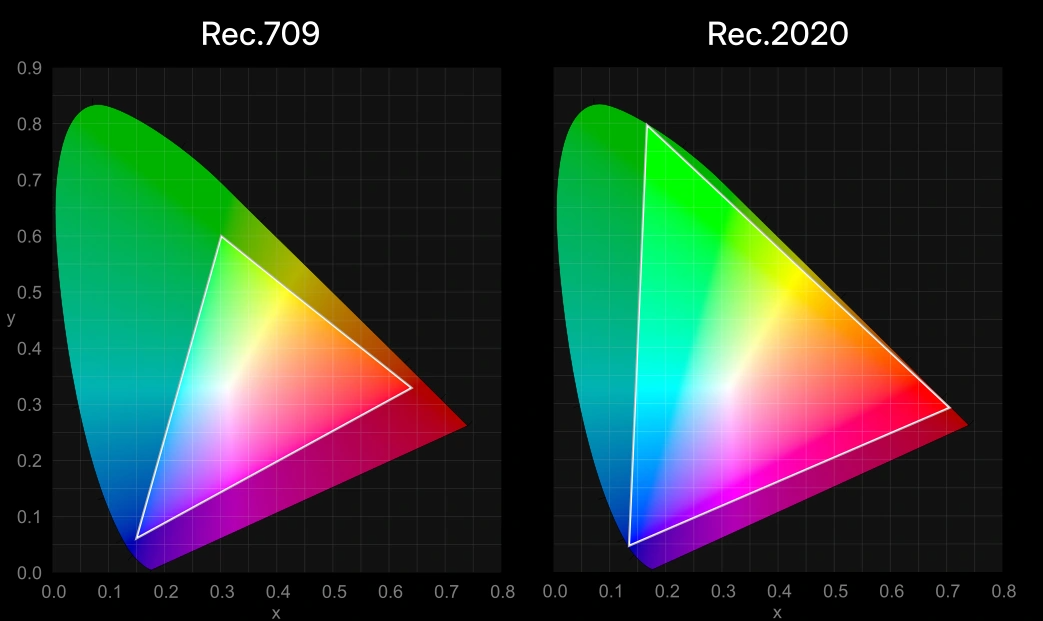
New display and views:
- ACES 1.3 and 2.0 views as an alternative to AgX and Filmic and for compatibility with ACES pipelines (both standard and HDR).
- Rec.2100-PQ and Rec.2100-HLG displays. May be used for color grading for HDR video export.
- AgX HDR view.
Your Safe Space
Introducing: Blend file Working Color space. With support for Linear Rec.2020 and ACEScg, it is now possible to use a wider gamut of colors for materials, lights and compositing, and to follow common ACES workflows.
Team Player
Blender 5.0 includes essential support for ACES 1.3 and 2.0 workflows with the ACEScg working space. ACES 2.0 view transform and OpenEXR images saved in the ACES2065-1 and ACEScg color spaces. This covers most needs when working in an ACES pipeline. For more complete support, the official ACES configurations can be manually installed and set through the OCIO environment variable.
Blender 5.0 improved compatibility with the OpenColorIO configuration for ACES 2.0.
When a blend file is loaded that was created with another OpenColorIO config, a warning is now shown.
See the color management documentation for how to make a configuration file work well with HDR and wide gamut in Blender.
More Color Management
- New Convert to Display node
- Brush and palette colors are now scene linear
- New Linear/Perceptual toggle in color pickers
- Tooltips now include descriptions of displays, views, and color spaces
Sky Texture
The Sky Texture node now supports multiple scattering, providing more realistic effects procedurally out of the box.
The new sky model works great for accurate reflections indoor too. The old "Nishita" model is still available as "Single Scattering".
Night & Day
Generate a sunset scene instantly by animating only one parameter.
Beautiful out of the box, in both Cycles and EEVEE.
Radial Tiling
The new Radial Tiling node is a building block for creating shapes and tilings, including rounded corners.
Multiresolution Baking
Baking from meshes that use the Multiresolution modifier has been greatly improved in Blender 5.0.
- Added support for baking Vector Displacement.
- Added support for n-gon faces.
- Bake only to selected and active images (as opposed to all active images).
- Subdivision Level and UV Interpolation matches the Subdivision Surface modifier.
- Several issues related to baking at non-zero subdivision levels have been resolved.
Unbiasedly Smooth
A new unbiased null-scattering volume rendering algorithm is now the default. It removes blocky artifacts in overlapping volumes and eliminates the need for step size, max steps, and homogeneous volume settings.
Subsurface Scattering
Blender 5.0 introduces a more accurate random walk subsurface scattering algorithm with multiple bounces, reducing darkening artifacts at the cost of some render time.
Metallic Thin Film Iridescence
The physically-based iridescense effects caused by dielectric thin film introduced in Blender 4.2 LTS, is now supported by metals too (Metallic BSDF and Principled BSDF).
Subdivide and Conquer
Adaptive Subdivision is no longer an experimental feature, and always available in the Subdivision Surface modifier.
It features a new Object Space option to set edge length in object space instead of pixel size. This allows object instancing to use minimal memory by subdividing the mesh once, independent of camera size, and instancing it many times.
Previous Release Notes:
With 2 years of updates, full Vulkan support, and quality-of-life improvements, Blender 4.5 LTS is every Blenderhead's best friend.
Vulkan
The Vulkan backend is now fully supported in Blender 4.5 LTS. The final frontier.
After years of work, support for the popular backend in Blender is now on par with OpenGL.
It's not enabled by default yet; make it so in the Preferences.
Make sure to keep your drivers up to date! Blender works closely with hardware manufacturers to ensure Vulkan performs as good as possible. See the supported platforms and drivers, and the current limitations.
Geometry Nodes
Got OBJ, CSV, STL, VDB, PLY, or a custom text file? Bring them all together with Geometry Nodes.
Mix & Match
Assemble your scenes by importing all kinds of files.
- CSV (.csv)
- Stanford PLY (.ply)
- OpenVDB (.vdb)
- STL (.stl)
- Wavefront (.obj)
- Text (.txt)
Drag & Drop
Import files by dragging and dropping them onto the Geometry Node Editor.
Smart Sequencing
When combined with the new Format String node, importing sequences is as flexible as it gets.
The New Normal
Custom mesh normals are now editable in Geometry Nodes with the new Set Mesh Normal node! Modify both "Tangent Space" normals and a new, faster "Free" format.
Grease Nodes
Grease Pencil creation with Geometry Nodes just got better, including added support for custom Node Tools.
Plus these new nodes:
- Set Grease Pencil Color: Writes stroke/fill color and opacity.
- Set Grease Pencil Depth: Controls the depth (rendering) option.
- Set Grease Pencil Softness: Controls the "Softness" attribute.
Additionally, the Named Layer Selection node now supports search.
All these nodes are now organized inside a dedicated Grease Pencil sub-menu.
Node Tools
Custom node tools are now easier to organize thanks to support for collapsible panels, including the use of boolean sockets as checkboxes in their headers, just like native built-in operators!
This is part of a refactor that allows the Adjust Last Operation panel to share the same code as modifiers, so future improvements will benefit both systems.
For example, you can now search for attributes within the Adjust Last Operation panel.
All New Nodes
Blender 4.5 LTS brings a solid set of new Geometry Nodes focused on data access and string handling.
Meet these new nodes:
- Camera Info
- Instance Bounds
- Match String
- Bit Math
- Field Average, Field Variance, and Field Min & Max
- Plus the already mentioned Format String and Grease Pencil nodes.
Read the complete release notes.
Previous Release Notes:
Quality Blend
Blender 4.4 is all about stability. During the 2024 – 2025 northern hemisphere winter, Blender developers doubled down on quality and stability in a group effort called "Winter of Quality."
Winter of Quality
In just a few months, developers fixed over 700 reported issues, revisited old bug reports, and addressed unreported problems.
Alongside bug fixes, Winter of Quality also included tackling technical debt and improving documentation.
Action Packed
Blender 4.4 introduces Action Slots, revolutionizing animation workflows by letting multiple data-blocks share a single Action.
VSE: Vastly Superior Editing
The Video Sequencer continues to improve with quality-of-life upgrades for text editing, expanded support for codecs including H.265 and 10/12-bit videos, and performance improvements that make editing faster than ever.
Faster Editing Everything
- Building proxies for image sequences is faster now.
- Preview playback performance of float/HDR content is faster now.
- Text strip background fill "Box" is several times faster for large fill areas.
- Curves, Hue Correct, White Balance modifiers are 1.5x-2x faster now.
- Many sequencer effects are slightly faster now thanks to more efficient multi-threading.
Expand Your Blender
The Blender Extensions platform keeps growing, with over 500 free add-ons and themes to customize your workflows.
You can also share your own add-ons and themes!
Video Beyond
Blender 4.4 adds support for rendering videos using the H.265/HEVC codec.
Videos are now rendered in BT.709 color space now, preventing playback inconsistencies from the previously unspecified color space.
Additionally, video playback YUV->RGB conversion is more accurate now, fixing color shifts and banding in dark regions.
Pole Position
A new option in the Select by Trait operator lets you select by pole count.
Easily find all 3-pole or 5-pole points in your mesh.
Given their impact on topology, the default selects all poles that do not have 4 edges, allowing for easy inspection.
Influencer
Joining triangles to quads now prioritizes quad-dominant topology, creating a more structured "grid" layout. This helps maintain cleaner geometry and improves mesh flow, especially in models where uniform quads are preferred.
This behavior can be adjusted using a topology influence factor, to better control how triangles are merged.
Vertex & Egde Dissolve
Dissolving edges may remove additional, unselected edges to ensure the mesh remains valid. Previously, this also dissolved vertices connected to those unselected edges.
The new behavior processes only vertices that belonged to the selected, now dissolved edges.
Read the complete release notes.
Previous Release Notes:
EEVEE
It's (real-)time for Light Linking
The real-time renderer EEVEE now supports Light Linking and Shadow Linking-features previously available only in Cycles. With light linking, lights can be set to affect only specific objects in the scene. Shadow linking additionally gives control over which objects acts as shadow blockers for a light. This is now feature parity with Cycles.
Shaders
A new Metallic BSDF node has been added to the shader editor. Metallic BSDF
This new node exposes existing, but hard to access metallic material configurations in a small node.
F82 Tint
The F82 Tint approximation is artist friendly, taking colors as inputs. This is currently in use by the Principled BSDF.
Conductor Fresnel
This method is more complex to use, requiring IOR and Extinction coefficients per color channel as inputs. However, it can produce subtly more accurate results for real-world metals, previously achievable only through custom OSL scripts.
EEVEE does not yet support the Conductor Fresnel type, so it internally remaps the IOR and Extinction coefficients to colors and uses them with the F82 Tint approximation.
Textures
Make Some (Gabor) Noise
A new texture node was added that can create procedural Gabor noise for random interleaved bands with controllable direction and width.
Compositor
Forget F12. EEVEE passes are now available for interactive compositing.
Read the complete release notes here.
Previous Release Notes:
The next generation of the render engine EEVEE is here. Completely rewritten from scratch to allow global illumination, displacement, better SSS, viewport motion blur, and so much more.
Read the complete release notes here.
Sunsational Lighting
Lighting is a breeze with added support for screen space global illumination. EEVEE can automatically extract intense lights from the World environment and treat them as Sun lights, improving the lighting quality and casting real shadows.
Bump up your game
Real displacement is now supported by EEVEE. Just like in Cycles, setting your materials to "Displacement and Bump" will combine true displacement and bump mapping for finer details. Vertex position is modified.
SSSuperb Scattering
Subsurface Scattering now doesn't leak between objects and has no energy loss. The subsurface translucency is now always computed, and the associated option has been removed.
Turn Up the Volume
Dithered volumetrics provide a much more stable result while navigating the scene.
Blurry Vision
Motion blur is now visible in the 3D Viewport through the camera view and supports a custom Shutter Curve, matching Cycles.

