Connecting the dots: Gmail users who are concerned about how Google handles their data should look for the toggles for smart features in the settings menu. The fine print states that the AI functionality, which includes many features, is intended mainly for personalizing the user experience. However, some remain suspicious given Google's efforts to insert Gemini into all of its products.
The settings menu states that users who enable smart features agree to let Google use their information and activity to personalize the experience. Malwarebytes and blogger Dave Jones interpreted the wording to mean that the company is training AI with user content, but Google insists this is inaccurate.
IMPORTANT message for everyone using Gmail.
– Dave Jones (@eevblog) November 19, 2025
You have been automatically OPTED IN to allow Gmail to access all your private messages & attachments to train AI models.
You have to manually turn off Smart Features in the Setting menu in TWO locations.
Retweet so every is aware. pic.twitter.com/54FKcr4jO2
To reach the settings menu, click the gear icon on the top right corner of the window, next to the Gemini icon. The smart features are located in two sections near the bottom of the list under Settings > General.
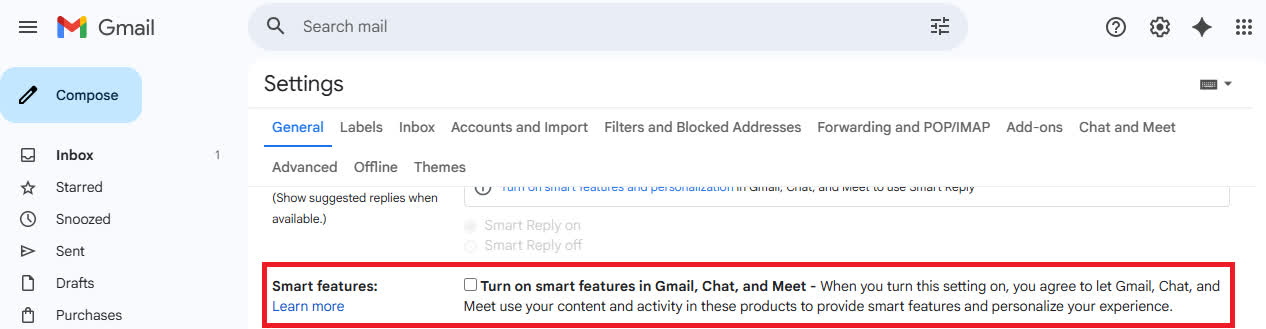
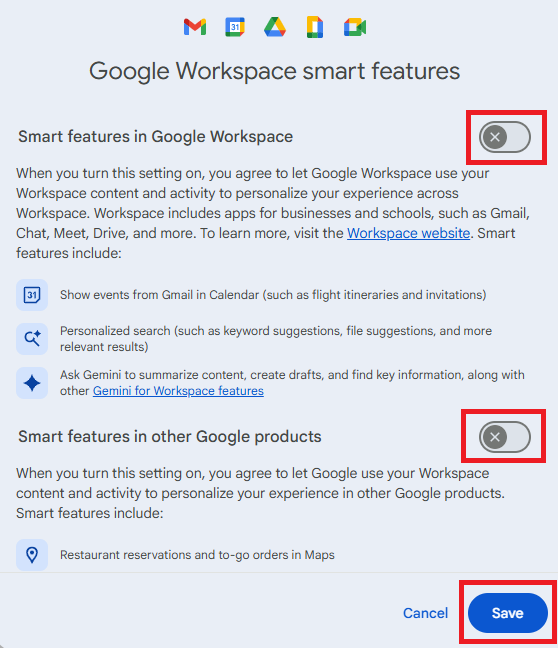
The first section controls smart features in Gmail, Chat, and Meet, including spell check, spam filters, and automatic email sorting. To reach the second section, click the button that opens the Workspace smart features menu.
This menu contains two toggles for functions such as displaying Gmail events in Google Calendar, generating summaries with AI, and managing restaurant reservations. After adjusting the settings, click Save and reload.
Let's set the record straight on recent misleading reports. Here are the facts:
– Gmail (@gmail) November 21, 2025
• We have not changed anyone's settings.
• Gmail Smart Features have existed for many years.
• We do not use your Gmail content to train our Gemini AI model.
We are always transparent and…
Google has flatly denied using user content to train Gemini, noting that Gmail has offered some of these features for many years. However, the Workspace menu refers to newly added Gemini functionality several times.
The company also denied automatically modifying user permissions, but some people have reported needing multiple attempts to turn off smart features.
Gmail started using AI in late 2023 when it incorporated the technology into its spam blocker. The following year, it introduced an AI writing assistant. Earlier this year, Google began activating AI generated summaries by default on mobile devices and added AI powered tools to Gmail search.
In addition to raising privacy concerns, Gmail's AI functionality has exposed serious vulnerabilities. In March, Mozilla found that attackers could easily inject prompts that would cause the client's AI generated summaries to become phishing messages.
Other services that have previously trained AI on user content include Facebook, LinkedIn, Slack, and YouTube. These days researchers are going beyond software and started observing people in real life in order to train future AI-powered robots.